Tool · Finance · Month-end close + reconciliations · Oct 2026
FloQast AI review (Oct 2026): AI assists for month-end close and reconciliations
FloQast is close management software for accounting teams: a close checklist, balance-sheet reconciliations with sign-offs, and a growing set of AI features that match transactions, draft explanations, review journal entries, and run agents built from your own close. FloQast says nothing hits your books without human approval. This page walks through each part with a real close task, a Try this, and where the preparer, reviewer, and controller still sign off.
What this FloQast AI page covers
This page is for controllers, accounting managers, and staff accountants who close the books every month, often with Excel workpapers and an ERP such as NetSuite, Sage Intacct, SAP, Workday, Microsoft Dynamics, or Xero. The question it answers: which close tasks can FloQast’s AI take on, what does a person still have to check, and what does the audit trail look like?
Company (checked 6 October 2026): FloQast is a private company in Los Angeles, founded by former accountants. It says more than 3,500 companies use it, and in January 2026 it announced it had passed $200 million in annual recurring revenue. FloQast says it holds ISO 42001 certification and SOC 2 Type II compliance. At its TakeControl conference on 16 September 2026 it announced new AI features, covered below. Those are FloQast’s statements.
Who signs off: FloQast’s pitch is “AI prepares, your team reviews.” Every reconciliation still has a named preparer and reviewer, every agent is approved by an accountant before it runs, and the controller owns the close. Everything below comes from FloQast’s pages as we read them on 6 October 2026.

Major features (with how someone uses them)
Examples at a glance: each feature has a concrete example from a real job plus a short Try this you can run this week.
1. AI Transaction Matching (primary)
What it is: AI Transaction Matching matches high-volume transactions across data sources — bank and credit card reconciliations are FloQast’s examples — including 3-way matching across three sources. You can write matching rules in plain language and adjust them without IT. Unmatched items and discrepancies are flagged and routed to the right people, and every matching action is kept in an audit trail. The match is a proposal; the preparer ties out what is left and the reviewer signs off.
The risky part of auto-matching is the exceptions nobody looks at, and the matches nobody questions. Plan time for both.
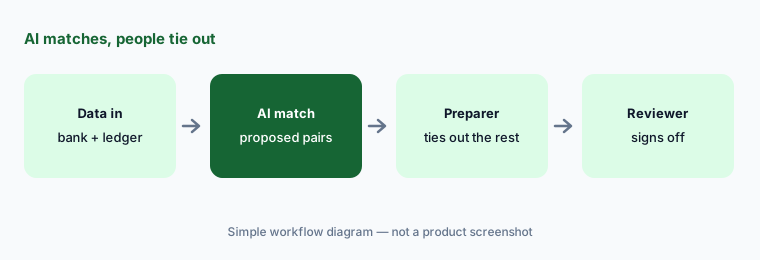
Primary workflow:
Pick one balance-sheet rec. Let FloQast’s AI draft the match. Tie out every unmatched item by hand.
2. Account reconciliations and sign-off
What it is: FloQast pulls each account’s balance from your ERP and stores the support — bank statements, subledger detail, schedules, or spreadsheets. If the general ledger shifts after sign-off, alerts go out by email, Slack, or Teams so sign-offs don’t go stale. Materiality thresholds decide whether a rec ties; anything that doesn’t becomes a reconciling item with an owner, description, and age. Each rec has a preparer, a reviewer, and a due date, and a completeness check confirms every account was reconciled. FloQast can auto-sign-off unchanged and zero-balance accounts — decide as a team which accounts, if any, should use that.
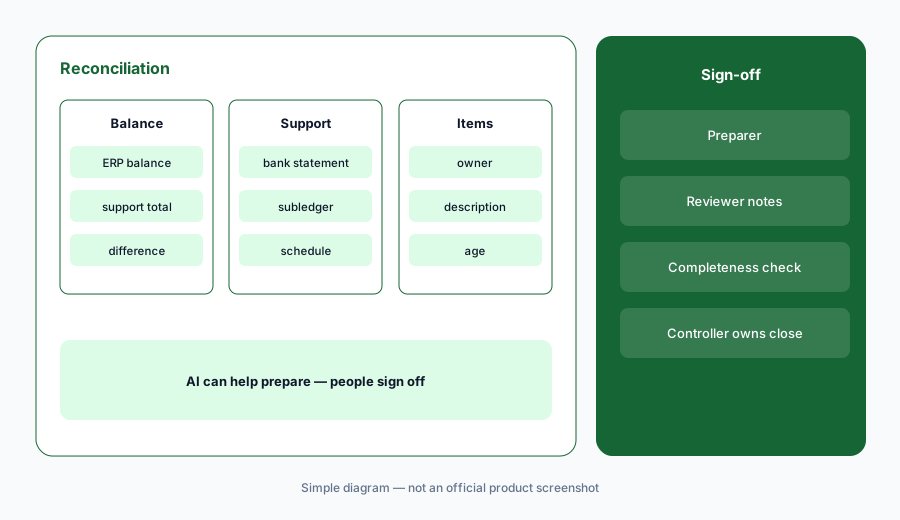
Check the auto sign-offs:
List every account set to auto sign-off. For each, check whether it had any activity during the month (not just at month-end), and move any that did back to manual review.
3. Transform AI agents built from your close
What it is: FloQast Transform builds AI agents for close work. The Builder can take files from a close your team already finished — or a description of inputs and outputs — and rebuild the process as an agent; FloQast announced this at TakeControl in September 2026. Skills are reusable steps such as fetching a trial balance, creating a journal entry, validating data, or posting a reconciliation. The Library has prebuilt agents to tailor. FloQast says each agent is tested against numbers your team already approved, shows its reasoning on every flag, and is signed off by an accountant before it runs.
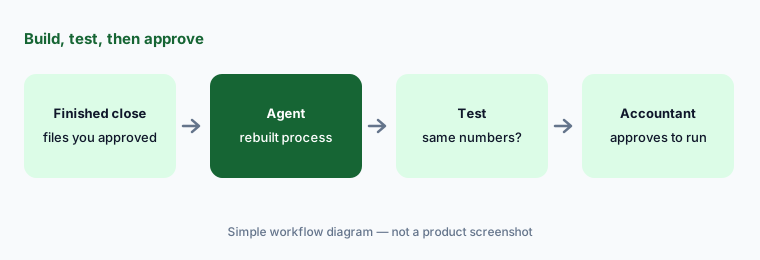
Test on a known month:
Build one agent from a close you already signed off. Run it on that same month and compare every output line to the approved workpaper before you let it touch the current period.
4. AI Assistant and journal entry review
What it is: FloQast’s AI Assistant sits on every page and answers questions from your own records — where the close stands, how a balance compares with last month, or what looks off. Its first review job, announced in September 2026, is journal entry review in FloQast Journal Entry Management: when a preparer submits an entry, the reviewer can ask for an AI review that flags errors and anomalies, scores audit risk, explains its reasoning, and recommends a fix. FloQast says the human makes every call.
Review the reviewer:
For one week, ask for an AI review on every manual journal entry over your materiality threshold. Log each flag as right or wrong after your own check, and share the tally with your team.
5. AI flux and budget variance analysis
What it is: Once reconciliations are complete, FloQast Variance Analysis builds flux reports from your thresholds and assignments, notifies preparers when a fluctuation needs an explanation, and uses AI to help find variance drivers and draft explanations. Budget variance compares final balances to budget for FP&A. Reviewers leave notes, and every sign-off is logged. An AI-drafted explanation is a starting point — keep only the reasons you can trace to a transaction.
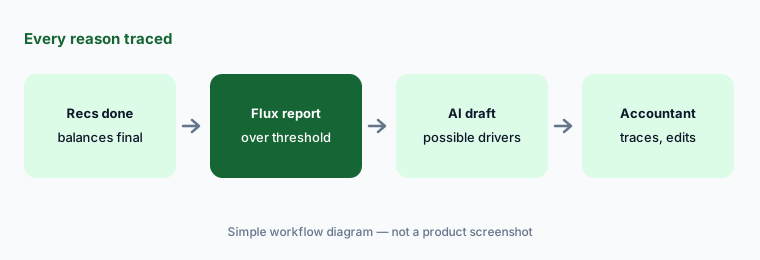
Trace every reason:
Take three AI-drafted flux explanations. For each reason, open the transaction behind it. Delete any reason you cannot trace, and note what the real driver was.
6. Detect: anomaly monitoring on the GL
What it is: FloQast Detect learns normal patterns for each account and subsidiary from your history and flags unusual transactions as they hit the general ledger, sorted by severity and routed to an owner. You can add your own rules on top. Reviews and sign-offs are kept in an activity log. FloQast also says a COSO GenAI governance module is coming “soon” to wrap agents in COSO-style controls — treat that as announced, not shipped, until you see it in your account.
Flag, then a person:
For the first month on Detect, have one named reviewer clear every flag and mark it as real issue or noise. Turn the most common real issue into a rule you own.
Pricing context (October 2026)
FloQast does not publish prices. Its pricing page (checked 6 October 2026) says there are no per-user fees and that packages are tailored to your business. It lists three packages without figures: Close Management (close checklist, account reconciliations, accounting operations, projects, AI Assistant, ERP integration), Close AI (Close Management plus AI agents, AI matching, automated reconciliations, and journal entry posting), and Risk & Compliance (controls, audit readiness, ERM, operational audits; on its own or with a close package).
FloQast offers free product training, free CPE, and a free FloQast Certified Accountant (FCA) program. The COSO GenAI governance module was announced as coming soon in September 2026.
Uncertainty: Pricing is quote-only, so budget from a written quote that names the package, which AI features are included (matching, agents, Detect, variance analysis), and any implementation fees. Ask your auditors early how they will test AI-prepared reconciliations and agent outputs, and confirm what audit evidence FloQast exports.
FloQast quotes by package, so the real cost depends on what your ERP, reconciliation, and general AI seats already cover. Check what you already pay for first: the $9 AI toolkit spreadsheet lists close and AI tools side by side before the quote call. See what the $9 AI toolkit spreadsheet covers or how the $19 AI toolkit audit works.
Want someone to do it for you? AI toolkit audit — $19
When it’s useful (honest take)
Useful when your close runs on Excel workpapers and a checklist you already trust, you have high-volume matching (bank, credit card, intercompany clearing), and your team will review exceptions and agent outputs every period. Useful too when auditors want clear preparer and reviewer sign-offs.
Less useful when your close process isn’t written down yet — FloQast itself suggests documenting first — or you only reconcile a handful of accounts a month. Less useful if anyone expects AI to sign off: the preparer, reviewer, and controller still own every reconciliation and entry.
Related options (educational)
| Need | Better home | Why |
|---|---|---|
| Close checklist, recs, and AI agents for Excel-heavy teams | FloQast (this page) | Accountant-built agents with sign-offs |
| Large-scale matching, journal entry, and intercompany | BlackLine AI | Built for bigger, multi-ERP finance teams |
| AI inside the ERP itself | NetSuite AI or Sage Intacct AI | Fewer tools if the ERP covers it |
| Small-business books | QuickBooks AI or Xero AI | Lighter close needs |
| Spend cards and bill pay before the close | Ramp or BILL | Cleaner data going in |
| One-off analysis of an export | Claude for finance | Sanitized files only; no sign-off trail |
Related comparisons
- FloQast vs Numeric for the month-end close
- Numeric AI for close management
- What's new in FloQast (Sep 2026)
- Gemini for finance teams
- Claude vs Gemini for finance work
FAQ
Does FloQast AI post entries or sign off on its own?
FloQast says nothing hits your books without human approval. Reconciliations have a named preparer and reviewer, agents are approved by an accountant before they run, and AI journal entry review only recommends; the reviewer decides.
How much does FloQast cost in October 2026?
FloQast does not publish prices. On 6 October 2026 its pricing page said there are no per-user fees and listed Close Management, Close AI, and Risk & Compliance packages without figures. Contact FloQast for a quote.
What is FloQast Transform?
FloQast’s AI agent product. It can build an agent from a close your team already finished, from reusable accounting steps, or from a prebuilt library agent, and it is tested against numbers your team approved before an accountant signs off.
Which ERPs does FloQast work with?
FloQast’s site lists solutions for NetSuite, Sage Intacct, SAP, Workday, Microsoft, Xero, and AWS. Confirm the exact connector for your ERP version during the demo.
Will auditors accept AI-prepared reconciliations?
That is your auditors’ call. FloQast says every AI action is logged and exportable and that it holds ISO 42001 and SOC 2 Type II. Walk your auditors through one AI-matched reconciliation, with its sign-offs, before you rely on it.
Optional next step (if seats overlap)
If you pay for FloQast, AI features in your ERP, and a general AI assistant your accountants use for flux notes — and more than one touches the same close task — that overlap is worth a look. Map the overlap with the $19 AI toolkit audit or the $9 AI toolkit spreadsheet. Email Audit $19 or Toolkit spreadsheet $9.
Checkout is live via Stripe. After you pay, we email delivery (spreadsheet) or intake next steps (audit).