Finance · Spend ops · Cards & bills
Ramp review (Sep 2026): spend ops — cards, bills, and AI assist
Finance ops angle — spend workflows and AI assists for small finance teams. This page maps corporate cards, bill pay, AI expense reviews and reporting, plan honesty on Free vs Plus, and fair alternatives when Brex or Sheets plus a chat seat is enough.
Who this page helps
Finance and ops leads who run corporate cards, expense chase, and bill pay for a small or mid-size team and want one control plane with AI help on reviews and digests — not a generic “best corporate card” list. If you already live in Brex, see Brex AI. If you only need export analysis, pair Sheets with Claude for finance or ChatGPT for finance. For ops playbooks beside the ledger, see Claude for ops.
What Ramp is
Ramp is a spend platform: corporate liability cards, expense management, accounts payable, budgets/reporting, vendor tracking, and (on paid tiers) heavier AI automation. Public packaging in September 2026 positions Free for smaller teams and Plus for “AI-driven automation to eliminate busywork.” This review focuses on the finance ops job — cards, bills, and AI assist — not treasury yield marketing in the abstract.

Major features (with how someone uses them)
Examples at a glance: each feature has a concrete finance-ops example plus a Try this mini-workflow.
1. Cards & spend controls
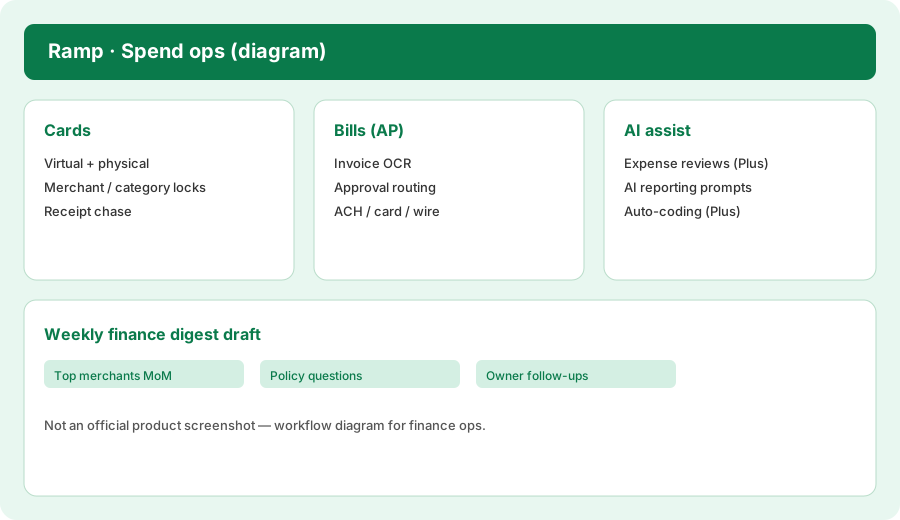
What it is: Unlimited physical and virtual cards with merchant, category, and limit controls. Ops issues a virtual card per vendor or trip, locks categories that should never hit the card, and chases receipts when policy requires them. Free includes core card issuing; Plus adds auto-lock when compliance items are missing (per public compare table).
From a merchant spend export:
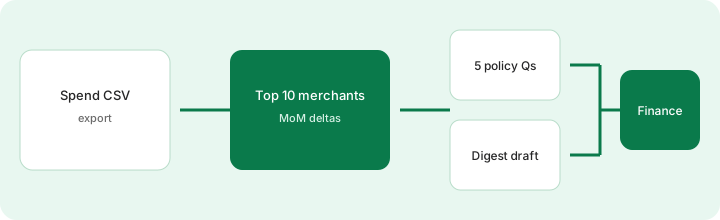
From this merchant spend CSV: top 10 merchants MoM, 5 policy questions, and a weekly digest draft.
2. Bills & AP workflows
What it is: Invoice capture (OCR), approval routing, and pay-out via ACH, card, check, or wire. Plus packaging highlights AP agents for fraud checks, approval recommendations, and line-item auto-coding. Treat OCR fields as drafts — humans still own vendor bank details and tax IDs.
Before trusting invoice OCR end-to-end:
List every field OCR can invent wrong (legal name, bank account, tax ID, amount, due date). Mark which fields require a human double-check before first payment to a new vendor.
3. AI assist (reviews, coding, reports)
What it is: Public Plus cards call out AI-driven expense reviews and policy insights, auto-coded line items, AI coding for accounting fields, and AI reporting / custom reports. Free still lists “custom reports and insights via AI reporting.” Always blank any severity, owner, or anomaly claim the export does not support — AI digests are drafts for humans.
On a sample merchant CSV in your chat seat or Ramp AI report:
Rank top 10 merchants by spend MoM. For each of the top 5 deltas, write one policy question for the budget owner. Draft a 6-bullet weekly digest. Flag any claim that invents a policy violation not visible in the rows.
4. Vs Brex / Sheets + LLM
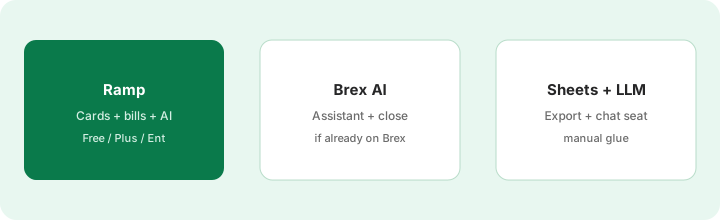
What it is: The honest alternatives for many finance teams are Brex AI (if you are already on Brex) or exporting to Sheets and summarizing with Claude / ChatGPT. Ramp wins when you want cards + AP + published Free/Plus AI packaging in one vendor. Sheets + LLM wins when card volume is tiny and nobody will adopt a new spend UI.
Before upgrading to Ramp Plus:
Count cardholders and monthly bill-pay volume. List which AI features you actually need (expense reviews, AP auto-coding, multi-entity). If Free covers cards and QBO sync, run one month on Free and only then ask sales for the Plus platform fee in writing.
Public pricing (September 2026)
From ramp.com/pricing we cross-checked in September 2026 (USD; confirm live):
- Free: $0/mo/user — corporate cards, expense workflows, bill pay basics, AR features as packaged, QBO/Xero, budgets/reporting including AI reporting, vendor tracking.
- Plus: $15/mo/user + platform fee based on team size (save 20% with annual billing) — AI-driven expense reviews, AP auto-coding / approval recommendations, deeper accounting automation (NetSuite/Sage Intacct and more), multi-entity, HRIS sync packaging.
- Enterprise: Custom annual — Workday/Oracle-class integrations, local card issuing packaging, white-glove support, custom implementation.
- Add-ons / extras: Procurement is listed as an add-on to Plus or Enterprise; AR advanced schedules may require an AR add-on; bill-pay rails can carry per-transaction fees on some payment methods — confirm the live fee schedule.
Uncertainty flags: Ramp publishes the Plus platform fee based on team size but does not publish the dollar amount on the pricing page — get it in writing for your headcount. Feature gates between Free and Plus can move. Treasury APYs and ACH fees are time-sensitive. Never budget from this page alone.
When Ramp is useful (honest take)
Ramp tends to help when cards and bills share one policy surface, finance wants receipt chase and merchant digests without a separate expense tool, and Plus AI reviews would cut real close hours. It tends not to help when you already standardized on Brex, when spend is so light that Sheets + a chat seat is enough, or when you buy Plus for “AI” without asking for the platform fee. Paying for Enterprise “just in case” while Free covers QBO sync and card controls is stack sprawl — pick the spend job, then the plan.
Paying for Ramp and a few other AI tools? The $9 AI toolkit spreadsheet lists every AI subscription you have, what each one costs, and how fast it pays for itself, so you can see which ones are worth the money.
Want someone to do it for you? AI toolkit audit — $19
Alternatives compared: Ramp vs Brex / Sheets + LLM
| Axis | Ramp | Brex AI | Sheets + LLM |
|---|---|---|---|
| Best when… | Cards + AP + Free/Plus AI in one home. | You already run spend on Brex. | Tiny volume; export is fine. |
| Cost shape (Sep 2026) | $0 Free; $15/user + platform fee Plus; Ent custom. | $0 Essentials; ~$12/user Premium; Ent custom. | Bank card + chat seat you already pay. |
| Less useful when… | Team will not adopt a new spend UI. | You are shopping cards from scratch vs Ramp Free. | Nobody runs the weekly LLM digest. |
Also see Brex AI, Claude for finance, ChatGPT for finance, Claude for ops, and the ops & automation hub.
Inventory seats by job on the stack map for finance ops.
FAQ
What is Ramp?
A spend platform combining corporate cards, expenses, bill pay, budgets/reporting, and AI assists for reviews, coding, and digests — aimed at finance and ops teams.
How much does Ramp cost in September 2026?
Public cards: Free $0/user/mo; Plus $15/user/mo plus an unpublished platform fee by team size (20% off annual); Enterprise custom. Confirm on ramp.com/pricing and ask for the platform fee in writing.
When should finance use Ramp instead of Brex or Sheets plus an LLM?
When cards + AP in one Free/Plus product beats staying on Brex or summarizing exports by hand. If already on Brex, evaluate Brex AI helpers first.
Will AI digests invent policy violations?
They can overstate themes. Treat digests as drafts: blank any violation, owner, or severity that is not visible in the export rows.
Optional next step (if seats overlap)
If Ramp is one of several AI seats (spend + chat + automation) and you want a written pass across the whole list, the optional $19 AI toolkit audit produces a short memo. Prefer an editable grid? The $9 AI toolkit spreadsheet is a one-time CSV. Soft offer only — this deep-dive stands alone. Or email hello@aiproduct.reviews with subject Audit $19 / Toolkit spreadsheet $9.
Checkout is live via Stripe. After you pay, we email delivery (spreadsheet) or intake next steps (audit).