Finance · Spend ops · Close helpers
Brex AI review (Sep 2026): spend and close helpers for finance ops
When Brex AI features help teams already on Brex — and when Ramp or Sheets plus an LLM is the fairer path. This page maps Brex Assistant, expense automation, month-end checklist patterns from Brex-like exports, plan honesty, and alternatives for finance ops leads.
Who this page helps
Finance and ops leads who already issue cards and run expenses on Brex and want to know when Assistant / AI automation shortens expense chase and close — not shoppers comparing every corporate card from zero. If you are choosing between Free-tier spend platforms, start with Ramp. For export analysis patterns, see Claude for finance and ChatGPT for finance. For ops playbooks beside the ledger, see Claude for ops.
What Brex AI is
Brex is a spend platform (cards, expenses, bill pay, travel, business accounts). Brex AI in public packaging (Sep 2026) includes Brex Assistant for memos/receipts/categories/attendees, AI-powered custom rules on Essentials, Premium compliance audit detection and insights, and AI-powered accounting rule suggestions on higher tiers. This review assumes you are already on Brex (or committed) and asks when those helpers earn their keep for finance ops.

Major features (with how someone uses them)
Examples at a glance: each feature has a concrete finance-ops example plus a Try this mini-workflow.
1. Brex Assistant for expenses
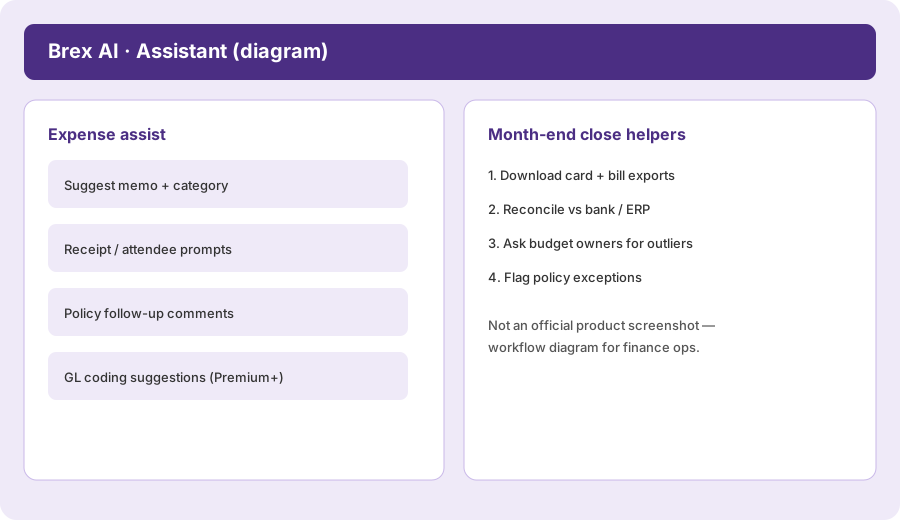
What it is: Brex Assistant (per Brex help docs) can suggest or auto-fill receipts, memos, categories, attendees, and spend limits; comment when policy needs more info; and answer policy questions in Slack when enabled. Managers get natural-language expense search and high-risk flags. Treat every auto-filled field as a draft — especially attendees and memos for tax-sensitive meals.
Draft a month-end checklist using Brex-like exports:
Draft a month-end checklist using Brex-like exports: what to download, what to reconcile, what to ask budget owners.
2. Month-end close helpers
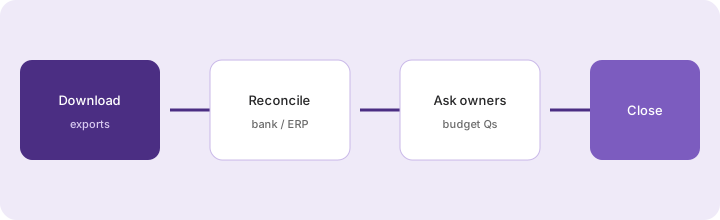
What it is: Brex does not replace your ERP close, but AI coding suggestions, live budgets (Premium+), and clean exports make the human close faster. The finance job is still: download card/bill/reimbursement exports, reconcile to bank/ERP, and ask budget owners about outliers — with AI only drafting the questions.
Before trusting AI for close week:
Write a one-page month-end checklist: (1) files to download from Brex, (2) totals to match in bank/ERP, (3) five questions for budget owners on outliers, (4) fields AI may invent that a human must blank. Keep counsel/tax questions out of AI auto-approve.
3. Policy & compliance insights
What it is: Public Premium packaging includes AI-powered compliance audit detection and insights, multiple custom policies, and alerts for high-risk or anomalous expenses. Essentials still lists AI-powered custom rules. Use insights to prioritize review queues — never as proof of fraud without a human path.
On a sample week of flagged expenses:
For each AI “high-risk” flag, write: what the export shows, what is unknown, and one neutral question to the employee. Do not invent a violation severity the export does not support.
4. Vs Ramp / Sheets + LLM
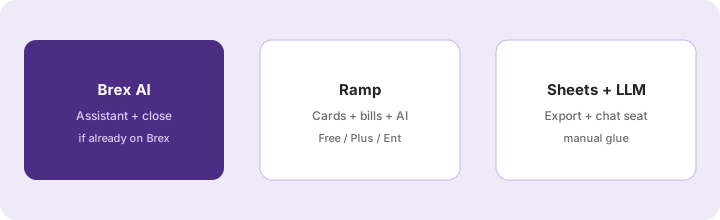
What it is: If you are already on Brex, turn on Assistant and measure close hours before migrating. If you are shopping from scratch, compare Ramp Free/Plus. If volume is tiny, export to Sheets and summarize with Claude for finance or ChatGPT for finance.
Before leaving Brex for Ramp (or the reverse):
List switching costs: card reissue, accounting integration rework, employee training hours. Estimate hours Assistant already saves this month. Only then compare Ramp Free/Plus list prices to Brex Essentials/Premium.
Public pricing (September 2026)
From brex.com/pricing we cross-checked in September 2026 (USD; confirm live):
- Essentials: $0/user/month — cards, reimbursements, bill pay, travel booking (as packaged), AI-powered custom rules, Brex AI expense assistant / auto-filled reports (per compare table), accounting integrations, API access.
- Premium: $12/user/month — multiple custom policies, dynamic review chains, AI-powered compliance audit detection and insights, live budgets, advanced approvals, multi-entity, HRIS / advanced ERP packaging, VAT docs, group travel rules.
- Enterprise: Custom — unlimited entities packaging, local card issuance/collections, named account manager, admin center, custom implementation.
- Smart Card: Custom — procurement-card-focused packaging for merchant controls.
Uncertainty flags: Business-account and bill-pay fees live on separate Brex fee schedules — not fully spelled out on the plan hero. Which Assistant modes need admin enablement can change. Feature rows on the compare table may disagree with in-product gates. Never budget from this page alone.
When Brex AI is useful (honest take)
Brex AI tends to help when you already run spend on Brex, employees will confirm Assistant drafts, and Premium insights would shrink a real review queue. It tends not to help when you are still choosing a card platform (compare Ramp Free honestly), when auto-pilot memos go unchecked, or when the real gap is ERP reconciliation skill — not another AI badge. Paying Premium only for “AI” while Essentials already fills receipts is stack sprawl — measure missing-receipt and close hours first.
Paying for Brex AI and a few other AI tools? The $9 AI toolkit spreadsheet lists every AI subscription you have, what each one costs, and how fast it pays for itself, so you can see which ones are worth the money.
Want someone to do it for you? AI toolkit audit — $19
Alternatives compared: Brex AI vs Ramp / Sheets + LLM
| Axis | Brex AI | Ramp | Sheets + LLM |
|---|---|---|---|
| Best when… | Already on Brex; Assistant + close helpers. | Shopping Free cards + AP + Plus AI. | Tiny volume; export is fine. |
| Cost shape (Sep 2026) | $0 Essentials; $12/user Premium; Ent custom. | $0 Free; $15/user + platform fee Plus; Ent custom. | Bank card + chat seat you already pay. |
| Less useful when… | You refuse to confirm AI memos. | Migration cost dwarfs Free-tier savings. | Nobody runs the weekly LLM digest. |
Also see Ramp, Claude for finance, ChatGPT for finance, Claude for ops, and the ops & automation hub.
Inventory seats by job on the stack map for finance ops.
FAQ
What is Brex AI?
Helpers inside Brex — especially Brex Assistant for expense fields and follow-ups, plus Premium compliance insights and AI accounting rule suggestions — for teams already on Brex.
How much does Brex cost in September 2026?
Public cards: Essentials $0/user/mo; Premium $12/user/mo; Enterprise and Smart Card custom. Confirm on brex.com/pricing and the separate fee schedules.
When should finance use Brex AI instead of Ramp or Sheets plus an LLM?
When you already live in Brex and Assistant would cut real expense/close work. Shopping from scratch? Compare Ramp Free. Tiny volume? Sheets + your chat seat.
Can Brex AI replace month-end reconciliation?
No. AI drafts fields and flags queues. Humans still download, reconcile, and ask budget owners before close.
Optional next step (if seats overlap)
If Brex is one of several AI seats (spend + chat + automation) and you want a written pass across the whole list, the optional $19 AI toolkit audit produces a short memo. Prefer an editable grid? The $9 AI toolkit spreadsheet is a one-time CSV. Soft offer only — this deep-dive stands alone. Or email hello@aiproduct.reviews with subject Toolkit spreadsheet $9 / Audit $19.
Checkout is live via Stripe. After you pay, we email delivery (spreadsheet) or intake next steps (audit).