Tool · Finance · Close management + flux analysis · Oct 2026
Numeric review (Oct 2026): AI close management and flux analysis for accounting teams
Numeric is close and reporting software for accounting teams, built on live transaction-level data from your ERP. Its AI drafts flux explanations, suggests matching rules, and works with your checklist through an MCP connection — and Numeric says models never compute a number or draft a journal entry. This page walks through each part with a real close task, a Try this, and where the accountant still edits and approves.
What this Numeric page covers
This page is for controllers, accounting managers, and senior accountants at growing companies — often on NetSuite — who want a faster close and better flux commentary without more spreadsheets. The question it answers: which close jobs can Numeric’s AI take on, what does a person still have to check, and how is it different from a checklist-and-reconciliation tool?
Company (checked 6 October 2026): Numeric is an in-person company with offices in San Francisco, New York, and London. Its pricing page says it was founded helping NetSuite, QuickBooks Online, Xero, and Sage Intacct customers with the month-end close. It now calls itself “the data platform for finance teams” — close, cash, billing and revenue alongside your ERP — and on 6 October 2026 its home page announced an ERP Replacement product for teams that want to move off their ERP module by module. Those are Numeric’s statements.
Who signs off: Numeric’s AI page puts it plainly: “AI writes the rules. Rules do the accounting.” Agents propose a treatment and bring it for review; the accountant approves. Flux drafts are edited, then approved. The preparer, reviewer, and controller still own the close. Everything below comes from Numeric’s own pages as we read them on 6 October 2026.

Major features (with how someone uses them)
Examples at a glance: each feature has a concrete example from a real job plus a short Try this you can run this week.
1. AI flux explanations (primary)
What it is: Numeric builds flux reports that mirror how your business looks at the numbers — for example all operating expenses grouped together — and in one click its AI goes through the transactions behind a variance, plus outside sources, to suggest the drivers. You can add context by uploading a payroll CSV or pulling a marketing budget through a NetSuite SavedSearch, drill into the transaction lines without leaving the report, and choose the format of the explanation. Numeric’s instruction is simple: edit, then approve.
A flux explanation is only as good as the transactions behind it. The draft saves typing; the accountant still decides which reasons are true.
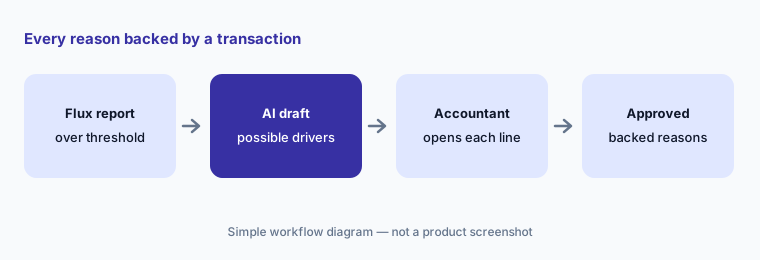
Primary workflow:
Generate flux commentary for one P&L line. Delete any reason not backed by a transaction you can open.
2. Close checklist for people and agents
What it is: Numeric’s close checklist brings every close task into one dashboard. You assign owners, tag items, map dependencies, attach workbooks, and keep a full audit log for every step. Numeric also says you can instruct agents through its MCP connection from the same checklist. Treat an agent like a new team member: it can do a task, but a named person still reviews it before the task is marked done.
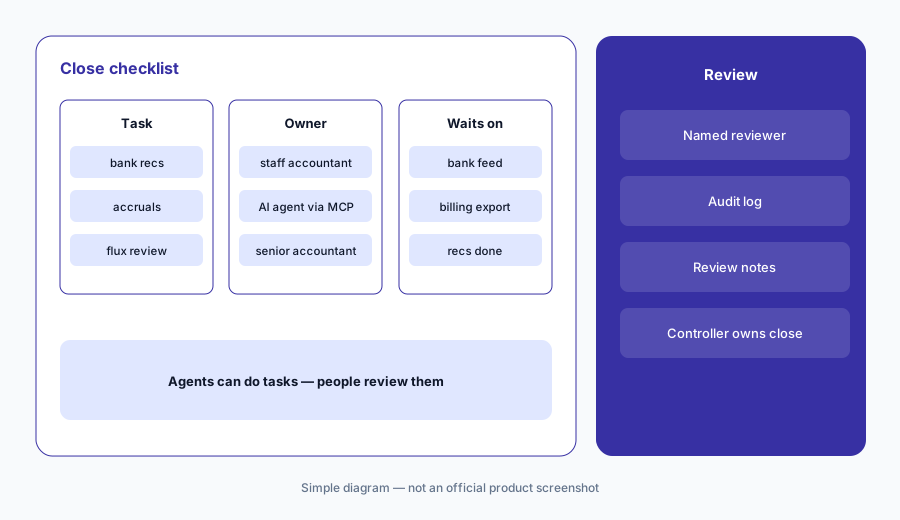
Find the bottleneck:
Map the dependencies for your five slowest close tasks. Give each one a named owner and a named reviewer, including any task an agent works on.
3. Reconciliations and auto-submit
What it is: Numeric pulls every transaction from your ERP and refreshes it as it hits the general ledger. It reads your reconciliation sources — cloud storage, a data warehouse, or NetSuite SavedSearches — and compares them to the GL against materiality thresholds you set. You can edit workpapers inside Numeric. Accounts that tie and stay under your threshold can be auto-submitted. If a new transaction hits an account you already reconciled, Numeric points you to the GL transactions that broke it.
When a rec breaks:
The next time an already-reconciled account stops tying, follow Numeric’s pointer to the GL transactions. Write down who posted each one and why before you re-submit, and decide whether that account should stay on auto-submit.
4. Transaction monitors before the close
What it is: Transaction monitors are custom alerts on live GL data, so more of the close happens during the month. Numeric’s examples: catch every expense with no vendor, watch specific vendors, departments, classes, or accounts for likely reclasses, flag items that belong on a fixed asset register or prepaid schedule based on account and materiality, track manual journal entries to cash accounts, and flag any transaction over a size you set. Monitors are rules you write — useful because they are predictable.
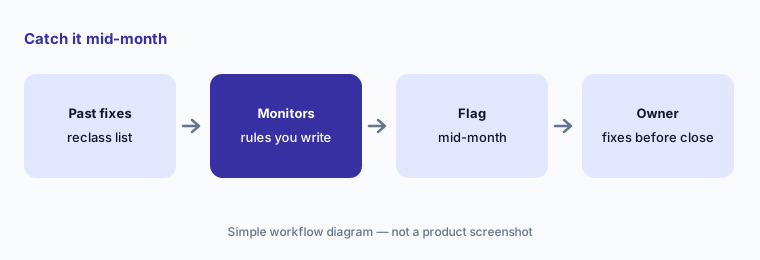
Turn fixes into rules:
Take last quarter’s audit adjustments and reclass requests. Write one monitor for each of the three most common, and name who clears each flag every week.
5. Cash matching rules drafted by AI
What it is: Numeric’s Cash Management matches bank transactions to the ledger with rules you can set on any field — memo, amount, date range, and more — and its AI agents suggest new rules to raise the match rate each month. It can book intercompany and routine cash transfers back to NetSuite and parse bank statements with AI for cash reconciliations. Numeric’s pricing page says automated cash matching covers “up to 95%” of bank transactions; that is Numeric’s figure. The important design choice: an agent proposes a rule, you approve it once, and every similar record follows it — so a bad rule spreads, too.
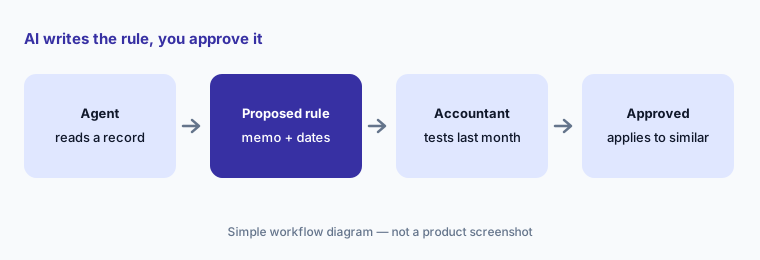
Test before you approve:
Before approving one AI-suggested matching rule, run it against last month’s bank transactions. Count any match you would have rejected, and tighten the rule until that count is zero.
6. Numeric MCP, Prism, and the ERP replacement
What it is: The Numeric MCP connects your Numeric workspace to AI tools such as Claude and ChatGPT. Numeric says it pre-computes reports so the AI works from clean inputs, and that you can submit tasks, reassign owners, and leave comments from your AI workspace, with changes synced back to Numeric where your auditor expects them. Prism is Numeric’s in-app AI that surfaces agent items needing review each day. For teams ready to go further, the Financial Data Platform (the ERP replacement) adds agentic subledgers, an App Studio that builds dashboards and apps from a prompt, and an Agent Builder; Numeric’s FAQ says some of these are only available in the ERP Replacement product.
Read first, then act:
Connect one AI tool through the Numeric MCP. For two closes, only ask it questions (open tasks, flux drafts, balances) and compare each answer to Numeric before you let it change owners or submit anything.
Pricing context (October 2026)
Numeric does not publish prices. Its pricing page (checked 6 October 2026) says you can “start with one module or run the whole platform” and lists four offerings without figures: ERP Replacement (the full Financial Data Platform), Close Management & Analytics (close checklist, live ERP integrations, auto-reconciliations, transaction monitoring, custom reporting, flux analysis, review notes), Cash Management (cash matching, journal entry automation, live bank feeds, AI parsing of bank statements), and Billing & Revenue (usage-based billing, invoicing, collections, revenue recognition, ASC 606). Each leads to “Schedule Demo.”
The home page FAQ says Numeric works with NetSuite and other ERPs, and that teams usually start with Close Management or Billing & Revenue before considering the ERP replacement.
Uncertainty: With no public prices, budget from a written quote that names the modules, which AI features are included (flux drafts, rule suggestions, MCP, Prism), and any implementation fees. We did not find security certifications on the pages we read — ask Numeric for its current audit reports, and ask your auditors early how they will test AI-drafted flux explanations and AI-suggested rules.
When it’s useful (honest take)
Useful when you close on NetSuite or another supported ERP, flux commentary eats days each month, and your team will edit every AI draft against the transactions. Useful too when you want more of the close done mid-month with monitors, and a checklist with clear owners and reviewers.
Less useful when your close is small and stable, your ERP isn’t supported, or no one has time to review AI-suggested rules before approving them. Less useful if anyone expects AI to sign off: Numeric’s own design keeps the accountant approving every rule and every explanation.
Paying for Numeric and a few other AI tools? The $9 AI toolkit spreadsheet lists every AI subscription you have, what each one costs, and how fast it pays for itself, so you can see which ones are worth the money.
Want someone to do it for you? AI toolkit audit — $19
Related options (educational)
| Need | Better home | Why |
|---|---|---|
| Close checklist, flux drafts, and monitors on live GL data | Numeric (this page) | Accountant edits and approves every draft |
| Close with Excel workpapers and accountant-built agents | FloQast AI | Sign-offs and Transform agents |
| Large-scale matching, journal entry, and intercompany | BlackLine AI | Built for bigger, multi-ERP teams |
| AI inside the ERP itself | NetSuite AI or Sage Intacct AI | Fewer tools if the ERP covers it |
| Small-business books | QuickBooks AI or Xero AI | Lighter close needs |
| One-off analysis of an export | Claude for finance | Sanitized files only; no audit trail |
FAQ
Does Numeric’s AI post journal entries or approve the close?
No. Numeric says models never compute a number or draft a journal entry: agents propose rules and treatments, and an accountant approves them. Flux drafts are edited and approved by a person, and the reviewer and controller still own the close.
How much does Numeric cost in October 2026?
Numeric does not publish prices. On 6 October 2026 its pricing page listed ERP Replacement, Close Management & Analytics, Cash Management, and Billing & Revenue without figures, each leading to a demo. Contact Numeric for a quote.
Does Numeric replace NetSuite?
Only if you choose its ERP Replacement product. Most teams use Numeric alongside their ERP for close, flux, and reporting; Numeric says teams can move to the ERP replacement module by module when they are ready.
Can I use Numeric from Claude or ChatGPT?
Yes, through the Numeric MCP. Numeric says you can ask questions, submit tasks, reassign owners, and comment from your AI workspace, with changes synced back to Numeric. Start with questions only and compare answers to Numeric.
Will auditors accept AI-drafted flux explanations?
That is your auditors’ call. An explanation that cites transactions a reviewer opened and approved is easier to support. Walk your auditors through one approved flux explanation and its transaction detail before you rely on the process.
Optional next step (if seats overlap)
If you pay for Numeric, AI features in your ERP, and a general AI assistant your accountants use for flux notes — and more than one drafts the same commentary — that overlap is worth a look. Map the overlap with the $19 AI toolkit audit or the $9 AI toolkit spreadsheet. Email Audit $19 or Toolkit spreadsheet $9.
Checkout is live via Stripe. After you pay, we email delivery (spreadsheet) or intake next steps (audit).