Tool · Ops & automation · Finance · AP · Oct 2026
BILL AI review (Oct 2026): AP assists for invoice ops
AP/invoice assists on BILL — coding drafts and exception queues with human approval. Pair with Tipalti AI, QuickBooks AI, Expensify AI, and stack map for finance ops.
What BILL AI covers here
This page is for AP / invoice ops evaluating AI assists on BILL — coding drafts and exception queues with human approval — not tax advice, not a payables bake-off scorecard. Feature names change; confirm on bill.com. Never invent GL amounts or payee bank details. Diagrams are educational workflows.
Major features (with how someone uses them)
Examples at a glance: each feature has a concrete AP example plus a short Try this.
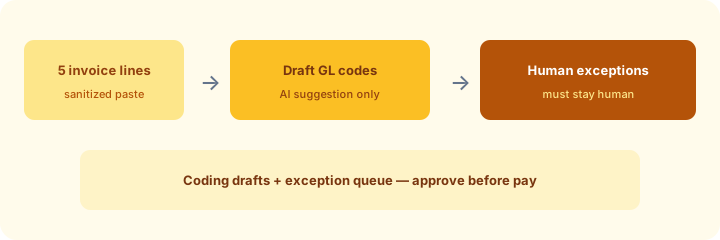
1. GL coding drafts + exceptions that must stay human (primary)
What it is: From invoice lines, AI may draft GL codes. You explicitly list exceptions that stay human (new vendor, over threshold, tax ambiguity) — approve before pay.
2. Exception queues with human approval
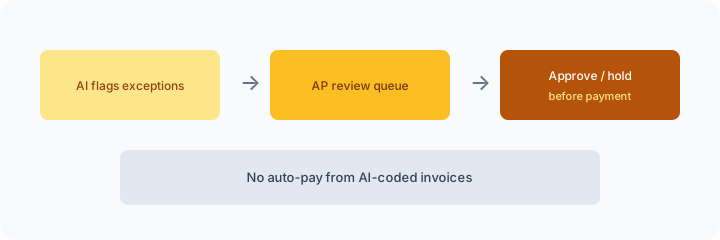
What it is: Treat AI flags as a queue. AP owner approves, holds, or rejects — never auto-pay from AI-coded invoices.
3. Invoice ops surfaces on BILL
What it is: Typical useful surfaces: coding suggestions, duplicate/exception hints, and routing notes grounded in invoices you can see. Mark Unknown when fields are blank.
4. Vs Tipalti / QuickBooks / Expensify / stack map
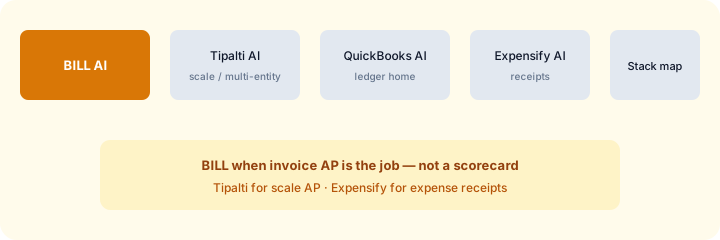
What it is: BILL AI when invoice AP on BILL is the job; Tipalti AI for scale / multi-entity AP; QuickBooks AI for ledger/close; Expensify AI for expense receipts; stack map for finance ops for seat inventory.
Pricing context (Oct 2026)
BILL plans and any AI packaging vary by plan, volume, and add-ons. We do not invent list prices. Confirm on bill.com public pricing / product pages and your BILL account. For scale multi-entity AP, compare Tipalti separately. Dated October 2026.
When useful / when not
Useful when: Invoice AP on BILL wants coding drafts and exception queues with human approval. Less useful when: You need Tipalti-scale multi-entity AP, or only expense-receipt AI (Expensify), or a ledger-only assist (QuickBooks/Xero). Educational — not a scorecard.
Paying for BILL AI and a few other AI tools? The $9 AI toolkit spreadsheet lists every AI subscription you have, what each one costs, and how fast it pays for itself, so you can see which ones are worth the money.
Want someone to do it for you? AI toolkit audit — $19
FAQ
When is BILL AI useful?
When invoice AP wants coding drafts and human-gated exceptions before pay.
Should it invent GL codes or auto-pay?
No — draft codes; list human-only exceptions; approve before pay.
How does it relate to Tipalti or Expensify AI?
Invoice AP vs scale AP vs expense receipts — different jobs. Map seats with the finance ops stack map when overlap appears.
What does it cost?
Verify on bill.com — we do not invent prices.
Optional next step (if seats overlap)
If several AI seats would cover the same jobs, optional help mapping overlap: $19 AI toolkit audit or $9 AI toolkit spreadsheet. Email Audit $19 or Toolkit spreadsheet $9.
Checkout is live via Stripe. After you pay, we email delivery (spreadsheet) or intake next steps (audit).