How-to · Finance · BILL AI · Oct 11, 2026
Design accounts payable exception rules on BILL before AI codes invoices
“Accounts payable exception rules” here means naming which invoice problems AI may draft through and which must stay in a human post queue — before you trust coding assists on BILL. This is not bookkeeping, tax, or audit advice. Terms: QA means a quality check done by a person.
Who this is for
Accounts payable leads whose accounts payable home is already BILL (bill.com) and who want coding assists without letting AI post exceptions unsupervised. If Tipalti is the payee/payout home, see Tipalti AI. If Xero is the general ledger system of record for bank reconciliation QA, see Xero AI. If you are adding a second accounts payable AI for the same invoice queue, read three checks before an AI seat first.
How to do it
This page is a how-to. It is not a ranking of accounts payable AI products. Product detail and dated packaging notes live on BILL AI. Confirm AI coding features on your BILL plan before you pilot.
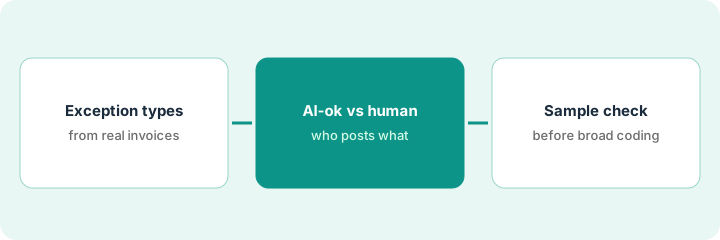
1. Step 1 — List exception types from real accounts payable
What it is: From the last 30–60 days of accounts payable, list the exception types you already see — do not invent exotic cases for theater.
- Common buckets: duplicate invoice, purchase order mismatch, missing tax fields, new vendor, amount over threshold, currency mismatch, credit memo confusion.
- Pull counts so the list reflects frequency, not fear.
- Name the human owner for each bucket (accounts payable specialist, controller, procurement).
- Ban using AI to “approve” payments in this design — coding ≠ paying.
Last 45 days: 18 purchase order mismatches, 9 new vendors, 6 duplicates, 4 over-threshold. Owners assigned. Payment release stays on the existing approval chain.
Spreadsheet: Exception type | Count (30d) | Owner | AI may draft code? (blank for now). Fill types from reality only.
2. Step 2 — Split AI-ok vs human-post
What it is: Mark which exceptions may get an AI-suggested code/category vs which must land in a human exception queue before post.
- AI-ok examples (typical): low-dollar repeat vendor with clear general ledger history — still reviewed in sample QA.
- Human-post examples: new vendor, over threshold, tax-uncertain, duplicate suspects, anything touching restricted accounts.
- Document the split in a one-pager accounts payable can train on.
- Do not invent general ledger accounts the chart does not contain.
AI-ok draft: office supplies under threshold for known vendor → suggested general ledger from history. Human-post: first invoice from new contractor; any invoice ≥ your named threshold; anything coded to prepaid/capital purchases until controller eyes it.
Mark Y/N on the sheet. Cap AI-ok to two or three high-volume, low-risk types for week one. Everything else human-post.
3. Step 3 — Run a sample QA before broad coding
What it is: Before enabling broad AI coding, score a fixed sample.
- Pull N invoices (e.g. 25) spanning AI-ok and human-post types.
- Compare AI draft codes to accounts payable’s correct codes; log misses.
- Pass gate only if miss rate and severity meet your written bar — humans set the bar.
- Keep Tipalti/Xero out of this BILL coding pilot unless they are truly a different system of record job.
25-invoice sample: 2 general ledger misses on AI-ok (fixed prompt/history), 0 AI posts on human-post types (correctly queued). Gate: enable AI-ok types only; human-post unchanged. Controller initials the gate sheet.
QA columns: Invoice | Type | AI draft | Human correct | Pass/Fail | Notes. No broad enable without a dated pass.
Pricing context (October 2026)
This how-to is not a price sheet. Plan notes live on BILL AI. Recheck bill.com pricing and your BILL admin before you budget. Related paths: Tipalti AI, Xero AI. Dated October 2026.
Checked Oct 11, 2026 on the vendor’s own pricing page: BILL’s pricing page lists accounts payable and receivable plans at Essentials $49, Team $65 and Corporate $89 per user per month, with Enterprise at custom pricing. Payment fees are separate; for example, an ACH bank transfer is listed at $0.59 and a mailed check at $1.99. The page says Corporate and Enterprise can add lower-cost approver-only users, while every Essentials and Team user is a standard user.
Uncertainty: AI coding and accounts payable automation packaging change by BILL product and contract. If an invoice and a review disagree, trust the invoice. Do not paste a marketing list price you did not pay. The only prices this site sells here are the optional $9 AI toolkit spreadsheet and $19 AI toolkit audit.
When this helps (honest take)
Useful when BILL is accounts payable system of record, exception types are counted from reality, and a QA gate exists.
Not useful when you want AI to approve payments, there is no controller/accounts payable owner, or the chart of accounts is undefined.
Related options (educational)
| Need | Where to look | Why |
|---|---|---|
| BILL accounts payable AI | BILL AI | Primary path on this page |
| Tipalti payee pilot | Tipalti AI | Payee/payout gates |
| Xero bank reconciliation QA | Xero AI | General ledger / bank reconciliation split |
| Finance stack map | Stack map for finance ops | Job | Tool | Owner |
| Before another seat | Three checks before an AI seat · Find unused AI seats | Live how-tos |
Related reviews: BILL AI · Tipalti AI · Xero AI. Free: seat-waste calculator if multiple finance AI seats code the same accounts payable queue.
FAQ
Is this accounting advice?
No. It is an ops design pattern. Your controller/CPA (certified public accountant) owns accounting policy.
Can AI post and pay once coding looks right?
Not in this pattern. Coding assists ≠ payment approval. Keep your payment gates.
Where do dated prices live?
On the BILL AI review plus the vendor site. This October 2026 how-to does not invent list prices. Our Oct 11, 2026 check of the vendor’s own pricing page is summarized in the pricing section above.
Do approvers need a full BILL seat?
According to BILL’s Oct 11, 2026 pricing FAQ, every user on Essentials and Team is billed as a standard user, while Corporate and Enterprise can add lower-cost approver-only users. Count who really needs to code invoices before you add seats for the pilot.
Optional next step
Free reviews stay free. Neither offer is required to use this page. If BILL and another accounts payable AI seat already code the same exception queue, optional help: $9 AI toolkit spreadsheet or $19 AI toolkit audit when you want a written memo.