Tool · Ops & automation · Finance · Expense · Oct 2026
Expensify AI review (Oct 2026): expense receipt assists for lean finance
Receipt OCR and policy drafts for Expensify-centered teams — policy flags before submit. Pair with BILL AI, QuickBooks AI, Tipalti AI, and Claude for finance.
What Expensify AI covers here
This page is for lean finance teams centered on Expensify evaluating receipt OCR and policy-flag assists — not tax advice, not an expense-tool bake-off scorecard. Feature names change; confirm on expensify.com. Never invent receipt amounts. Diagrams are educational workflows.
Major features (with how someone uses them)
Examples at a glance: each feature has a concrete expense example plus a short Try this.
1. Policy flags before submit (primary)
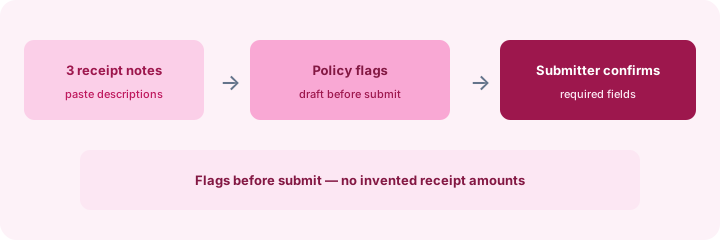
What it is: From receipt descriptions, AI may draft policy flags (alcohol, missing attendees, over per-diem). The submitter confirms required fields before submit — flags are not automatic rejections.
2. Receipt OCR drafts with human confirm
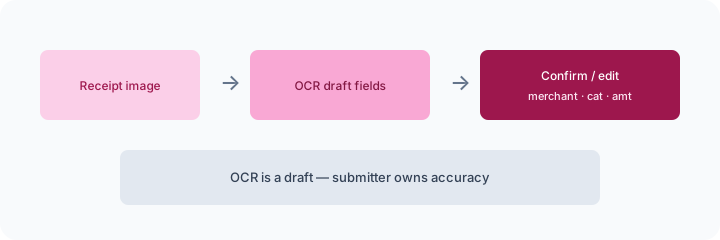
What it is: OCR extracts draft merchant / category / amount. Submitter confirms accuracy — OCR is never the source of truth alone.
3. Lean finance expense patterns
What it is: Useful when Expensify is already the expense home — policy flags, OCR drafts, and light manager queues. Pair with ledger AI (Xero/QuickBooks) separately for close.
4. Vs BILL / QuickBooks / Tipalti / Claude
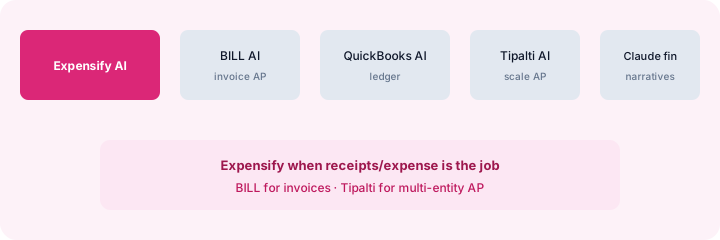
What it is: Expensify AI when receipts/expense is the job; BILL AI for invoice AP; QuickBooks AI for ledger/close; Tipalti AI for scale AP; Claude for finance for file-heavy narratives outside the expense tool.
Pricing context (Oct 2026)
Expensify plans and SmartScan / AI packaging vary by plan and seat mix. We do not invent list prices. Confirm on use.expensify.com/pricing (or current public Expensify pricing pages) and your account. Dated October 2026.
When useful / when not
Useful when: Expensify-centered teams want receipt OCR and policy flags with submitter confirm. Less useful when: The job is invoice AP (BILL), scale multi-entity AP (Tipalti), or ledger-only assists (QuickBooks/Xero). Educational — not a scorecard.
Paying for Expensify AI and a few other AI tools? The $9 AI toolkit spreadsheet lists every AI subscription you have, what each one costs, and how fast it pays for itself, so you can see which ones are worth the money.
Want someone to do it for you? AI toolkit audit — $19
FAQ
When is Expensify AI useful?
When expenses live in Expensify and AI drafts stay human-gated before submit.
Should it invent receipt amounts?
No — draft policy flags and confirm fields; never invent totals.
How does it relate to BILL or Tipalti AI?
Receipts/expense vs invoice AP vs scale AP — different jobs. Map seats when overlap appears.
What does it cost?
Verify on Expensify public pricing — we do not invent prices.
Optional next step (if seats overlap)
If several AI seats would cover the same jobs, optional help mapping overlap: $19 AI toolkit audit or $9 AI toolkit spreadsheet. Email Audit $19 or Toolkit spreadsheet $9.
Checkout is live via Stripe. After you pay, we email delivery (spreadsheet) or intake next steps (audit).
Inventory seats by job on the stack map for finance ops.