Role guide · Finance · Gemini · Workspace · Sep 2026
Gemini for finance (Sep 2026): Sheets/Docs close and variance in Workspace
Finance role guide in Google Workspace with Gemini — MoM variance in Sheets and Docs-ready close notes without inventing figures. Soft CTA only if multiple AI seats overlap on the same close jobs.
Who this guide is for
Finance owners and founder-operators whose close trackers and narrative notes already live in Google Sheets and Docs — and who want a repeatable Gemini loop for MoM variance, not another generic “AI for CFOs” list. Sheets-only formulas and range prompts: Gemini in Sheets. Product deep-dive: gemini.html. Ops-lead day loop: Gemini for ops. ChatGPT / Claude siblings: ChatGPT for finance · Claude for finance.
The finance close loop (picture)
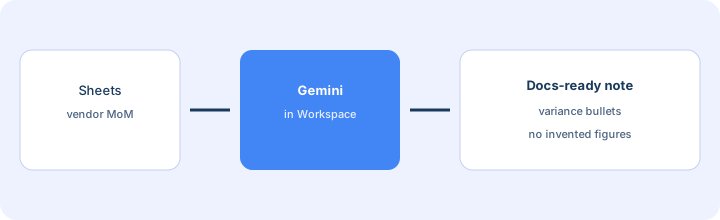
How a finance owner actually runs Gemini
Examples at a glance: each pattern has a concrete finance example plus a short Try this.
1. Sheets MoM vendor variance (primary)
What it is: In the vendor spend Sheet of record, select the top-vendor MoM range (prior month, current month, delta). Ask Gemini — grounded only in the selected cells — for variance bullets and questions for owners. Mark Unknown when the Sheet does not name a reason. Do not invent figures.
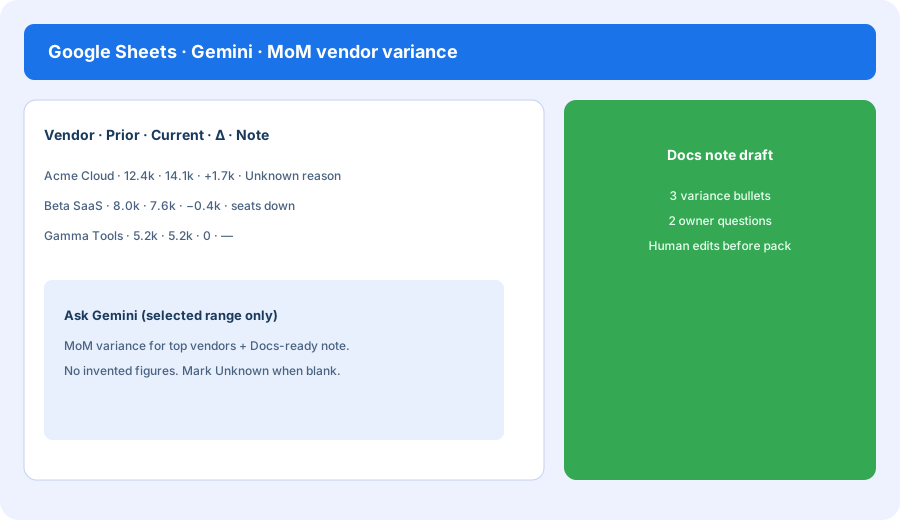
Primary SoT workflow:
In Sheets: MoM variance for top vendors + a Docs-ready note. No invented figures.
2. Docs-ready variance note
What it is: Paste or side-panel draft a short Docs note from the Sheet pass: KPI/variance bullets, owner questions, and blanks left as Unknown. The finance lead edits tone before the board or ops pack. Prefer Drive files over re-pasting into a second chat seat.
In Docs with the Sheet open (or a paste of the variance table only):
Draft a Docs-ready note: 3 MoM variance bullets for top vendors, 2 owner questions, 1 risk. Use only the numbers in the paste/Sheet. Mark Unknown when a reason is missing. Do not invent figures.
3. Guardrails (no invented figures)
What it is: Standing habits for finance: answer only from selected ranges / pasted tables; never invent journal entries or vendor amounts; leave owner blanks; human confirms before the pack leaves the team. Soft CTA later only if Claude or ChatGPT is drafting the same variance questions from the same Sheet.
Standing prompt line for the close week:
Use only the selected Sheet range. Output variance bullets and owner questions. Never invent figures, journal entries, or approvals. Flag missing reasons as Unknown.
4. When Gemini fits vs ChatGPT / Claude for finance
What it is: Same close/variance jobs; different home seat. Gemini wins when Sheets/Docs are already the SoR. ChatGPT wins for shared Custom GPTs (see ChatGPT for finance). Claude wins for Projects + Artifacts long-doc loops (see Claude for finance). Paying all three for identical MoM questions is stack sprawl.
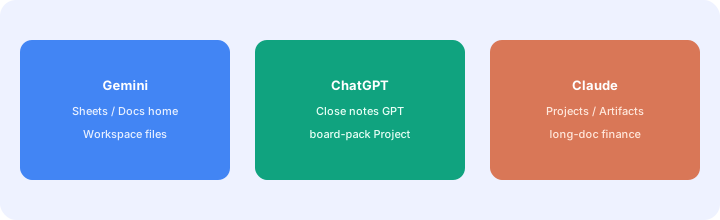
One decision this month:
List paid AI seats that draft MoM variance. Circle where the Sheet of record already lives. Keep variance narrative only there for 30 days. Revisit only if edit quality fails a real close review.
Pricing context (September 2026)
Google AI / Gemini consumer and Workspace SKUs are documented on public Google AI plan pages and gemini.google/subscriptions. Public pages often list Google AI Pro around $19.99/month (US) with Gemini in Workspace apps where available; Ultra and org Gemini for Workspace packaging differ. This page is dated September 2026 and is not a price sheet — we do not invent exact seat prices for every SKU.
Uncertainty: Plan names, Workspace add-ons, and which Gemini side panel features appear in Sheets/Docs move. Always confirm on live Google pages and your admin console before budgeting.
When Gemini for finance is useful (honest take)
Useful when finance already lives in Sheets/Docs, needs MoM vendor variance + a Docs-ready note, and will keep a human gate before the pack. Less useful when the GL or a dedicated FP&A tool is the SoR and Sheets is only a scratch pad — or when you hoped Gemini would invent missing vendor reasons. If ChatGPT Close notes and Claude Projects draft the same bullets, map overlap first (soft $19/$9 below). Sheets how-to depth: Gemini in Sheets.
Paying for Gemini and a few other AI tools? The $9 AI toolkit spreadsheet lists every AI subscription you have, what each one costs, and how fast it pays for itself, so you can see which ones are worth the money.
Want someone to do it for you? AI toolkit audit — $19
Related options (educational)
| Need | Better home | Why |
|---|---|---|
| MoM variance + Docs note in Workspace | Gemini for finance (this page) | Stay in Sheets/Docs of record |
| Shared Close notes Custom GPT | ChatGPT for finance | Team/Business GPT habit |
| Projects + Artifacts long-doc finance | Claude for finance | Weekly Project file loop |
| Sheets formulas / range prompts only | Gemini in Sheets | Feature how-to companion |
Same job, two products: Claude vs Gemini for finance.
Inventory seats by job on the stack map for finance ops.
FAQ
How should finance run Gemini in Workspace?
Select MoM vendor range in Sheets → variance bullets + Docs-ready note → human edit. No invented figures.
When should we use ChatGPT or Claude for finance instead?
ChatGPT for shared Close notes GPTs; Claude for Projects/Artifacts. Gemini when Sheets/Docs are already home.
How much is Google AI / Gemini in September 2026?
Public pages often cite Pro around $19.99/mo (US); org SKUs differ. Confirm on Google’s live plan pages.
Where is the Sheets how-to and full Gemini review?
Gemini in Sheets · Gemini. This page is the finance role guide.
Optional next step (if seats overlap)
If Gemini, ChatGPT, and Claude all draft the same MoM variance bullets, optional help: $19 AI toolkit audit or $9 AI toolkit spreadsheet. Email Audit $19 or Toolkit spreadsheet $9.
Checkout is live via Stripe. After you pay, we email delivery (spreadsheet) or intake next steps (audit).