Role guide · Healthcare ops · Gemini · Workspace · Oct 2026
Gemini for healthcare ops (Oct 2026): Gmail, Sheets, and Docs help for recall lists, denial trackers, and payer-email drafts in Google Workspace clinics
Healthcare ops role guide for practice managers, billing staff, and front-desk leads whose clinic runs on Google Workspace — Gemini summarises a sanitized denial tracker in Sheets, sorts a recall list into cohorts, drafts payer follow-up emails in Gmail, outlines a policy in Docs from approved sources, and answers SOP questions from a Gemini Notebook. The billing supervisor checks every total against the export, and the practice manager signs every patient-facing message. Nothing here is medical, coding, or billing advice. Companion to ChatGPT for healthcare ops.
Who this guide is for
Practice managers, billing and collections staff, front-desk leads, and clinic operations managers — the person who keeps the denial tracker, runs recall outreach, chases payers by email, and writes the front-desk policies — at a clinic or medical group that already pays for Google Workspace. If a dedicated tool already does the job, start there: Luma Health AI runs recall and waitlist outreach, Phreesia AI handles intake, Cedar AI handles patient billing conversations, and Waystar AI works denials inside the revenue cycle. If your team drafts in ChatGPT instead, see ChatGPT for healthcare ops.
What Google documents (its Gemini in Sheets, Gemini in Docs, and Help me write help pages and its pricing page, read 19 October 2026): in Sheets, Ask Gemini opens a side panel that summarises and analyses data and can take actions such as creating a pivot table, and Undo reverses an action. In Docs, you add files as Sources and accept or reject suggestions. In Gmail, Help me write drafts a message and can pull details from your other emails and Drive files — Sources shows what it used. Google’s pricing page lists Gemini in Gmail on every Business plan, and Gemini in Docs and Sheets on Business Standard and above.
PHI rules. Google’s HIPAA help page says customers must accept the Workspace BAA (in the Admin console) before using PHI, that Help me write and the Gemini side panel are covered as part of Workspace with Gemini in Google’s HIPAA included functionality, and that third-party add-ons are not covered. Google’s HIPAA services list names Gemini in Google Workspace, Gmail, and Drive (including Docs and Sheets); the Workspace version of Gemini Notebook is not named there. So: no PHI in prompts unless your clinic has accepted the BAA and your own policy allows that use. This guide uses sanitized data throughout.
Ground rules: Gemini suggests; it does not send payer or patient email, submit claims, file appeals, schedule patients, or decide medical necessity or coverage. The billing supervisor owns every denial figure, the practice manager signs every patient-facing message, and the privacy officer decides what data may go where.

Major features (with how someone uses them)
Examples at a glance: each feature has a concrete example from a real job plus a short Try this you can run this week.
1. Gemini in Sheets: denial summary by payer and reason (primary)
What it is: Export last month’s denials as a sanitized sheet — payer, reason code, CPT family, month, count, dollars; no patient names, MRNs, member IDs, or claim numbers — and open it as a native Google Sheet (Google says Gemini works best with native Sheets files). Click Ask Gemini and ask for a summary by payer and reason, then for a pivot table on a new tab. Keep the export untouched on its own tab so every total can be checked.
Insert results into the sheet rather than relying on the side panel: Google notes that conversation history is lost in some cases, such as reloading. A pivot table in the sheet can be re-checked next week; a chat answer cannot.
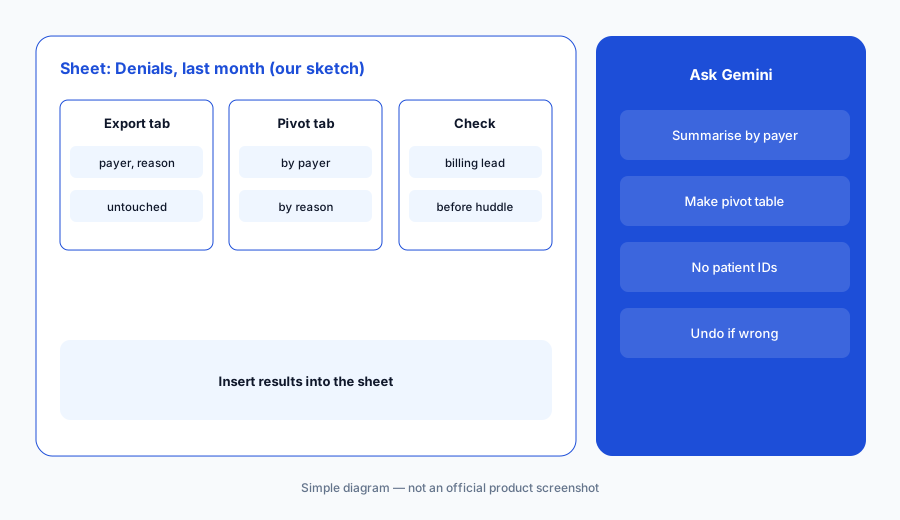
Primary workflow:
Ask Gemini in Sheets to summarise a sanitized denial tracker by payer and reason. Have the billing supervisor check every total against the export before the Monday huddle.
2. Recall cohort lists with a sign-off column
What it is: Recall lists usually start as an EHR report. Work in Sheets with a cohort-level version — visit type due, months overdue, provider, preferred channel — and ask Gemini to group rows into outreach cohorts and add a practice manager sign-off column. If the list has to carry patient details, that is a PHI decision for the privacy officer, not a convenience call. The outreach itself goes out from your patient-messaging tool after sign-off, not from Gemini.
The common miss is the visit type. A cohort labelled “annual physical” that actually mixes Medicare wellness visits and physicals will send the wrong message to half the list.
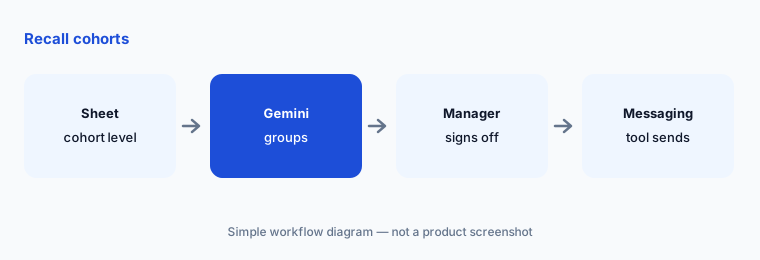
Check visit types:
Ask Gemini in Sheets to group a cohort-level recall list by visit type and months overdue. Have the practice manager sign off each cohort and confirm the visit type before any message goes out.
3. Gmail: payer follow-up drafts
What it is: Use Help me write in Gmail to draft a follow-up to a payer’s provider-relations contact about a denial pattern — payer, reason code, count, and the question you need answered. Google says Help me write can pull details from your other emails and Drive files, and Sources shows what it used. Open Sources every time; a draft that pulled from the wrong thread or a file with patient details does not get sent.
Keep payer follow-ups at the pattern level. Claim-specific appeals belong in your RCM workflow, where the claim, the payer portal, and the audit trail live.
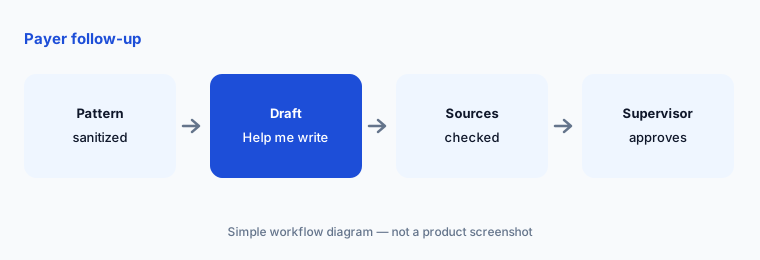
Open Sources:
Draft one payer follow-up with Help me write about a sanitized denial pattern. Have the billing supervisor open Sources and approve the text before a person sends it.
4. Docs: policy outlines from approved sources
What it is: In Docs, add your current front-desk procedures and one public payer or regulatory document as Sources, then ask Gemini for an outline of a policy — for example, how front-desk staff verify insurance at check-in. Accept or reject each suggestion. The outline is a starting draft; the practice manager writes the policy and the compliance officer approves it.
Name the sources at the top of the doc with their dates. A policy outline built from last year’s payer rules is worse than none.
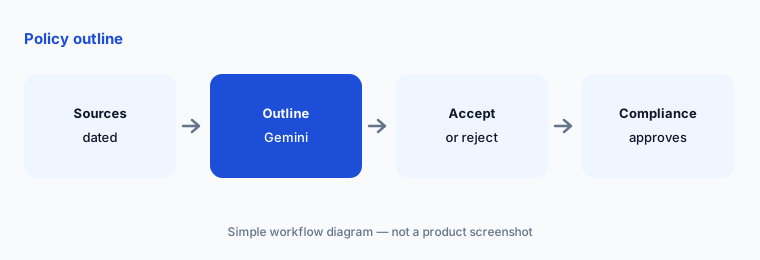
Date the sources:
Outline one front-desk policy in Docs from your current procedure and one dated public payer guide. Have the practice manager reject any step the clinic does not follow and the compliance officer approve the final policy.
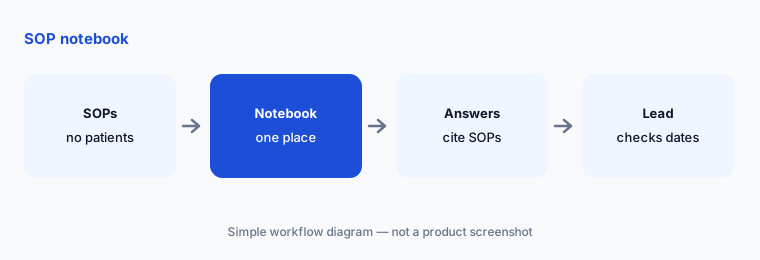
5. Gemini Notebook (formerly NotebookLM) for SOPs
What it is: Google renamed NotebookLM to Gemini Notebook on 16 July 2026 (Workspace Updates). Put your SOPs — check-in, prior-auth intake, refund requests, phone scripts — into one notebook so new staff can ask questions and see which SOP an answer came from. Google’s pricing page lists Gemini Notebook on every plan, with expanded limits from Business Standard. Keep SOP notebooks free of patient information; the Workspace notebook is not named on Google’s HIPAA services list.
Notebook answers are only as current as the SOPs inside. Put the SOP owner and review date on page one of each document.
Check the dates:
Load your front-desk SOPs into one Gemini Notebook with no patient information. Have the front-desk lead ask it ten real questions and update any SOP whose answer is out of date.
6. Before any PHI: BAA, admin settings, clinic policy
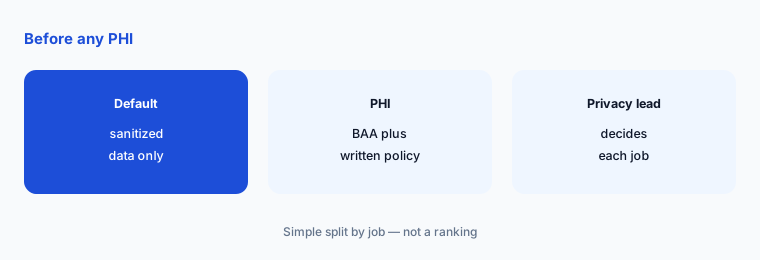
What it is: If the clinic wants Gemini to work with patient details — a recall list with names, a reply to a patient email — three things come first: the Workspace BAA accepted in the Admin console, admin settings reviewed against Google’s HIPAA implementation guidance, and a written clinic policy naming which apps and which jobs may include PHI. Google says third-party add-ons are not covered by the BAA, and data in Workspace is not used to train generative AI models outside your domain without permission (Google).
A BAA makes PHI use possible; it does not make every use a good idea. Patient-facing messages still need the practice manager’s sign-off, and clinical content still needs a clinician.
Write the policy:
Before anyone uses Gemini with patient details, have the privacy officer confirm the Workspace BAA, list installed add-ons, and write which jobs may include PHI and who approves them.
Pricing context (October 2026)
As checked on 19 October 2026 at workspace.google.com/pricing: Business Starter $7, Business Standard $14, Business Plus $22 per user per month with a one-year commitment, before tax. Gemini in Docs and Sheets requires Business Standard or above; Gemini in Gmail is on all Business plans; Gemini Notebook is on every plan, with expanded limits from Standard. Business plans max out at 300 users.
A limited-time three-month discount for new customers appears on the pricing page (20% off Starter and Standard, 50% off Plus; price details Nov 2, 2026 – Feb 2, 2027; first 20 users). Those dates moved by a day since 18 October, so budget from your invoice and the plan grid, not from memory.
Uncertainty: Workspace list prices and discount bands change, and the page shows prices for your region. Confirm the live pricing page and your admin console before budgeting. Google’s HIPAA services list we read was last updated 31 Aug 2025 and does not name the Workspace Gemini Notebook; ask Google or your reseller before putting PHI anywhere it is not listed. Gemini suggests; it does not send payer or patient mail, submit claims, or decide coverage. Feature availability can vary by language and admin settings.
When it’s useful (honest take)
Useful when your clinic already works in Google Workspace on Business Standard or above and the billing supervisor and practice manager will check every figure and sign every message before it leaves the clinic.
Less useful when a dedicated tool already runs the job (Luma Health AI for recalls, Waystar AI for denials, Cedar AI for patient billing), the team is on Business Starter without Sheets Gemini, or nobody has decided the clinic’s PHI policy.
Paying for Gemini and a few other AI tools? The $9 AI toolkit spreadsheet lists every AI subscription you have, what each one costs, and how fast it pays for itself, so you can see which ones are worth the money.
Want someone to do it for you? AI toolkit audit — $19
Related options (educational)
| Need | Better home | Why |
|---|---|---|
| Denial sheets, recall cohorts, payer emails in Workspace | Gemini for healthcare ops (this page) | Workspace Standard+ |
| Sanitized denial themes in a Project | ChatGPT for healthcare ops | Business seats |
| Recall and waitlist outreach | Luma Health AI | Quote-only |
| Denials and coding in the revenue cycle | Waystar vs Akasa | Quote-only |
| Insurance twin guide | Gemini for insurance ops | Workspace Standard+ |
FAQ
Can we use Gemini with patient information?
Only if your clinic has accepted Google’s Workspace BAA and your own policy allows that use. Google says Help me write and the Gemini side panel are covered as part of Workspace with Gemini; third-party add-ons are not. Until then, keep prompts and files sanitized.
Which Workspace plan do we need for Gemini in Sheets?
Business Standard or above. Google’s pricing page (checked 19 Oct 2026) shows Gemini in Docs and Sheets as not supported on Business Starter; Gemini in Gmail is on every Business plan.
Can Gemini send recall messages or payer emails?
Not in this guide. Gemini drafts and groups; a person sends payer email after the billing supervisor approves it, and patient messages go out from your messaging tool after the practice manager signs off.
Is NotebookLM still available?
Google renamed NotebookLM to Gemini Notebook on 16 July 2026. Use it for SOPs without patient information; the Workspace notebook is not named on Google’s HIPAA services list we read.
Who approves outputs?
The billing supervisor for every denial figure and payer email, the practice manager for every patient-facing message and recall cohort, the compliance officer for policies, and the privacy officer for any PHI decision.
Optional next step (if seats overlap)
If your clinic pays for Google Workspace with Gemini, ChatGPT, a patient-engagement tool, and an RCM platform that all draft the same summaries, map that overlap before adding another seat. Map the overlap with the $19 AI toolkit audit or the $9 AI toolkit spreadsheet. Email Audit $19 or Toolkit spreadsheet $9.
Checkout is live via Stripe. After you pay, we email delivery (spreadsheet) or intake next steps (audit).