Tool · Finance · Vena · Oct 2026
Vena AI review (Oct 2026): Excel-native planning with Vena’s copilot
Vena is a planning, reporting, and close platform for finance teams that want to keep working in Excel. Its CubeFLEX database sits under your Excel templates, and its AI — sold as Vena Copilot on the pricing page and marketed as Vena AI — works through a set of agents: Reporting, Analytics, Planning, and Query, with a Scenario agent announced. This page walks through each with a real job, a Try this, and the three cells you check against the general ledger before anyone repeats the answer.
What this Vena AI page covers
This page is for the FP&A manager, controller, or finance systems admin at a mid-size company that already budgets and reports in Excel, often alongside Microsoft Teams and Power BI. The question it answers: which of Vena’s AI agents are generally available today, which are still beta, what each one reads or writes, and which checks keep a generated report or plan from reaching leadership untested.
On naming: Vena’s pricing page and release notes still say Vena Copilot, while its AI page says Vena AI, powered by Vena Omega — Omega being what Vena calls a “cumulative context engine” that adds your role, industry, chart of accounts, fiscal calendar, and process stage to each request. Behind one chat, Vena says Vena AI hands each request to the agent built for that job. The agents are the useful unit: what each one does, and whether it is generally available, open beta, closed beta, or coming soon.
Everything below comes from Vena’s website, pricing page, product-release pages, and newsroom as we read them on 7 October 2026. Vena’s support knowledge base needs a customer login, so we used none of it. Vena’s own figures — such as 66% faster planning cycles on its homepage, or a Planning Agent event page saying early customers cut budgeting cycles by over 60% — are vendor claims, not something we measured.
Major features (with how someone uses them)
Examples at a glance: each feature has a concrete example from a real job plus a short Try this you can run this week.
1. Reporting Agent in Ad Hoc: a budget-vs-actual view for one department (primary)
What it is: Vena’s Reporting Agent builds a report from a plain-English request inside Vena Ad Hoc, the Excel add-in for pulling Vena data into a sheet. Vena’s current release page lists it as generally available and says AI-assisted report creation “is now included with Vena Ad Hoc”: every Ad Hoc user can generate a report from natural language, refine it in conversation, and get a chart. Vena says reports come with drill-downs to the data behind the numbers, and that you can work on them with colleagues in Excel Live in Microsoft Teams.
A generated report is a query, not a fact. The usual mistakes are quiet ones: the wrong scenario (budget version 2 instead of the approved version), a department hierarchy that leaves out a renamed cost center, or a period that is fiscal when you meant calendar. Checking three cells against the general ledger catches most of them.
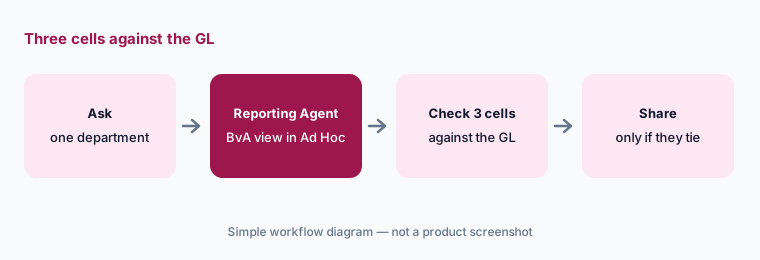
Primary workflow:
Ask Vena’s copilot to build a budget-vs-actual view for one department. Check three cells against the GL. If any cell is off, note whether the scenario, period, or department hierarchy caused it before you fix the request.
2. Analytics Agent (open beta): variance questions with reasoning you can correct
What it is: On 6 October 2026 Vena announced a new Analytics Agent, in open beta, with general availability “expected later in October 2026.” Vena says it reads the live Vena data model with no extra setup and works through questions about variances, trends, comparisons, and rankings in several steps. It shows how it reached an answer, points out missing context or uncertainty, and asks for clarification when a question is ambiguous. You can inspect its logic, correct a GL account, period, or assumption, and rerun before relying on the result. Existing Vena permissions apply, so users only see data they are cleared for.
The same announcement describes “personalized memory”: admins can save organization-wide context and individuals can add their own instructions, which carry into future conversations. That is useful, and it is also a new thing to own. Write down who can change the organization-wide instructions, and read them the way you would read a shared formula. Vena’s beta terms say beta features are provided “as is” and are not part of the contracted service.
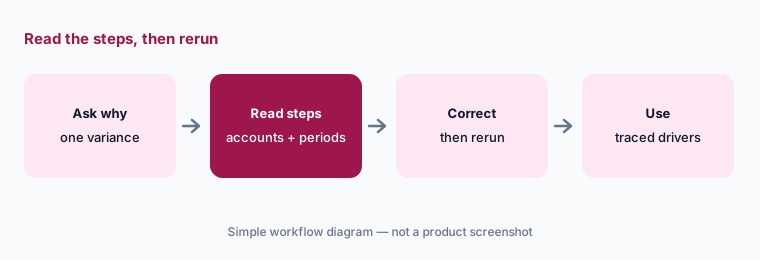
Read the steps:
Ask the Analytics Agent why one cost center missed plan last month. Read every reasoning step it shows, correct any GL account or period it got wrong, rerun, and keep only the drivers you can trace to a transaction.
3. Planning Agent: a driver-based plan from one prompt, in Excel
What it is: Vena’s Spring ’26 release lists the Planning Agent as generally available: it turns a natural-language prompt into a driver-based budget, forecast, or scenario directly in Excel, “powered by Vena Copilot and CubeFLEX,” without writing formulas or applying spreads by hand. Vena’s AI page says plans stay aligned with the relationships in your CubeFLEX model across revenue, headcount, and operating structure. A separate Scenario Agent for multi-entity cost, pricing, M&A, and timing scenarios is marked “Coming Soon.”
A plan built from a prompt carries the prompt’s assumptions. Before a budget owner sees it, list each driver the agent used — growth rate, hiring dates, price changes, seasonality — and give each one a named owner who agrees with it. The agent can build the plan in seconds; it cannot know that the sales leader already pushed two hires into next quarter.
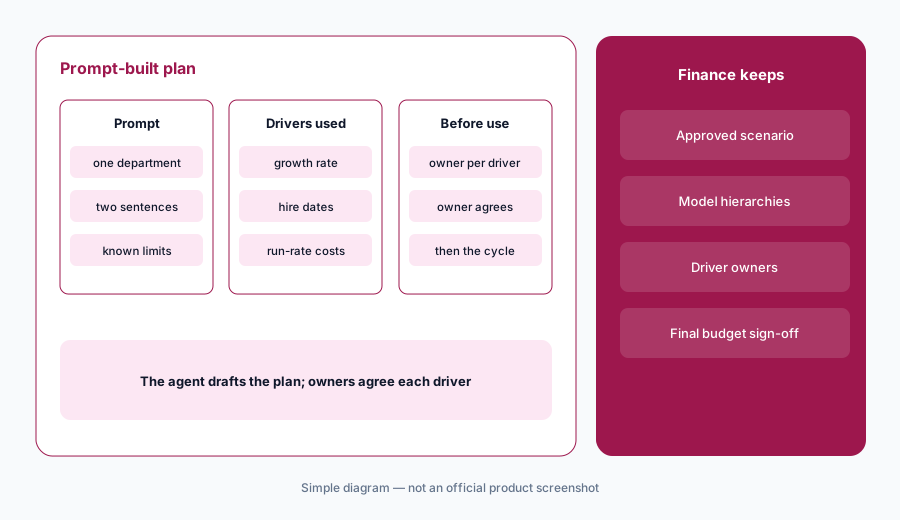
Owner per driver:
Ask the Planning Agent for one department’s draft budget from a two-sentence prompt. List every driver it used, send the list to the budget owner, and change nothing in the plan until each driver has an owner who agrees with it.
4. Query Agent and Vena AI in Microsoft Teams
What it is: The Query Agent (generally available in the Spring ’26 release) turns a plain-English description of the data you need into an MQL expression — Vena’s query language — with the hierarchy references filled in, ready to copy into Vena. It is a helper for people who build templates and reports, not a way to change data. Vena also puts Vena AI in Microsoft Teams: you can open it in a private chat during a meeting and share an Ad Hoc report in Excel Live without leaving the call.
Both are speed tools, and both shift the check to the moment of use. A generated MQL expression should be tested on a small member set before it goes into a template other people rely on. An answer pulled up mid-meeting should be labeled as a draft until someone checks it after the call.
Test before the template:
Describe one member selection you use often to the Query Agent. Paste the MQL it returns into a test sheet, check the member count against your hierarchy, and only then put it into a shared template.
5. Vena MCP, admin views, and permissions
What it is: Vena MCP connects outside AI tools to Vena data. The Spring ’26 release listed an MCP Server in closed beta, described with “read and write-back capabilities.” Vena’s 6 October 2026 announcement describes enhanced MCP that gives supported AI tools read access to general ledger, transaction, and operational data; supports skills and scheduled automations for alerts and recurring analysis; and works with Claude Cowork and ChatGPT Work alongside local Excel files and slide decks. Ask Vena in writing whether your tenant’s connection can write anything back, and which tools it supports today.
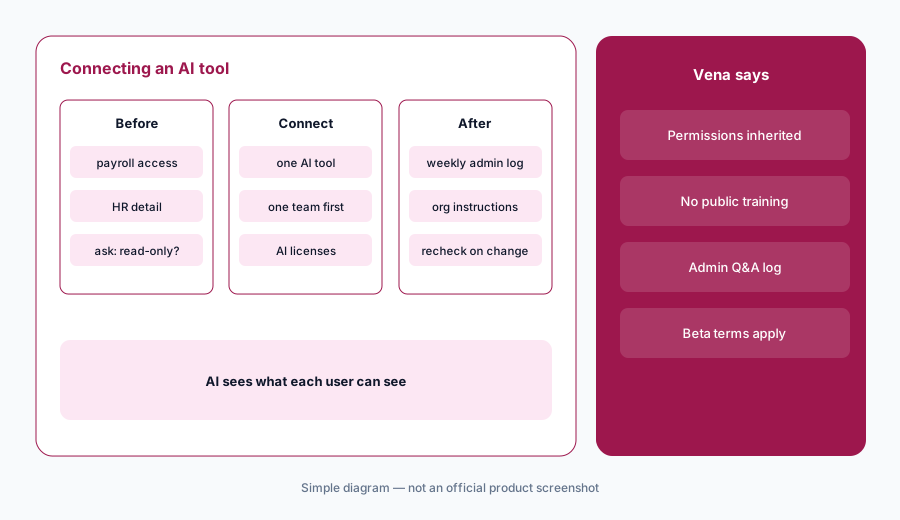
On controls, Vena’s AI page says Vena AI runs on CubeFLEX and inherits your existing data, application, and individual permissions; that it uses OpenAI models through Microsoft Azure, with data never used to train public models; that a Prompt Flow layer keeps data inside the Vena environment; and that admins get a view of all questions and responses Vena AI processed, plus feedback prompts and natural-language rules for phrases your team uses. Its FAQ also says anyone who uses it needs a Vena AI license. Read the admin log for the first month — it is the fastest way to see what people actually ask.
Permissions first:
Before connecting any AI tool through Vena MCP, list who can see payroll and HR detail in Vena and fix those permissions. Ask Vena in writing whether your connection is read-only, then connect one tool for one team and read the admin question log weekly for a month.
6. Where Vena fits against other options
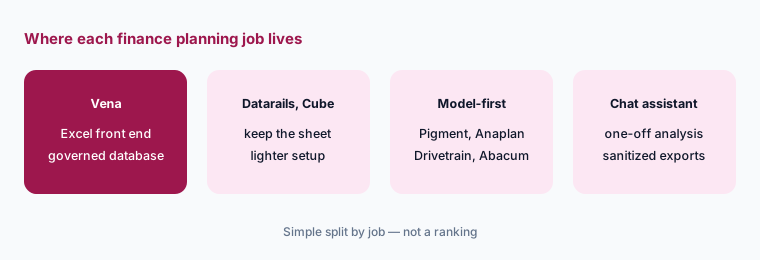
What it is: Vena suits mid-size and larger finance teams that want Excel as the front end with a governed database, workflow, and close underneath, and that already live in Microsoft 365, Teams, and Power BI — Vena now also sells through Microsoft Marketplace and owns Acterys for Power BI write-back. Datarails and Cube also keep the spreadsheet; Cube adds Google Sheets. Pigment, Anaplan, Abacum, Planful, and Drivetrain move planning into their own model instead.
Vena also sells close and consolidation: its AI-enabled Financial Consolidation became generally available on 26 August 2026, for intercompany eliminations, currency translation, and ownership structures. If your main pain is reconciliations and close checklists, compare it with FloQast or Numeric first. For one-off analysis on a sanitized export, a general assistant such as Claude or ChatGPT may be enough, as long as you check every number.
Four jobs, live:
Write your team’s four monthly finance jobs. In any Vena demo, ask to see each one run on your sample data, and check three numbers per job against your GL before the call ends.
Pricing context (October 2026)
Vena does not publish prices. On 7 October 2026, its pricing page showed two plans with no figures and a “Request a Demo” button: Professional (marked Most Popular: the Vena platform, a customer success manager, standard support, the customer portal, and Vena AI) and Complete (adds Vena Insights, premium support, a sandbox environment, and Expert Managed Services). Licenses come in three types — Power User, Contributor, and View Only — and the page says not-for-profits and Microsoft Dynamics 365 Business Central users may be eligible for discounted pricing.
The AI line is worth reading closely. The plan card lists Vena AI under Professional, but the feature table marks the Vena Copilot row on both plans with both an “Included in plan” icon and an “Available at an additional cost” icon, and Vena’s AI FAQ says users need a Vena AI license. Platform export APIs are an extra fee (import APIs are included). Ask in writing which agents, how many AI licenses, and whether MCP are in your quote.
Uncertainty: Vena publishes no prices, so we quote none; any figure elsewhere is someone’s quote, not a list price. The Analytics Agent is open beta (general availability expected later in October 2026, per Vena), the Scenario Agent is coming soon, Workflow is closed beta, and the MCP Server was closed beta in the Spring ’26 release — all as of 7 October 2026. Vena’s support knowledge base needs a login, so admin-level details may differ from its marketing pages.
When it’s useful (honest take)
Useful when your planning and reporting already run in Excel templates, you want a governed database and workflow behind them rather than a new modeling tool, and your team lives in Microsoft 365. The Reporting Agent in Ad Hoc and the Planning Agent shorten first drafts, and the Analytics Agent shows its steps so an analyst can correct it.
Less useful when no one owns the CubeFLEX model and its hierarchies — every agent answers from that model, so a stale hierarchy produces confident wrong answers. Less useful if your team wants to leave Excel entirely, if your finance stack is Google Workspace, or if you need the newest agents now rather than when they leave beta. And if AI licenses are priced separately, a small team may get more from one well-used Reporting Agent than from every agent at once.
Paying for Vena AI and a few other AI tools? The $9 AI toolkit spreadsheet lists every AI subscription you have, what each one costs, and how fast it pays for itself, so you can see which ones are worth the money.
Want someone to do it for you? AI toolkit audit — $19
Related options (educational)
| Need | Better home | Why |
|---|---|---|
| Excel-native planning, reporting, and close on a governed database | Vena AI (this page) | Reporting, Analytics, Planning, and Query agents; Teams; MCP |
| Excel-native FP&A for a small team | Datarails | FinanceOS consolidation under Excel, AI Assistant (Beta) |
| Stay in Excel or Google Sheets | Cube | Charlie in the sheet sidebar, Planner Agent |
| Model-first planning with AI agents | Pigment AI, Anaplan AI, or Drivetrain | Planning moves out of the spreadsheet |
| Forecasting and anomaly checks for FP&A | Planful AI | Signals, Projections, Planner |
| Inventory of finance AI seats | Stack map for finance ops | Overlap check before adding another tool |
FAQ
What is Vena AI, and is it the same as Vena Copilot?
Vena’s pricing page and release notes call its AI Vena Copilot; its AI page calls it Vena AI, powered by Vena Omega. Either way it is a chat interface that hands each request to an agent — Reporting, Analytics, Planning, or Query — working on your Vena data model in Excel and Teams.
Which Vena AI agents are generally available in October 2026?
As of 7 October 2026, Vena lists the Reporting Agent in Ad Hoc, the Planning Agent, and the Query Agent as generally available. The new Analytics Agent is in open beta with general availability expected later in October, the Scenario Agent is marked coming soon, and the MCP Server was in closed beta in the Spring ’26 release.
Does Vena AI see data I am not allowed to see?
Vena says Vena AI runs on its CubeFLEX database and inherits your existing data, application, and individual permissions, so users only see data they are authorized to access. Check those permissions before turning AI on, because the AI will see whatever each user can see.
Which AI models does Vena use?
Vena says Vena AI combines Microsoft Azure AI with its CubeFLEX database and gives access to OpenAI models without your data being used to train publicly accessible models. It also says a Prompt Flow layer keeps data inside the Vena environment and admins can see all questions and responses.
How much does Vena cost?
Vena publishes no prices. As of 7 October 2026 its pricing page lists Professional and Complete plans and Power User, Contributor, and View Only licenses, with a Request a Demo button. Its feature table marks Vena Copilot as both included and available at additional cost, so ask what your quote covers.
Optional next step (if seats overlap)
If finance pays for Vena AI licenses, Microsoft 365 Copilot, and a separate chat assistant that analysts use to write the same variance notes, that overlap is worth mapping. Map the overlap with the $19 AI toolkit audit or the $9 AI toolkit spreadsheet. Email Audit $19 or Toolkit spreadsheet $9.
Checkout is live via Stripe. After you pay, we email delivery (spreadsheet) or intake next steps (audit).