Tool · IT ops · Moveworks · Oct 2026
Moveworks review (Oct 2026): the AI Assistant, enterprise search, and Tool Studio for employee IT help
Moveworks is an AI assistant that employees message in Slack, Microsoft Teams, or a browser when they need IT, HR, or other internal help. It can answer from your company’s content and take actions in your systems: reset a password, grant software access after approval, or file and update a ticket. This page walks through each piece with a real IT job, a Try this, and the places where a technician still has to own the outcome.
What this Moveworks page covers
This page is for the person who owns employee IT support at a mid-size or large company — an IT service desk manager, an IT ops lead, or the ServiceNow or Jira Service Management admin who keeps being asked to “add AI”. The question it answers: if employees could ask one assistant for help, which requests would actually get resolved, which would just be routed faster, and what does IT have to build, approve, and watch?
Moveworks pulls those requests into one chat assistant that sits on top of your existing systems. Its pieces: the AI Assistant with built-in plugins for common IT jobs, enterprise search across your apps, Knowledge Studio for drafting help articles from ticket history, Tool Studio (called Agent Studio until late September 2026) for building your own actions, and a no-code Assistant Builder for scoped assistants. Moveworks says it does not replace your IT service management (ITSM) tool; it works across ServiceNow, Jira, Freshservice, identity providers such as Okta and Entra ID, and device tools.
Ownership changed recently. ServiceNow completed its acquisition of Moveworks on 15 December 2025. In February 2026 ServiceNow launched EmployeeWorks, which combines Moveworks’ chat and search with ServiceNow’s portal and workflows, and said Moveworks is still sold as a standalone product. At its Knowledge 2026 event in May, ServiceNow introduced Otto, a unified AI experience that brings together Now Assist and Moveworks. Everything below comes from Moveworks’ public site, help docs, and community posts, and ServiceNow’s press releases, as we read them on 7 October 2026.
Major features (with how someone uses them)
Examples at a glance: each feature has a concrete example from a real job plus a short Try this you can run this week.
1. AI Assistant plugins for everyday IT requests (primary)
What it is: The Assistant ships with plugins for the requests that fill a service desk queue. Moveworks’ docs list plugins to reset a password, unlock an account (for example in Okta or Azure AD), reset MFA, grant software access (with manager approval where your process needs it), add people to distribution lists, and a ticketing concierge that can create a ticket, show its status, add a comment, resolve it, or reopen it from chat. When the Assistant can’t solve something, a smart handoff lets the employee file a ticket or reach a person. Admins can also set plugin deflections, so for sensitive actions such as password resets the Assistant sends a self-service link or instructions instead of acting directly.
The Assistant works in Slack, Microsoft Teams, Google Chat, web, and mobile, and Moveworks says it handles more than 100 languages. In Slack, a Channel Resolver skill can watch public help channels and message the person directly with steps, a form, or an access workflow; Moveworks’ docs say this is Slack-only and limited to a short list of plugins.
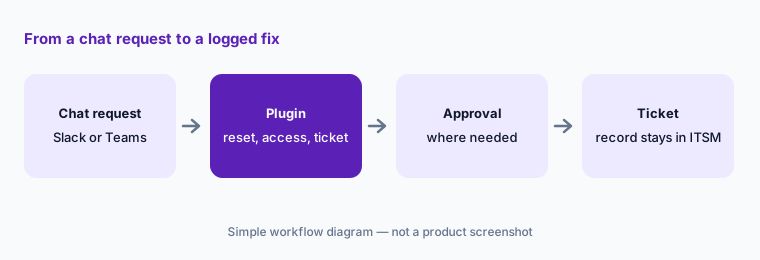
Primary workflow:
Pull last month’s top 20 IT ticket categories. Mark which ones a built-in Moveworks plugin already covers, which would need a Tool Studio build, and which must stay with a technician. Turn on only the first group, and give each plugin a named owner.
2. Enterprise search across your apps
What it is: Moveworks’ enterprise search answers questions from content spread across business apps — knowledge bases, intranet pages, HR policies, and more — and Moveworks says results are tailored to the person’s role, region, language, and access level rather than exact keywords. The Assistant summarizes an answer and links the source, so an employee asking “how do I get a second monitor?” in Denver can get a different answer from a colleague in London if the policies differ.
Content check:
Ask the Assistant your ten most common “how do I…” questions. For each answer, open the linked source and check its last-updated date. Retire or fix any page older than a year before you announce the Assistant to employees.
3. Knowledge Studio: help articles from ticket history
What it is: Knowledge Studio drafts knowledge articles from your support tickets and agent notes, which is where a lot of “how we actually fix it here” knowledge lives. Moveworks says generated articles include citations to the source material, that it recommends articles based on what employees keep asking, flags when a new draft overlaps an existing article, and suggests updates when new tickets change the answer. After publishing, article-level analytics show how often the Assistant uses each article to resolve issues.
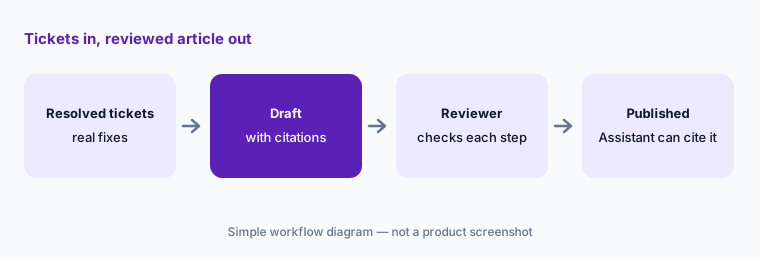
Reviewer pass:
Generate one article from your most common resolved ticket type. Open every cited ticket. Delete any step that only one technician used, and get the owning team to confirm the rest before you publish.
4. Tool Studio (formerly Agent Studio), Marketplace, and MCP
What it is: Tool Studio is Moveworks’ low-code environment for building your own actions — calling an API, chaining several steps, collecting details from the employee, and asking for approval. On 25 September 2026 Moveworks said Agent Studio is being renamed Tool Studio across the product, docs, and Marketplace, with the change expected to finish by early November; only the name changes. Its docs list building blocks such as HTTP actions, compound actions, inline LLM steps for summarizing or classifying, and a built-in human approval request. You can bring tools from a remote MCP server, and the AI Agent Marketplace offers prebuilt agents that Moveworks says are free to install.
Moveworks’ own lab shows a build that reads past change-request notes in ServiceNow and asks an LLM to suggest a risk level for a new change request. That is a useful pattern, but treat the suggestion as input to your change advisory process, not the decision.
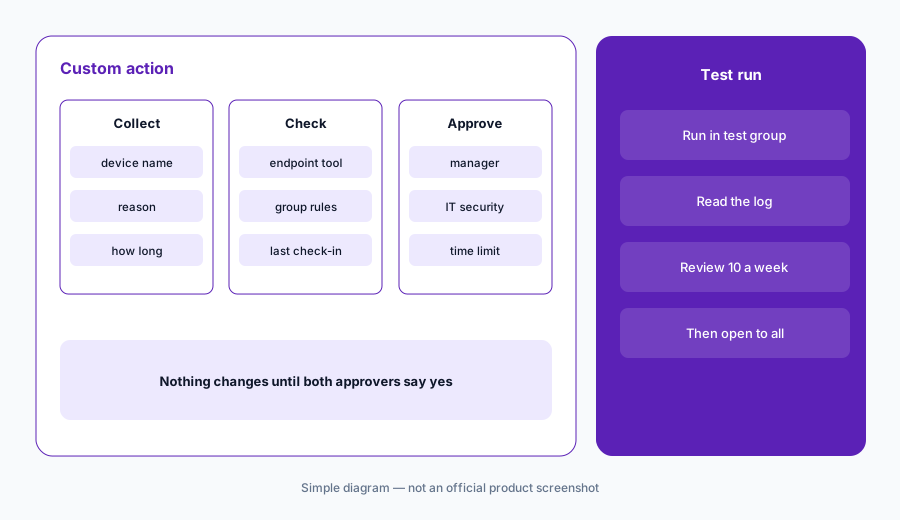
One action, two approvers:
Pick one request that today needs a technician to click through two systems. Build it in Tool Studio with an explicit approval step. Run it in a test group for two weeks and review every run before you open it to everyone.
5. Assistant Builder and Assistant Insights
What it is: Assistant Builder is a no-code workspace where a team describes what it needs and picks content sources, prebuilt plugins, and a list of allowed users; the resulting scoped assistant can be published to an internal store after approval. On the admin side, Assistant Insights shows usage trends, feedback, and gaps, and Moveworks lists tools for employee announcements and a Conversations API for embedding the Assistant in your own apps.
Gap list:
Each week, export the questions the Assistant could not answer. Group them by owning team, send each team its list, and track how many gaps close before you add another plugin.
6. Where Moveworks fits against other options
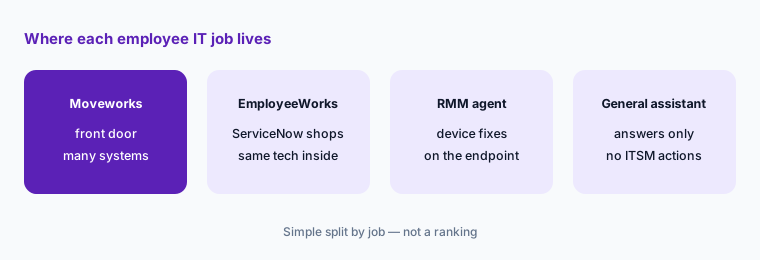
What it is: Moveworks is built for companies large enough to have several back-end systems and a real service desk. If ServiceNow is already your ITSM, the same capability now also arrives as ServiceNow EmployeeWorks, so ask which route your ServiceNow contract covers before buying separately (see our ServiceNow AI review). Smaller IT teams that manage devices directly often get more from AI inside their device tool — Atera’s Robin acts on the endpoint, and JumpCloud’s assistant works on users and devices in one directory. A general workplace assistant such as Slack AI or Google Agentspace can answer questions, but it won’t reset an Okta account or file an ITSM ticket without integration work.
Front door or not yet:
Count the systems a typical IT request touches today (chat, ITSM, identity, device tool). If most requests touch only one, fix that tool’s self-service first. Revisit a front-door assistant when requests routinely cross two or more systems.
Pricing context (October 2026)
Moveworks does not publish prices. Its pricing page on 7 October 2026 offered a custom quote with “scalable packages” and pointed to a Forrester Total Economic Impact study (commissioned by Moveworks) that reports 256% ROI for a composite customer. Treat that as a vendor-commissioned figure, not a benchmark for your company.
Since February 2026 there are two ways to buy: Moveworks on its own, or as part of ServiceNow EmployeeWorks inside a ServiceNow deployment. ServiceNow’s announcements give no list price for either. Expect pricing to depend on employee count, which plugins and systems you connect, and contract length, and ask how Marketplace agents, Tool Studio builds, and Knowledge Studio are packaged in your quote.
Uncertainty: We could not find any public Moveworks price on 7 October 2026. Packaging may shift as ServiceNow folds Moveworks into EmployeeWorks and Otto, and the Agent Studio to Tool Studio rename is still rolling out until early November. Feature availability depends on which systems you connect and how your admins configure plugins and deflections.
When it’s useful (honest take)
Useful when you have thousands of employees, a busy service desk, and requests that cross several systems (chat, ITSM, identity, device tools), and when someone will own plugin settings, approval rules, and content quality. Then password and access plugins, ticket status from chat, and articles drafted from real tickets can take repeat work off technicians while every sensitive action keeps an approver or a deflection.
Less useful when you are a small team whose tickets are mostly hands-on device fixes, when your knowledge base is thin or stale (the Assistant can only answer from what exists), or when ServiceNow already sells you EmployeeWorks and a separate contract would duplicate it. It is also a weak fit if nobody has time to review Tool Studio builds — an automated action with no owner is a new risk, not a saving.
Paying for Moveworks and a few other AI tools? The $9 AI toolkit spreadsheet lists every AI subscription you have, what each one costs, and how fast it pays for itself, so you can see which ones are worth the money.
Want someone to do it for you? AI toolkit audit — $19
Related options (educational)
| Need | Better home | Why |
|---|---|---|
| Chat front door across many systems | Moveworks (this page) | Plugins, search, Tool Studio on top of your ITSM |
| AI inside ServiceNow you already own | ServiceNow AI (Now Assist, EmployeeWorks) | Same vendor now; check what your contract covers |
| Device fixes by an AI agent on the endpoint | Atera AI | RMM data plus Robin for end users |
| Identity and device admin help | JumpCloud AI | AI Admin Assistant for users, devices, groups |
| Answers from workplace content only | Google Agentspace or Amazon Q Business | Search and agents; actions need integration work |
| Small team, few systems | Identity self-service page plus a short help doc | No new seat; fix content first |
FAQ
Is Moveworks still available after ServiceNow bought it?
Yes. ServiceNow completed the acquisition on 15 December 2025 and said in February 2026 that Moveworks is still offered as a standalone product, alongside ServiceNow EmployeeWorks, which combines Moveworks’ chat and search with ServiceNow workflows.
How much does Moveworks cost in October 2026?
Moveworks does not publish prices. Its pricing page offers a custom quote. Expect the price to depend on employee count, connected systems, and contract terms. Confirm on moveworks.com/pricing.
Does Moveworks replace ServiceNow, Jira Service Management, or Freshservice?
No. Moveworks says it does not replace your ITSM; it sits on top and files, updates, and resolves tickets there. Your ITSM stays the system of record.
What is the difference between Agent Studio and Tool Studio?
Only the name. On 25 September 2026 Moveworks said Agent Studio is being renamed Tool Studio, with the rollout expected to finish by early November 2026. Existing builds are unaffected.
Can the Assistant reset passwords without a technician?
It can, through the reset password, unlock account, and reset MFA plugins, if your admins connect the identity system and allow it. Admins can instead set a deflection so the Assistant only sends a self-service link. Decide that with your security team first.
Optional next step (if seats overlap)
If you pay for an ITSM AI add-on, a separate chat assistant for employee help, and a general workplace assistant that all answer the same “how do I” questions, that overlap is worth a look. Map the overlap with the $19 AI toolkit audit or the $9 AI toolkit spreadsheet. Email Audit $19 or Toolkit spreadsheet $9.
Checkout is live via Stripe. After you pay, we email delivery (spreadsheet) or intake next steps (audit).