Tool · IT ops · JumpCloud · Oct 2026
JumpCloud AI review (Oct 2026): AI Admin Assistant, AI and SaaS Management, and the AI Gateway
JumpCloud is a cloud directory that manages user identities, single sign-on, MFA, and Windows, Mac, Linux, and mobile devices from one admin console. In 2026 it added a lot of AI: an assistant that can act on users and devices, discovery of the AI tools your people actually use, and controls for AI agents and MCP connections. This page walks through each piece with a real IT job, a Try this, and where an admin still has to say yes.
What this JumpCloud AI page covers
This page is for the IT admin or IT lead at a company of roughly 50 to a few thousand people who owns accounts, laptops, and app access — often the same person who gets asked “are we allowed to use this AI tool?” several times a week. The question it answers: which JumpCloud AI features save that person time, which ones help them see and control AI use across the company, and which actions still need a human to confirm?
JumpCloud’s AI work in 2026 falls into two groups. AI that helps the admin: the AI Admin Assistant (generally available since 17 June 2026), which answers questions and carries out user, device, and group tasks after you confirm, plus AI search and natural-language reports. Controls for AI itself: AI & SaaS Management, which discovers the AI apps, MCP servers, and coding tools people use and tracks token costs; the AI Gateway, a governed route for AI assistants to reach company apps through MCP; Agent Identities, which give each AI agent its own account tied to a human owner; and MCP servers so tools like Claude or ChatGPT can work with JumpCloud.
Several of these were still in public preview when we checked (the AI Gateway and Agent Identities). Everything below comes from JumpCloud’s 2026 release notes, help docs, pricing page, and a 10 September 2026 press release, as we read them on 7 October 2026.

Major features (with how someone uses them)
Examples at a glance: each feature has a concrete example from a real job plus a short Try this you can run this week.
1. AI & SaaS Management: finding shadow AI (primary)
What it is: AI & SaaS Management shows which apps people use, including AI tools nobody approved. In 2026 JumpCloud extended it beyond the browser: the device agent now discovers locally installed desktop apps and tracks active use (June 2026); AI application connectors link directly to Claude, Cursor, ElevenLabs, Fal.ai, Gemini Enterprise, and GitHub Copilot to show who has access, seat allocations, and token or cost data where each app supports it (June 2026); and MCP discovery with token and cost tracking (August 2026) finds MCP servers connected to AI coding tools — Cursor, Claude Code, OpenCode, Codex, VS Code, and Copilot CLI on managed Windows and macOS devices — and estimates their usage cost.
Since late August, discovered MCP servers also show whether they are routed through JumpCloud’s AI Gateway, so you can move an unmanaged connection into the gateway from the same screen. Discovery tells you what exists; it does not tell you whether a tool is allowed. That decision, and the conversation with the person using it, stay with you.
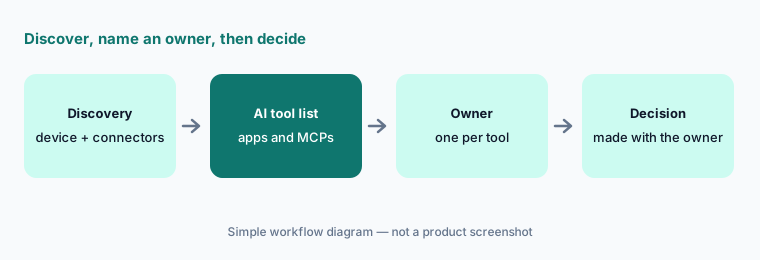
Primary workflow:
Turn on AI & SaaS Management discovery (including MCP discovery) for one device group for a week. List every AI tool and MCP server it finds that nobody approved, write an owner next to each, and decide with that owner — not alone — whether it stays, moves behind the AI Gateway, or is retired.
2. AI Admin Assistant for users, devices, and groups
What it is: The AI Admin Assistant is a chat panel in the Admin Portal. You ask in plain language and it lists users or devices, shows details, suspends or reactivates accounts, resets MFA, locks, restarts, or erases devices, binds users to devices, builds dynamic user and device groups, generates and runs commands, and pulls Directory Insights audit events. JumpCloud’s docs say it is off by default, available to Administrator with Billing, Administrator, and Read Only roles, and that it asks for your approval before any action. AI-generated commands and dynamic groups are provided as-is: JumpCloud says an admin must review and validate them, and its support team won’t troubleshoot AI-generated code.
The assistant gained global rules and a memory engine in June 2026, and since 16 September 2026 you can upload up to 25 internal documents (PDF, TXT, DOCX, or MD, 10 MB each) so it can answer questions about your own runbooks and policies, naming the source document when it uses one. It also answers “how do I…” questions from JumpCloud’s Help Center with inline links, and a custom report builder (August 2026) accepts natural-language requests.
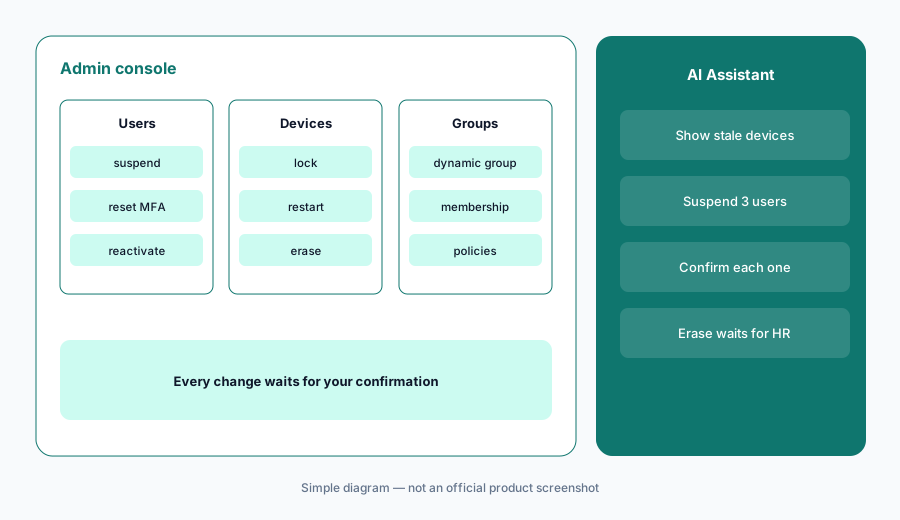
Confirm-before-act:
Turn the assistant on for one admin. Use it read-only for a week (“which devices haven’t checked in for 14 days?”) and check each answer in the console. Then allow one routine action, such as an MFA reset, and add a global rule that destructive actions like erase always need a second admin.
3. AI Gateway: a governed route for MCP connections
What it is: The AI Gateway (public preview since 30 April 2026) is an authentication and routing layer between AI clients — such as ChatGPT or Claude — and your company apps’ MCP servers. You add MCP servers in JumpCloud, and since 21 August 2026 each must be tied to an SSO application or bookmark so access can be scoped with user groups; users then authorize through OAuth or API tokens depending on the server. Tool calls are logged as Directory Insights events and shown in an activity log, and a dashboard (added 16 September 2026) shows usage, tool-call volume, and error rates by server, client, and user. JumpCloud’s docs are clear that the gateway is not an SSO login for the AI client and doesn’t change the AI’s answers; it controls and records which company data the AI can reach.
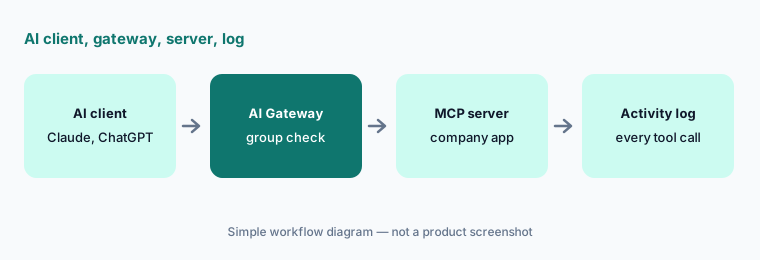
One server, one group:
Pick the one MCP server people most want. Add it to the AI Gateway tied to its SSO app, scope it to one user group, and read the activity log weekly for a month before adding a second server.
4. Agent Identities: an account and an owner for every AI agent
What it is: Agent Identities (public preview since 31 August 2026) give each AI agent its own non-human identity, separate from any employee account. You register the agent, assign a human owner, generate OAuth client credentials for the AI Gateway, add it to groups, and authorize the MCP servers it may use. JumpCloud’s 10 September 2026 announcement says agents registered in JumpCloud can’t run without an assigned owner, can be audited or disabled without locking out that owner, and that a PAM MCP server to replace shared API keys with short-lived, least-privilege access is coming before the end of Q4 2026.
Owner check:
List every AI agent or automation that runs on a person’s credentials today. For each, name a human owner and register it as its own identity with only the access it needs. Anything without an owner by month’s end gets switched off.
5. JumpCloud MCP servers for admins and for users
What it is: JumpCloud also exposes itself to outside assistants through MCP. The MCP Server for admins was rebuilt on 16 July 2026 with three times as many tools, OAuth session management, and automatic revocation of stale sessions, so an admin can work with users, groups, devices, and policies from tools such as Claude or ChatGPT. The MCP Server for Users (30 September 2026) lets employees connect their own AI client to supported User Portal tasks; admins turn it on under Settings > JumpCloud AI and can review and revoke sessions, and users can revoke their own.
Short sessions:
If you enable either MCP server, set an automatic session expiry first (a day is a sensible start). Use the admin server for read-only questions for a month, and review the session list every Friday.
6. Where JumpCloud AI fits against other options
What it is: JumpCloud’s AI makes the most sense when JumpCloud is already your directory and device manager, because the assistant, discovery, and gateway all work from the same users, groups, and devices. Atera comes at IT from the RMM and helpdesk side, with an AI agent employees talk to. Moveworks is a front-door assistant for large companies with many back-end systems. If your main worry is paid AI seats nobody uses, our how-to on finding unused AI seats and the free seat-waste calculator are a lighter first step than a new SaaS management module. People-ops platforms such as Rippling bundle device and app management with HR.
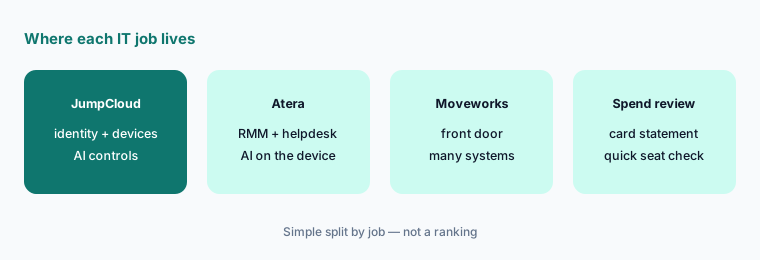
Spend before software:
Before buying any SaaS or AI discovery tool, export three months of card and invoice data and list every AI subscription. If that list is short and owned, a quarterly review may be enough; if it is long or growing, pilot discovery on one device group.
Pricing context (October 2026)
JumpCloud publishes per-user prices for its single products on jumpcloud.com/pricing. When we checked on 7 October 2026: Device Management (device management and MDM) $9 per user per month billed annually or $11 billed monthly; SSO (SSO, MFA, and a password manager) $11 or $13; and Device Identity Management $13 or $15. Individual features can also be bought à la carte — for example SaaS License Management at $3 per user per month billed annually or $4 monthly, MDM at $5 or $6, and premium support at $2 or $3.
The bundled packages — Platform Essentials (up to 300 users), Platform, and Platform Prime — were “contact sales” with no public price. JumpCloud’s table lists the full AI & SaaS Management set (discovery, license management, access control, insights) in Platform Prime, along with Zero Trust and premium support. We found no separate price for the AI Admin Assistant, the AI Gateway, or Agent Identities. JumpCloud offers a 30-day free trial, prices exclude VAT, and suspended users are still billed.
Uncertainty: Per-user prices come from JumpCloud’s public table on 7 October 2026 and can change; packages, education and nonprofit pricing, and MSP pricing need a quote. Which plans include the AI Admin Assistant, the AI Gateway, and Agent Identities was not spelled out on the pricing page, and the gateway and Agent Identities were public previews when we checked, so availability and packaging may change at general availability.
When it’s useful (honest take)
Useful when JumpCloud is (or will be) your directory and device manager, AI tools and MCP connections are spreading faster than anyone approves them, and someone owns the conversations that follow discovery. Then discovery, the gateway, and agent identities turn “who is using what AI, with which data?” into a list with owners, and the admin assistant takes routine user and device lookups off your plate — with a confirmation before every change.
Less useful when you are a small team that can answer the AI question from a card statement in an afternoon, or when your identity and devices already live in Okta, Entra ID, Intune, or Jamf and you would be adding a second directory. The AI Gateway and Agent Identities were public previews in October 2026, so they are better for a pilot than for a policy everyone depends on.
Paying for JumpCloud AI and a few other AI tools? The $9 AI toolkit spreadsheet lists every AI subscription you have, what each one costs, and how fast it pays for itself, so you can see which ones are worth the money.
Want someone to do it for you? AI toolkit audit — $19
Related options (educational)
| Need | Better home | Why |
|---|---|---|
| One directory for identity, devices, and AI controls | JumpCloud AI (this page) | Admin assistant, AI and SaaS discovery, AI Gateway |
| Device fixes with an AI agent employees talk to | Atera AI | RMM and helpdesk data; Robin on the device |
| Employee help front door across many systems | Moveworks | Plugins and Tool Studio on top of your ITSM |
| HR, payroll, and devices in one platform | Rippling AI | People-ops first; IT add-ons |
| Policy and evidence for compliance audits | Vanta AI | Controls and questionnaires, not device actions |
| A quick check of paid AI seats | Find unused AI seats how-to | Card statement plus owners; no new module |
FAQ
What can the JumpCloud AI Admin Assistant do?
It answers questions and performs admin tasks in plain language: listing and updating users, resetting MFA, locking, restarting, or erasing devices, building dynamic groups, generating and running commands, and pulling audit events. JumpCloud says it asks for approval before any action and is off by default.
How much does JumpCloud cost in October 2026?
On 7 October 2026 JumpCloud listed Device Management at $9 per user per month billed annually ($11 monthly), SSO at $11 ($13), and Device Identity Management at $13 ($15). Platform packages, which include the full AI & SaaS Management set in Platform Prime, are quoted. Confirm on jumpcloud.com/pricing.
Can JumpCloud find AI tools employees use without approval?
Yes, within limits. AI & SaaS Management discovers apps through the browser, the device agent, and direct connectors to services such as Claude, Cursor, Gemini Enterprise, and GitHub Copilot, and it can find MCP servers in supported AI coding tools on managed Windows and macOS devices. Unmanaged personal devices are outside its view.
Is the JumpCloud AI Gateway an SSO login for ChatGPT or Claude?
No. JumpCloud’s docs say SSO controls who logs in to an AI client, while the AI Gateway controls and audits which company data that client can reach through MCP servers. It was in public preview in October 2026.
What are JumpCloud Agent Identities?
They are accounts for AI agents, separate from employee accounts, each tied to a human owner. You can give an agent its own OAuth credentials, group memberships, and MCP access, and disable it without affecting its owner. They were in public preview from 31 August 2026.
Optional next step (if seats overlap)
If discovery shows several AI chat and coding seats per person — some paid by the company, some expensed — that overlap is worth a look before renewal. Map the overlap with the $19 AI toolkit audit or the $9 AI toolkit spreadsheet. Email Audit $19 or Toolkit spreadsheet $9.
Checkout is live via Stripe. After you pay, we email delivery (spreadsheet) or intake next steps (audit).