Tool · IT ops · Atera · Oct 2026
Atera AI review (Oct 2026): AI Copilot for technicians and Robin for employee IT issues
Atera is a remote monitoring and management (RMM) platform with ticketing, patching, and remote access built in, priced per technician rather than per device. Its AI comes in two parts: AI Copilot, which helps technicians inside Atera, and Robin, a separately sold AI agent that employees talk to and that can act on their device. This page walks through both with real IT jobs, a Try this for each feature, and where a technician still has to approve.
What this Atera AI page covers
This page is for the person who keeps a company’s laptops, accounts, and tickets running — a one- to ten-person internal IT team, or a managed service provider (MSP) supporting many small clients. The question it answers: which Atera AI features take real work off technicians, which ones act on employee devices by themselves, and what guardrails do you have to set before that happens?
Atera splits its AI by audience. AI Copilot is for technicians: it generates scripts and commands, summarizes tickets and remote sessions, drafts replies and knowledge-base articles, runs device health checks, and can look up outside data or act in other tools through cloud actions and MCP. Robin is for employees: a 24/7 AI technician in the service portal, email, Slack, and Microsoft Teams that answers from your knowledge base and can reset passwords, install approved apps, and run approved scripts on the person’s device. Robin was called IT Autopilot until Atera renamed it on 10 March 2026; Atera says only the name changed.
Atera says both run on Microsoft’s Azure OpenAI Service, with customer data stored in the US and EU and never used to train OpenAI, Microsoft, or Atera models, and that its AI management system is certified to ISO 42001. Everything below comes from Atera’s public pricing page, AI pages, and support articles as we read them on 7 October 2026.
Major features (with how someone uses them)
Examples at a glance: each feature has a concrete example from a real job plus a short Try this you can run this week.
1. AI Copilot: scripts, commands, and health checks (primary)
What it is: Describe a task in plain English and Copilot writes a script (.bat, .ps1, or .sh) or a single command-line instruction you can run on selected devices. It can also run health checks on Windows and macOS devices, diagnose a problem, and suggest a fix, and it generates SNMP OIDs with suggested thresholds for network monitoring. Atera’s support FAQ says Copilot draws on your device and ticket data, your knowledge base, and Atera’s curated library of diagnostics and actions, and that it cannot learn beyond those inputs. Atera’s Copilot page says it is built into every plan with no usage caps.
The speed is the risk. A generated PowerShell script that clears a print queue on one laptop can do something very different when pushed to 300. Atera’s security page says high-risk scripts or code require explicit human approval before they run; your own habit should be the same for every generated script.
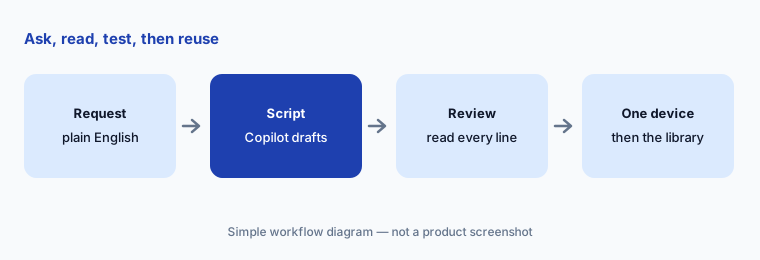
Primary workflow:
Mark three scripts you already trust as “Enable for AI assistants”. Then ask Copilot to write a fourth from a plain-English request. Read every line, switch any delete or change step to report-only, and run it on one test device before it touches anything else.
2. AI Copilot in tickets: summaries, replies, and KB drafts
What it is: Inside a ticket, Copilot writes a summary of a long history, reads the sentiment of the latest end-user comment, and drafts or rephrases a reply in a tone you pick. After a remote session it can produce an itemized session summary of what was done on the device. When a ticket is resolved, it can draft a knowledge-base article from the resolution, which in turn feeds Robin’s answers. Atera says Copilot works in English, French, German, Italian, and Spanish, with some health checks and actions fully supported in English only.
KB loop:
For one week, have Copilot draft a KB article from every resolved ticket in one category. Edit each draft before it is published, and count how many needed a factual fix, not just style edits. That count tells you how much review Robin’s answers will need.
3. Robin: the AI technician employees talk to
What it is: Robin is a separate product that employees reach through the service portal, email, Slack, or Microsoft Teams. Atera’s support FAQ lists what it can do: device health checks (CPU, disk, drivers), run scripts an admin has marked as approved for AI, reset local, hybrid, and Azure AD passwords with MFA verification, add or remove Azure AD group memberships within policy, install or update pre-approved apps, detect account lockouts, and open, update, and resolve tickets — escalating to a technician with context when it can’t finish. It needs the device online for local actions, the person set up as a contact, and a phone number on file for MFA.
Just as useful is the list of things Atera says Robin won’t do: hardware replacements or repairs, license approvals or purchasing, contacting outside vendors, or handling sensitive data requests. If the device is offline, Robin falls back to knowledge-base answers. Atera advertises figures such as “92% of technical issues” resolved autonomously; those are vendor claims, so measure your own resolution rate in a pilot.
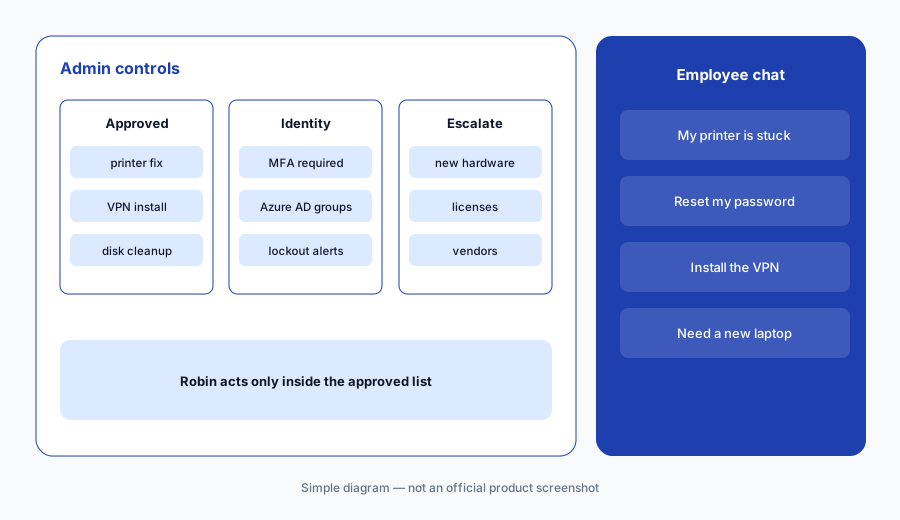
Approved list first:
Before turning Robin on, write the list of scripts and apps it may use and mark only those as approved for AI. Pilot with one team for two weeks, read every logged action on Fridays, and add a script check for anything it ran that you wouldn’t have.
4. Approvals, audit logs, and data handling
What it is: Atera’s AI security page describes the controls an IT lead should check before rollout. Admins set the boundaries Robin works within; high-risk scripts or code are presented as suggestions that a technician must review and enable; sensitive tasks such as password resets require MFA; and approval workflows can pull approvers from Azure AD, Workday, or another HR system. Every Robin action is logged under its own technician ID with the employee’s prompt, Robin’s reasoning, and the action or code run, and logs can be exported or sent to a SIEM. Atera says a prompt-filtering layer and a second AI that reviews Robin’s outputs can end a session that goes off track.
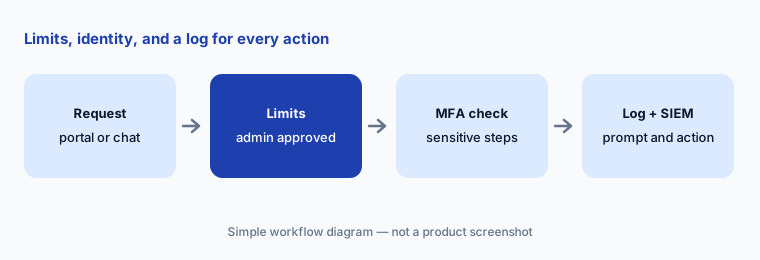
Log review:
Send Robin’s action log to wherever your security alerts already go. Each week, pick five Robin actions at random and check that the prompt, the reasoning, and the action match what a technician would have done.
5. Cloud actions and MCP: reaching other tools
What it is: Copilot can reach outside Atera in two ways. Cloud actions are read-only lookups against external services — Atera’s example is pulling a CVE briefing from the MITRE vulnerability database into the chat. MCP integration lets Copilot write into third-party tools your team uses; Atera’s example is creating an incident in monday.com with severity, type, and priority filled in. Atera’s FAQ says both are included with AI Copilot at no extra cost. Robin can also be extended with playbooks, MCP integrations, and custom API integrations, according to Atera’s Autonomy Day Q&A.
Read before write:
Start with one read-only cloud action you’d use weekly (for example a CVE lookup). Only after a month of checking its answers, connect one MCP tool for writes, and require a person to review every item Copilot creates there.
6. Where Atera AI fits against other options
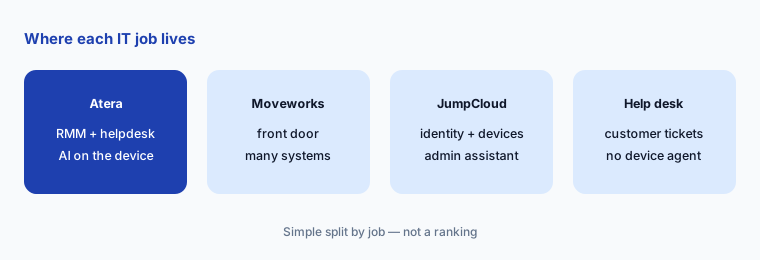
What it is: Atera’s AI is strongest when Atera is already your RMM, because both Copilot and Robin read live device data, scripts, and ticket history from the same place. A front-door assistant such as Moveworks sits on top of many systems and suits large companies with an ITSM; it does not manage devices itself. JumpCloud focuses on identity and device management with its own admin assistant. Help desks such as Freshdesk or Zendesk have AI for customer support, but they have no agent on the employee’s laptop.
Copilot first:
Use the included Copilot for a month and track how many tickets were password, app-install, or known-fix issues. If that share is large and your knowledge base is current, price Robin for that one team. If not, keep improving Copilot’s KB drafts first.
Pricing context (October 2026)
Atera prices per technician with unlimited endpoints, and every plan includes AI Copilot, ticketing and a service portal, Windows, Mac, and Linux support, reports, IT automations, and 24/7 chat support, according to its pricing page. As listed on the page for IT departments on 8 October 2026, Professional is $149, Expert $189, and Master $219 per technician per month billed annually, or $169, $229, and $269 billed monthly. The page also offers a free 30-day trial of the Expert plan with no credit card, and lists the Network Discovery add-on at $29 per technician per month and Work from Home at $5 per end user per month.
Robin is billed separately from your Atera plan: Atera’s support FAQ says it is a paid add-on billed per end user per month on an annual contract, with usage measured quarterly (peak daily active users against purchased licenses) and any difference billed pro rata for the rest of the term. No Robin price is public. AI Copilot, including cloud actions and MCP, is included in every plan at no extra cost per Atera’s FAQ and Copilot page.
Uncertainty: The plan prices above are what Atera’s pricing page showed on 8 October 2026; older price lists elsewhere on the web may be out of date. One Atera Q&A post describes Copilot as an add-on while its support FAQ and Copilot page say it is included in every plan; confirm in your quote. Robin’s per-user price and minimums need a quote from Atera.
When it’s useful (honest take)
Useful when Atera is (or will be) your RMM and helpdesk, technicians spend real time writing scripts, reading long tickets, and repeating the same fixes, and someone owns the approved-script list and the logs. Copilot is the low-risk start because it is included and every output passes through a technician. Robin earns its cost when a large employee base sends many password, access, and known-fix requests and your knowledge base is current.
Less useful when you have a small team with few repeat tickets — Atera positions Robin for larger organizations, and it is billed per employee. Less useful when nobody will review generated scripts or Robin’s action log, because speed without review moves risk onto every device. And if your company already runs a different RMM, Atera’s AI is a reason to evaluate a switch, not a bolt-on.
Paying for Atera AI and a few other AI tools? The $9 AI toolkit spreadsheet lists every AI subscription you have, what each one costs, and how fast it pays for itself, so you can see which ones are worth the money.
Want someone to do it for you? AI toolkit audit — $19
Related options (educational)
| Need | Better home | Why |
|---|---|---|
| RMM + helpdesk with an AI technician on the device | Atera AI (this page) | Copilot for techs; Robin for employees |
| Front door across many enterprise systems | Moveworks | Plugins, search, Tool Studio on top of your ITSM |
| Identity and device admin in one directory | JumpCloud AI | AI Admin Assistant; AI and SaaS discovery |
| Enterprise ITSM with AI assists | ServiceNow AI | Larger IT orgs on ServiceNow |
| Reading or drafting scripts only | Claude or GitHub Copilot Business | No device access; you still test and run |
| A few devices and one IT person | Built-in OS tools plus a short help page | No new seat; document the top five fixes |
FAQ
What is the difference between Atera AI Copilot and Robin?
AI Copilot helps technicians inside Atera with scripts, commands, ticket summaries, replies, and KB drafts, and it is included in every plan. Robin is a separate, paid AI technician that employees talk to and that can act on their device within limits you set.
Is Robin the same as IT Autopilot?
Yes. Atera renamed IT Autopilot to Robin on 10 March 2026. Atera says capabilities, workflows, and pricing for existing customers did not change.
How much does Atera cost in October 2026?
Atera prices per technician with unlimited devices. As listed on Atera’s pricing page on 8 October 2026, Professional is $149, Expert $189, and Master $219 per technician per month billed annually ($169, $229, and $269 billed monthly), with a 30-day free trial of Expert. Robin is billed separately per end user per month on an annual contract, with no public price. Confirm on atera.com/pricing.
Does Atera use our data to train AI models?
Atera says its AI runs on Microsoft Azure OpenAI Service, that customer data is stored in the US and EU, and that it is not used to train OpenAI, Microsoft, or Atera models. Ask for its AI security documentation during your vendor review.
Can Robin run any script on an employee’s laptop?
No. Robin runs only scripts an admin has marked as approved for AI, and Atera says high-risk scripts need a technician to review and enable them. Password resets require MFA verification, and every action is logged.
Optional next step (if seats overlap)
If you pay for an RMM with AI, a separate help-desk AI add-on, and a general chat assistant that technicians use to write the same scripts, that overlap is worth a look. Map the overlap with the $19 AI toolkit audit or the $9 AI toolkit spreadsheet. Email Audit $19 or Toolkit spreadsheet $9.
Checkout is live via Stripe. After you pay, we email delivery (spreadsheet) or intake next steps (audit).