How-to · Endpoint management · Atera · Oct 19, 2026
Let Atera’s AI Copilot draft a script, have the technician approve it, and keep Robin to a short self-service list
Atera’s AI Copilot can draft scripts, ticket summaries, and help-article drafts inside the RMM and helpdesk. Robin (formerly IT Autopilot) can take employee self-service actions on the device. Both need a human boundary. This page shows how to approve one Copilot script and keep Robin on a short named list. Terms: QA means a quality check done by a person.
Who this is for
Internal IT and MSP technicians on Atera who want Copilot help without unsupervised scripts, and who may add Robin later. The job here is script approval plus Robin scope. For NinjaOne Patch Intelligence overrides — a different job — see NinjaOne Patch Intelligence override.
How to do it
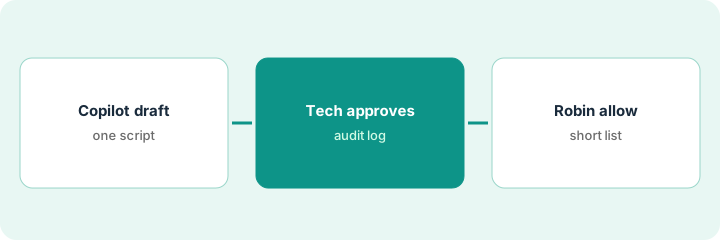
This is a how-to, not a ranking of RMM tools. Per the Atera AI review, AI Copilot covers scripts, ticket summaries, help-article drafts, and MCP actions; Robin (formerly IT Autopilot) handles employee self-service; approvals and audit logs are part of the design. The ground rule: no Copilot script runs on a fleet until a technician approves it, and Robin only gets a short allow list.
1. Draft one script with Copilot
What it is: Describe one repeatable fix, let Copilot draft the script, and keep it in a lab device group first.
- Write the goal as one fix, such as clear a stuck print spooler on Windows.
- Let Copilot draft; do not point it at production yet.
- Remove any step that changes credentials or firewall rules unless that was the ticket.
- Note MCP actions separately — this routine is about the script draft.
- Save the draft with the ticket ID in the name.
Copilot drafts a PowerShell clear-spooler script. The tech deletes a reboot step Copilot added without being asked.
Draft against one ticket and cut any step you did not request.
2. Technician reviews, approves, and checks the audit log
What it is: A technician reads the script line by line, approves it in Atera, runs it on a lab device, and confirms the audit log captured the approval.
- Read every line; reject anything you cannot explain.
- Approve in Atera so the audit log has your name.
- Run on one lab device before a customer ring.
- If it fails, reject and rewrite — do not keep a half-tested script.
- Keep help-article drafts from Copilot on a separate QA path.
The tech approves the trimmed spooler script, runs it on a lab laptop, sees the approval in the audit log, then allows a 20-device customer ring.
Approve with your name on the audit log before any customer device runs the script.
3. Write Robin’s allowed-fix list
What it is: If you use Robin, write a short list of employee self-service actions it may take, and keep everything else as ask-a-tech.
- List password resets, app installs from an approved catalog, and disk cleanup if you allow them.
- Exclude mailbox access changes, admin group membership, and production server actions.
- Name who may expand the list.
- Review Robin’s actions weekly.
- Remember Robin is billed separately per end user on an annual contract per our review — get a quote before a wide rollout.
IT allows Robin to install three approved apps and clear temp files. Password resets stay with the helpdesk. The list is pinned in the service portal.
Write Robin’s allow list on one page and publish it before employees see Robin.
Pricing context (October 2026)
This how-to isn’t a price sheet. Per the Atera AI review and Atera’s pricing materials (checked Oct 19, 2026; public page routes many figures behind forms, Product schema still listed Professional $149, Expert $189, and Master $219 per technician per month billed annually, or $169, $229, and $269 monthly). Robin is a separate per-end-user add-on with no public list price. Dated October 2026.
Checked Oct 19, 2026 on the vendor’s own pricing page: Atera’s pricing page routes many figures behind forms; Product schema on Oct 19, 2026 still listed Professional at $149, Expert at $189, and Master at $219 per technician per month billed annually ($169, $229, $269 monthly). Robin is a separate per-end-user add-on with no public list price.
Uncertainty: The only prices this site sells here are the optional $9 AI toolkit spreadsheet and $19 AI toolkit audit.
When this helps (honest take)
Useful when you already work tickets in Atera and need Copilot scripts gated plus a short Robin allow list.
Not useful when nobody will read scripts before run, or you wanted Robin to do unrestricted device changes.
Related options (educational)
| Need | Where to look | Why |
|---|---|---|
| Atera AI features | Atera AI | Primary path |
| NinjaOne vs Atera | NinjaOne vs Atera | Compare RMM AI paths |
| NinjaOne patch overrides | NinjaOne Patch Intelligence override | A different job |
FAQ
Is Robin the same as IT Autopilot?
Yes. Per our review, Atera renamed IT Autopilot to Robin on 10 March 2026.
Is Copilot included in every plan?
Atera’s Copilot page and support FAQ say it is included; one older Q&A called it an add-on. Confirm in your quote.
Optional next step
If you want a one-page toolkit map for the tools you already pay for, use the optional $9 AI toolkit spreadsheet. If you want a short review of seat waste and unused tools, use the optional $19 AI toolkit audit. Neither is required to follow this how-to.