Compare · IT ops · RMM AI · Oct 2026
NinjaOne vs Atera (Oct 2026): AI in RMM for internal IT teams and MSPs
NinjaOne and Atera are both remote monitoring and management (RMM) platforms with ticketing, used by internal IT teams and managed service providers (MSPs). Their AI goes in different directions: NinjaOne’s sits mostly in patching, vulnerabilities, and the technician’s ticket view, while Atera pairs a technician assistant with Robin, an agent employees talk to that can act on their device. This page compares them by pricing model, what the AI touches, and who approves device actions — not as a ranking — with a Try this for each.
What this comparison covers
This page is for the IT lead at a company with a few hundred to a few thousand devices, or the MSP owner choosing or renewing an RMM, who wants to know where each product’s AI actually shows up in device work — and where a technician, admin, or manager still has to approve the fix.
The short version: NinjaOne prices per device and its AI mostly helps technicians decide — a short analysis of each Windows patch, AI that can pull a risky patch out of automatic approval, AI-matched vulnerabilities, and Katana AI in Early Access. Atera prices per technician with unlimited endpoints, includes AI Copilot for technicians in every plan, and sells Robin separately per end user; Robin is the one that acts on an employee’s device without a technician in the loop, within scripts and apps an admin has approved for AI.
Facts come from NinjaOne’s and Atera’s public pricing pages, AI and product pages, documentation, and support articles, re-checked on 7 October 2026, and match our NinjaOne AI and Atera AI reviews from the same day. Vendor figures — such as Atera’s “92%” of tickets, or NinjaOne’s 500,000-endpoint vulnerability beta — are their claims, not our measurement.
| Question | NinjaOne | Atera |
|---|---|---|
| Pricing model | Per device, tiered with volume discounts; monthly or annual | Per technician, unlimited endpoints; Robin billed per end user |
| Published prices | $1.50 USD per device per month at 10,000 endpoints to $3.75 USD at 50 or fewer; varies by region and products (commercial, non-FedRAMP only); quote for specific pricing | Professional $149, Expert $189, Master $219 per technician per month billed annually ($169/$229/$269 monthly), as listed 8 October 2026; 30-day Expert trial |
| AI for technicians | Patch Intelligence AI, AI approval overrides, AI-matched CVEs; Katana AI (Early Access) | AI Copilot: scripts, commands, health checks, ticket and session summaries, KB drafts |
| AI employees talk to | None listed | Robin (paid add-on) in the portal, email, Slack, and Teams |
| AI acting on devices | AI can move automatically approved Windows patches to manual or rejected | Robin runs scripts and installs apps that an admin pre-approved for AI |
| Who approves device actions | Technicians and patch policies; ticket approvals route to a manager, device owner, or role | Admins pre-approve scripts; technicians enable high-risk code; MFA for password resets |
Major features (with how someone uses them)
Examples at a glance: each feature has a concrete example from a real job plus a short Try this you can run this week.
1. Start from your five most common device tickets (primary)
What it is: Feature lists for two RMMs look alike. The useful comparison is ticket by ticket: take the device tickets your team handles most — a slow laptop, a failed patch, a password reset, a software install, a printer — and for each one write which product’s AI would touch it, what it would do (summarize, suggest, hold a patch, run a script), and who still approves the fix. That last column is where the two products differ most.
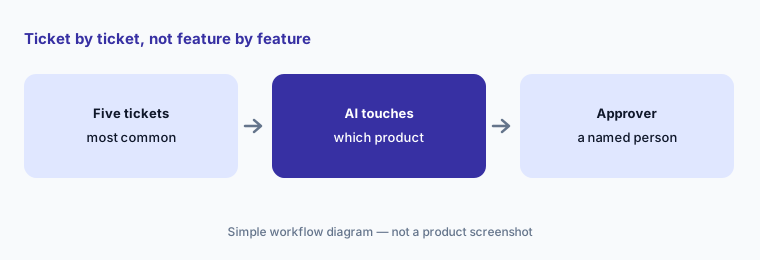
Primary workflow:
List your five most common device tickets. For each, write which product’s AI would touch it and who still approves the fix.
2. Pricing model: per device vs per technician (plus Robin per end user)
What it is: NinjaOne says it uses per-device pricing with tiered volume discounts — the more devices, the lower the cost per device — paid monthly or annually with flexible contracts. As of 7 October 2026, its pricing FAQ lists $1.50 USD per device per month at 10,000 endpoints, rising to $3.75 USD at 50 or fewer, varying by region and products purchased (commercial, non-FedRAMP instance only), alongside a quote form, a free trial, and free onboarding and training. Atera prices per technician with unlimited endpoints; every plan includes AI Copilot, and as of 8 October 2026 its pricing page lists Professional at $149, Expert at $189, and Master at $219 per technician per month billed annually ($169, $229, and $269 monthly), with a 30-day free trial of the Expert plan. Robin is a paid add-on: Atera’s AI FAQ (updated 5 October 2026) says it is billed per user per month on an annual basis, with usage measured quarterly against purchased licenses and any difference billed pro rata.
So the shapes scale differently. NinjaOne’s bill follows your device count. Atera’s base bill follows your technician count, which suits a small team with many endpoints — but if you add Robin, part of the bill follows your employee count instead. Model all three numbers (devices, technicians, employees) for this year and next before comparing quotes.
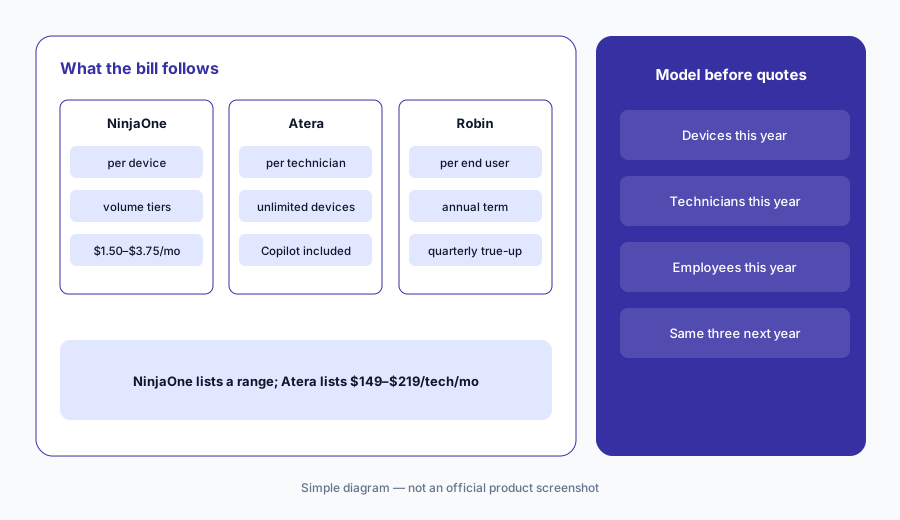
Three counts, two years:
Write your device count, technician count, and employee count for this year and next. Ask both vendors to quote against them, and ask Atera to price Robin separately so you can see which part of the bill follows employees.
3. What the AI touches: technician assists vs an agent employees talk to
What it is: NinjaOne’s AI works on the technician’s side. Patch Intelligence AI writes a short analysis of each Windows OS patch and labels it Appears Stable, Caution, or Known Issues — Windows OS patches only, not macOS, Linux, or third-party apps — and NinjaOne says it is “meant to augment user research, not replace it.” Vulnerability Management (announced 16 March 2026) uses AI-driven CVE intelligence to map vulnerabilities to the patches that fix them. Katana AI, an agentic assistant, is Early Access through your account manager. Atera’s AI Copilot, included in every plan with no usage caps, writes scripts and commands, runs device health checks, summarizes tickets and remote sessions, and drafts replies and knowledge-base articles. Robin is different in kind: employees reach it in the service portal, email, Slack, or Teams, and it answers from your knowledge base and can act on their device.
If your pain is the patch queue and vulnerability exposure, NinjaOne’s AI is aimed at it. If your pain is technician time spent writing scripts and ticket notes, Atera’s Copilot is. If your pain is the volume of simple employee requests, only Atera offers an agent employees talk to; with NinjaOne you would pair the RMM with a separate front door such as Moveworks or Atomicwork (see Moveworks vs Atomicwork).
Three piles:
Sort last month’s device tickets into patch and vulnerability work, technician scripting and write-ups, and simple employee requests. Count each pile, then ask each vendor to demo against the biggest one.
4. Who approves device actions
What it is: In NinjaOne, technicians and patch policies own device changes. The one place the AI changes a decision itself is AI approval overrides: in a Windows policy you can let Known Issues or Caution patches move to Manual approval or Rejected. NinjaOne’s docs say only automatically approved patches are affected, and that as the AI re-evaluates every six hours it may move a patch from approved back to manual or rejected — so the AI can make patching more cautious, not less. NinjaOne’s 15.0 release also added ticket approvals routed to a manager, device owner, role, or ad hoc list, and lists Katana with role-based access controls and a kill switch. In Atera, an admin marks which scripts are “Enable for AI assistants,” and Robin runs only those scripts and installs only pre-approved apps. Atera’s security page says high-risk scripts or code need explicit human approval, password resets need MFA, approval flows can pull approvers from Azure AD or Workday, and every Robin action is logged under its own technician ID with the prompt and its reasoning.
Both designs keep a person responsible; they put that person in different places. NinjaOne’s approver is a technician or policy owner at the patch queue; Atera’s approver is the admin who decides, in advance, what Robin may run — plus whoever approves sensitive requests. Write those names down before the pilot, not after the first surprise.
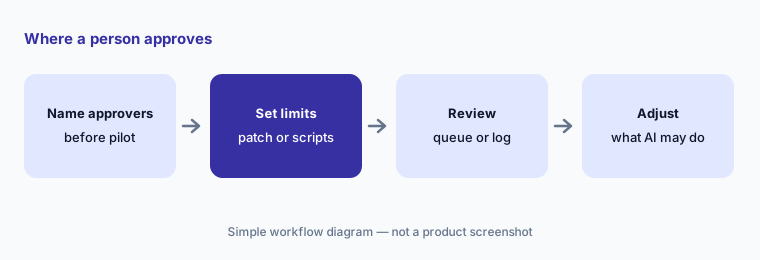
Name the approvers first:
Before any pilot, write who reviews NinjaOne’s manual patch queue and who approves ticket requests, and which Atera scripts you would mark for AI. Mark none that touch disks, security tools, or user data.
5. Data handling and what each AI reads
What it is: NinjaOne’s docs say Patch Intelligence AI combines generative AI, third-party content including community reports, and anonymized patch failure and rollback data, and does not use identifiable customer data; in FedRAMP instances it does not use customer metadata, patch telemetry, or rollback data. Atera says Copilot and Robin run on Microsoft’s Azure OpenAI Service, with customer data stored in the US and EU and never used to train OpenAI, Microsoft, or Atera models, and that its AI management system is certified to ISO 42001. Atera’s FAQ adds that Copilot’s cloud actions are read-only lookups against outside services, while its MCP integration can write into third-party tools such as monday.com — both included with Copilot.
The practical difference: NinjaOne’s patch AI learns from fleet-wide patch outcomes; Atera’s AI reads your own device, ticket, and knowledge-base data, and Robin’s answers are only as good as that knowledge base. Before a Robin pilot, read the ten knowledge-base articles employees will hit most.
Same three questions, in writing:
Ask both vendors in writing what data leaves your tenant for AI, where it is processed, and whether it trains any model. Add one product-specific question each: Atera’s default MCP write actions, and what NinjaOne’s Katana can read.
6. Where each fits, and when to use both or neither
What it is: NinjaOne’s AI fits teams whose hardest work is patching and vulnerability exposure across a large or mixed fleet, and who want AI to inform technicians rather than act for employees. Atera’s fits small IT teams and MSPs with many endpoints per technician who want AI in scripting and tickets, and who may add an employee-facing agent later. For Apple-only fleets, Jamf goes deeper; if identity is the center of your IT, JumpCloud starts there. Seat and SaaS sprawl is a different job — Torii or Zluri.
Running both RMMs is rare and usually an MSP transition. If you are paying for one RMM plus a separate employee front door, compare that pair with Atera plus Robin on the same five tickets before renewal.
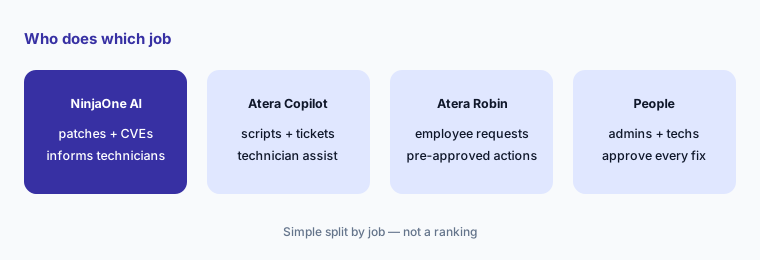
Price the pair you already have:
If you pay for an RMM plus a separate employee front door, run your five-ticket list against that pair and against Atera with Robin. Count tickets covered and name the approver for each before renewal.
Pricing context (October 2026)
NinjaOne publishes a per-device price range. As of 7 October 2026, the FAQ on its pricing page states: “NinjaOne starts as low as $1.50 USD per month at 10,000 endpoints, increasing to $3.75 USD at 50 or fewer endpoints; pricing varies by region and products purchased. This pricing is only applicable to customers on the commercial, non-FedRAMP instance.” The page describes per-device pricing with tiered volume discounts, monthly or annual payment, and flexible contracts; NinjaOne calls these standard pricing ranges and asks buyers to request a quote for specific pricing. It also offers a free trial and free onboarding and training. We found no public price for Patch Intelligence AI, AI approval overrides, Vulnerability Management, or Katana AI.
Atera publishes per-technician plan prices. As listed on its pricing page on 8 October 2026, Professional is $149, Expert $189, and Master $219 per technician per month billed annually, or $169, $229, and $269 billed monthly. The page says it is priced per technician for unlimited endpoints and that all plans include AI Copilot, ticketing and a service portal, Windows, Mac, and Linux support, reports, IT automations, and 24/7 chat support; it offers a 30-day free trial of the Expert plan and a contact-sales form. Robin is a paid add-on billed per user per month on an annual contract, with no public price.
Uncertainty: NinjaOne’s $1.50–$3.75 range is its own published range as of 7 October 2026; it varies by region and products purchased, applies only to the commercial, non-FedRAMP instance, and does not name an endpoint minimum, so your quote may differ. Atera’s plan prices are the ones its pricing page showed on 8 October 2026; older per-device or per-technician figures elsewhere on the web may be out of date. NinjaOne’s Katana AI is Early Access and Patch Intelligence AI covers Windows OS patches only. Atera’s Robin pricing, minimums, and true-up terms need a quote.
When it’s useful (honest take)
NinjaOne is useful when patching and vulnerability exposure across a large or mixed fleet are the hardest part of the job, you want AI that informs technicians and can only make patch approvals more cautious, and per-device pricing matches how you budget.
Atera is useful when a small team or MSP covers many endpoints per technician, you want AI Copilot in scripting and tickets at no extra cost, and you may want an agent employees talk to — accepting that Robin is a separate, per-user bill and needs a well-kept knowledge base and a short list of AI-approved scripts.
Less useful when (either one) nobody owns the patch queue, the AI-approved script list, or the knowledge base, or when the main pain is not device work at all but access requests and approvals — that is a service desk question (see Moveworks vs Atomicwork).
Still choosing between NinjaOne and Atera? The $19 AI toolkit audit gives you a written plan for which tools to keep using and which to drop across your whole AI stack, including this pair.
Prefer to do it yourself? Spreadsheet — $9
Related options (educational)
| Need | Better home | Why |
|---|---|---|
| Patch and vulnerability AI on a per-device RMM | NinjaOne AI | Patch Intelligence AI, overrides, AI-matched CVEs |
| Technician AI plus an employee-facing agent | Atera AI | AI Copilot included; Robin per end user |
| Apple-only fleets | Jamf AI | Apple device management with an AI assistant |
| Identity plus devices in one directory | JumpCloud AI | AI Admin Assistant and AI governance |
| Employee front door on top of, or as, the service desk | Moveworks vs Atomicwork | Requests, approvals, and answers |
| SaaS seats and shadow AI | Torii or Zluri | Different job: apps and licenses, not devices |
FAQ
Is NinjaOne or Atera better for AI in RMM?
Neither in general, and this page is not a ranking. NinjaOne’s AI is aimed at patching, vulnerabilities, and technician context; Atera includes AI Copilot for technicians and sells Robin, an agent employees talk to. List your five most common device tickets and see which AI touches them.
How are NinjaOne and Atera priced?
NinjaOne prices per device with tiered volume discounts; as of 7 October 2026 its pricing FAQ lists $1.50 USD per device per month at 10,000 endpoints, rising to $3.75 USD at 50 or fewer, varying by region and products purchased (commercial, non-FedRAMP instance only). Atera prices per technician with unlimited endpoints and includes AI Copilot in every plan, with Robin as a paid add-on billed per end user; as listed on Atera’s pricing page on 8 October 2026, its plans are Professional $149, Expert $189, and Master $219 per technician per month billed annually ($169, $229, and $269 billed monthly).
Can either AI change a device on its own?
Atera’s Robin can run scripts and install apps on an employee’s device without a technician, but only those an admin pre-approved for AI, with MFA for password resets. NinjaOne’s AI approval overrides can move automatically approved Windows patches to manual or rejected; technicians handle other device actions.
Is Katana AI generally available?
Not as of 7 October 2026. NinjaOne’s 15.0 release notes list Katana AI as Early Access, requested through your account manager, with role-based access controls and a kill switch. Treat any Katana pilot as early and check NinjaOne’s documentation for current behavior.
Do MSPs and internal IT teams need different things here?
Often. MSPs with many endpoints per technician feel per-device versus per-technician pricing most, and must decide per client whether an employee-facing agent is worth a per-user bill. Internal IT teams usually care more about who approves patches and access, and about the knowledge base an agent would answer from.
Optional next step (if seats overlap)
If IT pays for an RMM, a separate employee chat front door, and AI seats that technicians use to write the same scripts, that overlap is worth mapping before renewal. Map the overlap with the $19 AI toolkit audit or the $9 AI toolkit spreadsheet. Email Audit $19 or Toolkit spreadsheet $9.
Checkout is live via Stripe. After you pay, we email delivery (spreadsheet) or intake next steps (audit).