Tool · IT ops · Torii · Oct 2026
Torii review (Oct 2026): AI for SaaS discovery, renewals, and license cleanup
Torii is a SaaS management platform that has grown into identity governance and, most recently, AI spend management. It finds the apps people actually use, pulls renewal terms out of contracts, matches licenses to real usage, and runs workflows that reclaim seats or remove access. Its AI shows up as Contract Magic Auto-Fill, the Eko governance copilot, Data Agents, an AI Module for AI tool spend, and an MCP server. This page walks through each with a real IT or finance job, a Try this, and the point where a person still approves.
What this Torii page covers
This page is for the IT lead, finance partner, or procurement owner who gets surprised by renewals and suspects a third of the company’s seats go unused. The question it answers: which parts of Torii’s AI save real work on discovery, renewals, and license cleanup, and where a human still has to say yes before anything is removed.
Torii sells three products on its pricing page as of 7 October 2026: a SaaS Management Platform (app discovery, license and renewal workflows, expense and contract integrations, renewal forecasting), Identity Governance & Administration (access requests, reviews, certifications, lifecycle automation), and a newer AI Management product (AI tool discovery, token tracking, AI spend by department). Torii’s support docs split its AI into features powered by its own models, such as matching expenses to apps, and features powered by AI partners — OpenAI, Anthropic, and Amazon Nova — such as contract extraction, the Slack bot, AI-generated filters, Data Agents, and Eko.
Everything below comes from Torii’s public website and support center as we read them on 7 October 2026. Torii says it does not use your inputs or outputs to train models, that AI partners may keep data for up to 30 days without training on it, and that an admin can switch off each AI feature individually under Settings → AI Settings.

Major features (with how someone uses them)
Examples at a glance: each feature has a concrete example from a real job plus a short Try this you can run this week.
1. Renewals: Contract Magic Auto-Fill and the renewal calendar (primary)
What it is: Torii’s contract management keeps every contract in one place with a renewal calendar and automated renewal notifications. Contracts can be added by hand, by forwarding the signed PDF to a Torii inbox, through a Zip integration, by CSV, or by API. For PDFs, Contract Magic Auto-Fill uses an AI partner model to extract contract details so nobody retypes them. Torii’s renewal page says it builds a plan for each renewal — what should renew, change, or end — based on contract terms, usage, and spend, and flags auto-renew clauses ahead of time.
The extraction saves typing, but it reads documents; it doesn’t know your business. A renewal decision still needs two facts no contract contains: who owns the app today, and whether people are actually using it.
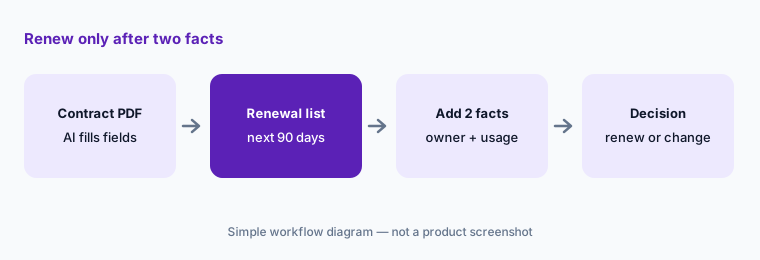
Primary workflow:
Export the next 90 days of renewals. For each, write the owner and last-30-day active users before anyone renews. Spot-check three AI-filled contract fields — renewal date, notice period, seat count — against the signed PDF.
2. License reclaim: usage-based workflows with an owner’s yes
What it is: Torii’s license optimization matches each license to real usage and flags inactive, duplicate, and abandoned seats, plus users on a higher tier than they need. Policy-based workflows can then reclaim seats, downgrade tiers, and route approvals automatically. Torii also lets you hand reclamation to each app’s owner while IT and finance keep the guardrails, and it logs every license change for later review.
“Automatically” is a setting, not a requirement. The safer pattern for the first few months is a workflow that asks the user and the app owner before removing anything, then removes the seat only when no one objects.
Ask before reclaiming:
Set up one reclaim workflow for a single app with an approval step for the app owner. Run it for one cycle, count how many flagged users said they still needed the seat, and adjust the inactivity window before turning on any automatic removal.
3. Eko: the governance copilot that explains its recommendations
What it is: Torii calls Eko “your governance copilot.” Its product pages say you can ask Eko questions about your stack, that it monitors usage, access, entitlements, and spend continuously, finds recurring risk and waste patterns, and recommends policies — with the reasoning spelled out behind each recommendation. Torii describes enforcement as human-in-the-loop: Eko amplifies your decisions rather than overriding them, and every recommendation is traceable from approval to enforcement.
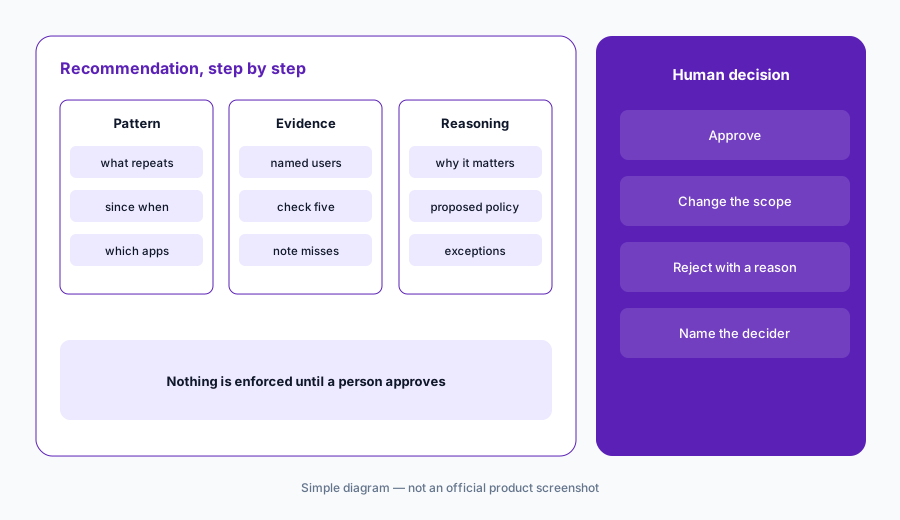
Read the why first:
Ask Eko for its top three policy recommendations. For each, open the evidence list it cites, check five named users or apps yourself, and write approve, change, or reject with your name before anything is enforced.
4. AI Module: AI tool spend, token value, and shadow AI
What it is: Torii’s AI Module (docs updated 8 September 2026) brings AI usage into one place: an AI home with a card per supported AI platform, Usage, Adoption, and Productivity dashboards, a live AI Pulse view, AI Insights summaries, and telemetry for developer command-line tools such as Claude Code, Gemini CLI, and Codex. Data arrives through the Torii AI Lens browser extension, CLI telemetry, vendor admin APIs, and existing integrations such as Microsoft 365. Torii’s marketing also highlights shadow-AI discovery, including tools with no billing trail, with a risk level for each.
Read the dollar figures carefully. Torii’s own docs say that for most AI tools the AI Module shows an estimated token value at standard API rates — a measure of usage intensity, not your invoice. Cursor, OpenAI, Claude Platform, and Claude.ai are the exceptions: their cost is synced daily from the vendor’s admin API and reflects billed amounts. Microsoft 365 Copilot cost is your recorded license price times assigned seats.
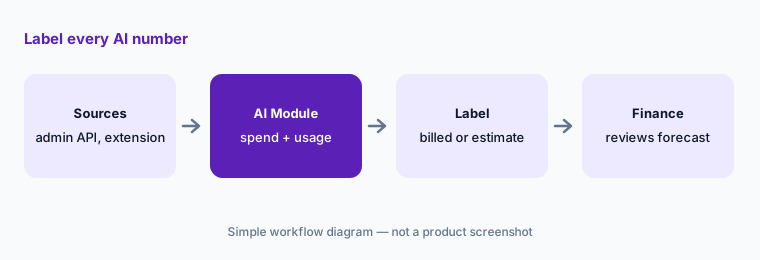
Billed or estimate:
Open the AI Module and list your top ten AI tools by spend. Mark each figure billed or estimated token value, using Torii’s own definitions, before anyone quotes a number in a budget meeting.
5. Data Agents and the MCP server: AI on your own terms
What it is: Data Agents let you write your own AI query — for example “does this vendor host data in the EU?” — and have Torii fill and refresh structured app fields on a schedule. Torii’s doc says they run on your organization’s OpenAI API key (billed by OpenAI), currently use GPT-4o with web search, show an estimated cost during setup, can’t be edited by hand, and keep the last good value if a run fails. Separately, Torii’s MCP server (doc updated 30 July 2026) lets assistants such as Claude, ChatGPT, and Cursor search apps, users, and contracts, list workflows and audit logs, and run tools such as run_workflow — always under the signed-in user’s Torii role and permissions.
Both deserve a narrow start. A Data Agent answer comes from a model plus the open web, so it is a lead to check, not a fact for an audit file. And an MCP connection that can run workflows can change access — give it to a read-only role first.
Check five answers:
Create one Data Agent for a filtered group of sanctioned apps with a single, specific question. Check five of its answers against the vendor’s own trust or security page, and connect the MCP server only under a read-only Torii role for the first month.
6. Where Torii fits against other options
What it is: Torii is strongest when the job is the whole SaaS lifecycle: find the apps, tie them to contracts and spend, reclaim what’s unused, and now track AI tool spend. Zluri covers similar SaaS management ground but has moved its positioning toward identity governance and security. JumpCloud starts from directory and devices and adds SaaS and AI discovery. Service desks such as Atomicwork and Moveworks handle the employee request (“can I get this app?”) rather than the renewal and license math.
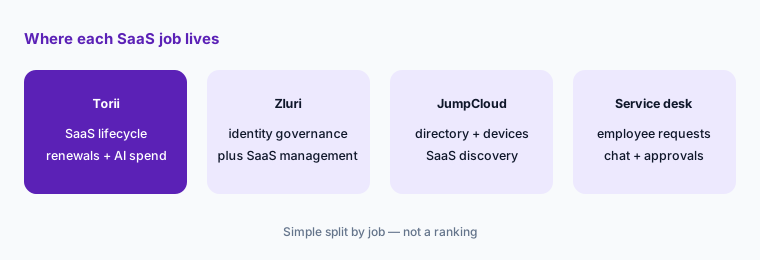
Count before you buy:
Write three numbers: SaaS apps in use, contracts renewing in the next year, and people who own renewals today. Ask Torii for a quote against those numbers, and ask which AI features — AI Module, Data Agents, Eko — the quote includes.
Pricing context (October 2026)
Torii’s pricing page lists three products — Identity Governance & Administration, SaaS Management (app discovery, savings, and renewals), and AI Management (marked New) — each with a “Get started” button. When we checked on 7 October 2026, it showed no prices for any of them; pricing comes through a demo or sales conversation.
Two AI costs sit outside Torii’s own price. Data Agents run on your organization’s OpenAI API key, so OpenAI bills that usage to you directly; Torii shows an estimated cost during setup based on the number of apps and refresh cadence. AI Module cost sync for Claude.ai needs a Claude Enterprise plan for the Analytics API, per Torii’s doc. Ask your rep which AI features are included and which are add-ons.
Uncertainty: Torii’s pricing page showed no prices on 7 October 2026, so we quote none; figures you may see elsewhere could be out of date. The AI Management product is new, and AI Module dollar figures are mostly estimated token value rather than billed cost, by Torii’s own definition. Eko’s exact capabilities in your tenant may differ from the marketing description — check with Torii.
When it’s useful (honest take)
Useful when you have dozens or hundreds of SaaS apps, renewals spread across inboxes and cards, and someone — IT, finance, or procurement — who will own renewal decisions. Contract Magic Auto-Fill removes retyping, usage-based reclaim with owner approval recovers real seats, and the AI Module answers the new “what are we spending on AI?” question with a clear line between billed and estimated.
Less useful when your stack is small enough to track in one sheet, or when nobody will act on the findings — discovery without an owner just produces a longer list. Less useful when you want automatic removals from day one; the honest setup is owner approval first, automation later. And if identity governance is the main job, compare Zluri and your identity provider’s own tools before choosing.
Paying for Torii and a few other AI tools? The $9 AI toolkit spreadsheet lists every AI subscription you have, what each one costs, and how fast it pays for itself, so you can see which ones are worth the money.
Want someone to do it for you? AI toolkit audit — $19
Related options (educational)
| Need | Better home | Why |
|---|---|---|
| SaaS lifecycle, renewals, and AI tool spend | Torii (this page) | Discovery, contract extraction, reclaim workflows, AI Module |
| Access reviews and identity governance first | Zluri | Review insights, approver context, SaaS management too |
| Directory, devices, and SaaS discovery together | JumpCloud AI | Identity and devices first, AI and SaaS management added |
| Employee app requests in Slack or Teams | Atomicwork or Moveworks | The request, not the renewal |
| Purchase intake and approvals before a contract | Zip | Procurement front door; Torii can sync its contracts |
| A quick seat check without new software | Find unused AI seats | One sheet, one owner, one decision per tool |
FAQ
What AI features does Torii have in October 2026?
Per Torii’s support docs: AI matching of expenses to apps, Contract Magic Auto-Fill for contract PDFs, Custom App Magic Auto-Fill, a Torii AI Slack bot, an AI (GPT) workflow action, AI-generated filters, AI-suggested workflow names, Data Agents, and Eko. Torii also sells an AI Module for AI tool usage and spend and runs an MCP server for assistants such as Claude and ChatGPT.
Does Torii remove licenses automatically?
It can. Torii’s license optimization supports policy-based workflows that reclaim seats and route approvals. You choose whether a workflow removes seats on its own or waits for a user or app owner to confirm; we suggest the approval route until you trust the usage data.
Does Torii train AI models on my data?
Torii says it does not use your inputs or outputs to train models and does not let others do so. Its AI partners (OpenAI, Anthropic, and Amazon Nova, per Torii) may retain data for up to 30 days but cannot train on it. Admins can disable each AI feature under Settings → AI Settings.
Are the AI spend numbers in Torii’s AI Module my real bill?
Mostly not. Torii says most figures are an estimated token value at standard API rates. Cursor, OpenAI, Claude Platform, and Claude.ai costs are synced daily from each vendor’s admin API and reflect billed amounts; Microsoft 365 Copilot cost is your recorded license price times assigned seats.
How much does Torii cost?
Torii’s pricing page showed no prices on 7 October 2026 — it lists IGA, SaaS Management, and AI Management with “Get started” buttons. Data Agents also use your own OpenAI API key, billed by OpenAI. Confirm on toriihq.com/pricing.
Optional next step (if seats overlap)
If you pay for a SaaS management tool, an identity governance tool, and several overlapping AI assistants — and nobody owns the renewal list — that overlap is worth mapping. Map the overlap with the $19 AI toolkit audit or the $9 AI toolkit spreadsheet. Email Audit $19 or Toolkit spreadsheet $9.
Checkout is live via Stripe. After you pay, we email delivery (spreadsheet) or intake next steps (audit).