Tool · Finance · Pigment · Oct 2026
Pigment AI review (Oct 2026): AI agents and assistants for business planning
Pigment is a business planning platform for finance, sales, HR, and supply chain teams — budgets, forecasts, headcount, and scenarios in one model instead of linked spreadsheets. In 2026 its AI moved from assistants to agents: the Analyst Agent answers variance questions and writes reports, the Modeler Agent builds and edits the model from plain-language requests, Custom Agents follow your own instructions, and Predictions adds machine-learning forecasts. This page walks through each with a real FP&A job, a Try this, and where the analyst still owns the model.
What this Pigment AI page covers
This page is for the FP&A lead or finance business partner who owns the plan, answers “why did we miss?” every month, and is tired of rebuilding the same variance deck. The question it answers: which of Pigment’s AI agents do real work today, what each one is allowed to change, and which checks keep a confident-sounding answer from reaching the CFO unverified.
As of 7 October 2026, Pigment’s roadmap lists the Analyst Agent, the Modeler Agent, and supply-chain AutoML as released, and the Planner Agent (scenarios and recommendations), a Report Editor, and a Mission Builder as on the roadmap. Pigment’s help center says the agents replaced its earlier AI features: the Data Assistant, Insights, and Navigation Assistant map to the Analyst Agent or a Custom Agent, and the Documentation Assistant became the Documentation Agent.
Everything below comes from Pigment’s website, help center, and dated product updates as we read them on 7 October 2026. Pigment says its models do not train on or store customer data, and that agent actions are explainable and traceable; we treat those as Pigment’s statements, not something we tested.

Major features (with how someone uses them)
Examples at a glance: each feature has a concrete example from a real job plus a short Try this you can run this week.
1. Analyst Agent: why did a cost center miss plan? (primary)
What it is: The Analyst Agent answers questions about your data in conversation, drills down on its own to find drivers, and turns the conversation into an editable report of text and charts. You can open it from the AI sidebar or straight from a Board: an AI Analysis symbol beside a number opens a chat about that figure in context. Pigment’s product page says the Analyst can write and run code on your metrics and dimensions to answer a specific question, and that outputs are explainable and can be refined or overwritten.
Pigment’s own troubleshooting notes are worth reading before you trust a variance answer. Check that each Metric has the right default time aggregator, or the agent “may sum together non-cumulative data points such as FTEs or exchange rates.” Avoid pointing it at pre-calculated variance Metrics — the agent computes variances itself. And access follows the person asking: a Member who sees only UK data gets UK-only answers.
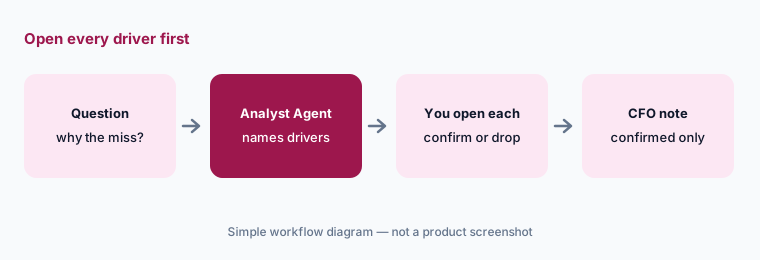
Primary workflow:
Ask Pigment’s AI why one cost center missed plan last month. Open every driver it cites before you repeat the answer. Write “confirmed” or “not supported” next to each, and keep only confirmed drivers in your note.
2. Missions: scheduled reports and per-item Multi-Reports
What it is: Any Analyst conversation can be saved as a Mission — a natural-language task the agent re-runs on a schedule. Missions can produce one report or a Multi-Report, one per item of a dimension (up to 60), such as one commentary per department, exported to a text Metric for display on a Board. Pigment’s doc says Missions take 5 to 15 minutes to run, and that you can preview a Mission’s full instructions and output before saving.
One access detail matters for finance: a Mission runs with the access rights of the Member who runs it, and those rights aren’t re-checked when others open the output. If you export the output to a text Metric, set access rights on that Metric too, or people may read commentary about data they can’t otherwise see.
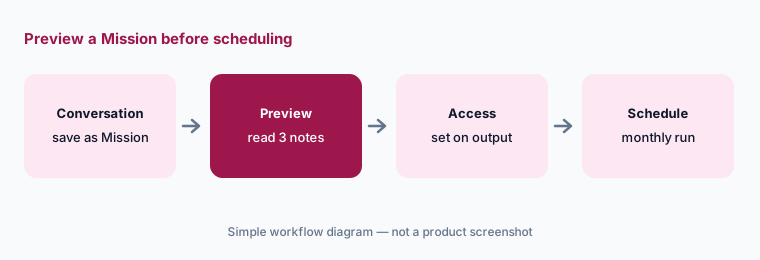
Preview, then schedule:
Save one variance conversation as a Mission that writes a note per department. Preview it, read three departments’ notes against the model, set access rights on the output Metric, and only then turn on scheduling.
3. Modeler Agent: Ask, Build, and Plan modes
What it is: The Modeler Agent builds and edits the model itself — Lists, Metrics, Properties, calendars, formulas, Views, and Boards — from plain-language requests, CSV files, pasted text, images, or voice notes. It has three modes: Ask (explains and proposes, no changes), Build (makes changes), and Plan & Build (writes an action plan and waits for your go-ahead at each waypoint). Pigment’s 30 September 2026 update says the agent now picks the mode and asks before switching, and that changes happen only after your explicit go-ahead.
There is an Auto-accept actions setting that skips validation at waypoints — though deletions always need your approval. Pigment’s best practice is to use the Modeler Agent only in a development environment when you use Pigment’s environment-promotion feature, and to know how to restore a Block or Application from backup before big changes. Members need both the Access AI Agents and Configure Blocks permissions to use it.
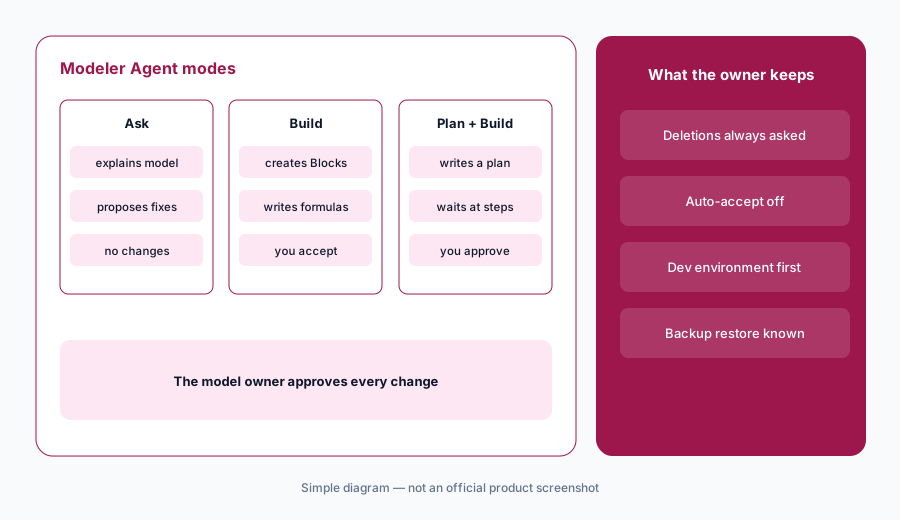
Ask mode first:
Spend one week using the Modeler Agent in Ask mode only: have it explain your three most complex Metrics and list unused Blocks. Check its explanations against the formulas before you let it build anything, and keep Auto-accept off.
4. Predictions: machine-learning forecasts inside the model
What it is: Predictions brings machine-learning forecasts into Pigment models; Pigment says it generates tailored forecasts from your live data for revenue, expenses, headcount, or any metric. Pigment’s roadmap lists ML Forecasting with statistical and ML models such as ARIMA and Prophet, and supply-chain AutoML, which picks the most accurate prediction model for your data, as released. Predictions draw on the same AI credit pool as the agents.
Cross-check, don’t replace:
Run Predictions for one stable metric and plot it beside your current forecast. For any month where they differ by more than your tolerance, write the business reason before choosing which number goes in the plan.
5. MCP server, Agent Connectors, web search, and Frames
What it is: The Pigment MCP Server lets external assistants such as ChatGPT, Claude, Cursor, and Codex query Pigment data and build in your models, under the signed-in user’s Pigment permissions; Pigment says admins approve which assistants connect. Agent Connectors go the other way: since 22 September 2026, Pigment’s agents can read from and create content in Notion, with Slack and Google Drive listed as coming soon. Security Administrators can also allow agent web search per Workspace, optionally limited to an allowlist of domains. Frames, in open beta since 28 September 2026, lets the Modeler Agent build custom charts, data-entry forms, and reports that read and write live Pigment data.
Each of these widens what an agent can see or change. “Build directly in your models” from an outside assistant, Frames that write data, and connectors that create Notion pages all deserve the same rule as the Modeler Agent: a named owner, a narrow first use, and a check of what changed.
List every door:
List every external assistant connected through MCP, every Agent Connector, and whether web search is on and allowlisted. Give each one an owner and a reason, and switch off anything nobody claims.
6. Where Pigment AI fits against other options
What it is: Pigment suits teams replacing linked spreadsheets with one planning model and wanting AI that works inside that model. Anaplan serves large, often multi-function enterprises with heavier model-building and its own AI agents. Close and accounting work — reconciliations, flux, journal review — belongs in tools such as FloQast or Numeric, not the planning model. And for one-off analysis on a sanitized export, a general assistant like Claude or ChatGPT may be enough.
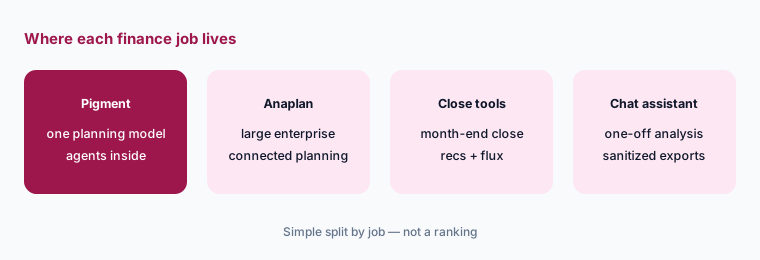
Three CFO questions:
Write the three planning questions your CFO asks every month. In a Pigment trial or demo, ask the Analyst Agent each one on your own data and note which answers you could verify from the model in under ten minutes.
Pricing context (October 2026)
Pigment does not publish prices. On 7 October 2026, pigment.com/pricing returned a “page not found” error, and the site offers “Request a demo” and “Start free trial” instead. The free trial is 14 days from first login with no credit card, gives a private workspace with access to modeling, simulation, planning, and AI agents (some features limited), and moves to read-only when it ends.
AI usage is metered in AI credits. Pigment’s help center says credits are consumed by the Analyst, Modeler (including Frames), Custom, and Documentation Agents, Predictions, the MCP server, and features such as the Formula Explainer. Admins have an AI Credits page (added 17 September 2026) showing the quota for the current period and usage by Member and feature; when the limit is reached, Pigment says to contact your CSM to add credits. No credit price is published.
Uncertainty: Pigment publishes no plan or AI credit prices, so we quote none; any figure you see elsewhere is a quote someone received, not a list price. Agent features change monthly — the Planner Agent is still on the roadmap and Frames is in open beta as of 7 October 2026 — and Pigment’s customer time-savings figures are vendor claims, not our measurement.
When it’s useful (honest take)
Useful when your plan already lives in Pigment (or is moving there), an analyst owns the model, and the team answers the same variance questions every month. The Analyst Agent and Missions cut first-draft time, and the Modeler Agent helps model owners extend the model faster — with Ask mode as a safe way to learn an inherited model.
Less useful when nobody owns the model’s logic — agents that explain and edit a model can’t fix unclear ownership. Less useful for small teams whose plan fits in one spreadsheet, and for close and accounting work, which belongs in accounting tools. If your Metrics have the wrong time aggregators or your hierarchy is mid-reorg, fix that before trusting any agent’s variance answer.
Paying for Pigment AI and a few other AI tools? The $9 AI toolkit spreadsheet lists every AI subscription you have, what each one costs, and how fast it pays for itself, so you can see which ones are worth the money.
Want someone to do it for you? AI toolkit audit — $19
Related options (educational)
| Need | Better home | Why |
|---|---|---|
| One planning model with built-in AI agents | Pigment AI (this page) | Analyst and Modeler Agents, Missions, Predictions |
| Large, multi-function connected planning | Anaplan AI | Analyst, CoModeler, Forecaster, AI Gateway |
| Month-end close and reconciliations | FloQast AI or Numeric | Accounting work, not planning |
| Plan still in a spreadsheet | Gemini in Sheets | Formula help and variance notes in place |
| One-off analysis on a sanitized export | Claude for finance | No live model access; you check every number |
| Inventory of finance AI seats | Stack map for finance ops | Overlap check before adding another tool |
FAQ
What AI agents does Pigment have in October 2026?
The Analyst Agent (analysis, reports, scheduled Missions), the Modeler Agent (builds and edits models), Custom Agents (your own instructions and documents), and a Documentation Agent. Pigment’s roadmap lists the Planner Agent for scenarios as coming. Predictions adds ML forecasting.
Can Pigment’s Modeler Agent change my model without asking?
In Plan & Build mode it waits for your go-ahead at each waypoint, and Pigment says changes happen only after explicit approval. An Auto-accept actions setting can skip waypoint validation, but deletions always need approval. Ask mode makes no changes.
Does Pigment train AI on my financial data?
Pigment says its models are trained on contextual information and planning best practices, and that its LLMs do not train on or store customer information. Admins can also turn off AI data access for specific sensitive Metrics.
How are Pigment’s AI features billed?
With AI credits. Agents, Predictions, the MCP server, and other AI features draw on a Workspace credit quota per billing period, visible on the AI Credits page. Pigment publishes no price for credits or plans.
Is there a free trial of Pigment?
Yes. As of 7 October 2026, Pigment offers a 14-day free trial with no credit card, including AI agents with some features limited; the workspace becomes read-only afterward. Sign up at pigment.com/trial/sign-up.
Optional next step (if seats overlap)
If finance pays for a planning platform, a separate BI seat, and several chat assistants that analysts use to write the same variance notes, that overlap is worth mapping. Map the overlap with the $19 AI toolkit audit or the $9 AI toolkit spreadsheet. Email Audit $19 or Toolkit spreadsheet $9.
Checkout is live via Stripe. After you pay, we email delivery (spreadsheet) or intake next steps (audit).