Tool · IT ops · Atomicwork · Oct 2026
Atomicwork review (Oct 2026): an AI-native service desk for IT and employee requests
Atomicwork is a newer IT and enterprise service management (ITSM/ESM) platform built around AI from the start. Employees talk to its assistant, Atom, in Slack, Microsoft Teams, the browser, email, or a portal; behind it sit requests, incidents, changes, assets, and workflows, plus AI Coworkers — role-based AI agents that Atomicwork says own work end to end under budgets and approvals you set. This page walks through the parts with real IT jobs, a Try this per feature, and who still approves.
What this Atomicwork page covers
This page is for the IT lead or service-desk owner at a mid-size or growing company who is tired of an inbox-and-spreadsheet help desk, or who runs ServiceNow or Jira Service Management and wants an AI front end on it. The question it answers: what Atomicwork’s assistant and AI Coworkers actually handle, what still needs a human approver, and what the published prices mean for your volume.
Atomicwork has two layers. The first is a service desk: requests, incidents, changes, asset management, a CMDB, workflows, and analytics, with custom workspaces so HR, finance, and other teams can run their own queues. The second is AI: Atom, the employee-facing assistant, and the AI Workforce, which Atomicwork launched on 9 June 2026 with seven AI Coworkers such as a Device Ops Engineer and an Access Manager. Atomicwork also offers Bring Your Own Platform, running its AI Coworkers on top of an existing ServiceNow or Jira Service Management instance.
Everything below comes from Atomicwork’s public pricing page, product pages, 2025 release recap, and launch blog as we read them on 7 October 2026. Resolution and ROI claims on those pages are Atomicwork’s, not our measurement.
Major features (with how someone uses them)
Examples at a glance: each feature has a concrete example from a real job plus a short Try this you can run this week.
1. Atom: the assistant in Slack, Teams, browser, email, and portal (primary)
What it is: Employees ask Atom for help where they already work. Atomicwork says Atom keeps context across a thread, asks follow-up questions, splits a message with several asks into separate requests, and adapts to your organization’s terms and tone. It supports voice and screenshots — Atom can read an error on screen and walk someone through the fix — and Atomicwork says answers are permissions-aware, so people only see content they’re allowed to see, with verbatim answers available for sensitive topics such as payroll or benefits. Its 2025 release recap adds a benchmarking tool to test Atom’s answers on real questions before rollout.
The test that matters is not whether Atom answers, but how often a request still needs a person to approve, fix, or reroute it. Start with one request type that has a clear approval rule, and count.
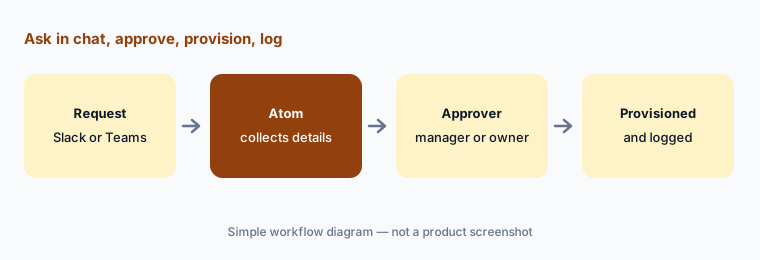
Primary workflow:
Route one request type (software access) through Atomicwork’s assistant for a week. Count how many still needed a human approver and why. Sort the reasons into missing rule, missing owner, or genuinely a judgment call.
2. Access requests with approvals and time limits
What it is: Access is Atomicwork’s most concrete AI job. Its pricing page defines an Access automation outcome as one access request handled end to end — manager approval, provisioning, or deprovisioning — with examples such as Gong access for a sales manager, Salesforce admin access for eight hours, and a reporting role on AWS Redshift. Its launch lineup includes an Access Manager AI Coworker for access requests, provisioning, and deprovisioning across SaaS and internal apps, and the site lists an Access Ops Manager for identity and access governance. Integrations include Okta, Microsoft Entra (Azure AD), Intune, Workday, and Slack.
Time-boxed admin access:
Pick one admin role that people only need occasionally. Make it time-limited through Atomicwork with a named approver, and after a month check every grant was removed on time.
3. AI Coworkers: role-based agents with managers and budgets
What it is: Atomicwork’s AI Workforce, launched 9 June 2026, frames each AI agent as a coworker with a job. The launch lineup had seven: Device Ops Engineer (hardware, peripherals, firmware, MDM-managed diagnostics), Network Ops Engineer (VPN, DNS, firewall, LAN/WAN), Cloud Ops Engineer, Access Manager, Incident Manager (third-party SaaS incidents), SecOps Engineer (phishing reports), and HR Ops Specialist. Each has a defined scope, a human manager, a budget, rules it follows on every request (Atomicwork’s examples include “verify before acting” and “stick to read-only first”), and an escalation plan. Coworkers can hand work to each other and to people with the history attached.
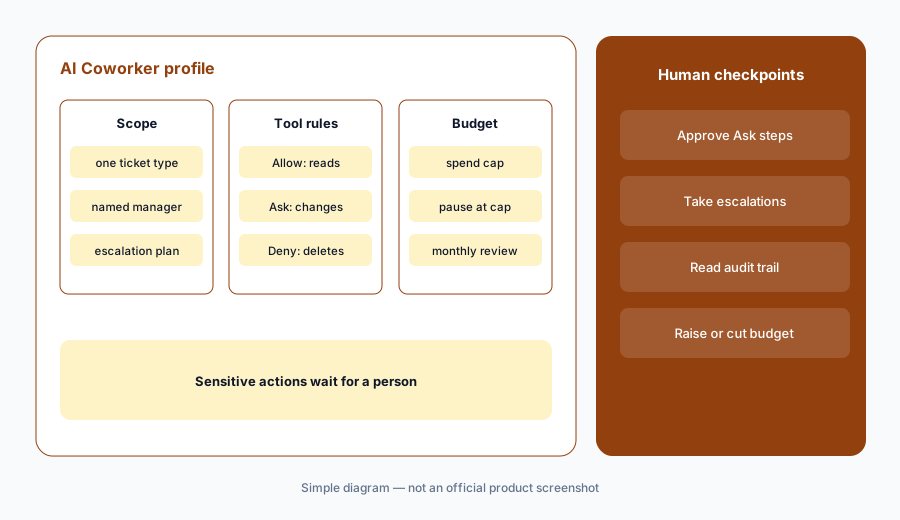
One Coworker, one lane:
Turn on one AI Coworker for one ticket category. Name its human manager, give it read-only tools first, and review every handoff it made after two weeks before you widen its scope.
4. Guardrails: Allow/Ask/Deny, spend caps, and audit trails
What it is: Atomicwork’s AI Workforce page lists the controls to check before rollout. Each tool a Coworker can use is set to Allow, Ask, or Deny, so risky actions wait for a person. Each Coworker gets a spend cap and pauses for review when it hits it. You can put a human in the loop at any step, and Atomicwork says every decision and action is logged so you can trace it back. Access to your systems is scoped through MCP down to specific capabilities — its example is read-only diagnostics but not destructive commands — and rules can be enforced in code around actions regardless of what the model decides. Atomicwork lists SOC 2, ISO 27001, ISO 42001, GDPR, HIPAA, Cloud Security Alliance (CSA) Level 1, CASA, and Microsoft 365 certifications.
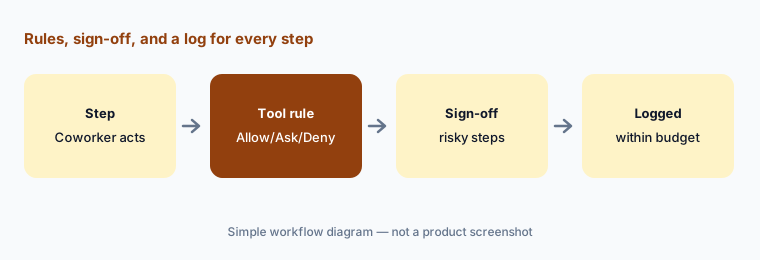
Ask for anything that writes:
For your first Coworker, set every tool that changes something to Ask and every destructive one to Deny. Each week, read the audit trail for five random runs and check the steps match what your own technician would have done.
5. The service desk underneath, or on top of ServiceNow/JSM
What it is: Atomicwork is also the ticketing system: requests, incidents, changes, asset management, a CMDB, analytics, and an SLA-aware queue. Its 2025 release recap lists workflow features such as scheduled workflows, AI classification of replies, code actions that run scripts (restart a service, clear a cache, update a config), version history with rollback, and fail-safe retries. Atomicwork also offers a native MCP server so tools like Claude, Codex, Cursor, and VS Code Copilot can query tickets, create incidents, and browse the service catalog. If you already run ServiceNow or Jira Service Management, Bring Your Own Platform runs the AI Coworkers on top of it; Atomicwork says there is no platform fee and you pay for consumption.
Keep or replace:
Write down whether you would keep your current ITSM or replace it. If keeping it, ask for a Bring Your Own Platform pilot on one request type. If replacing, list the five workflows you must rebuild before day one, and who owns each.
6. Where Atomicwork fits against other options
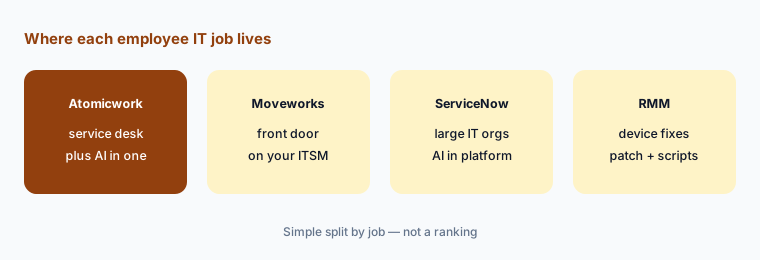
What it is: Atomicwork’s distinctive bet is being the service desk and the AI front door at once. Moveworks sits on top of your existing ITSM and many other systems, and is now a ServiceNow company. ServiceNow AI suits large IT organizations already on ServiceNow. Atera and NinjaOne start from device management, and Jamf from Apple fleets. JumpCloud starts from identity.
Price your real volume:
Count last quarter’s requests by type: knowledge questions, access requests, and incidents. Multiply each by Atomicwork’s published outcome price and compare that with the $25,000-a-year starting plan before you book a demo.
Pricing context (October 2026)
Atomicwork publishes two pricing formats on its pricing page (checked 7 October 2026). Usage-based: the Professional plan starts from $25,000 per year, billed annually, including 25,000 credits, two AI Coworkers (additional Coworkers $499 per Coworker per month), up to 250 end users, 500 managed devices, and 50 software applications, chat, voice, email, and portal channels, full ITSM, and business-hours email support. Business (five Coworkers, up to 1,000 end users) and Enterprise (ten Coworkers, unlimited users and devices, data residency, SLAs, 24×7 support) are quoted. A credit is drawn each time a Coworker completes a job, and heavier jobs use more.
Outcome-based: Knowledge support at $1 per outcome (minimum 25,000 outcomes a year), Access automation at $2 per outcome (minimum 12,000 a year), and Service resolution from $3 per outcome (minimum 8,000 a year), each with volume discounts. Bring Your Own Platform on ServiceNow or Jira Service Management has no platform fee per Atomicwork; you pay for consumption. A free trial can be requested.
Uncertainty: Prices are as shown on Atomicwork’s pricing page on 7 October 2026 and may change. Atomicwork’s own pages disagree on what the starting plan includes: the pricing table lists two AI Coworkers for Professional, while its AI Workforce FAQ says plans start at $25,000 a year for 25,000 credits and five Coworkers — confirm in your quote. Credit use per job is Atomicwork’s estimate, not a cap.
When it’s useful (honest take)
Useful when you are replacing an inbox, form, or aging help desk and want requests, approvals, and AI in one place, or you run ServiceNow or Jira Service Management and want to test an AI layer without migrating. It fits best when access requests and repeat questions make up much of your volume and someone owns the approval rules and the audit trail.
Less useful when you are a small company with low request volume — the published starting price is $25,000 a year and outcome plans carry annual minimums. Less useful when your main pain is patching and device health, which an RMM handles more directly. And if nobody will set tool rules or read the logs, autonomous Coworkers move risk instead of removing work.
Paying for Atomicwork and a few other AI tools? The $9 AI toolkit spreadsheet lists every AI subscription you have, what each one costs, and how fast it pays for itself, so you can see which ones are worth the money.
Want someone to do it for you? AI toolkit audit — $19
Related options (educational)
| Need | Better home | Why |
|---|---|---|
| AI-native service desk plus employee assistant | Atomicwork (this page) | Atom, AI Coworkers, ITSM in one |
| AI front door on top of an existing ITSM | Moveworks | Plugins, search, Tool Studio across many systems |
| Large IT org already on ServiceNow | ServiceNow AI | AI inside the platform you run |
| Device fixes and patching | NinjaOne AI or Atera AI | RMM data and scripts |
| Customer support tickets, not employees | Zendesk AI or Freshdesk Freddy | Built for customers and agents |
| Under ~50 requests a month | A form, a shared channel, and a help page | No new platform until volume justifies it |
FAQ
What is Atomicwork?
Atomicwork is an AI-native IT and enterprise service management platform. Employees get help from its assistant, Atom, in Slack, Teams, the browser, email, or a portal, and AI Coworkers handle defined jobs such as access requests or device diagnostics under budgets and approvals you set.
How much does Atomicwork cost in October 2026?
Atomicwork’s Professional plan starts from $25,000 a year with 25,000 credits; outcome-based pricing is $1 per knowledge outcome, $2 per access outcome, and from $3 per service outcome, each with annual minimums. Confirm on atomicwork.com/pricing.
Do we have to replace ServiceNow or Jira Service Management?
No. Atomicwork’s Bring Your Own Platform option runs its AI Coworkers on top of an existing ServiceNow or Jira Service Management instance, with no platform fee per Atomicwork.
Can AI Coworkers act without approval?
Only where you allow it. Atomicwork says each tool is set to Allow, Ask, or Deny, sensitive actions pause for human sign-off, each Coworker has a spend cap and a human manager, and every action is logged.
What is an Atomicwork credit?
A credit is Atomicwork’s unit of AI use, drawn each time an AI Coworker completes a job. Simple knowledge answers draw few credits; multi-step jobs that call several tools or use advanced models draw more.
Optional next step (if seats overlap)
If you pay for a service desk, a separate AI front door, an access-request tool, and chat assistants that answer the same employee questions, that overlap is worth a look. Map the overlap with the $19 AI toolkit audit or the $9 AI toolkit spreadsheet. Email Audit $19 or Toolkit spreadsheet $9.
Checkout is live via Stripe. After you pay, we email delivery (spreadsheet) or intake next steps (audit).