Tool · IT ops · Jamf · Oct 2026
Jamf AI review (Oct 2026): the AI assistant for Apple device admins
Jamf manages and secures Apple devices at work — Macs, iPhones, iPads, and more — through products such as Jamf Pro, Jamf Connect, Jamf Protect, Jamf Now, and Jamf School. Its AI Assistant lets admins ask questions about their fleet in plain language, get plain-language explanations of policies and scripts, and check compliance, while a separate AI Governance capability shows which AI tools are running on managed Macs. This page walks through both with real Apple-admin jobs, a Try this per feature, and where an admin still owns every change.
What this Jamf AI page covers
This page is for the person who runs a company’s or school’s Apple fleet — often a Mac admin inside a larger IT team, sometimes the one IT person at a design or software company. The question it answers: what Jamf’s AI Assistant can actually answer about your devices today, what it can and can’t change, how it handles your data, and where AI Governance fits if your people are installing AI tools on their Macs.
Jamf’s AI Assistant page lists five things it does today: inventory questions across Mac and mobile, configuration explanations for policies, scripts, and Smart Groups, Blueprint search and explanation, compliance benchmarking, and mobile app risk analysis. Security alert analysis for Jamf Protect is labeled coming soon on that page and as beta in Jamf’s launch blog. Jamf says the assistant is off by default, works for Jamf Pro, Jamf Protect, and Elevate, and that your data is never used for model training.
Separately, AI Governance discovers AI tools, agents, and MCP servers on managed Macs and enforces policies for them; Jamf says it is built into Jamf for Mac at no separate license. Everything below comes from Jamf’s public pages, pricing, technical paper, and its 23 September 2026 JNUC press release as we read them on 7 October 2026.
Major features (with how someone uses them)
Examples at a glance: each feature has a concrete example from a real job plus a short Try this you can run this week.
1. Inventory questions in plain language (primary)
What it is: Ask a question about your fleet and get the answer as a list, table, or chart. Jamf’s examples include how many devices run an outdated version of Chrome and what the OS distribution looks like across departments. Jamf says the assistant inherits the signed-in admin’s Jamf session, so it can only surface what that admin is already allowed to see under role-based access, and its 2025 technical paper describes the search skill as turning a natural-language question into a database query.
That translation step is where mistakes hide. “Missed the last OS update” could mean not on the newest version, not on the version your policy requires, or update deferred by a configuration profile. The answer is only as right as the query the assistant chose, so check a few results before you act on the list.
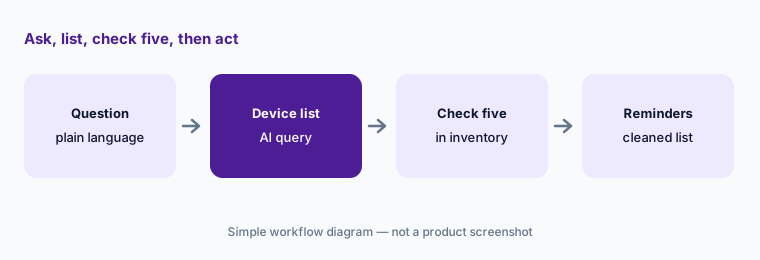
Primary workflow:
Ask Jamf’s AI which Macs missed the last OS update. Check five results in inventory before you send a single reminder. Note anything the list got wrong — stale check-ins, deferrals, loaners — and add that filter to the question next time.
2. Configuration explanations for inherited policies and scripts
What it is: Point the assistant at a policy, script, or Smart Group and it explains the item’s purpose, scope, and dependencies in plain language. Jamf pitches this as recovering institutional knowledge in environments where nobody documented why something exists. In the read-only design Jamf describes, the explanation reads the item’s current configuration through the Jamf Pro API but cannot edit it.
Inherited policy pass:
Pick the five policies that run most often. Ask the assistant to explain each one, then compare its explanation with the scope and script yourself. Write your own one-line purpose for each and keep it in your runbook, not just in the chat.
3. Blueprints and compliance benchmarks
What it is: Two related skills. Blueprint search and explanation finds Blueprints by name or by the settings they contain and breaks down what one will roll out before you apply it. Compliance benchmarking checks your fleet against popular security frameworks; Jamf says you can ask how many devices fail a benchmark, see counts by the requirement they miss, and drill into the non-compliant devices. Jamf’s blog describes this as audit prep in minutes rather than days — a vendor claim worth testing on your own fleet.
Benchmark, then three devices:
Ask for your fleet’s failures against one benchmark, broken down by requirement. Drill into three devices for the biggest failure and confirm each in its record before you change the Blueprint or policy behind it.
4. Mobile app risk and Jamf Protect alerts
What it is: Mobile app risk analysis reviews apps deployed across your managed iOS fleet for security vulnerabilities, privacy concerns, and policy violations, scores findings by severity, and gives remediation guidance for each. For Macs, security alert analysis explains a Jamf Protect alert in plain language — what triggered it, how severe it is, what to look for next — and can search for similar alerts across the fleet. Jamf’s launch blog calls this beta, its AI Assistant page lists it as coming soon, and the blog describes event-driven triage that queues a response plan for admin approval as a further-out goal.
Severity, then a person:
Run app risk analysis on your managed iOS fleet. For every high-severity finding, write the owner, the decision (remove, restrict, or accept), and who signed off. Don’t remove an app from devices based on the score alone.
5. Opt-in controls, data handling, and what it can change
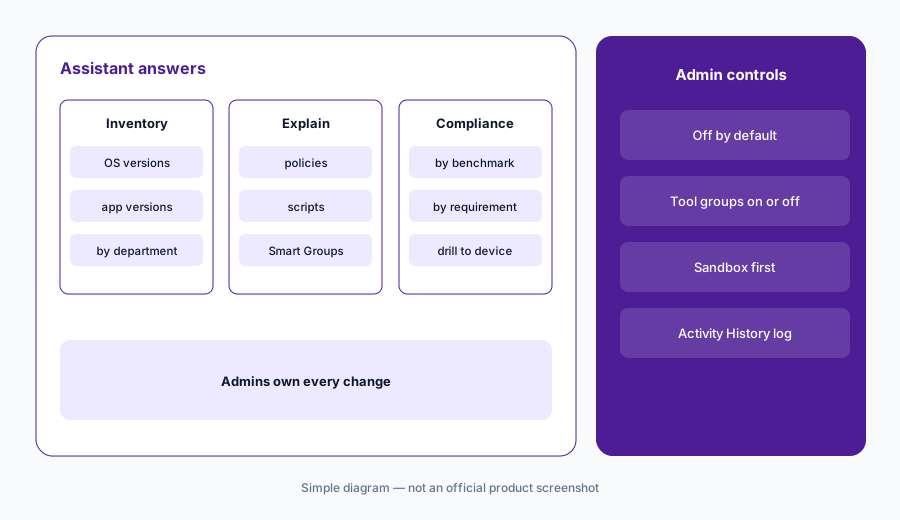
What it is: Jamf says the AI Assistant is off by default: you opt in through Jamf Account, turn tool groups on or off independently, review changes in an Activity History audit log, and can scope it to specific environments such as a sandbox before production. Its May 2025 technical paper says the assistant uses Anthropic models served through Amazon Bedrock inside Jamf’s AWS environment, that prompts and outputs are not used to train the models, and that conversation data is kept for 30 days and then purged. Admin SSO controls who can use it.
On changes, Jamf’s wording has moved. The 2025 paper says the assistant is read-only and cannot modify your Jamf Pro instance, with write skills planned as opt-in. The current AI Assistant page says you can “opt in to read-only or read-and-write skills.” Before enabling anything that writes, ask Jamf which actions exist on your instance and how each one is confirmed.
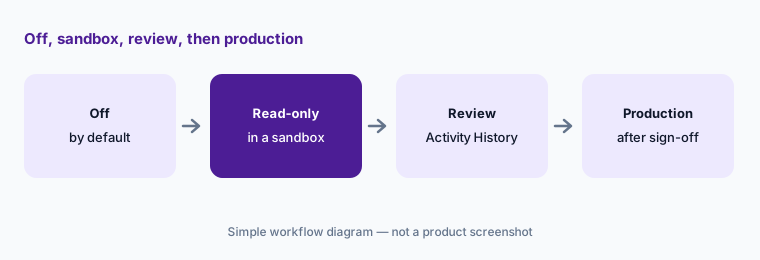
Sandbox, read-only first:
Enable only read-only tool groups, and only in a sandbox or staging instance, for two weeks. Review Activity History each Friday. Ask Jamf in writing how any write action is confirmed before you turn one on in production.
6. AI Governance for Mac, the JNUC 2026 roadmap, and other options
What it is: AI Governance discovers AI tools, agents, and MCP servers running on managed Macs (Jamf names tools such as Claude Code, Claude Desktop, OpenAI Codex, Cursor, and GitHub Copilot), deploys vendor-specific configuration scoped by user or group, and keeps an exportable audit record plus an on-demand Executive AI Posture Report. Jamf says it is built into Jamf for Mac and Jamf for Mac – Higher Education and is not available for K-12. At JNUC on 23 September 2026, Jamf said deeper AI activity insights, AI usage and cost insights, and browser governance are targeted for general availability in Q4 2026, with AI-powered self-service diagnostics for employees targeted for public beta in Q1 2027.
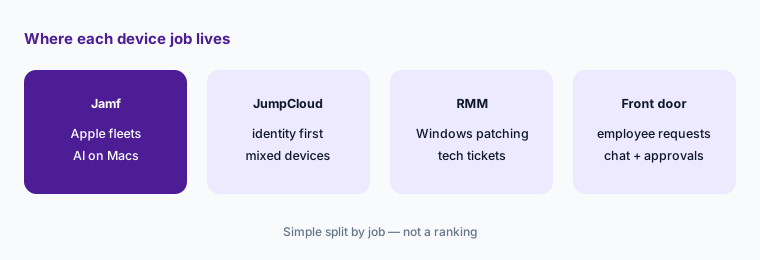
For other jobs: JumpCloud starts from identity and covers mixed fleets; NinjaOne and Atera are RMMs that lean toward Windows patching and technician tickets; front doors such as Atomicwork and Moveworks handle employee requests.
Owner per AI tool:
If you have Jamf for Mac, run AI Governance discovery on one device group. For every AI tool or MCP server it finds, write an owner and a decision — approved, approved with settings, or retire — before you change any policy.
Pricing context (October 2026)
Jamf publishes business prices on its pricing page. On 7 October 2026 it listed Jamf for Mac at $12.50 per macOS device per month, billed annually, with a 25-device minimum (Jamf Pro, Jamf Connect, and Jamf Protect; device management, endpoint protection, identity and access, and Zero Trust Network Access); Jamf for Mobile at $5.75 per mobile device per month, billed annually, 25-device minimum; and Jamf Now starting at $4 per device per month for organizations with fewer than 25 employees. Jamf for Mac and Jamf for Mobile are only for Jamf Cloud customers. A free 14-day trial is offered; education pricing is on a separate page.
Jamf says AI Governance is built into Jamf for Mac and Jamf for Mac – Higher Education with no separate license. We found no separate price for the AI Assistant; Jamf’s page describes it as an opt-in feature for Jamf Pro, Jamf Protect, and Elevate. Local-currency prices may differ from the US dollar figures, and Premium Services for onboarding are quoted separately.
Uncertainty: Prices are the US dollar figures on Jamf’s page on 7 October 2026 and may change; quotes in other currencies can differ. We found no published AI Assistant price, and Jamf’s pages differ on whether write skills exist (the 2025 technical paper says read-only; the current page mentions read-and-write skills) — confirm on your instance. JNUC 2026 roadmap items are targets, not shipped features.
When it’s useful (honest take)
Useful when you already run Jamf Pro on a sizable Apple fleet, you inherited configurations nobody documented, or you need quick compliance and inventory answers without writing queries. AI Governance is a strong fit when engineers run AI coding tools on Macs and you need an owner and an audit trail for each one.
Less useful when your fleet is mostly Windows or mixed and your device work lives in another tool. Less useful on Jamf Now or Jamf School, which Jamf’s AI Assistant page does not list, or for K-12, where AI Governance is not available. And if nobody checks the assistant’s lists before acting, a wrong query becomes a wrong reminder to dozens of people.
Paying for Jamf AI and a few other AI tools? The $9 AI toolkit spreadsheet lists every AI subscription you have, what each one costs, and how fast it pays for itself, so you can see which ones are worth the money.
Want someone to do it for you? AI toolkit audit — $19
Related options (educational)
| Need | Better home | Why |
|---|---|---|
| Apple fleet questions, config explanations, AI on Macs | Jamf AI (this page) | AI Assistant plus AI Governance in Jamf for Mac |
| Identity first, mixed Mac/Windows/Linux devices | JumpCloud AI | AI Admin Assistant; AI and SaaS discovery |
| Windows-heavy patching and technician tickets | NinjaOne AI or Atera AI | RMM with AI patch or ticket help |
| Employee requests and approvals in chat | Atomicwork or Moveworks | Front door, not device management |
| Reading a shell script before it runs | Claude | No device access; you still test and run |
| A handful of Macs and no admin | Apple Business Manager plus a short checklist | Fewer moving parts until the fleet grows |
FAQ
What can Jamf’s AI Assistant do in October 2026?
Jamf lists inventory questions across Mac and mobile, plain-language explanations of policies, scripts, and Smart Groups, Blueprint search and explanation, compliance benchmarking, and mobile app risk analysis. Jamf Protect alert analysis is in beta.
Can Jamf’s AI Assistant change my settings?
Jamf’s 2025 technical paper describes it as read-only. Its current page says you can opt in to read-only or read-and-write skills. It is off by default either way, and an admin owns every change — confirm which write actions exist on your instance before enabling them.
Does Jamf use our data to train AI models?
Jamf says no. Its technical paper says the assistant uses Anthropic models through Amazon Bedrock inside Jamf’s AWS environment, that prompts and outputs are not used for training, and that conversation data is purged after 30 days.
How much does Jamf cost?
On 7 October 2026 Jamf listed Jamf for Mac at $12.50 per Mac per month and Jamf for Mobile at $5.75 per mobile device per month, both billed annually with a 25-device minimum, and Jamf Now from $4 per device per month. Confirm on jamf.com/pricing.
Is AI Governance an extra license?
Jamf says no: AI Governance is built into Jamf for Mac and Jamf for Mac – Higher Education. It is not available to K-12 institutions.
Optional next step (if seats overlap)
If you pay for Jamf, a separate shadow-AI discovery tool, and chat assistants your admins use to read scripts, that overlap is worth a look. Map the overlap with the $19 AI toolkit audit or the $9 AI toolkit spreadsheet. Email Audit $19 or Toolkit spreadsheet $9.
Checkout is live via Stripe. After you pay, we email delivery (spreadsheet) or intake next steps (audit).