Tool · IT ops · NinjaOne · Oct 2026
NinjaOne AI review (Oct 2026): AI assists for RMM, patching, and IT tickets
NinjaOne is a remote monitoring and management (RMM) and endpoint management platform with patching, remote access, backup, MDM, and ticketing in one console, priced per device. Its AI is spread across that console: Patch Intelligence AI explains and flags Windows patches, Vulnerability Management uses AI to match CVEs to fixes, and Katana AI, an agentic assistant, is in Early Access. This page walks through each with real IT jobs, a Try this per feature, and where a technician still has to approve.
What this NinjaOne AI page covers
This page is for the person who keeps a fleet of Windows, Mac, and Linux machines patched and working — an internal IT team of a few people, or a managed service provider (MSP) running many client environments. The question it answers: which parts of NinjaOne’s AI save technician time today, which parts are still Early Access, and which settings let AI change a patch decision so you know who owns that call.
NinjaOne’s AI is less a single assistant than a set of assists inside the tools you already use there. Patch Intelligence AI writes a short analysis for each Windows OS patch and labels it Appears Stable, Caution, or Known Issues. AI approval overrides can pull a risky patch out of automatic approval. NinjaOne Vulnerability Management, announced on 16 March 2026, uses AI-driven CVE intelligence to show exposure without scheduled scans and points each vulnerability at the patch that fixes it. Katana AI is an agentic assistant that NinjaOne’s 15.0 release notes list as Early Access, with role-based access controls and a kill switch.
Everything below comes from NinjaOne’s public pricing page, product pages, documentation, and release blog as we read them on 7 October 2026. Where a feature is Early Access or only described in a conference talk, we say so.
Major features (with how someone uses them)
Examples at a glance: each feature has a concrete example from a real job plus a short Try this you can run this week.
1. Katana AI on tickets: summaries and next steps (primary, Early Access)
What it is: NinjaOne’s 15.0 release blog (last updated 25 August 2026) describes Katana AI as “an agentic assistant built into NinjaOne that turns operational data into guided steps,” shipping with role-based access controls and a kill switch, and lists it as an Early Access feature you request through your account manager. In an AWS re:Invent 2025 session, NinjaOne’s field CTO described Katana, then in beta, summarizing tickets and generating possible answers, while stressing a human-in-the-loop model. NinjaOne’s ticketing already links every ticket to the device record, with remote access, scripts, and app installs available inside the ticket, so a suggested next step can turn into a device action in a click — which is exactly why someone should read it first.
Because Katana is Early Access, what you see may differ by account and change month to month. Treat this section as a pilot plan, not a description of a finished product, and check NinjaOne’s Dojo documentation for the current behavior before you rely on it.
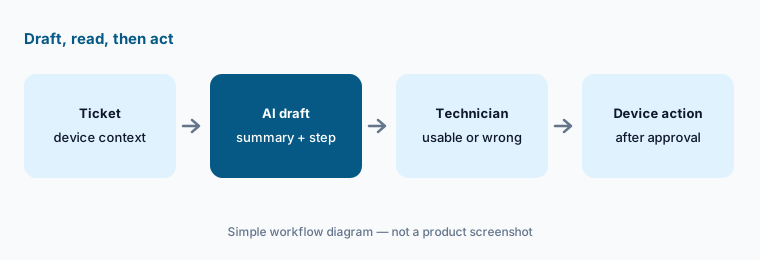
Primary workflow:
Pick ten open tickets. Let NinjaOne’s AI draft the summary and next step. Mark each draft usable, edited, or wrong. If Katana isn’t on your account yet, ask your account manager about Early Access and run the same ten-ticket check the week it arrives.
2. Patch Intelligence AI: a short read on every Windows patch
What it is: Turn on Patch Intelligence AI under Administration → Apps → NinjaOne Patching, then add the KB Analysis column on the OS Patches page. For each Windows OS patch, NinjaOne’s docs say it writes a summary of the patch’s purpose, effects, and known issues using generative AI, third-party content (including community reports), and anonymized patch failure and rollback data — and that it does not use identifiable customer data. Each patch gets a status: “-” (no data), Appears Stable, Caution, or Known Issues. Data refreshes every six hours for Windows patches released in the last month and less often for older ones.
The limits matter. NinjaOne says the analysis is “meant to augment user research, not replace it,” and that you should not make patch decisions solely on it. It covers Windows OS patches only, not macOS, Linux, or third-party apps, and in FedRAMP instances it does not use customer metadata, patch telemetry, or rollback data.
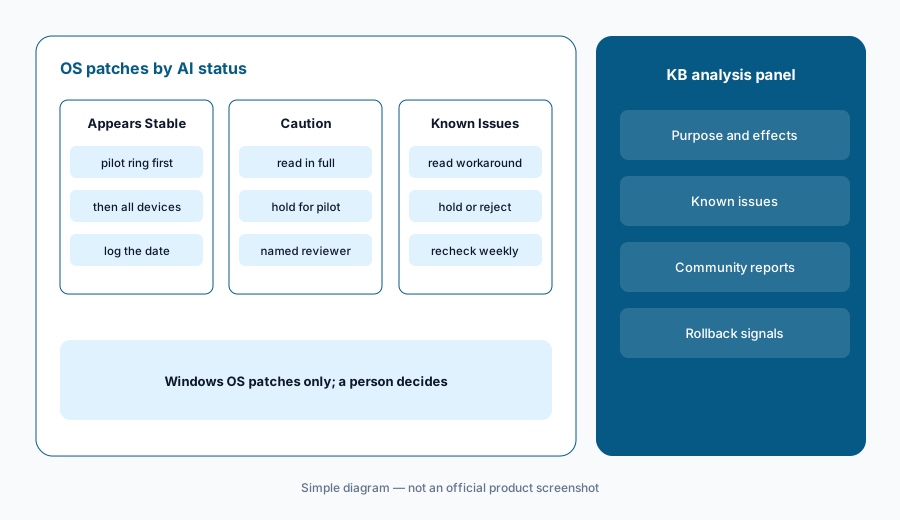
Read the flagged ones:
This Patch Tuesday, read the full analysis for every patch marked Caution or Known Issues before approving anything. Write one line per patch: approve, hold for a pilot group, or reject — and who decided.
3. AI approval overrides: letting AI pull a patch from auto-approval
What it is: This is where NinjaOne’s AI changes something on its own. In a Windows policy’s OS patching settings, Patch Intelligence AI approval overrides let you choose what happens when the AI flags a patch: for Known Issues, for Caution, or both, the patch moves to Manual approval or is Rejected. NinjaOne’s docs say only patches with automated approvals are changed; patches you approved by hand stay untouched. The NinjaOne AI app has to be active first.
Two timing details are easy to miss. The AI re-evaluates Windows patches every six hours, so if your policy installs patches right after release, the AI may not have had time to form a view. And as it learns more, it can move a patch from approved back to manual or rejected. Pick a person who reviews the manual queue, or held patches will simply sit there.
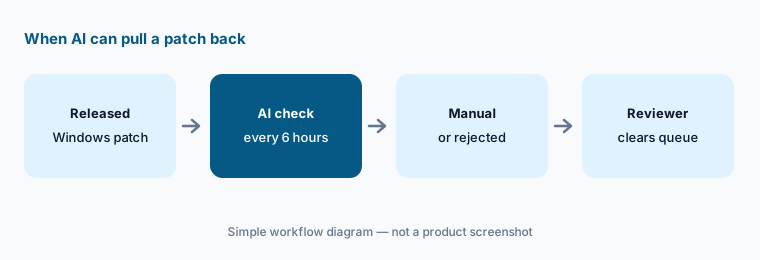
Manual, not reject, first:
Turn on overrides for one Windows policy with both Caution and Known Issues set to Manual, not Reject. Name the person who clears the manual queue each week, and review what landed there after one month before you allow any automatic rejects.
4. Vulnerability Management: AI-matched CVEs and fixes
What it is: NinjaOne announced NinjaOne Vulnerability Management on 16 March 2026. Its product page describes AI-powered vulnerability intelligence, including Known Exploited Vulnerability (KEV) insights, correlated continuously against the live and last-known software on each endpoint instead of waiting for a scheduled scan. NinjaOne says AI maps vulnerabilities to the patches that resolve them and connects them to remediation workflows, and that it can pair with Patch Intelligence AI so stable updates proceed while risky ones pause. The press release reports results from a beta of more than 500,000 endpoints; those are NinjaOne’s figures, not our measurement.
Check the mapping:
Filter to your top five Known Exploited Vulnerabilities. For each, open the vendor advisory yourself and confirm that the patch NinjaOne matched is the one the advisory names before you schedule it.
5. Ticket approvals and SLAs: the human checkpoint
What it is: The NinjaOne 15.0 release added two non-AI pieces that make AI suggestions safer to use. SLA tracking shows response and resolution targets by priority on the board and the ticket, with alerts at 80 percent of the allotted time and again at breach. Approvals attach an approval step to any ticket and route it to a manager, device owner, role, or ad hoc list; NinjaOne says approvers without a NinjaOne login can approve straight from the email. Ticket automation can also create tickets from alerts and route them by rules, so a lot of triage needs no AI at all.
Approval for AI steps:
Add an approval step to every ticket where an AI suggestion would reinstall software, change a service, or touch a server. Route it to the device owner or a named lead, and check a month of SLA alerts to see what the step really costs.
6. Where NinjaOne AI fits against other options
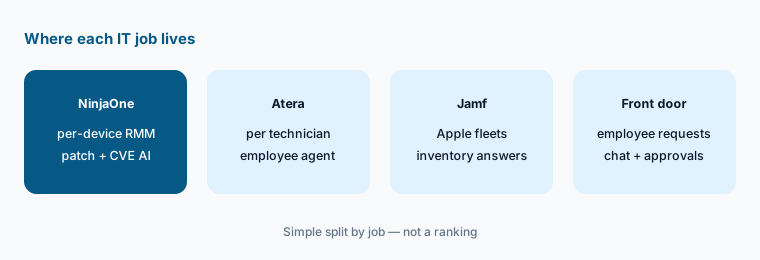
What it is: NinjaOne’s AI is strongest on the infrastructure side: patch decisions, vulnerability exposure, and device context on tickets. Atera is also an RMM but prices per technician and sells Robin, an AI agent that employees talk to and that acts on their device. Jamf goes deeper on Apple-only fleets. JumpCloud starts from identity and adds device management. Front doors such as Moveworks and Atomicwork handle the employee conversation and requests rather than the patch queue.
Count devices and techs:
Write two numbers: managed devices and technicians. NinjaOne prices per device and Atera per technician, so get a quote for your real counts before comparing AI features, and note which AI features each quote actually includes.
Pricing context (October 2026)
NinjaOne says it uses per-device pricing with monthly or annual payment and flexible contracts, according to its pricing page. As of 7 October 2026, the FAQ on that page states: “NinjaOne starts as low as $1.50 USD per month at 10,000 endpoints, increasing to $3.75 USD at 50 or fewer endpoints; pricing varies by region and products purchased. This pricing is only applicable to customers on the commercial, non-FedRAMP instance.” In other words, roughly $1.50 to $3.75 per device per month, with the lowest rate at 10,000 endpoints and the highest at 50 or fewer. NinjaOne calls these standard pricing ranges and says the way to get specific pricing is to request a quote; the page also offers a quote form (with RMM/endpoint management, backup, MDM, and remote access as products of interest), a free trial, and free onboarding and training.
We found no public price for Patch Intelligence AI, AI approval overrides, Vulnerability Management, or Katana AI. Patch Intelligence AI is switched on through the NinjaOne AI app in your console; Katana is Early Access through your account manager. Ask your rep which AI features your quote includes and whether any carry an extra charge.
Uncertainty: The $1.50–$3.75 range is NinjaOne’s own published range as of 7 October 2026. It varies by region and products purchased, applies only to the commercial, non-FedRAMP instance, and does not name an endpoint minimum or say which products it covers, so your quote may differ; older per-device figures elsewhere on the web may be out of date. Katana AI is Early Access, and its ticket-summary behavior comes from a NinjaOne conference session rather than published documentation, so it may change. Patch Intelligence AI covers Windows OS patches only.
When it’s useful (honest take)
Useful when NinjaOne is (or will be) your RMM, you patch a lot of Windows machines, and a named person owns patch decisions and the manual-approval queue. Patch Intelligence AI cuts the reading on Patch Tuesday, the overrides catch risky patches in automatic policies, and Vulnerability Management helps when one person covers both IT and security.
Less useful when your fleet is mostly Mac or Linux, since the patch AI covers Windows OS patches only. Less useful when you want an AI that employees talk to and that resolves their requests — NinjaOne’s shipped AI is aimed at technicians, and Katana is still Early Access. And if nobody will read the flagged patches or clear the manual queue, the AI just moves the backlog.
Paying for NinjaOne AI and a few other AI tools? The $9 AI toolkit spreadsheet lists every AI subscription you have, what each one costs, and how fast it pays for itself, so you can see which ones are worth the money.
Want someone to do it for you? AI toolkit audit — $19
Related options (educational)
| Need | Better home | Why |
|---|---|---|
| Per-device RMM with AI patch and vulnerability help | NinjaOne AI (this page) | Patch Intelligence AI, overrides, CVE mapping |
| Per-technician RMM with an employee-facing agent | Atera AI | Copilot for techs; Robin acts on devices |
| Apple-only fleets | Jamf AI | Inventory questions, config explanations, AI governance |
| Employee requests and approvals in chat | Atomicwork or Moveworks | Front door for requests, not the patch queue |
| Identity plus device admin | JumpCloud AI | Directory first, devices second |
| Reading a script before it runs | Claude | No device access; you still test and run |
FAQ
What AI features does NinjaOne have in October 2026?
Patch Intelligence AI (an AI analysis and status for each Windows OS patch), AI approval overrides for Windows patch policies, AI-driven Vulnerability Management (announced 16 March 2026), and Katana AI, an agentic assistant listed as Early Access in the 15.0 release.
Does Patch Intelligence AI install patches by itself?
No. NinjaOne says its status labels guide decisions but do not automatically prioritize or install patches. The separate approval-override setting can move an auto-approved Windows patch to manual approval or reject it, but it never approves a patch.
Does Patch Intelligence AI work for Mac and Linux?
Not as of October 2026. NinjaOne says it covers Windows OS patches only. NinjaOne’s patching itself covers Windows, macOS, Linux, and third-party apps.
How much does NinjaOne cost?
NinjaOne prices per device with monthly or annual payment. As of 7 October 2026, the FAQ on its pricing page says: “NinjaOne starts as low as $1.50 USD per month at 10,000 endpoints, increasing to $3.75 USD at 50 or fewer endpoints; pricing varies by region and products purchased. This pricing is only applicable to customers on the commercial, non-FedRAMP instance.” For specific pricing it asks for a quote, and it offers a free trial. Confirm on ninjaone.com/pricing.
What is Katana AI?
Katana AI is NinjaOne’s agentic assistant. NinjaOne’s 15.0 release blog says it turns operational data into guided steps and ships with role-based access controls and a kill switch. It is Early Access, available through your account manager.
Optional next step (if seats overlap)
If you pay for an RMM, a separate vulnerability scanner, a ticketing add-on, and a chat assistant your technicians use to read patch notes, that overlap is worth a look. Map the overlap with the $19 AI toolkit audit or the $9 AI toolkit spreadsheet. Email Audit $19 or Toolkit spreadsheet $9.
Checkout is live via Stripe. After you pay, we email delivery (spreadsheet) or intake next steps (audit).