How-to · Employee IT help · Atomicwork · Oct 18, 2026
Give an Atomicwork AI Coworker a budget and Allow/Ask/Deny rules, and have IT review the audit log weekly
Atomicwork's AI Coworkers are role-based AI agents with a scope, a human manager, a budget, and tool rules. Each tool is set to Allow, Ask, or Deny, so risky actions wait for a person. This page shows how to set up one Coworker and have IT check its audit log every week.
Who this is for
IT leads and service desk owners on Atomicwork, or running its AI on top of ServiceNow or Jira Service Management. The job here is one Coworker's rules and weekly log review. For turning on one Moveworks plugin and having IT approve which apps it can grant — a different job — see Moveworks access plugin IT approval.
How to do it
This is a how-to, not a ranking of service desks. Per the Atomicwork review, the AI Workforce launched on 9 June 2026 with seven AI Coworkers, each with a defined scope, a human manager, a budget, and an escalation plan; every tool is set to Allow, Ask, or Deny; each Coworker has a spend cap and pauses for review when it hits it; and every decision and action is logged. Atomicwork's own pages disagree on how many Coworkers the starting plan includes, so confirm in your quote. The ground rule: anything that changes something is Ask, anything destructive is Deny, and IT reads the log.

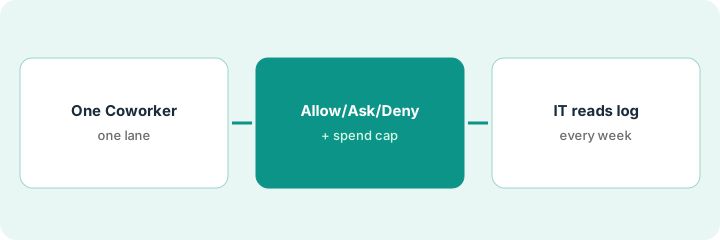
1. Define one Coworker's job
What it is: Turn on one AI Coworker for one ticket category, name its human manager, and give it read-only tools first.
- Pick one Coworker, such as the Device Ops Engineer.
- Limit it to one ticket category, such as laptop hardware.
- Name its human manager.
- Write its scope and escalation plan in one paragraph.
- Start with read-only diagnostics.
She starts the Device Ops Engineer on laptop hardware tickets only, with read-only diagnostics, and names herself its manager.
Write one Coworker's scope, manager, and escalation plan before turning it on.
2. Set a budget and Allow, Ask, or Deny per tool
What it is: Give the Coworker a monthly spend cap and set every tool it can use to Allow, Ask, or Deny.
- List every tool the Coworker can reach.
- Set reads and status checks to Allow.
- Set anything that changes something to Ask, with a named approver.
- Set anything that deletes to Deny.
- Set a monthly spend cap; it pauses for review when reached.
Before approving a Network Ops Coworker, the security reviewer asks for its tool list. Log reads and status checks are Allow, firewall rule changes are Ask with the network engineer as approver, and anything that deletes is Deny.
Set every tool that writes to Ask and every destructive tool to Deny.
3. IT reads the audit log weekly
What it is: Each week, IT reads the audit trail for a sample of runs and checks the steps match what a technician would have done.
- Pick five random runs each week.
- Read every step in the audit trail.
- Check each Ask was approved by the right person.
- Review handoffs to people and other Coworkers.
- Widen scope only after two clean weeks.
After two weeks, the IT manager's review shows most handoffs came with the right diagnostics attached, and two network issues were correctly passed to a person. She widens scope to peripherals.
Read five random runs in the audit log every week before widening a Coworker's scope.
Pricing context (October 2026)
This how-to isn't a price sheet. Per the Atomicwork review and Atomicwork's pricing page (checked Oct 18, 2026), the Professional plan starts from $25,000 per year billed annually, additional AI Coworkers are $499 per Coworker per month, and outcome-based pricing is $1 per knowledge outcome, $2 per access outcome, and from $3 per service outcome, each with annual minimums. Dated October 2026.
Checked Oct 18, 2026 on the vendor’s own pricing page: Atomicwork’s pricing page lists Professional from $25,000 per year billed annually, additional AI Coworkers at $499 per Coworker per month, and outcome prices of $1 per knowledge outcome, $2 per access outcome, and from $3 per service outcome, each with annual minimums.
Uncertainty: The only prices this site sells here are the optional $9 AI toolkit spreadsheet and $19 AI toolkit audit.
When this helps (honest take)
Useful when access requests and repeat questions make up much of your volume and someone owns the tool rules and the audit trail.
Not useful when you are a small company with low request volume, your main pain is device patching, or nobody will set tool rules or read the logs.
Related options (educational)
| Need | Where to look | Why |
|---|---|---|
| Atomicwork features | Atomicwork | Primary path |
| IT-approved app list for one plugin | Moveworks access plugin IT approval | A different job |
| Moveworks and Atomicwork side by side | Moveworks vs Atomicwork | Compare the two |
| Help desk ticket triage | ServiceNow triage labels | Existing how-to |
| IT ops stack map | Stack map: IT ops | Where Atomicwork fits |
FAQ
Can AI Coworkers act without approval?
Only where you allow it. Per our review, each tool is set to Allow, Ask, or Deny, each Coworker has a spend cap and a human manager, and every action is logged.
Do we have to replace ServiceNow or Jira Service Management?
No. Per our review, Bring Your Own Platform runs the Coworkers on top of an existing instance.
How much does Atomicwork cost?
Professional starts from $25,000 a year, extra Coworkers are $499 per month each, and outcome prices run $1, $2, and from $3. See the pricing section.
Optional next step
If you want a one-page toolkit map for the tools you already pay for, use the optional $9 AI toolkit spreadsheet. If you want a short review of seat waste and unused tools, use the optional $19 AI toolkit audit. Neither is required to follow this how-to.