How-to · Employee IT help · Moveworks · Oct 18, 2026
Turn on one Moveworks AI Assistant plugin for software access, and have IT approve which apps it can grant
The Moveworks AI Assistant can grant software access from chat, with manager approval where your process needs it. Every app it can grant is a decision IT should make once, in writing. This page shows how to turn on one plugin and have IT approve exactly which apps it covers.
Who this is for
IT service desk managers, IT ops leads, and service management admins who own employee IT help. The job here is an IT-approved app list for one plugin. For giving an Atomicwork AI Coworker a budget and Allow, Ask, and Deny rules — a different job — see Atomicwork AI Coworker rules.
How to do it
This is a how-to, not a ranking of IT assistants. Per the Moveworks review, the Assistant ships plugins for password resets, account unlocks, software access, and a ticketing concierge; admins can set deflections so sensitive actions send a self-service link instead; Knowledge Studio drafts help articles from tickets with citations; and Tool Studio is the new name for Agent Studio, with the rename rolling out until early November 2026. ServiceNow completed its acquisition of Moveworks on 15 December 2025 and says Moveworks is still sold standalone. The ground rule: IT approves every app the plugin may grant.

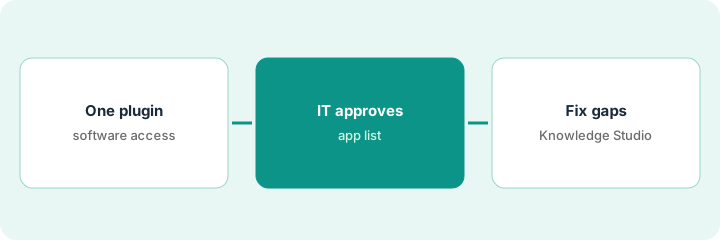
1. Pick one plugin
What it is: Pull last month's largest IT ticket categories and pick the software access plugin as the one to turn on first.
- Pull last month's 20 largest ticket categories.
- Mark which a built-in plugin covers and which must stay with a technician.
- Pick software access as the single plugin for this pilot.
- Give the plugin a named owner in IT.
- Keep password and account actions on deflection until security signs off.
At a 2,000-person company with about 1,100 tickets a month, software access is the second-largest category. She picks that plugin and names herself as owner.
Name one plugin and one owner before turning anything on.
2. IT approves which apps it may grant
What it is: IT writes and approves the list of apps the plugin may grant, and each app must already have a named approver in the service catalog.
- List the apps employees request most.
- Include only apps with a named approver in your service management catalog.
- Leave out admin roles and apps with sensitive data.
- IT approves the list by name and date.
- Review every grant the plugin makes for the first two weeks.
IT approves twelve apps, each with a manager or license-owner approver. Finance and admin tools stay with a technician. In week one, review finds one request routed to the wrong approver, which the catalog owner fixes.
Write the approved app list and have IT sign it before the plugin goes live.
3. Fix top Knowledge Studio gaps
What it is: Use Knowledge Studio to draft articles for the access questions the Assistant couldn't answer, and have the owning team check each step.
- Export questions the Assistant could not answer.
- Draft one article from resolved tickets with Knowledge Studio.
- Open every cited ticket and delete any step only one technician used.
- Have the owning team confirm the rest before publishing.
- Retire old pages the Assistant cites.
The gap list shows repeated questions about how long access takes. Knowledge Studio drafts an article from 14 tickets; the knowledge manager removes one workaround step and the access team confirms the rest.
Fix the top three knowledge gaps before you add another plugin.
Pricing context (October 2026)
This how-to isn't a price sheet. Per the Moveworks review and Moveworks' pricing page (checked Oct 18, 2026), Moveworks does not publish prices; its page offers a custom quote. It can also be bought as part of ServiceNow EmployeeWorks; ask which route your contract covers. Dated October 2026.
Checked Oct 18, 2026 on the vendor’s own pricing page: Moveworks shows no public list price. Moveworks’ pricing page offers a custom quote. This page quotes no Moveworks dollar figure; confirm what your contract includes with Moveworks or your admin.
Uncertainty: The only prices this site sells here are the optional $9 AI toolkit spreadsheet and $19 AI toolkit audit.
When this helps (honest take)
Useful when you have thousands of employees, a busy service desk, and requests that cross several systems, and someone will own plugin settings and approvals.
Not useful when you are a small team whose tickets are mostly hands-on device fixes, your knowledge base is thin, or ServiceNow already sells you the same capability.
Related options (educational)
| Need | Where to look | Why |
|---|---|---|
| Moveworks features | Moveworks | Primary path |
| Allow, Ask, and Deny rules for an AI Coworker | Atomicwork AI Coworker rules | A different job |
| Moveworks and Atomicwork side by side | Moveworks vs Atomicwork | Compare the two |
| Help desk ticket triage | ServiceNow triage labels | Existing how-to |
| IT ops stack map | Stack map: IT ops | Where Moveworks fits |
FAQ
Is Moveworks still available after ServiceNow bought it?
Per our review, yes: ServiceNow completed the acquisition on 15 December 2025 and said Moveworks is still offered standalone, alongside ServiceNow EmployeeWorks.
What is the difference between Agent Studio and Tool Studio?
Only the name. Per our review, the rename was announced on 25 September 2026 and rolls out until early November.
How much does Moveworks cost?
Moveworks does not publish prices; it is a custom quote. See the pricing section.
Optional next step
If you want a one-page toolkit map for the tools you already pay for, use the optional $9 AI toolkit spreadsheet. If you want a short review of seat waste and unused tools, use the optional $19 AI toolkit audit. Neither is required to follow this how-to.