Compare · IT ops · Employee IT front door · Oct 2026
Moveworks vs Atomicwork (Oct 2026): AI front doors for employee IT requests
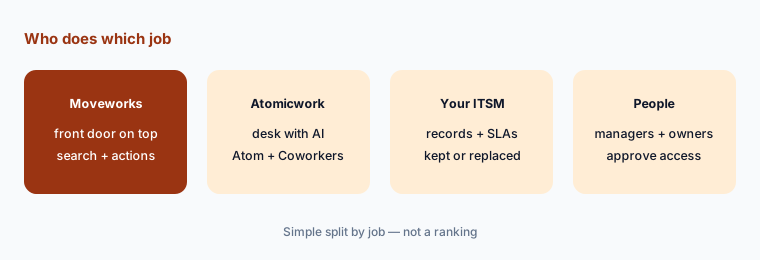
Moveworks and Atomicwork both put an AI assistant in front of employee IT requests, in Slack, Teams, and the browser. The real difference is what sits underneath. Moveworks says it “doesn’t replace your ITSM” — it works across ServiceNow, Jira, Freshservice, and the rest. Atomicwork is a service desk, and also offers to run its AI on top of ServiceNow or Jira Service Management while you decide whether to switch. This page compares them on that keep-or-replace question, not as a ranking, with a Try this for each.
What this comparison covers
This page is for the IT service desk owner or IT ops lead who wants employees to ask one assistant for help, and has to decide whether that assistant should sit on top of the IT service management (ITSM) tool they already run, or come with a new one.
The short version: Moveworks is a front door over your existing systems — its assistant files and updates tickets in your ITSM, resets passwords, grants software, and searches knowledge, and its Approvals Queue brings approvals from those systems into chat. ServiceNow completed its acquisition of Moveworks on 15 December 2025, and Moveworks still sells directly by custom quote. Atomicwork is a service desk with an assistant (Atom) and role-based AI Coworkers built in; its Bring Your Own Platform option runs those Coworkers on ServiceNow or Jira Service Management, which Atomicwork frames as a way to “start with IT, see the value, and decide to switch.” Atomicwork publishes prices; Moveworks does not.
Facts come from Moveworks’ and Atomicwork’s public pricing, product, and help pages and ServiceNow’s newsroom, re-checked on 7 October 2026, and match our Moveworks and Atomicwork reviews from the same day. Resolution and ROI figures on both sites — such as a Forrester study commissioned by Moveworks reporting 256% ROI — are vendor claims, not our measurement.
| Question | Moveworks | Atomicwork |
|---|---|---|
| Your current ITSM | Keep it: Moveworks says it “doesn’t replace your ITSM” | Replace it with Atomicwork’s service desk, or run its AI on ServiceNow or Jira Service Management first |
| Where the ticket lives | In ServiceNow, Jira, Freshservice, or another ITSM | In Atomicwork (or in ServiceNow/JSM with Bring Your Own Platform) |
| Assistant employees use | AI Assistant in Slack, Teams, Google Chat, web, and mobile | Atom in Slack, Teams, browser, email, and portal |
| Building your own | Tool Studio (formerly Agent Studio), AI Agent Marketplace, MCP | AI Coworkers with a manager and budget; native MCP server |
| Approvals | Approvals Queue syncs approvals from your systems into chat | Allow/Ask/Deny per tool, spend caps, human sign-off steps |
| Prices | Custom quote only | Published: Professional from $25,000/year, or per outcome |
Major features (with how someone uses them)
Examples at a glance: each feature has a concrete example from a real job plus a short Try this you can run this week.
1. Start from your top ten employee requests (primary)
What it is: Before comparing assistants, sort your requests by what they need underneath. Some need an ITSM record (an incident, a change, an asset update — something auditors or SLAs care about). Some need an approval (software access, an admin role, a new laptop). Some need just an answer (VPN steps, the Wi-Fi password policy, how to expense a monitor). The mix tells you how much the ITSM underneath matters, and therefore whether keeping it or replacing it is the real question.
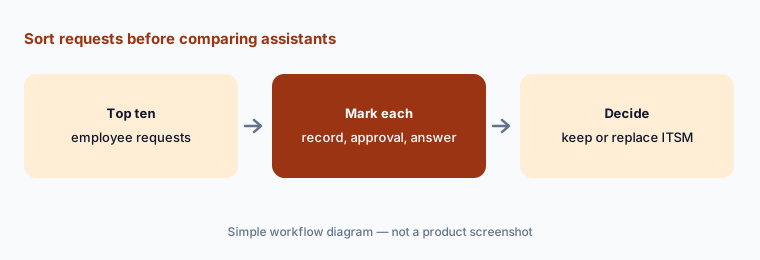
Primary workflow:
Write your top ten employee requests. Mark which need an ITSM record, an approval, or just an answer.
2. Keep your ITSM or replace it
What it is: Moveworks is explicit: “Moveworks doesn’t replace your ITSM — it makes it smarter,” across ServiceNow, Jira, Freshservice, or a mix, plus identity providers such as Okta and endpoint tools such as Intune. Tickets, approvals, and records stay where they are, and the assistant reads and writes them. Inside ServiceNow, Moveworks’ chat and search also arrive as part of ServiceNow EmployeeWorks, and ServiceNow introduced Otto, a unified AI experience, at its Knowledge 2026 event in May — so a ServiceNow customer should ask which route their contract already covers. Atomicwork is the service desk itself: requests, incidents, changes, assets, a CMDB, workflows, and analytics. Its Bring Your Own Platform option runs its AI Coworkers on an existing ServiceNow or Jira Service Management instance with no platform fee — and its FAQ says you can “start here, prove ROI, and choose when you’d like to move to the full Atomicwork platform.”
So the honest framing is: Moveworks assumes you keep your ITSM; Atomicwork lets you keep it for now, and is built for the day you replace it. If your ITSM is deeply customized, audited, and shared with HR and facilities, keeping it is a big advantage. If your “ITSM” is a shared inbox and a spreadsheet, replacing it is the point.
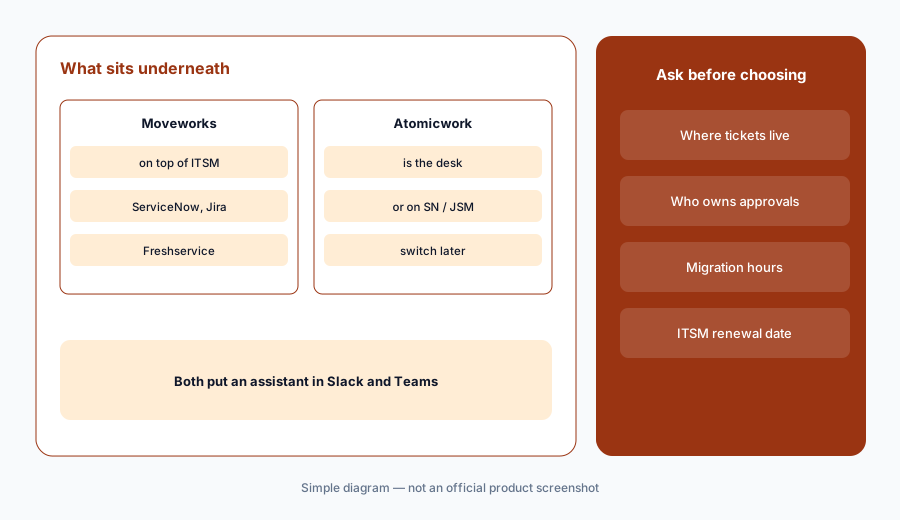
Where do tickets live in a year:
Ask both vendors, in writing, where your tickets, approvals, and asset records will live in twelve months. Then estimate the admin hours a migration would take, even if you never do it.
3. The assistant employees talk to
What it is: Moveworks’ AI Assistant works in Slack, Microsoft Teams, Google Chat, web, and mobile. Its help docs describe knowledge answers with citations you can open, people and places lookups, and forms, and say it can file a ticket, provision software, add people to distribution lists, reset passwords, and unlock accounts. Built-in plugins look up, comment on, resolve, and reopen tickets from chat. A Smart Handoff feature passes conversations to people, and admins can set plugin deflections so a sensitive action sends instructions instead. Atomicwork’s Atom works in Slack, Teams, the browser, email, and the portal; Atomicwork says it uses on-screen context such as error messages, reads screenshots, splits a message with several asks into separate requests, and gives permissions-aware answers, with verbatim answers for sensitive topics such as payroll.
Both will answer questions. The difference to test is what happens next: where the ticket is created, who sees it, and what the employee sees when the assistant hands off. Run the same five requests through both pilots and read what landed in the queue.
Same five requests:
Send the same five real employee requests to both assistants in a pilot channel. For each, record what was created — ticket, approval, answer, or handoff — and where it landed.
4. Approvals and access requests
What it is: Moveworks brings approvals to the approver: its Approvals Queue synchronizes approval records from your systems so managers can approve or deny in chat (records drop out after 30 days without an update), and its software-access plugins grant access through your existing process. If you build your own actions in Tool Studio, design an explicit approval step into them. Atomicwork builds approvals into its own workflows and AI Coworkers: its pricing page defines an Access outcome as one request handled end to end — manager approval, provisioning, or deprovisioning — and its AI Workforce page lets you set each tool a Coworker can use to Allow, Ask, or Deny, put a human sign-off at any step, and set a spend cap per Coworker.
Whichever you pick, write the approval rule before you automate it: who approves which app, for how long, and what happens when the approver is out. An assistant makes a vague rule faster, not clearer.
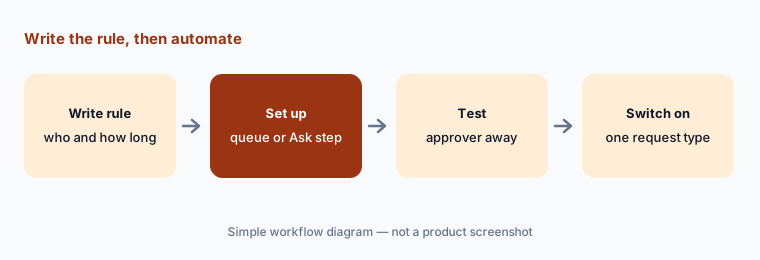
Rule first, then automate:
Write the approval rule for one access request type: who approves, for how long, and what happens when the approver is away. Set it up in each pilot and test the away case before switching it on.
5. Building your own: Tool Studio vs AI Coworkers
What it is: Moveworks Tool Studio — the new name for Agent Studio, with the rename expected to finish rolling out by early November 2026 — is a low-code environment for building actions and agents, with an AI Agent Marketplace of installable templates and support for tools from MCP servers. Moveworks says an MCP Workspace to track changes is coming “soon.” Atomicwork’s AI Coworkers are framed as roles rather than tools — Atomicwork launched seven on 9 June 2026, such as a Device Ops Engineer and an Access Manager — each with a defined scope, a human manager, a budget, and an escalation plan, and you can describe a new one in a few sentences. Atomicwork also offers a native MCP server so tools like Claude or VS Code Copilot can query tickets and create incidents.
The build question is who maintains it. A Tool Studio action is owned by whoever owns the integration; an AI Coworker is owned by its named human manager. Put a name next to each before the first one goes live.
One build, one owner:
Pick one multi-step IT request you repeat every week. Sketch it as a Tool Studio action and as an AI Coworker job, and write the name of the person who would maintain each before you build either.
6. Pricing and ownership
What it is: Moveworks offers a custom quote with “scalable packages” on its pricing page, and points to a Forrester Total Economic Impact study, commissioned by Moveworks, that reports 256% ROI for a composite customer. It is a ServiceNow company, and the same capabilities also reach ServiceNow customers through EmployeeWorks. Atomicwork publishes two pricing formats: usage-based, with the Professional plan from $25,000 a year, and outcome-based, from $1 per knowledge answer to from $3 per resolved service request, with annual minimums. Bring Your Own Platform has no platform fee; you pay for consumption.
Price the same thing both ways: take your top ten requests, estimate monthly volume for each, and ask each vendor what that volume costs and which requests it would handle end to end. Published prices make Atomicwork easier to model up front; a Moveworks quote may bundle more systems. Either way, compare against the ITSM licenses you already pay for.
Same volumes, both quotes:
Estimate monthly volume for each of your top ten requests. Ask both vendors to price that same list, and add your current ITSM renewal to both totals before comparing.
Pricing context (October 2026)
Moveworks does not publish prices. Its pricing page (checked 7 October 2026) offers a custom quote with scalable packages and cites a Forrester Total Economic Impact study commissioned by Moveworks (256% ROI and $11.5M savings over three years for a composite customer) — a vendor-commissioned figure, not a benchmark for your company. Inside ServiceNow, ask how EmployeeWorks is packaged in your contract.
Atomicwork publishes prices. On its pricing page (checked 7 October 2026), the usage-based Professional plan starts from $25,000 per year, billed annually, including 25,000 credits and two AI Coworkers (additional Coworkers $499 per Coworker per month), for up to 250 end users; Business and Enterprise are quoted. Outcome-based pricing is $1 per Knowledge outcome (minimum 25,000 a year), $2 per Access outcome (minimum 12,000 a year), and from $3 per Service outcome (minimum 8,000 a year), with volume discounts. Bring Your Own Platform on ServiceNow or Jira Service Management has no platform fee.
Uncertainty: Moveworks prices are not public, so we quote none. Atomicwork prices are as shown on 7 October 2026 and may change; its own pages disagree on the starting plan — the pricing table lists two AI Coworkers for Professional, while its AI Workforce FAQ says plans start at $25,000 a year for 25,000 credits and five Coworkers. Moveworks’ Agent Studio to Tool Studio rename is still rolling out until early November 2026, and ServiceNow packaging may keep shifting.
When it’s useful (honest take)
Moveworks is useful when you run a mature ITSM (often ServiceNow) plus many other systems, you want one assistant on top of all of them, and your company is large enough that a custom quote and integration work pay off. Ask first whether your ServiceNow contract already covers it through EmployeeWorks.
Atomicwork is useful when your current help desk is light or due for replacement, you want published prices you can model, and you are comfortable with role-based AI Coworkers that each have a manager and a budget — or when you want to try its AI on ServiceNow or Jira Service Management before deciding.
Less useful when (either one) most of your requests are device fixes rather than access and answers — an RMM such as Atera or NinjaOne may matter more (see NinjaOne vs Atera) — or when your knowledge base is out of date, because both assistants answer from it.
Still choosing between Moveworks and Atomicwork? The $19 AI toolkit audit gives you a written plan for which tools to keep using and which to drop across your whole AI stack, including this pair.
Prefer to do it yourself? Spreadsheet — $9
Related options (educational)
| Need | Better home | Why |
|---|---|---|
| AI front door on top of an existing ITSM | Moveworks | Assistant, enterprise search, Tool Studio, Approvals Queue |
| Service desk with AI built in | Atomicwork | Atom, AI Coworkers, published prices |
| You already run ServiceNow | ServiceNow AI | Now Assist, EmployeeWorks, Otto |
| Device fixes and patching | NinjaOne vs Atera | RMM AI and who approves device actions |
| Identity and device admin | JumpCloud AI | Directory, devices, and AI governance |
| SaaS access reviews and license cleanup | Zluri or Torii | Seats and access, not tickets |
FAQ
Is Moveworks or Atomicwork better for employee IT requests?
Neither in general, and this page is not a ranking. Moveworks sits on top of the ITSM you already run; Atomicwork is a service desk with AI built in, and can also run its AI on ServiceNow or Jira Service Management. Sort your top ten requests by record, approval, or answer to see which question matters.
Do I have to replace ServiceNow or Jira Service Management?
Not with Moveworks, which says it doesn’t replace your ITSM. Not at first with Atomicwork either: its Bring Your Own Platform option runs AI Coworkers on ServiceNow or Jira Service Management with no platform fee, and Atomicwork says you can choose later whether to move to its full platform.
Is Moveworks part of ServiceNow now?
Yes. ServiceNow completed its acquisition of Moveworks on 15 December 2025 and brought Moveworks’ chat and search into ServiceNow EmployeeWorks. Moveworks still offers custom quotes directly on its own pricing page as of 7 October 2026.
How much do Moveworks and Atomicwork cost?
Moveworks is custom quote only. Atomicwork publishes a Professional plan from $25,000 a year and outcome-based prices from $1 to from $3 per outcome with annual minimums, as of 7 October 2026. Check Moveworks and Atomicwork.
Who approves access when the assistant handles a request?
In both, a person you name. Moveworks brings approval records from your systems into its Approvals Queue so managers approve in chat. Atomicwork lets you set each Coworker tool to Allow, Ask, or Deny and add human sign-off steps. Write the rule before you automate it.
Optional next step (if seats overlap)
If IT pays for an ITSM, an AI front door on top of it, and AI features inside the ITSM that answer the same questions, that overlap is worth mapping before renewal. Map the overlap with the $19 AI toolkit audit or the $9 AI toolkit spreadsheet. Email Audit $19 or Toolkit spreadsheet $9.
Checkout is live via Stripe. After you pay, we email delivery (spreadsheet) or intake next steps (audit).