Tool · Finance · Drivetrain · Oct 2026
Drivetrain review (Oct 2026): AI-assisted FP&A for growing companies
Drivetrain is a cloud FP&A platform for finance teams that have outgrown spreadsheets: it connects to your accounting, CRM, HR, and billing systems, holds the model in its own multi-dimensional engine, and puts Drive AI on top — agents that build models, run scenarios, explain variances, and draft reports. Drivetrain says the AI writes logic and formulas but never generates the numbers, and asks before it changes anything. This page walks through each piece with a real job, a Try this, and the number you rebuild yourself before it goes in the board deck.
What this Drivetrain page covers
This page is for the founder, first finance hire, or small FP&A team at a startup or mid-market company whose model has outgrown a spreadsheet — usually because actuals live in several systems, scenarios live in separate files, and every “what if” lands on one person. The question it answers: what Drive AI does today, what still needs a person, and how to check an AI-built number before a board or investor sees it.
Drivetrain’s pitch rests on two claims worth testing in a demo. First, that the AI “writes the logic and the formulas, but every number is calculated deterministically by our calculation engine” — so the risk shifts from made-up numbers to wrong logic. Second, that the AI “never changes anything on its own” and asks for approval before modifying any model, report, or dataset. Both are Drivetrain’s statements; a pilot is how you see whether they hold for your model.
Everything below comes from Drivetrain’s public website — the Drive AI, MCP, trust and security, FAQ, micro-demo, and use-case pages — as we read them on 7 October 2026. Drivetrain’s product documentation sits behind its customer login, and we found no public changelog, so dates for individual features aren’t available. Drivetrain’s figures (800+ connectors, 4–6 week implementations) are vendor claims, not our measurement.
Major features (with how someone uses them)
Examples at a glance: each feature has a concrete example from a real job plus a short Try this you can run this week.
1. Insights agent: this month’s burn and runway from one connected source (primary)
What it is: Drivetrain connects to accounting and ERP systems, CRM, HR and applicant tracking, billing, data warehouses, and spreadsheets, with scheduled syncs; its site says 800+ connectors. Once actuals flow in, the Insights agent answers ad-hoc questions grounded in your data, and Drivetrain’s cash flow page describes daily visibility into runway and burn and prompts such as “How would our runway change if we hired 30 reps next month?” Drivetrain says each answer comes with its source so you can drill into the inputs and formulas behind it.
Burn and runway sound simple and rarely are. Is burn net or gross? Does cash include a restricted account or a credit line? Is runway at last month’s burn or a three-month average? The AI will pick a definition. Rebuilding the number yourself from the bank and the GL shows you which one it picked, and whether it matches the definition your board already uses.
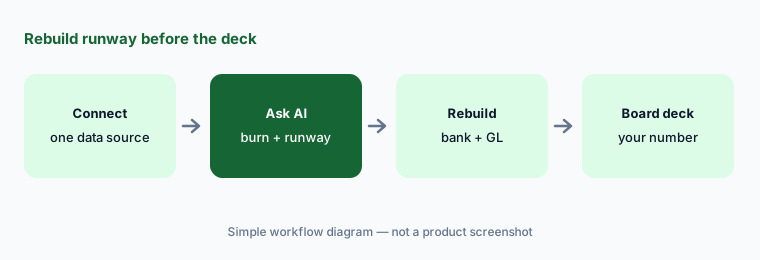
Primary workflow:
Connect one data source. Ask the AI for this month’s burn and runway. Rebuild the number yourself before the board deck. Write down which burn definition and cash balance the AI used, and whether they match your board’s.
2. Modeling and Formula agents: build a model, or rebuild your Excel one
What it is: The Modeling agent builds a model from a description using your own dimensions and metrics, or — Drivetrain says — you can upload an existing Excel model and it rebuilds the same logic. Drivetrain also ships starter applications such as a three-statement model for NetSuite, Sage Intacct, or Xero, headcount and payroll, ARR waterfall, vendor cost, and pipeline movement. The Formula agent explains, writes, and debugs formulas in plain English, which is the quickest way to read logic someone else built.
A rebuilt model is a translation, and translations lose things. Before you retire the spreadsheet, pick the five outputs that matter most — revenue, gross margin, opex, ending cash, headcount — and compare them month by month against the old file. Use the Formula agent on every line that differs.
Five outputs, month by month:
Rebuild one existing Excel model with the Modeling agent. Compare five key outputs month by month against the original file, and ask the Formula agent to explain every line that differs before anyone retires the spreadsheet.
3. Scenario agent and the approval step before any change
What it is: The Scenario agent runs what-ifs on your model — Drivetrain’s example is growing 30% in a new market and letting the change ripple through — or works backward from a target to find a path to it. Its homepage also lists Plan mode, versioning, and an audit trail. Drivetrain’s trust page says the AI “never changes anything on its own. It asks for your approval before modifying any model, report, or dataset,” and its FAQ says the platform logs every action with timestamps and user attribution, plus an impact log showing how model changes moved key metrics.
The approval prompt is only a control if the person approving reads the change. For the first month, treat every AI-proposed change like a pull request: open the impact log, read which metrics moved and by how much, and approve only what you can explain to the CEO in one sentence.
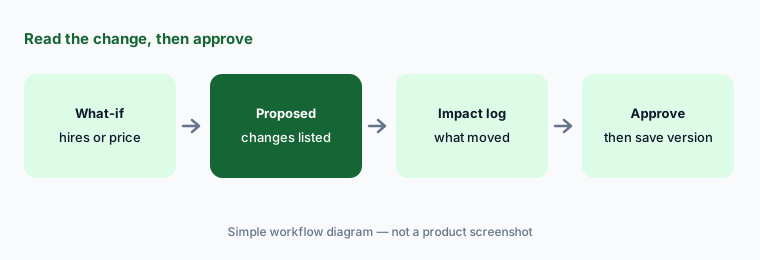
Read before you approve:
Ask the Scenario agent one what-if about hiring or pricing. Before you approve, open the impact log and write one sentence for each metric that moved. Approve only the changes you can explain, and save the result as a separate version.
4. BvA, Reporting, and Transform agents: commentary, dashboards, and data cleanup
What it is: The BvA agent finds the driver behind a budget-versus-actual variance and drafts the commentary; the Reporting agent builds live dashboards and reports from plain English, in your brand colors; and the Transform and data classification agents clean messy data, classify accounts, and run transformations without SQL. A Help agent answers product questions inside Drivetrain. Drivetrain’s homepage also lists department-scoped views, budget templates, approval workflows, and locked versions for budget owners.
Drafted commentary is the part most likely to be pasted straight into a board pack. Keep a simple rule: every sentence that explains a variance must name the driver and the amount, and someone who owns that budget line has read it. Account classification is the part most likely to be accepted in bulk — spot-check it before you trust any report built on it.
Driver and amount, every sentence:
Run the BvA agent on last month. For every sentence it drafts, check that it names a driver and an amount you can drill into, and have the owner of that budget line read it before it goes in the board pack.
5. MCP server, Slackbot, and custom agents: Drivetrain numbers in Claude and ChatGPT
What it is: Drivetrain’s MCP server lets Claude, ChatGPT, Perplexity, Slack, Notion, and automation tools such as n8n and Zapier read your live planning data. Drivetrain says people sign in with their Drivetrain credentials, access controls are enforced at the metric level and carry through MCP, and admins can see what is connected. It goes beyond reading: Drivetrain says its interoperability with Claude lets you edit models and reports and update assumptions from the chat, with every change still passing through your access controls and approval steps. There is also a Drivetrain Slackbot and custom agents that run a defined task — Drivetrain’s examples are a weekly re-forecast or a cash flow analysis delivered on Slack.
On data handling, Drivetrain says Drive AI routes tasks between its own models and frontier models from providers such as Anthropic and OpenAI, under enterprise agreements with zero-data-retention terms, and that customer data is never used to train or fine-tune any model. Role-based access and compensation masking (individual salaries hidden, totals visible) apply to AI the same way. Two of Drivetrain’s own pages disagree on hosting: its trust page says data is stored in the region you choose (Frankfurt or Virginia), while its FAQ says production runs on AWS and Google Cloud “all hosted in the USA.” Ask which applies to your contract.
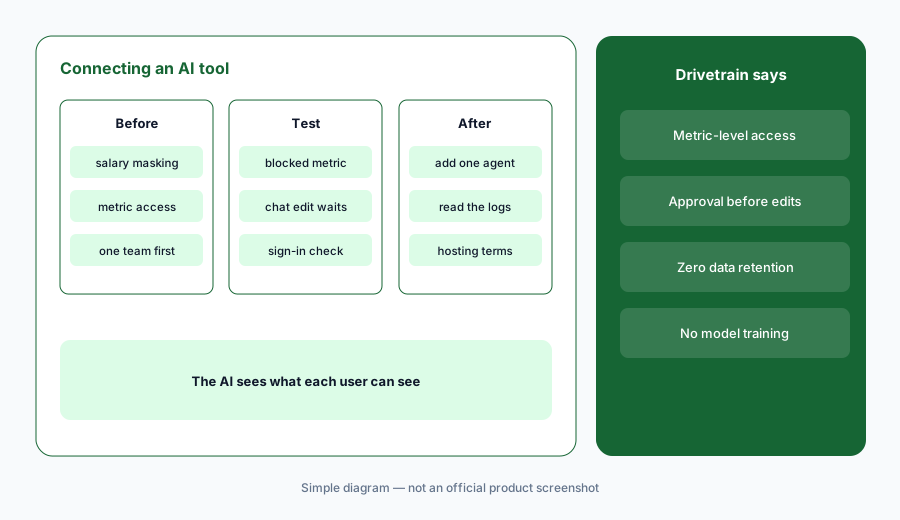
Test the edges first:
Connect one AI tool to Drivetrain through MCP for one team. Test that a user who can’t see salaries in Drivetrain can’t get them through the AI tool, and that a change requested from chat waits for approval in Drivetrain. Then add one scheduled agent.
6. Where Drivetrain fits against other options
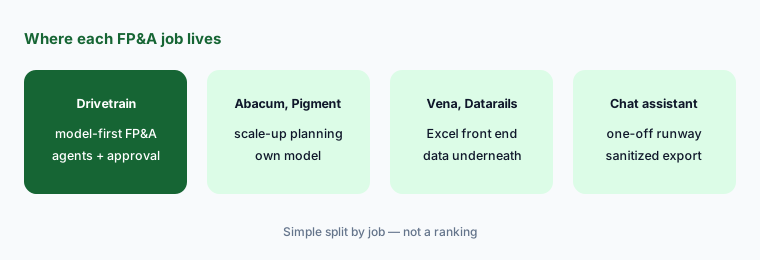
What it is: Drivetrain suits startups and mid-market companies that want to move planning out of spreadsheets into a connected model without hiring consultants: Drivetrain says implementation is handled in-house, usually in 4–6 weeks, with self-serve, co-build, or white-glove options, a dedicated customer success manager, and a shared Slack channel. Abacum and Pigment make a similar move for scale-ups and larger teams; Anaplan and Planful lean enterprise. Teams that want to keep Excel as the front end look at Vena, Datarails, or Cube instead.
If the real need is a cleaner close rather than planning, FloQast or Numeric may come first. And if you only need a one-off runway model for a fundraise, a sanitized export and a general assistant such as Claude can get you a draft — you still rebuild the number.
Proof of concept on your data:
Drivetrain offers guided demos and proof-of-concept engagements instead of a free trial. Bring your own sanitized export, ask for the board pack and runway on it, and have someone rebuild both numbers by hand before you compare quotes.
Pricing context (October 2026)
Drivetrain does not publish prices. On 7 October 2026, drivetrain.ai/pricing returned a “page not found” error, and its FAQ says pricing “depends on the systems you integrate and the features you need,” with “fixed plans tailored to your setup” and a custom proposal. It lists model complexity, the number of connected data sources, and the implementation model as factors, and says pricing is not strictly tied to company size or usage volume.
Three FAQ answers matter for budgeting: implementation costs are included in the pricing package with no separate setup fee; there is no additional fee for AI features, which Drivetrain says are covered as a standard part of the contract; and there is no self-serve free trial — Drivetrain offers guided demos and proof-of-concept engagements. Ask for those three points in writing in your proposal.
Uncertainty: Drivetrain publishes no prices, so we quote none; any figure elsewhere is someone’s quote, not a list price. Its product docs are behind a customer login and we found no public changelog, so we can’t date individual agents or say which are beta. Hosting details differ between its trust page and FAQ — confirm in your contract. All as of 7 October 2026.
When it’s useful (honest take)
Useful when actuals live in several systems, scenarios live in separate spreadsheet copies, and one or two people answer every “what if.” The connectors, starter models, and agents shorten first drafts, and the approval step plus impact log give a reviewer something concrete to read before a change lands.
Less useful when your team wants to stay in Excel day to day, when one simple spreadsheet still does the job, or when nobody owns metric definitions such as burn, ARR, or headcount — the AI will pick a definition for you. Less useful too if you need public documentation or a dated changelog before buying; Drivetrain’s are behind its login.
Paying for Drivetrain and a few other AI tools? The $9 AI toolkit spreadsheet lists every AI subscription you have, what each one costs, and how fast it pays for itself, so you can see which ones are worth the money.
Want someone to do it for you? AI toolkit audit — $19
Related options (educational)
| Need | Better home | Why |
|---|---|---|
| Model-first FP&A for startups and mid-market | Drivetrain (this page) | Drive AI agents, approval before changes, MCP |
| Collaborative planning for scale-ups | Abacum or Pigment AI | Planning model with AI assists and agents |
| Enterprise connected planning | Anaplan AI or Planful AI | Larger models and teams |
| Keep Excel as the front end | Vena AI, Datarails, or Cube | Spreadsheet stays; data and AI sit underneath |
| One-off runway model on an export | Claude for finance | No live data; you rebuild every number |
| Inventory of finance AI seats | Stack map for finance ops | Overlap check before adding another tool |
FAQ
What is Drive AI?
Drive AI is Drivetrain’s set of AI agents — Modeling, Formula, Scenario, Insights, BvA, Reporting, Transform, and Help — plus custom agents, a Slackbot, and an MCP server. Drivetrain says it builds models, scenarios, and reports and explains variances, while a deterministic engine calculates every number.
Can Drivetrain’s AI change my model on its own?
Drivetrain says no: its AI asks for approval before modifying any model, report, or dataset, and changes requested through Claude still pass through your access controls and approval steps. Every action is logged, and an impact log shows how changes moved key metrics.
Which AI models does Drivetrain use?
Drivetrain says Drive AI uses a mix of its own models and frontier models from providers such as Anthropic and OpenAI, choosing a model per task, under enterprise agreements with zero-data-retention terms. It says customer data is never used to train or fine-tune any model.
Can I use Drivetrain data in Claude or ChatGPT?
Yes, through Drivetrain’s MCP server, which Drivetrain says works with Claude, ChatGPT, Perplexity, Slack, Notion, and tools such as n8n and Zapier. Users sign in with Drivetrain credentials, and metric-level access controls carry through, so the AI shows only what that user can see.
How much does Drivetrain cost?
Drivetrain publishes no prices. As of 7 October 2026 its FAQ says pricing depends on the systems you integrate, the features you need, model complexity, and the implementation model, with a custom proposal; implementation is included and AI features carry no extra fee. There is no self-serve free trial.
Optional next step (if seats overlap)
If finance pays for Drivetrain, a spreadsheet add-in, and several chat assistants that the team uses to rebuild the same runway numbers, that overlap is worth mapping. Map the overlap with the $19 AI toolkit audit or the $9 AI toolkit spreadsheet. Email Audit $19 or Toolkit spreadsheet $9.
Checkout is live via Stripe. After you pay, we email delivery (spreadsheet) or intake next steps (audit).