Tool · Finance · Planful · Oct 2026
Planful AI review (Oct 2026): AI forecasting and anomaly checks for FP&A
Planful is a financial performance management platform for mid-size and enterprise finance teams: planning, budgeting, consolidation, close, and reporting in one system. Its AI, branded Planful AI, has two layers. Machine-learning features — Signals for anomaly detection and Projections for baseline forecasts — come from what Planful calls its Predict engine. On top sit conversational assistants: Analyst, Planner, and Help, plus a read-only MCP Server for Claude. This page walks through each with a real FP&A job, a Try this, and where the analyst confirms the flag.
What this Planful AI page covers
This page is for the FP&A manager or director at a mid-size or enterprise company who already runs on Planful — or is evaluating it — and wants to know what the AI flags, forecasts, and explains, and how much of it to trust before it reaches leadership. The question it answers: which Planful AI features do real work today, which are announced as coming, and what the analyst still owns.
On naming: older announcements in Planful’s own newsroom archive call the machine-learning features “Predict: Signals” and “Predict: Projections.” As of 7 October 2026, Planful’s product pages call them simply Signals and Projections, while its 29 April 2026 press release still says the Planner Assistant is “built on the Planful Predict engine.” Same features. Planful says Analyst launched in October 2025 and Planner reached general availability on 29 April 2026.
Everything below comes from Planful’s public product pages, press release, and trust center as we read them on 7 October 2026. Planful’s help center now requires a customer login, so setup details (such as how much history Signals needs) aren’t verified here; ask for them in a demo. Planful’s “1,500+ customers” figure is a vendor claim.
Major features (with how someone uses them)
Examples at a glance: each feature has a concrete example from a real job plus a short Try this you can run this week.
1. Signals: run the anomaly check on one month (primary)
What it is: Signals scans actuals, forecasts, and assumptions against your own historical trends, seasonality, and expected ranges, and flags what falls outside. Planful says it pairs machine learning with statistical variance analysis, prioritizes anomalies by risk level, explains what caused each one, and lets your team confirm, resolve, or escalate variances in the platform. You control the time horizon. Planful lists the kinds of issues it catches as unexpected expense spikes, broken formulas, unusual headcount changes, forecast deviations, and data entry errors.
An anomaly is “unusual for your history,” not “wrong.” A planned price increase, a reorg, or a one-time bonus will all look odd to a model trained on the past. That is why the useful output is the analyst’s note on each flag, not the flag itself.
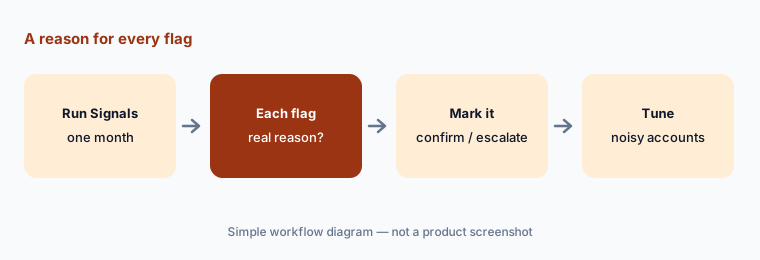
Primary workflow:
Run Planful’s anomaly check on one month. For every flag, write the real reason or “not an anomaly”. Then confirm, resolve, or escalate each one in Signals so the next reviewer sees your note, and count how many flags were noise.
2. Projections: machine-learning baselines with boundaries
What it is: Projections builds a baseline forecast from your historical performance so each cycle starts from numbers instead of a blank model. Planful says ALGO mode picks the best-fit model for your data, upper and lower boundaries keep the forecast from drifting with bias, and you can adjust by value or percentage and compare plans side by side. Planful says Projections and Signals run on its own proprietary models, not on the outside language model.
Baseline beside actuals:
Generate a Projections baseline for one stable account and put it beside last year’s actuals and your current forecast. For any month outside the upper or lower boundary, write the business reason before you change the plan.
3. Planner Assistant: plain-language forecasts and drift flags
What it is: The Planner Assistant (generally available since 29 April 2026) takes plain-language requests — Planful’s examples include “What does CAPEX look like if we increase headcount by 15% in Q3?” and “Detect anomalies in my current forecast for sales and marketing expenses.” Planful says it projects each account forward using that account’s trend, seasonality, and step changes, shows those three components behind every number, and monitors P&L and GL activity between cycles to flag accounts drifting off plan.
Two items on Planful’s Planner page are labeled “coming soon”: scenario write-back (Planner writing projections directly into your planning structure) and deeper driver insight with recommended actions. Until write-back ships, a Planner forecast is an answer in a conversation, and someone still keys or loads it into the plan — which is also a natural review step.
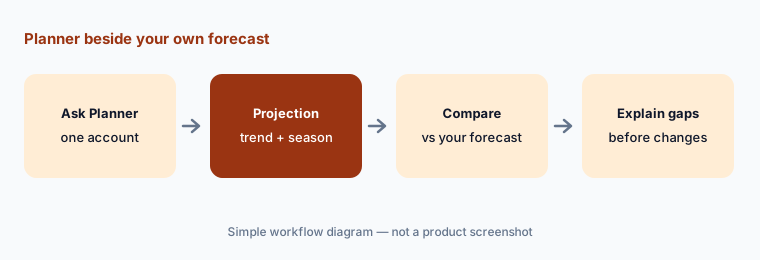
Check it against your own forecast:
Ask Planner for one projection your team already forecast by hand, such as next quarter’s IT spend. Compare the two line by line and note whether trend, seasonality, or a step change explains each gap.
4. Analyst Assistant: what drove the variance, and is it one-time?
What it is: The Analyst Assistant answers questions like “What’s driving the increase in OpEx?” by pulling the account-level detail behind the number, writing the explanation in plain language with a chart, and flagging whether a variance looks like a one-time event or a repeating pattern. Planful says every answer shows the accounts, entities, and periods behind it, drawn from its calculation engine, and that the assistant uses OpenAI for language understanding.
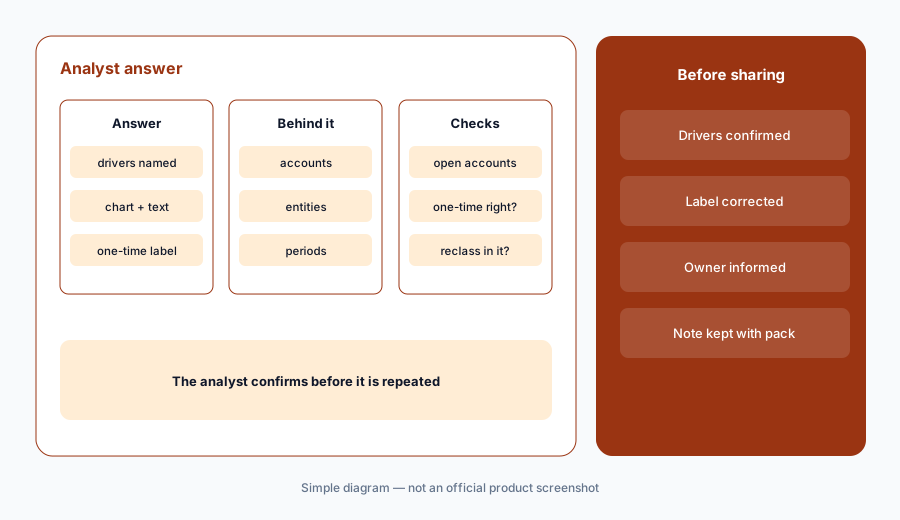
One-time or repeating?
Ask Analyst what drove last month’s biggest opex variance. Open the accounts it names and check whether it labeled the variance one-time or repeating correctly before you repeat the answer.
5. MCP Server, the Help assistant, and where your data goes
What it is: The Planful MCP Server lets Claude pull live Planful reports, with ChatGPT, Copilot, and Gemini listed as “coming next.” Planful says it is read-only — it “can’t create, edit, or delete anything in Planful” — uses OAuth, and enforces dimension security, scenario security, and role-based access before any data leaves. The Help assistant finds reports, dashboards, and settings by name and answers how-to questions from Planful’s support documentation.
Read Planful’s data statements side by side. Planful says customer data is never used to train AI models, that prompts are logged within Planful for usage analytics, and that its assistants combine OpenAI with its own calculation engine. Its FAQ also says “your financial data never leaves the platform.” For MCP, Planful says data flows into your own AI workspace under your agreement with that provider. Ask Planful in writing how the OpenAI processing works, and check your Claude plan’s data terms before connecting.
Security before connection:
Before connecting Claude through the MCP Server, list which reports each finance role can open in Planful. Fix scenario and dimension security first, then confirm which Claude plan and data terms your company uses.
6. Where Planful AI fits against other options
What it is: Planful suits mid-size and enterprise finance teams that want planning, consolidation, close, and reporting in one platform with ML forecasting and anomaly checks built in. Anaplan serves the largest connected-planning programs with dedicated model builders. Abacum and Pigment target faster-moving mid-market teams. Teams staying in spreadsheets may prefer Datarails or Cube.
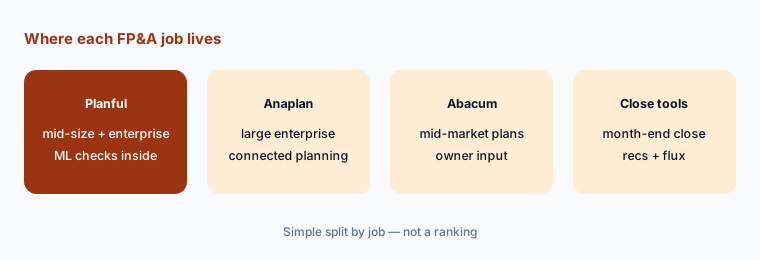
Four jobs, four owners:
List the four FP&A jobs you want AI for: forecast, variance, anomaly, and how-to. In a Planful demo, ask which assistant or feature handles each, which are coming soon, and what still needs an analyst.
Pricing context (October 2026)
Planful does not publish prices. On 7 October 2026, planful.com/pricing/ returned a “page not found” error, and the site offers “Book a Demo” and “Get a Demo” forms instead. We found no plan names, seat counts, or AI add-on prices on Planful’s public pages.
Planful’s public pages also don’t say which AI features are included in a base subscription and which are extra. Ask which of Signals, Projections, Analyst, Planner, Help, and the MCP Server your quote covers.
Uncertainty: Planful publishes no prices, so we quote none; any figure you see elsewhere is someone’s quote, not a list price. Planner scenario write-back and MCP support for ChatGPT, Copilot, and Gemini are announced as coming, not live, as of 7 October 2026. Planful’s accuracy and time-savings statements are vendor claims, not our measurement.
When it’s useful (honest take)
Useful when you already plan and consolidate in Planful and have several years of clean actuals, so Signals and Projections have history to learn from. The anomaly check catches miscodings before the pack, Projections gives each cycle a starting baseline, and Analyst and Planner shorten first-draft explanations.
Less useful when your history is short or full of reorgs and one-offs — anomaly and baseline models learn from the past, so a messy past means noisy flags. Less useful for small teams whose plan fits in a spreadsheet, and if you need an assistant to write forecasts straight into the plan today, since write-back is still coming.
Paying for Planful AI and a few other AI tools? The $9 AI toolkit spreadsheet lists every AI subscription you have, what each one costs, and how fast it pays for itself, so you can see which ones are worth the money.
Want someone to do it for you? AI toolkit audit — $19
Related options (educational)
| Need | Better home | Why |
|---|---|---|
| Mid-size and enterprise FP&A with ML checks | Planful AI (this page) | Signals, Projections, Analyst, Planner, MCP |
| Large connected planning | Anaplan AI | Forecaster, Analyst, CoModeler |
| Mid-market planning with owner input | Abacum | AI Data Entry, AI Spaces |
| Stay in Excel or Google Sheets | Datarails or Cube | Spreadsheets stay the front end |
| Month-end close and reconciliations | FloQast AI or Numeric | Accounting close tools |
| Inventory of finance AI seats | Stack map for finance ops | Overlap check before adding another tool |
FAQ
What AI features does Planful have in October 2026?
Signals (anomaly detection), Projections (machine-learning baselines), the Analyst, Planner, and Help assistants, and a read-only MCP Server for Claude. Planner scenario write-back and MCP support for ChatGPT, Copilot, and Gemini are listed as coming.
Is Planful Predict the same as Signals and Projections?
Yes. Older Planful material calls them Predict: Signals and Predict: Projections; current product pages call them Signals and Projections, and Planful still refers to the Predict engine behind them.
Can Planful’s AI change my plan?
Planful says the MCP Server is read-only and cannot create, edit, or delete anything. Planner’s scenario write-back is labeled coming soon, so today its projections stay in the conversation until someone puts them in the plan. Signals lets your team confirm, resolve, or escalate each flag.
Does Planful use my data to train AI?
Planful says no: customer data is never used to train AI models. It says its assistants combine OpenAI with its own calculation engine, that Signals and Projections are proprietary, and that prompts are logged within Planful for usage analytics.
How much does Planful cost?
Planful publishes no prices. As of 7 October 2026 its pricing URL returns a not-found page and the site offers a demo instead. Ask which AI features your quote includes.
Optional next step (if seats overlap)
If finance pays for Planful, a BI copilot, and general chat seats that all explain the same variances, that overlap is worth mapping. Map the overlap with the $19 AI toolkit audit or the $9 AI toolkit spreadsheet. Email Audit $19 or Toolkit spreadsheet $9.
Checkout is live via Stripe. After you pay, we email delivery (spreadsheet) or intake next steps (audit).