Tool · Data & BI · Microsoft Power BI · Oct 2026
Power BI Copilot review (Oct 2026): report summaries, DAX drafts, and the capacity it needs
Copilot in Power BI answers questions about reports, writes DAX, drafts report pages, and summarizes what changed. Two things decide whether it helps: your organization needs paid Fabric or Premium capacity (a Pro license alone is not enough), and your semantic model needs clear names and descriptions. This page walks through each Copilot surface with a real job and a Try this.
What this Power BI Copilot page covers
This page is for finance, ops, and sales leaders who live in Power BI reports, and for the report author or Fabric admin who gets asked “can we turn Copilot on?” The question it answers: what can Copilot do on the reports you already have, what does it need underneath, and where should a person still check the number?
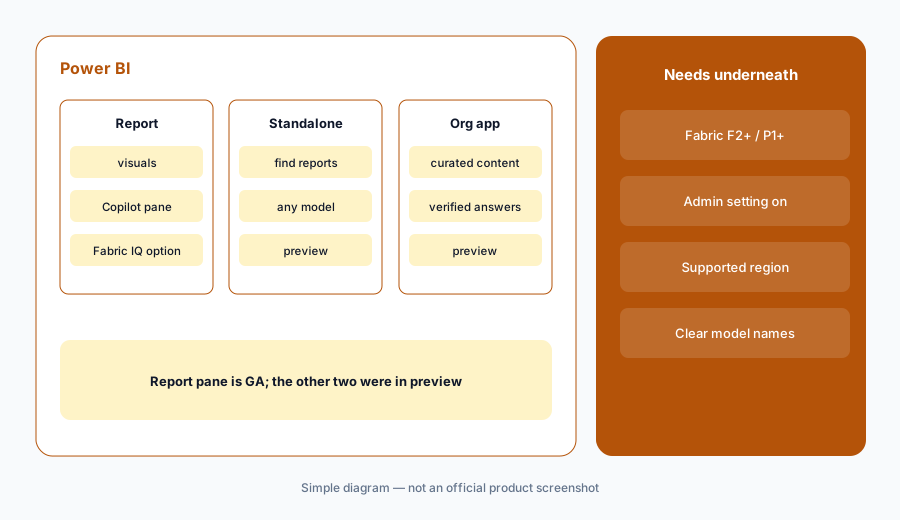
Microsoft’s documentation describes several Copilot surfaces. The Copilot pane on the right side of a report is generally available. A standalone Copilot that searches across everything you can access, and Copilot in apps scoped to an org app, were in preview when we read the docs. Report authors get help creating pages, writing DAX, and describing measures; model authors get Copilot in web modeling (preview). The Power BI September 2026 Feature Summary added a Fabric IQ option in the report pane that shows its reasoning steps and the underlying DAX query, plus a new control over Copilot access to semantic models.
Facts here come from Microsoft Learn, the Power BI pricing page, and the September 2026 Feature Summary as read in early October 2026. Preview features change; check your tenant before you tell anyone a button exists.
Major features (with how someone uses them)
Examples at a glance: each feature has a concrete example from a real job plus a short Try this you can run this week.
1. Copilot pane: summarize and ask about a report (primary)
What it is: Open a report, open the Copilot pane, and ask for a summary or a question about what the report shows. Microsoft’s docs say that when a question relates to the semantic model, Copilot uses the model; otherwise it answers from the language model’s general knowledge — which is exactly the part to watch. Since September 2026 you can enable Fabric IQ in the pane, which takes a multi-step approach, shows reasoning steps, and provides the underlying DAX query and data table behind an answer. You can also include Copilot summaries in report subscriptions.
Primary workflow:
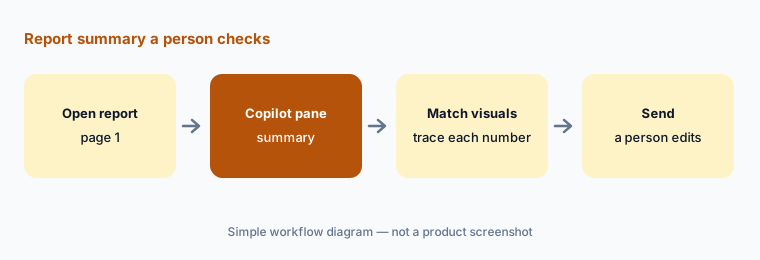
Open one report. Ask Copilot to summarize page 1. Check each number against a visual on the page and mark any sentence you cannot trace. Delete those before you share.
2. Standalone Copilot and Copilot in apps (preview)
What it is: The standalone Copilot is a full-screen experience from the left navigation that can find and answer questions about any report or semantic model you have access to. Copilot in apps is scoped to the curated content of one org app and can surface verified answers that app authors prepared for common questions. Both were in preview when we read Microsoft’s docs, need specific tenant settings, and are not available in every region. Separately, Microsoft says Power BI data answers in Microsoft 365 Copilot Chat are generally available, and a Microsoft 365 Copilot experience inside Power BI is in preview, off by default.
Find-the-source check:
Ask standalone Copilot to find the report that owns one metric, such as gross margin. Open every report it suggests and confirm the owner before you quote a number.
3. Report authors: pages, DAX, and descriptions
What it is: Report authors can ask Copilot to create or edit report pages, summarize the semantic model, add a narrative summary visual, write DAX queries, and add descriptions to measures. Microsoft’s September 2026 summary also lists agentic authoring as generally available for developers, using tools such as the Power BI Authoring MCP server, and a remote version of that MCP server in preview. Copilot drafts quickly; the author still owns whether a measure means what its name says.
DAX check:
Ask Copilot to write a DAX query for one measure by month. Run it in DAX query view and compare one month to an existing visual. If they differ, find out why before you reuse it.
4. Prepare the semantic model for AI
What it is: Microsoft’s docs are blunt: without preparation, Copilot can misinterpret the data and return generic or inaccurate results. Preparation means clear table and measure names, descriptions, and the business context model owners add. Copilot in web modeling (preview) can point out unclear structures and inconsistent naming. Since September 2026, semantic model editors also have a setting to block read-only users from using Copilot and Microsoft’s MCP tools on a model and its reports — useful for sensitive models. Microsoft says the setting stays enabled by default to keep current behavior.
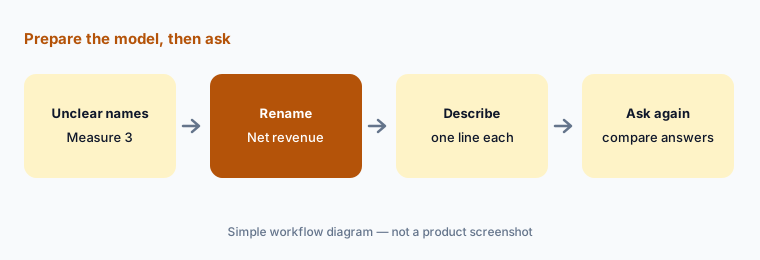
Measure 3 and Rev_final_v2 in the sales model. He renames them “Net revenue” and “Gross revenue,” adds a one-line description to each, and asks the same Copilot question before and after. Before, Copilot picked the gross figure; after, it picks net. For the HR headcount model, he turns off read-only AI access until HR approves it.
Before-and-after check:
Rename three ambiguous measures and add a one-line description to each. Ask the same Copilot question before and after. Write down what changed.
5. Capacity, settings, and usage
What it is: Copilot in Power BI needs paid Fabric capacity (F2 or higher) or Power BI Premium (P1 or higher); trial capacities and free SKUs are not supported, and Microsoft says a Pro or Premium Per User license alone is not enough. An admin setting must allow Copilot, the capacity must be in a supported region, and sovereign clouds are not supported. Copilot usage is measured in capacity units: admins can see a 30-day breakdown in the Fabric Capacity Metrics app, and organizations can use a dedicated Fabric Copilot capacity so usage bills to one place. Microsoft notes identical prompts on an unchanged model within 24 hours are answered from cache, and it can take up to 24 hours for Copilot to appear after a capacity change.
Usage check:
Ask your capacity admin for the last 30 days of “Copilot in Fabric” usage in the Capacity Metrics app before you widen access. Note which reports drive it.
6. Versus Tableau Pulse, ThoughtSpot, and Hex
What it is: Power BI Copilot fits organizations whose reports already live in Power BI and who have, or will buy, Fabric capacity. Tableau Pulse fits people who mostly follow a few metrics. ThoughtSpot Spotter fits search-first BI on a coached model. Hex fits analyst notebooks with self-serve Threads. If people mainly want report answers inside Teams or Outlook, compare with Microsoft 365 Copilot, which Microsoft says can now answer from Power BI data.
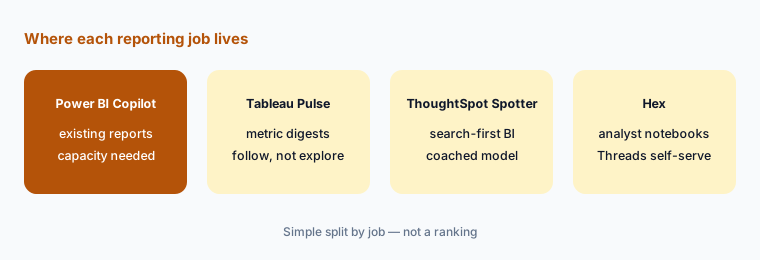
Home for the job:
Write the one metric you check daily. If you only need to know when it moves, a digest is enough; if you need to ask why, open the report and ask Copilot there.
Pricing context (October 2026)
Microsoft’s Power BI pricing page, as read in early October 2026, listed Power BI Pro at $14.00 per user per month paid yearly and Power BI Premium Per User at $24.00 per user per month paid yearly, with Power BI Embedded and Fabric capacity priced separately. The page also lists Copilot in Fabric as a feature row in its comparison table.
The catch for Copilot is capacity. Microsoft Learn says Copilot requires paid Fabric capacity (F2 or higher) or Power BI Premium (P1 or higher), and that a Pro or PPU license alone is not sufficient. Copilot usage draws down capacity units, and Microsoft says token consumption drives billing for Copilot in Fabric, with downstream actions such as queries or refreshes billed through normal Fabric paths. We do not quote Fabric capacity prices here — they vary by SKU, region, and reservation.
Uncertainty: Several Copilot surfaces were still in preview, availability varies by region, and capacity cost depends on your SKU and how heavily people use Copilot. The Microsoft 365 Copilot integration in Power BI also depends on Microsoft 365 Copilot licensing. Read the live Microsoft pages and check with your Fabric admin before you budget.
When it’s useful (honest take)
Useful when your reports already live in Power BI, you have Fabric or Premium capacity (or a clear plan to buy it), and someone owns the semantic model enough to name and describe measures well. Then Copilot saves real time on summaries and first-draft DAX, and the new Fabric IQ option shows the DAX behind an answer so you can check it.
Less useful when you are on Pro only and would buy capacity just for Copilot — price that carefully against your report usage. Less useful when the model is full of unclear measure names, because Copilot will confidently pick the wrong one. And when the real need is “tell me when this metric moves,” a digest tool or a subscription with a summary is simpler than a chat.
Paying for Power BI Copilot and a few other AI tools? The $9 AI toolkit spreadsheet lists every AI subscription you have, what each one costs, and how fast it pays for itself, so you can see which ones are worth the money.
Want someone to do it for you? AI toolkit audit — $19
Related options (educational)
| Need | Better home | Why |
|---|---|---|
| Questions and summaries on existing Power BI reports | Power BI Copilot (this page) | Needs Fabric F2+ or Premium P1+ capacity |
| Report answers inside Teams, Outlook, or Copilot Chat | Microsoft 365 Copilot | If people live in Microsoft 365 apps |
| Following a few metrics as digests | Tableau Pulse | Follow, not explore |
| Search-first BI on a coached model | ThoughtSpot Spotter | Readable search tokens |
| Analyst notebooks with self-serve Threads | Hex AI | SQL and Python on the warehouse |
| A one-off spreadsheet question | Sheets + Gemini or Claude for finance | No capacity purchase for one file |
FAQ
What is Power BI Copilot for on this page?
Summaries and questions on existing reports, help finding the right report, DAX and page drafts for authors, and model clean-up help. A person still checks each number against the report.
Does Power BI Pro include Copilot?
Not on its own. Microsoft Learn says Copilot needs paid Fabric capacity (F2 or higher) or Premium (P1 or higher); a Pro or PPU license alone is not enough.
How much does it cost in October 2026?
Microsoft listed Pro at $14 and Premium Per User at $24 per user per month paid yearly. Copilot also needs capacity, which we do not price here. Check Microsoft’s pricing page and your admin.
Can we stop Copilot from using a sensitive model?
Yes. Since September 2026, semantic model editors can block read-only users from using Copilot and Microsoft’s MCP tools on a model and its reports. It is on by default, so turn it off where needed.
Why did Copilot give an answer that isn’t in the report?
Microsoft says Copilot answers from the semantic model when it can, and otherwise from the language model’s general knowledge. Treat any sentence you cannot match to a visual as unverified.
Optional next step (if seats overlap)
If you pay for Power BI capacity, Microsoft 365 Copilot, and another BI or chat tool that all summarize the same reports, that overlap is worth mapping. Map the overlap with the $19 AI toolkit audit or the $9 AI toolkit spreadsheet. Email Audit $19 or Toolkit spreadsheet $9.
Checkout is live via Stripe. After you pay, we email delivery (spreadsheet) or intake next steps (audit).