Tool · BI · Metric alerts · Sep 2026
Tableau Pulse review (Sep 2026): metric alerts for ops/finance consumers
Educational overview for ops and finance evaluating Tableau Pulse when the job is metric following for non-analyst consumers — digests and alerts on trusted KPIs — versus building another full dashboard.
What this review covers
This page helps ops and finance leads decide when Tableau Pulse is the right surface for metric alerts to consumers who will not build dashboards. Unique intent: define a small set of weekly ops metrics, pick an audience for each alert, and know when a full Tableau view (or Sheets + Gemini) is the better home. It is not a substitute for Tableau’s product docs, and feature names/packaging should be verified live.
How to evaluate Tableau Pulse for ops/finance
Examples at a glance: each section has a concrete ops/finance example plus a short Try this.
1. Define metrics & audiences (primary)
What it is: Pulse works when metrics are already defined (name, grain, owner, threshold) and each alert has a clear audience. AI-assisted insights around those metrics can help consumers notice change; they do not replace a human-owned definition. Verify how Pulse metrics and digests are configured in your Tableau Cloud / Server deployment — packaging changes.
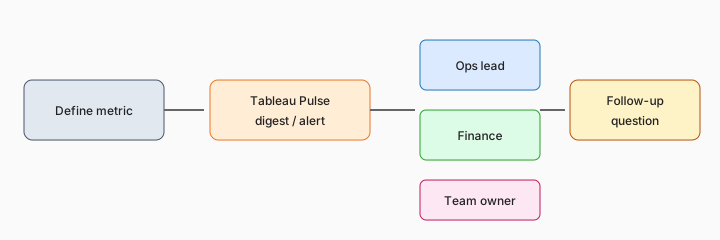
Primary SoT workflow:
Define 5 Pulse metrics for weekly ops and the audience for each alert.
2. Metric followers (non-analysts)
What it is: The product bet is that busy operators follow a few metrics and get digests/insights without logging into a heavy dashboard every morning. That only works if consumers trust the numbers and know who to escalate to when the digest looks wrong.

Follower map:
List 8 people who should follow metrics (not build dashboards). For each, name 1–2 metrics and whether they get a daily digest, weekly digest, or threshold alert only.
3. Vs full dashboards
What it is: Use Pulse when the job is “tell me when this KPI moves.” Reach for a full Tableau workbook when the job is exploration, custom filters, or analyst storytelling. Also compare Google-side report narratives in Looker Studio + Gemini and working-table jobs in Gemini in Sheets.
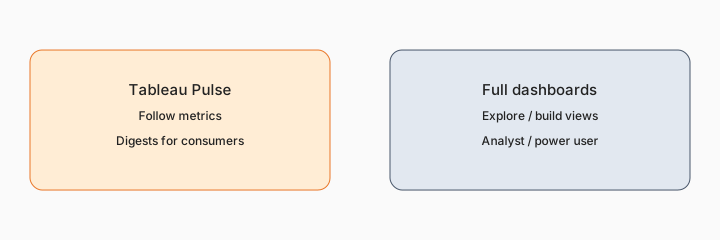
Home-for-the-job:
Take 6 recurring metric asks this quarter. Assign each to Pulse digest, full Tableau dashboard, Looker Studio, or Sheets — one sentence why.
4. Trust, grain & escalation
What it is: Digests that disagree with the source of truth destroy adoption. Ops should document grain (daily vs weekly), filters, and the human owner for each metric. Soft $19/$9 below only if Tableau, Looker, Sheets Gemini, and chat seats overlap on the same reporting jobs.
Trust card:
For one Pulse metric write a 6-line trust card: definition, grain, filters, data owner, escalation channel, and what AI digests must never invent.
Pricing context (September 2026)
Tableau / Salesforce packaging for Pulse and related AI features is documented on Tableau’s public pages (start from tableau.com/pricing and the Pulse product page). This page is dated September 2026 and is not a price sheet — we do not invent exact per-seat or add-on prices.
Uncertainty: Which Cloud / Server editions include Pulse, how AI insights are packaged, and regional availability change. Always verify on live Tableau pages and your admin before budgeting.
When Tableau Pulse is useful (honest take)
Useful when ops/finance already trusts a small metric set, consumers will actually follow digests, and escalation owners are named. Less useful when metrics are still disputed, when everyone needs ad-hoc exploration, or when a simple Sheets + email already covers the five KPIs. Soft $19/$9 below only if BI and chat seats overlap on the same reporting jobs.
Paying for Tableau Pulse and a few other AI tools? The $9 AI toolkit spreadsheet lists every AI subscription you have, what each one costs, and how fast it pays for itself, so you can see which ones are worth the money.
Want someone to do it for you? AI toolkit audit — $19
Related options (educational)
| Need | Better home | Why |
|---|---|---|
| Follow trusted KPIs / digests | Tableau Pulse (this page) | Metric followers without building dashboards |
| Report narratives / Slides summaries | Looker Studio + Gemini | Google-side report storytelling (Pro / enablement gated) |
| Working table + formulas | Gemini in Sheets · Gemini for finance | In-grid ops/finance cleanup |
| Narrative memo from numbers | Claude for finance | Chat/Project draft after you paste verified figures |
FAQ
When does Tableau Pulse help ops and finance consumers?
When non-analysts need to follow a small set of trusted metrics with digests/alerts — not when they need deep exploration.
How does it differ from a full dashboard?
Pulse for following metrics; full workbooks for exploration. See also Looker Studio + Gemini.
Should AI invent metric definitions?
No. Humans own definition, grain, and audience.
Where do I verify pricing?
On Tableau’s public pricing — this page does not invent exact prices.
Optional next step (if seats overlap)
If these seats would sit beside other BI, chat, or automation seats on the same ops jobs, optional help mapping overlap: $19 AI toolkit audit or $9 AI toolkit spreadsheet. Email Audit $19 or Toolkit spreadsheet $9.
Checkout is live via Stripe. After you pay, we email delivery (spreadsheet) or intake next steps (audit).