Feature · Looker Studio · Gemini · Sep 2026
Looker Studio + Gemini how-to (Sep 2026): report narratives for ops
Educational how-to for ops using Gemini-assisted reporting in Looker Studio — drafting narratives and chart summaries from shared reports — with explicit hedges on Pro / admin enablement. Companion to Gemini in Sheets and Gemini.
What this how-to covers
This page helps ops leads practice Gemini-assisted report narratives in Looker Studio: turn a chart description into a short story and questions for the data owner. Unique intent: feature how-to for report storytelling — not a full Looker (modeled) deep-dive, and not Sheets in-grid work. Naming has shifted historically (“Gemini in Looker,” “Gemini in Data Studio”); always verify the live Google Cloud docs for your project.
How to evaluate Gemini in Looker Studio
Examples at a glance: each section has a concrete ops example plus a short Try this.
1. Report narratives from charts (primary)
What it is: Use Gemini assistance (where enabled) to draft plain-language summaries of charts and reports so ops can share a readout without rewriting every visual from scratch. Humans still check every number. Even when the in-product feature is gated, practicing the narrative skill offline is useful.
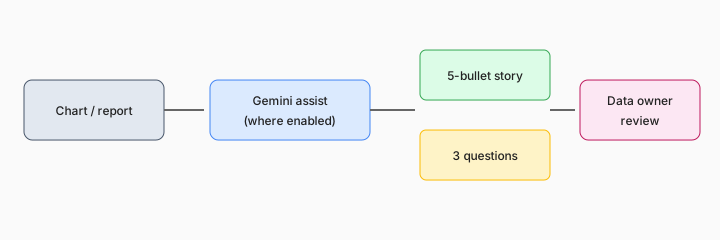
Primary SoT workflow:
From a sample chart description, draft a 5-bullet narrative and 3 questions for the data owner.
2. Availability & naming (verify live)
What it is: As of public Google Cloud documentation (Sep 2026 context), Gemini assistance in Looker Studio is commonly tied to Looker Studio Pro and admin settings to enable Gemini in Looker for the associated Google Cloud project. Some capabilities have been preview / Trusted Tester gated. Release notes have also referred to “Gemini in Data Studio.” Do not assume your free Looker Studio workspace has every narrative or Slides feature.
Enablement checklist:
Write a 5-line checklist: Pro license?, Gemini in Looker enabled for project?, Trusted Tester / preview flags?, which UI entry points you see, who owns admin settings.
3. Slides / summary handoff
What it is: Google documents Gemini assistance that can export Looker Studio report content into Google Slides with generated text summaries of charts (subject to Pro, enablement, and documented limits such as visualization count). Treat those summaries as drafts. Pair with Gemini for ops role patterns for Workspace-wide habits.
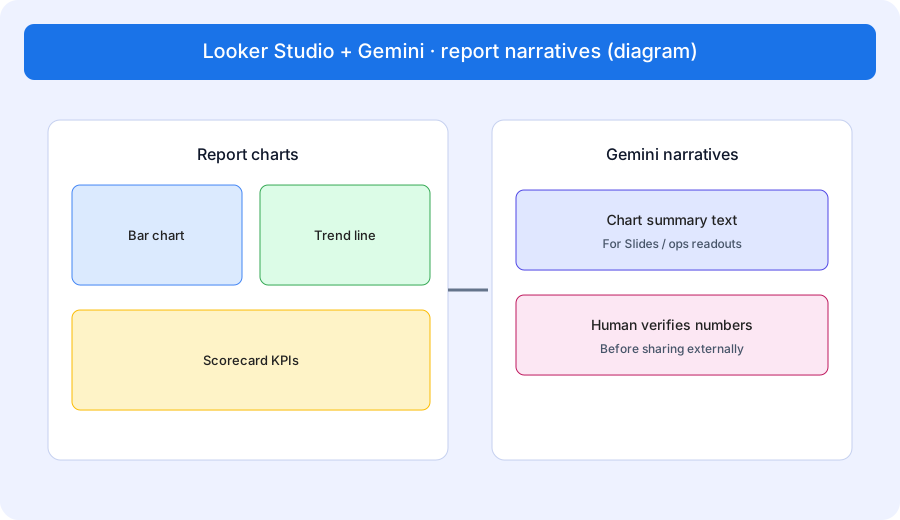
Draft then verify:
Paste 3 chart titles + one-line facts each. Draft a Slides-ready blurb (2 sentences) per chart. Mark any number that still needs a human verify against the live report.
4. Vs Gemini in Sheets
What it is: Use Looker Studio + Gemini when the artifact is a shared report / dashboard narrative. Use Gemini in Sheets (and Gemini for finance) when the job is in-grid cleanup, formulas, or a working table. Metric digests for non-analysts may fit Tableau Pulse if that is already your BI stack.
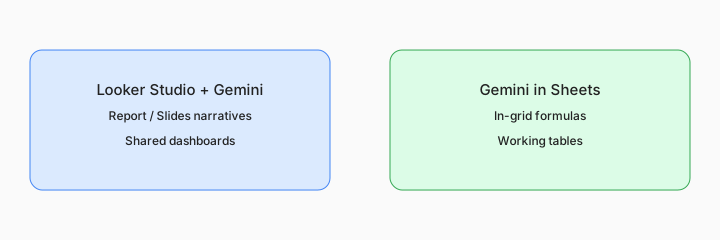
Home-for-the-job:
List 5 recurring reporting jobs. Assign each to Looker Studio + Gemini, Gemini in Sheets, Tableau Pulse, or a plain Docs memo — one sentence why.
Pricing context (September 2026)
Looker Studio Pro and Gemini for Google Cloud packaging are documented on Google Cloud’s public pages (start from Looker Studio product/pricing pages and the enable Gemini in Looker for Looker Studio docs). This page is dated September 2026 and is not a price sheet — we do not invent exact Pro seat prices or guarantee GA status for every assist.
Uncertainty: Pro requirements, Trusted Tester / preview flags, Conversational Analytics, and Slides generation limits change. Always verify in your Google Cloud project and admin console before promising features.
When Looker Studio + Gemini is useful (honest take)
Useful when ops already publishes Looker Studio reports, Pro + Gemini are enabled (or you can practice narratives offline), and humans will verify numbers before sharing. Less useful when the team only works in Sheets, when Pro/Gemini is not available, or when digests without dashboards are the real need (see Tableau Pulse). Soft $19/$9 below only if Google BI/chat seats overlap on the same jobs.
Paying for Looker Studio + Gemini and a few other AI tools? The $9 AI toolkit spreadsheet lists every AI subscription you have, what each one costs, and how fast it pays for itself, so you can see which ones are worth the money.
Want someone to do it for you? AI toolkit audit — $19
Related options (educational)
| Need | Better home | Why |
|---|---|---|
| Report / Slides narratives | Looker Studio + Gemini (this page) | Shared dashboard storytelling (enablement gated) |
| In-grid formulas / cleanup | Gemini in Sheets | Working tables |
| Ops role patterns in Workspace | Gemini for ops · Gemini | Broader Gemini habits |
| Metric digests for consumers | Tableau Pulse | When Tableau is the BI home |
FAQ
Is Gemini available in Looker Studio?
Google documents Gemini in Looker for Looker Studio Pro with admin enablement. Verify live docs — names and gates change.
What ops job does it help?
Drafting report narratives and chart summaries for shared readouts. In-grid work belongs in Gemini in Sheets.
Can I share AI narratives without checking numbers?
No. Treat them as drafts; humans verify against the report.
Where do I verify packaging?
On Google Cloud Looker Studio docs and pricing — this page does not invent exact prices.
Optional next step (if seats overlap)
If these seats would sit beside other BI, chat, or automation seats on the same ops jobs, optional help mapping overlap: $19 AI toolkit audit or $9 AI toolkit spreadsheet. Email Audit $19 or Toolkit spreadsheet $9.
Checkout is live via Stripe. After you pay, we email delivery (spreadsheet) or intake next steps (audit).