Tool · Data & BI · ThoughtSpot · Oct 2026
ThoughtSpot Spotter review (Oct 2026): conversational analytics on a coached data model
Spotter is ThoughtSpot’s AI analyst: business people type a question and get a chart built on the company’s governed data model. What decides whether the answers are right is less the prompt and more the coaching — the reference questions, business terms, and model instructions an analyst sets up. This page shows how each part works, with a real job and a Try this under each.
What this ThoughtSpot Spotter page covers
This page is for a business or ops lead whose company already uses ThoughtSpot, or is evaluating it, and for the analyst who would have to set Spotter up. The question it answers: what does Spotter actually do with a question, what does an analyst need to teach it, and where should a person still check the answer?
ThoughtSpot describes Spotter as an analyst built on its relational search model — answers are assembled from search tokens mapped to columns, filters, and formulas in your data model, which you can read. ThoughtSpot’s docs list three experiences: Spotter Classic, Spotter Agent (Spotter 2), and Spotter 3, which adds structured-plus-unstructured data, cross-model search, Python and forecasting skills, and connections to tools like Slack, Confluence, or Jira. The wider “team of agents” also includes SpotterModel (semantic model drafts), SpotterViz (Liveboard drafts), and SpotterCode (embedding code in your IDE).
Facts here come from ThoughtSpot’s public product page, pricing page, and documentation as read in early October 2026. ThoughtSpot’s docs note that not every feature is on every instance, so check with your admin.

Major features (with how someone uses them)
Examples at a glance: each feature has a concrete example from a real job plus a short Try this you can run this week.
1. Ask a question, read the search tokens (primary)
What it is: You pick a data model and ask in plain English. Spotter reasons through the steps, builds the answer, and shows the search tokens it used — for example, a measure, a date filter, and a grouping column. ThoughtSpot’s product page says Spotter “checks its own work” and that its token architecture is meant to make answers explainable. Spotter Agent can also suggest follow-up questions and answer several questions at once, and you can ask it how a formula was calculated.
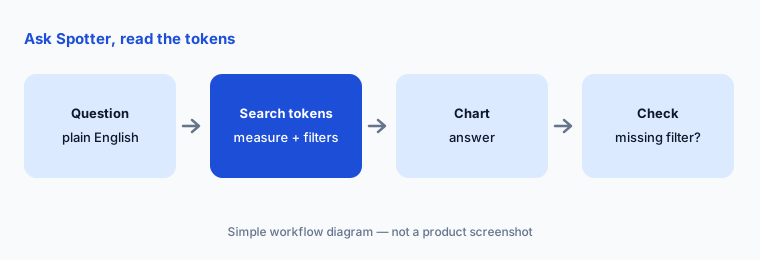
Primary workflow:
Ask Spotter one KPI question you already know the answer to. Read the search tokens behind the answer. If a filter you expected is missing, coach a reference question instead of re-asking every week.
2. Coaching: reference questions and business terms
What it is: Coaching is how an analyst teaches Spotter the company’s language. ThoughtSpot’s docs describe a layered order: tidy the data model and metadata first, then add data model instructions for global rules, then reference questions — verified question-and-answer pairs that teach intent and logic — and finally business terms for definitions that never change, like “sales contribution = sum(order_amount) / sum(total_revenue).” The docs warn that business terms apply only when the exact term is used, and that piling up near-duplicate reference questions can confuse Spotter. Corrections made mid-conversation can be saved as memory for future questions.
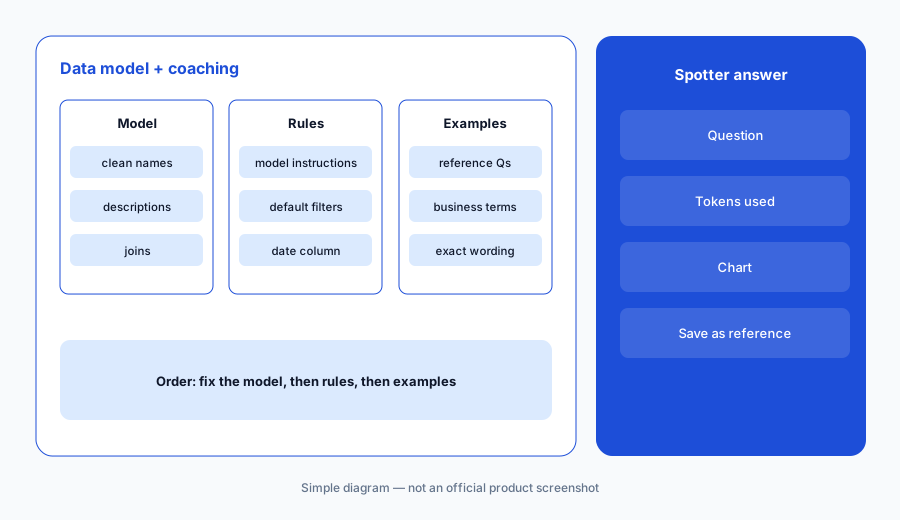
Coaching check:
Pick one term with a single meaning, such as “booked revenue.” Save it as a business term with the filter included. Ask three different phrasings and note which ones pick it up — business terms only match the exact wording.
3. Spotter 3: unstructured data and connected tools
What it is: ThoughtSpot’s docs say Spotter 3 can query structured and unstructured data together, choose the right data model on its own with cross-model search, switch sources within one conversation, and run Python and forecasting. It can also connect to tools such as Slack, Confluence, or Jira to pull context in and push actions out. That last part is where a team should slow down: an analyst’s chart is one thing; an agent creating a Jira ticket or posting in Slack is an action someone should approve.
Action check:
Before letting Spotter push anything to Jira or Slack, write the one action you would allow, the channel or project it goes to, and who approves it. Test it on a sandbox project first.
4. SpotterViz and SpotterModel drafts
What it is: SpotterViz builds a first-draft Liveboard (ThoughtSpot’s dashboard) from one prompt — planning the story, generating answers with Spotter, and laying out the board. SpotterModel drafts governed semantic models from raw tables, mapping relationships, dimensions, and measures, with what ThoughtSpot calls human-in-the-loop validation. Both are drafts: a Liveboard nobody asked for is clutter, and a model that guesses a join wrong will make every later answer wrong.
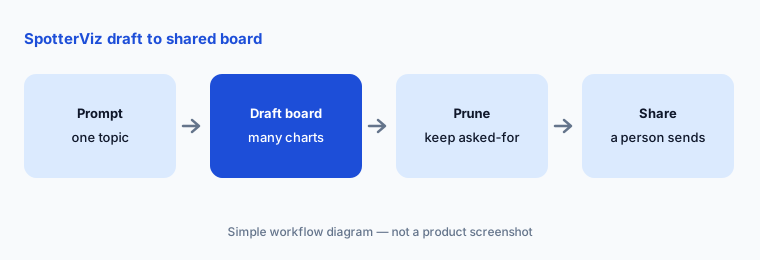
Prune check:
Ask SpotterViz for a first-draft Liveboard on one topic. Delete every chart that does not answer a question someone asked this month. Share only what is left.
5. Embedding and the MCP Server
What it is: ThoughtSpot lets you embed Spotter in other apps “with just a few lines of code,” and its MCP Server lets custom agents and LLM apps call Spotter’s skills. On the pricing page the MCP Server appears as an add-on. ThoughtSpot also says Spotter works with the LLM you choose, including GPT-series models, Google Gemini, Snowflake Cortex, and Claude. The practical question is not whether you can connect it, but which data model each outside app is allowed to query.
Scope check:
List every app that would call Spotter through embedding or MCP. For each, write the one data model it may query and the person who approved that. Anything without an approver waits.
6. Versus Hex, Power BI Copilot, and Tableau Pulse
What it is: Spotter suits companies that want business users to search governed data without seeing SQL. Hex suits teams where analysts write SQL and Python and publish apps, with Threads for self-serve on endorsed data. Power BI Copilot suits Microsoft shops whose reports already live in Power BI. Tableau Pulse suits people who only want to follow a few trusted metrics.
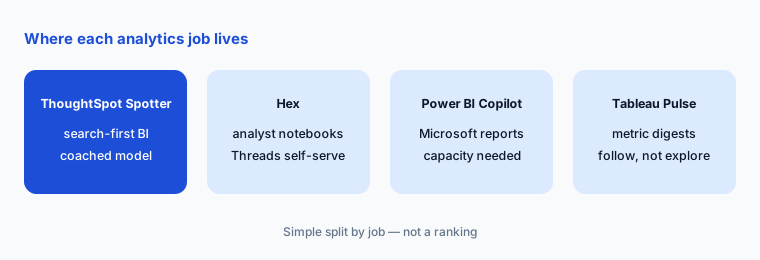
Home for the job:
Write down who asks most of your data questions — managers, analysts, or executives. Match each group to the one tool they already open daily. Do not add a new seat for a group that already has a home.
Pricing context (October 2026)
ThoughtSpot’s pricing page, as we read it in early October 2026, showed several options. One per-user tier starts “as low as $25 per user / per month (billed annually)” for 5 to 50 users and up to 25M rows, with dashboards and insights — Spotter agents were not in that tier’s list. Another tier at $50 per user per month (billed annually) lists Spotter AI Agents at 25 queries per month per user, for up to 1,000 users and 250M rows. A usage-based option starts “as low as $0.10 per credit” and lists Spotter AI Agents with unlimited LLM tokens. Enterprise is custom, and Embedded has its own pricing.
ThoughtSpot states it does not meter or charge for LLM tokens and that platform use is governed by your subscription; if you bring your own LLM provider, that provider’s fees may apply. Add-ons on the page include Analyst Studio, an in-memory cache, and the MCP Server.
Uncertainty: The pricing page groups prices and plan names in a way that was hard to match line by line, and the 25-queries-per-user limit on per-user tiers matters a lot if Spotter is the main reason you are buying. Confirm the plan name, query limits, and add-ons with ThoughtSpot before you budget.
When it’s useful (honest take)
Useful when ThoughtSpot is already your BI layer (or will be), an analyst owns the data model, and someone has time to coach Spotter with reference questions and business terms. Then business users can ask follow-ups without filing a ticket, and the tokens keep answers explainable.
Less useful when the data model is messy and nobody owns definitions — Spotter will answer, but from whatever the model says. Less useful when the main users are analysts who would rather write SQL in a notebook, or when the per-user query limits on lower tiers would run out in the first week. And if your reports already live in Power BI or Tableau, adding ThoughtSpot just for a chat box is usually more change than it is worth.
Paying for ThoughtSpot Spotter and a few other AI tools? The $9 AI toolkit spreadsheet lists every AI subscription you have, what each one costs, and how fast it pays for itself, so you can see which ones are worth the money.
Want someone to do it for you? AI toolkit audit — $19
Related options (educational)
| Need | Better home | Why |
|---|---|---|
| Search-first questions for business users on a governed model | ThoughtSpot Spotter (this page) | Coached model; readable tokens |
| Analyst notebooks with self-serve Threads on endorsed data | Hex AI | SQL and Python stay visible |
| Reports already in Microsoft Power BI | Power BI Copilot | Copilot on existing reports and models |
| Following a few trusted metrics | Tableau Pulse | Digests instead of exploration |
| Google-stack reporting | Looker Studio + Gemini | If reports already live in Looker Studio |
| A one-off pasted spreadsheet | Sheets + Gemini | No BI rollout for one file |
FAQ
What is ThoughtSpot Spotter for on this page?
Plain-English questions on a governed ThoughtSpot data model, with answers built from search tokens you can read. Coaching by an analyst decides how good the answers are.
What is coaching?
Teaching Spotter your business language: data model instructions for global rules, reference questions for recurring patterns, and business terms for fixed definitions. ThoughtSpot recommends fixing the model first.
How much does Spotter cost in October 2026?
ThoughtSpot’s pricing page listed per-user tiers from $25 and $50 per user per month billed annually (the $50 tier lists 25 Spotter queries per user per month), a credit option from $0.10 per credit, and custom Enterprise. Confirm on thoughtspot.com/pricing.
Can Spotter take actions in Slack or Jira?
ThoughtSpot’s docs say Spotter 3 can connect to tools like Slack, Confluence, or Jira to pull data and push actions. Keep a person approving anything that leaves ThoughtSpot.
Do we need ThoughtSpot already?
Yes. Spotter is part of ThoughtSpot, not a standalone chat tool. If your BI lives elsewhere, start with that tool’s AI features.
Optional next step (if seats overlap)
If you pay for a BI tool with its own AI analyst plus separate chat seats that people use to ask the same data questions, that overlap is worth mapping. Map the overlap with the $19 AI toolkit audit or the $9 AI toolkit spreadsheet. Email Audit $19 or Toolkit spreadsheet $9.
Checkout is live via Stripe. After you pay, we email delivery (spreadsheet) or intake next steps (audit).