Tool · Data & BI · Hex · Oct 2026
Hex AI review (Oct 2026): the Hex Agent, Threads, and Generative Apps for data questions
Hex is where a lot of data teams already write SQL and Python notebooks and publish data apps. Its AI layer — the Hex Agent, Threads, and Generative Apps — lets business people ask questions in plain English while the data team decides which tables and definitions the agent is allowed to lean on. This page walks through each piece with a real job, a Try this, and where it stops being the right tool.
What this Hex AI page covers
This page is for the person who gets the “can you pull this number?” messages — an analytics lead, a finance or RevOps analyst, or an ops manager at a company whose data already sits in a warehouse such as Snowflake, BigQuery, Databricks, or ClickHouse. The question it answers: if we turn on Hex’s AI features, what can non-analysts safely do on their own, and what still needs a person who knows the data?
Hex’s AI work happens in a few places. Threads is the chat-style space where someone asks a question and the agent writes and runs the queries. The notebook agent edits SQL and Python cells for people who build. Generative Apps turn a prompt into a shareable data app. Context Studio is where admins curate what the agent should trust and watch how it is used. The thread that ties them together is endorsement: Hex lets you mark tables, semantic models, and projects as Endorsed, and its agents prioritize those first.
Everything below comes from Hex’s public pricing page, docs, and changelog as we read them in early October 2026. Feature names move quickly in this category, so check your own workspace before you promise a button to your team.

Major features (with how someone uses them)
Examples at a glance: each feature has a concrete example from a real job plus a short Try this you can run this week.
1. Threads with Endorsed Mode (primary)
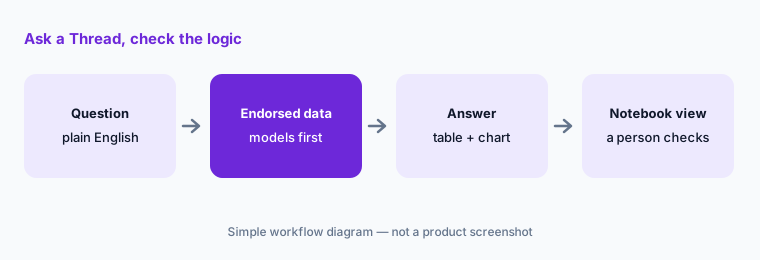
What it is: Threads is a conversational space: you type a question, and the Hex Agent searches the connections you are allowed to use, writes SQL, runs it, and answers with tables and charts. Hex’s docs say the agent heavily prioritizes semantic models and endorsed data. With Endorsed Mode on, it only uses endorsed assets; by default, people with the Explorer role can only use Threads in Endorsed Mode, though admins can change that. Every Thread is backed by an unlisted project, so an Editor can flip to the Notebook view and read the exact logic the agent used.
Threads also turns up outside Hex: a Slack integration returns a Threads link with the agent’s answer, and MCP clients such as Claude or Cursor can start a Thread. Answers show the agent’s tool calls and thinking steps, collapsed after it finishes, so you can expand them and see which tables it touched.
fct_shipments model instead of a half-finished staging table. The answer comes back as a bar chart. Before forwarding it, the manager opens the Notebook view and sees the late-shipment rule the data team defined — promised date before actual ship date — not a guess.
Primary workflow:
Turn on Endorsed Mode. Ask one recurring business question in a Thread. Open the Notebook view and confirm every table used is one you would have picked. If one isn’t, endorse the right one instead of re-asking.
2. Notebook agent with approval modes
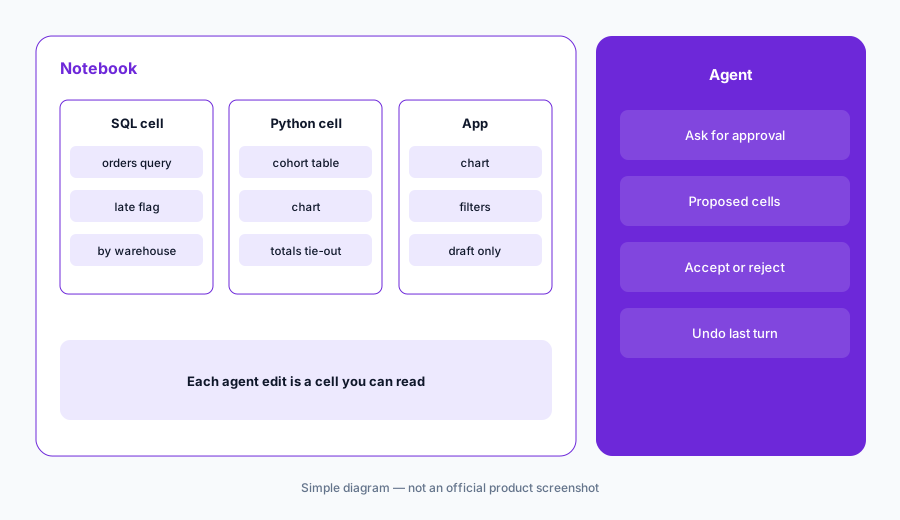
What it is: For people who build, the agent works inside a regular Hex notebook — adding SQL and Python cells, fixing errors, and building charts. Since mid-September 2026, the prompt bar has two modes. Ask for approval pauses before destructive actions such as deleting a cell or publishing. Skip approvals lets the agent work straight through, and you can still undo the changes from its last turn. Hex says anything that widens access — granting OAuth, reconnecting an app, authorizing an MCP server — still stops for your approval in either mode.
Build check:
In a copy of one notebook, ask the agent to add one breakdown in Ask-for-approval mode. Accept only the cells you could explain to a colleague. Rerun and compare one total to the original.
3. Generative Apps and scheduled exports
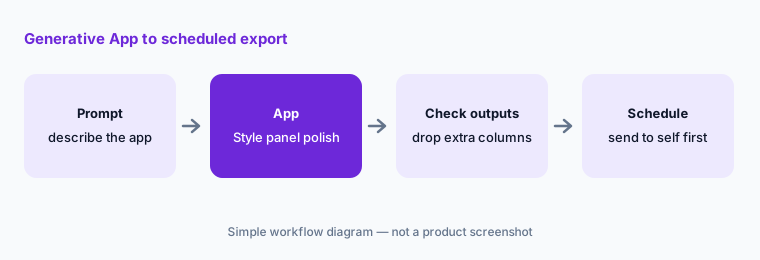
What it is: Generative Apps (introduced May 2026) turn a prompt into an interactive data app. Since then Hex has added point-and-click chart controls in a Style panel (27 Aug 2026), direct text editing and targeted chart updates (10 Sep), and on 23 Sep both Chat with Generative Apps — viewers can ask follow-up questions in a Thread without leaving the app — and scheduled CSV exports alongside app notifications. Hex’s own note on exports is worth repeating: scheduled exports use the project’s underlying cell outputs, not the filters someone applied in the app, so check those outputs contain only what the recipients should see.
Before you schedule:
Build an app from one endorsed query. Before scheduling a CSV export, open the cell outputs and delete any column the recipients should not see. Then schedule it to yourself first.
4. Context Studio, guides, and evals
What it is: Context Studio is the admin side: guides and workspace rules that tell agents how your business talks about data, semantic models, endorsement, and a view of how people use the agent. As of 29 Sep 2026, it classifies agent activity as Analysis, App building, or Modeling. Hex also added evals in August, and on 15 Sep let Managers and Admins publish, version, and schedule eval suites from the CLI and track results over time. In plain words: you can keep a fixed list of questions with answers you trust, and see whether a change to your guides made the agent better or worse.
Trust check:
Write five questions your team asks every week with the answer you would accept. Run them as an eval before and after you change one guide. Keep the change only if nothing got worse.
5. Slack, MCP, and the CLI
What it is: Hex is increasingly reachable from other tools. You can mention @Hex in Slack, and since 10 Sep 2026 you can attach a CSV and ask for a summary in the thread. Hex is an MCP server, so chat agents such as Claude, ChatGPT, or Cursor can start Threads; since 15 Sep they can also create, read, and update Hex projects. Hex notes that MCP edits land in a project’s draft notebook and do not change the published app. There is also a Hex CLI for scripting Threads, semantic projects, and evals.
Slack check:
In Slack, mention @Hex on a sanitized CSV and ask for the top five rows by one column. Open the Hex link and confirm the grouping before you repost the answer.
6. Versus ThoughtSpot, Power BI, and a chat assistant
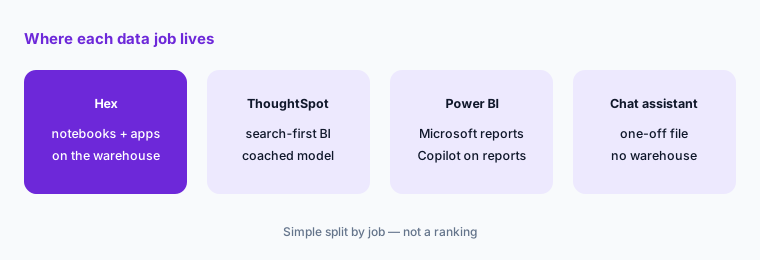
What it is: Hex fits teams where analysts already write SQL and Python and want business users to self-serve on top of that work. ThoughtSpot Spotter fits companies that want a search-first BI tool for business users on a governed model. Power BI Copilot fits Microsoft shops whose reports already live in Power BI. A general chat assistant such as Claude with artifacts is fine for a one-off pasted CSV, but it does not know your warehouse or your definitions.
Home for the job:
List the six data questions people asked you last month. For each, write where it should be answered — Hex, your BI tool, or a one-off chat — and one sentence why. Do not add a tool you do not already pay for.
Pricing context (October 2026)
Hex publishes prices on hex.tech/pricing. When we checked in early October 2026, the page listed: Community free (with a Hex agent trial and small compute); Professional at $36 per Editor per month (Hex agent with standard credits, up to 5 published apps); Team at $75 per Editor per month with a 14-day free trial (extended credits, unlimited published apps, scheduled runs and alerts); and Enterprise at custom pricing (premium credits, Explorer seat add-on, audit logs, BYOK, single-tenant and HIPAA add-ons).
AI features use credits. Hex’s FAQ says Professional and Team include monthly per-seat credit grants that refresh monthly and do not roll over, with add-on credits available; Enterprise grants are set on the order form. The changelog also mentions spend limits and credit usage controls (July 2026) and a Fast mode for some models “at a higher credit cost” (September 2026). Medium compute is included on paid plans; larger compute profiles are billed per minute.
Uncertainty: Hex changes plan contents and credit rules often, and the price of a heavy agent month depends on credits, not just seats. Whether your plan bills monthly or annually, how many credits a typical Thread uses, and which add-ons you need are questions for Hex’s live pricing page and your account team before you budget.
When it’s useful (honest take)
Useful when your data already sits in a warehouse, someone on the team writes SQL, and you are willing to endorse the tables and models people should trust. Then Threads can take the “can you pull this?” load off the data team, and the Notebook view keeps every answer checkable.
Less useful when you have no warehouse and your data lives in a few spreadsheets — a spreadsheet tool with AI, or a chat assistant on a pasted file, is lighter. Less useful when nobody owns definitions: without endorsed data and guides, the agent will happily answer from whatever table looks closest. And if your company standard is already Power BI or Tableau for business users, Hex is more likely a tool for the data team than a replacement BI seat for everyone.
Paying for Hex AI and a few other AI tools? The $9 AI toolkit spreadsheet lists every AI subscription you have, what each one costs, and how fast it pays for itself, so you can see which ones are worth the money.
Want someone to do it for you? AI toolkit audit — $19
Related options (educational)
| Need | Better home | Why |
|---|---|---|
| Self-serve questions on warehouse data, with notebooks behind them | Hex (this page) | Endorsed data first; logic visible in the notebook |
| Search-first BI for business users on a governed model | ThoughtSpot Spotter | Coached model; business users never see SQL |
| Reports already in Microsoft Power BI | Power BI Copilot | Summaries and DAX on existing reports |
| A few trusted metrics pushed as digests | Tableau Pulse | Follow metrics; no exploration needed |
| A one-off CSV or a quick chart | Sheets + Gemini or Claude artifacts | No warehouse, no new seat |
| Product usage analytics | Amplitude AI or PostHog AI | Event data already lives there |
FAQ
What is Hex AI for on this page?
Plain-English questions on warehouse data (Threads), agent help inside notebooks, prompt-built data apps, and admin tools to curate what the agent trusts. Check which features your plan includes.
What does Endorsed Mode do?
It limits the agent to endorsed tables, semantic models, and projects. Hex’s docs say Explorers use Threads in Endorsed Mode by default, and admins can change that.
How much does Hex cost in October 2026?
Hex’s pricing page listed Community free, Professional $36 and Team $75 per Editor per month, and custom Enterprise when we checked in early October 2026. AI use draws on credits. Confirm on hex.tech/pricing.
Should the agent run with approvals skipped?
Only on work you can undo and review. Skip approvals lets it work straight through; Hex says access-widening steps still pause. Publishing to others should stay a human decision.
Do we need a warehouse?
In practice, yes, for Hex to shine. For a single spreadsheet, a spreadsheet tool with AI or a chat assistant on a pasted file is lighter.
Optional next step (if seats overlap)
If you pay for a notebook tool, a BI tool, and a chat assistant that all answer the same “what was revenue last month?” question, that overlap is worth a look. Map the overlap with the $19 AI toolkit audit or the $9 AI toolkit spreadsheet. Email Audit $19 or Toolkit spreadsheet $9.
Checkout is live via Stripe. After you pay, we email delivery (spreadsheet) or intake next steps (audit).