How-to · Analytics · ThoughtSpot Spotter · Oct 12, 2026
Write a metric glossary before letting Spotter answer leadership questions
When an executive asks "what was revenue last month?" and gets a number that doesn't match the board deck, trust in the tool is gone. This page shows an analyst how to define the company's key metrics in plain words first, teach those definitions to ThoughtSpot Spotter, test them, and give the glossary one owner before leadership starts asking.
Who this is for
Analysts and analytics leads at companies that already use ThoughtSpot, or are piloting Spotter, and plan to open it to executives. If your team works in a spreadsheet-style tool on the warehouse instead, see Sigma AI. For report narratives in Google's tools, see Looker Studio + Gemini.
How to do it
This is a how-to, not a ranking of analytics tools. Feature detail lives on the ThoughtSpot Spotter review. The glossary comes first; Spotter is only as consistent as the definitions you give it.

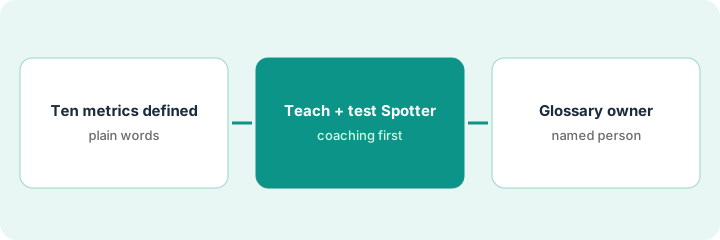
1. Step 1 — Define ten metrics in plain words
What it is: A short glossary of the ten metrics leadership asks about most, each with one definition everyone in finance and the business agrees on.
- List the metrics from the last three board or leadership decks.
- For each, write one plain-language definition, the exact calculation, and the filters that always apply (for example, "booked revenue only, excludes refunds").
- Note where two teams use the same word differently. Settle it in writing, or give the two meanings different names.
- Get the CFO or a finance lead to approve the list.
Sales says "revenue" and means bookings. Finance says "revenue" and means recognized revenue. The glossary defines "Revenue" as recognized revenue and "Bookings" as signed contract value, and both names go into the leadership deck from then on.
Glossary sheet: Metric | Plain definition | Calculation | Always-on filters | Approved by | Date.
2. Step 2 — Teach them to Spotter and test
What it is: ThoughtSpot calls this coaching: tidy the data model first, then add model instructions, reference questions (verified question-and-answer pairs), and business terms for definitions that don't change.
- Add each glossary metric as a business term, in the exact wording people use. ThoughtSpot's docs note business terms apply only when that exact term is used.
- Save one reference question per metric, such as "revenue last month," with the right filters.
- Avoid stacking near-duplicate reference questions. The docs warn they can confuse Spotter.
- Test each metric by asking it two ways, then read the search tokens Spotter shows to confirm the right measure and filters were used.
The analyst asks "What was revenue last month?" and "How much did we make in September?" The first shows the booked-status filter token; the second doesn't. She adds "how much did we make" to the business term's wording, asks again, and the filter appears.
Test sheet: Metric | Question A | Question B | Tokens correct? (yes/no) | Fix made.
3. Step 3 — Give the glossary an owner
What it is: One person owns the glossary and the matching coaching in Spotter, so when a definition changes, both change together.
- Name the owner at the top of the glossary.
- Any definition change goes through the owner and finance approval, then into Spotter the same week.
- Before each board meeting, the owner reruns the Step 2 tests for the metrics in that deck.
- When someone corrects Spotter mid-conversation and saves it, the owner reviews that saved correction so it matches the glossary.
Finance changes "Active customers" from 30-day to 90-day activity. The owner updates the glossary, the business term, and the reference question on the same day, then reruns the test. The next leadership question gets the new number.
First line of the glossary: "Owner: [name]. Changes need: finance approval + Spotter update same week. Last tested: [date]."
Pricing context (October 2026)
This how-to isn't a price sheet. When we checked in October 2026, ThoughtSpot's pricing page listed per-user tiers from $25 and $50 per user per month billed annually (the $50 tier lists 25 Spotter queries per user per month), a credit option from $0.10 per credit, and custom Enterprise. Confirm on ThoughtSpot's pricing page; notes live on the ThoughtSpot Spotter review. Dated October 2026.
Checked Oct 12, 2026 on the vendor’s own pricing page: ThoughtSpot’s pricing page lists per-user tiers from $25 and $50 per user per month billed annually (the $50 tier lists 25 Spotter queries per user per month), a credit option from $0.10 per credit, and custom Enterprise.
Uncertainty: Query limits and tiers may change. If ThoughtSpot's page and our review disagree, trust ThoughtSpot's. The only prices this site sells here are the optional $9 AI toolkit spreadsheet and $19 AI toolkit audit.
When this helps (honest take)
Useful when leadership is about to get direct access to Spotter, and the company has at least one metric that means different things to different teams.
Not useful when the data model itself is messy or unowned. Tidy the model first; a glossary on top of a confusing model still gives confusing answers.
Related options (educational)
| Need | Where to look | Why |
|---|---|---|
| Spotter features | ThoughtSpot Spotter | Primary path on this page |
| Spreadsheet-style warehouse analysis | Sigma AI | Different way to answer the same questions |
| Report narratives | Looker Studio + Gemini | Written summaries, not questions |
| Data ops stack | Stack map for data ops | Job, tool, and owner in one view |
Free: seat-waste calculator if more than one AI analytics tool is answering leadership's questions.
FAQ
What is coaching in Spotter?
ThoughtSpot's term for teaching Spotter your company's language through model instructions, reference questions, and business terms.
Do we need ThoughtSpot already?
Spotter runs on ThoughtSpot data models, so yes. If you don't have one, compare it with the tools above first.
Where do current prices live?
On ThoughtSpot's pricing page. The ThoughtSpot Spotter review notes what it showed when we checked. Our Oct 12, 2026 check of the vendor’s own pricing page is summarized in the pricing section above.
Why a glossary before leadership questions?
Executives will treat Spotter answers as source of truth. Shared definitions come first so “revenue” means the same thing every time.
Optional next step
Free reviews stay free. If Spotter, a BI tool's AI, and a chat assistant are all answering leadership's metric questions, the $9 AI toolkit spreadsheet helps you lay them out, or the $19 AI toolkit audit gets you a written memo.