Tool · Data & BI · Sigma · Oct 2026
Sigma AI review (Oct 2026): spreadsheet-style analysis on the warehouse with AI assists
Sigma looks like a spreadsheet but runs every formula as a live query on your cloud data warehouse — Snowflake, Databricks, BigQuery and others. Its AI layer drafts and explains formulas, answers plain-English questions with the SQL attached, adds AI-written columns, and lets builders put agents inside workbooks. This page walks through each piece with a real finance or ops job, a Try this, and where a person still owns the numbers.
What this Sigma AI page covers
This page is for the finance analyst, FP&A lead, or ops manager who lives in Excel or Google Sheets but whose real data has outgrown a file — millions of order lines, every invoice, every ticket — and already sits in a warehouse. The question it answers: if your company uses Sigma, what can its AI features safely take off your plate, and which steps should stay with the person who owns the workbook?
Sigma’s AI shows up in a few places. The formula assistant writes, corrects, and explains formulas in the formula bar. Sigma Assistant (renamed from Ask Sigma in April 2026) answers plain-English questions from Sigma Home and inside workbooks, and can build dashboards in build mode. AI columns (Beta) run a prompt down a table column using your warehouse’s own AI function. Sigma agents live inside workbooks and can call actions, MCP tools, and warehouse agents such as a Snowflake Cortex Agent or a Databricks Genie Agent.
Facts here come from Sigma’s help center, its weekly “What’s new in Sigma” notes through 2 October 2026, and its AI product page, as we read them on 5 October 2026. Several pieces are marked Beta in Sigma’s own docs; we say so where it matters.
Major features (with how someone uses them)
Examples at a glance: each feature has a concrete example from a real job plus a short Try this you can run this week.
1. Formula assistant: write, correct, explain (primary)
What it is: In any column’s formula bar, the formula assistant (the wand icon) offers three actions. Write a new formula takes a plain description and suggests a formula you can accept with Use formula. Correct this formula appears when Sigma flags an error such as Unknown column and suggests valid syntax. Explain this formula describes an existing formula in plain words — handy when you inherit a workbook. Sigma’s docs say it needs an AI provider set up by an admin and an account type with the Use AI with formulas permission; Sigma’s license overview lists the formula assistant under the Analyze tier.
Sigma formulas look familiar to spreadsheet people, but they reference columns by name ([Revenue]) rather than cell ranges, and every result is computed in the warehouse. Sigma’s docs don’t describe an Excel import button for formulas; in practice you paste the Excel formula into the description and say what it does.
=SUMIFS(Amount, Region, "West", Month, B2). In Sigma she opens a new column, picks Write a new formula, pastes it with “sum Amount for the West region for the selected month,” and gets a suggestion using Sigma’s own functions and column names. Before using it in the board pack, she runs it on last month and compares the total to the closed Excel file.
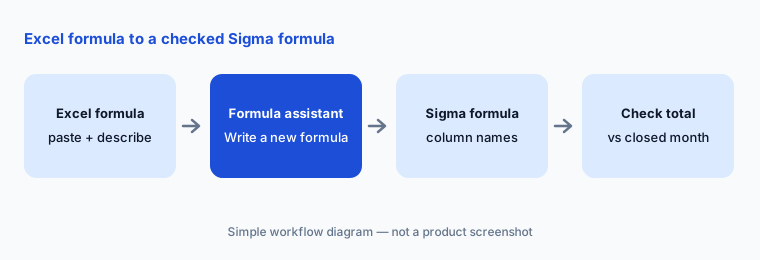
Primary workflow:
Paste one Excel formula you use monthly. Ask for the Sigma equivalent. Run it on last month and compare totals. If they differ, use Explain this formula to see which filter or column changed.
2. Sigma Assistant: questions with the SQL attached
What it is: From Sigma Home, click Chat and ask a question. Assistant searches the data sources you can access (or only the sources an admin picked), may ask a clarifying question, and answers with a chart or table plus a summary of its reasoning. Expand Worked for… and Gathered data from… to see the filters and calculations, and click View SQL for the exact query it sent to the warehouse. With the right permission, Open in workbook turns the answer into an exploration you can edit. Sigma’s 25 Sep 2026 notes added clarifying questions, visible reasoning, and side-by-side source inspection.
Admins choose between All sources and Specific sources (for example, endorsed data models with metrics). Data model owners can also add AI context (Beta) — aliases and rules in Markdown — so Assistant uses the model the way your team means it. Either way, Sigma says Assistant respects each user’s existing data access.
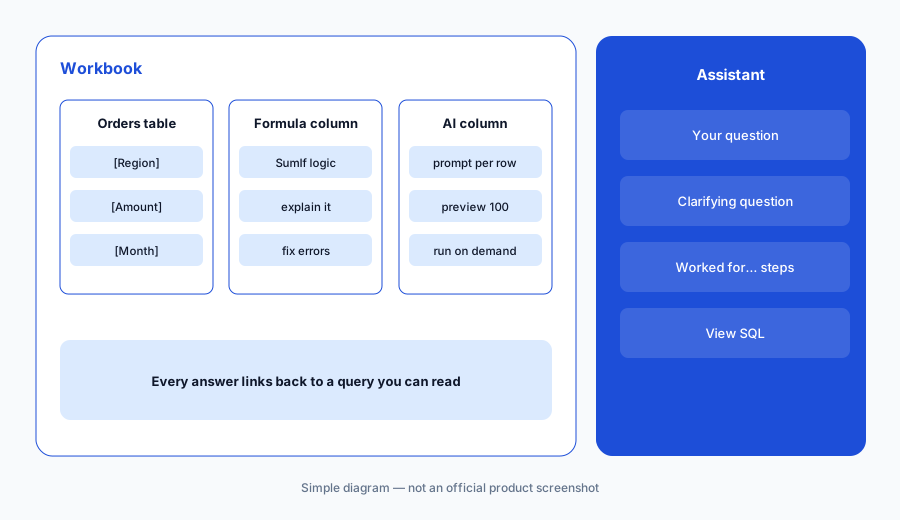
Check the logic:
Ask Sigma Assistant one question you already answer in a saved workbook. Click View SQL and compare the filters to your workbook’s filters. Write down any difference before you share either number.
3. Assistant in the workbook and build mode
What it is: Inside a workbook, Assistant can explore the data on the page, or — in a draft you can edit — plan and build dashboards and apps. Sigma made Sigma Assistant in the workbook generally available on 2 Oct 2026 and says build mode now writes code under the hood, supports more element types (maps, combo charts, navigation, drawers), and, when you attach a data model, reuses that model’s metrics instead of recreating tables and calculations. Late-September notes added pivot heatmap styling and cohort retention tables.
Net New ARR metric, the KPI tile matches finance’s number. He still checks one segment against the CRM report before publishing, and fixes a chart title Assistant worded too strongly.
Before you publish:
In a workbook draft, attach one data model and ask Assistant to build a three-tile summary page. Confirm each tile uses a model metric (not a new calculation). Publish only after one number matches your existing report.
4. AI columns and warehouse AI functions (Beta)
What it is: AI columns (Beta) let you write a prompt that references other columns — summarize a call transcript, classify a ticket, extract a competitor name — and Sigma runs it on every row using Snowflake’s AI_COMPLETE or Databricks’ ai_query. You can Preview the first 100 rows, return JSON fields, and tick Don’t run automatically. Sigma caches outputs so only new or changed rows rerun. Sigma lists limits: Snowflake or Databricks connections with write access only, no AI column referencing another AI column, and not in input tables. Admins can cap tokens per connection; the default is 10 million tokens per connection per month.
Sigma also documents AI queries — calling your warehouse’s generative AI SQL functions from a formula (for example with CallText) — for teams that prefer to write the function call themselves.
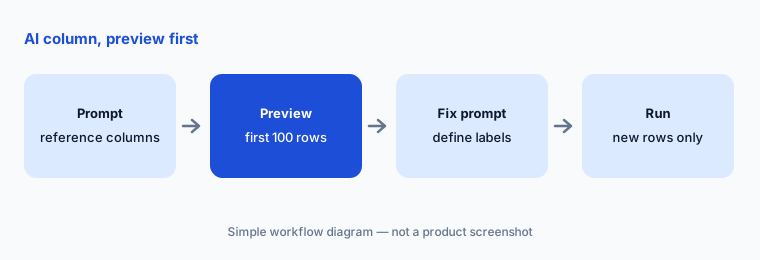
Preview first:
Create one AI column on a sanitized table with Don’t run automatically ticked. Preview 100 rows and read 20 of them yourself. Fix the prompt once, then run it on the full table.
5. Sigma agents and warehouse agents
What it is: Sigma agents are built inside a workbook with instructions, data sources, and tools — Sigma actions, MCP connectors (GA on 2 Oct 2026), and warehouse agents. People chat with them in a chat element, or editors schedule them. Since 25 Sep 2026 you can also use a Snowflake Cortex Agent or Databricks Genie Agent directly from Sigma Assistant. One caveat from Sigma’s docs is worth repeating: warehouse agents use the data in your platform directly, so row-level security and transformations you applied in Sigma do not apply to them — access is governed in Snowflake or Databricks.
Sigma’s billing doc says agents are free today and that messages sent to Sigma agents will use credits starting November 1, 2026. Sigma also added an agent API (Beta, 18 Sep) and Sigma MCP server tools to list and call workbook agents (2 Oct).
Scope the agent:
Write the one job a workbook agent should do in a single sentence and list the tables it may read. If it needs a warehouse agent, confirm row-level rules exist in the warehouse, not only in Sigma.
6. Versus Hex, Power BI Copilot, and a spreadsheet with AI
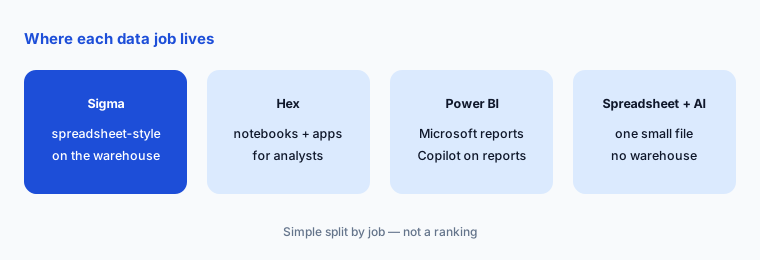
What it is: Sigma fits teams where business people want spreadsheet-style control over live warehouse data, including write-back through input tables. Hex fits analysts who write SQL and Python notebooks and publish apps. Power BI Copilot fits Microsoft shops whose reports already live in Power BI. Google Sheets with Gemini is lighter when the data truly fits in a file. If your warehouse is Databricks or Snowflake, its built-in assistant (Genie or Cortex) may already answer some of the same questions.
Home for the job:
List the five spreadsheets your team rebuilds every month. Mark each one: warehouse-sized (Sigma or your BI tool) or file-sized (keep it in a spreadsheet). Move only one this quarter.
Pricing context (October 2026)
Sigma does not publish list prices. When we checked on 5 October 2026, sigmacomputing.com/pricing redirected to Sigma’s contact page, and its license overview says to contact your account executive for license pricing. What Sigma does document: four license tiers — View, Act, Analyze, and Build — with Sigma Assistant and Explain this chart available from View, and the formula assistant listed under Analyze. Sigma’s site also offers a free trial.
Sigma also bills some activity as usage credits: published input-table row edits (1 credit per row, capped at 100 per action), API and stored-procedure calls triggered by actions, report exports, and — from 1 November 2026 — messages to Sigma agents. Sigma says to ask your account executive for credit pricing. AI features themselves run on the AI provider your admin configures (a warehouse-hosted model or an external provider such as OpenAI, Anthropic, Gemini, or Amazon Bedrock), so token costs show up on that bill — for example Snowflake Cortex or Databricks model serving — not as a Sigma line item. See our Snowflake Cortex page for Snowflake’s published AI credit rates.
Uncertainty: Because Sigma quotes privately, we can’t tell you what a seat costs, how tiers bundle, or what a credit costs. The total also depends on warehouse compute and AI-provider tokens your queries and AI columns consume. Ask Sigma for a written quote by tier, the credit price, and whether agent-message credits from 1 November 2026 are included in your contract.
When it’s useful (honest take)
Useful when your data already sits in a warehouse Sigma connects to, your finance or ops people think in rows and formulas, and someone owns a few data models with named metrics. Then the formula assistant shortens the jump from Excel, Assistant answers with SQL you can read, and AI columns can label or summarize text where the data already lives.
Less useful when your data fits in a spreadsheet and nobody needs warehouse scale — a spreadsheet with AI is cheaper and simpler. Less useful when no one maintains data models: Assistant will still pick a source, but definitions drift. And if you need published list prices to budget, Sigma’s quote-based pricing means you’ll be waiting on a sales call.
Paying for Sigma AI and a few other AI tools? The $9 AI toolkit spreadsheet lists every AI subscription you have, what each one costs, and how fast it pays for itself, so you can see which ones are worth the money.
Want someone to do it for you? AI toolkit audit — $19
Related options (educational)
| Need | Better home | Why |
|---|---|---|
| Spreadsheet-style analysis and write-back on warehouse data | Sigma (this page) | Formulas run as live queries; input tables for adjustments |
| Notebooks and data apps for SQL/Python analysts | Hex AI | Notebook logic behind every answer |
| Reports already in Microsoft Power BI | Power BI Copilot | Summaries and DAX on existing reports |
| Search-first BI on a coached model | ThoughtSpot Spotter | Business users never see SQL |
| Plain-English questions inside Databricks or Snowflake | Databricks Genie or Snowflake Cortex | Assistant lives where the data lives |
| Data that fits in one file | Sheets + Gemini | No warehouse, no new seat |
FAQ
What does Sigma’s AI do on this page?
It drafts, fixes, and explains formulas; answers plain-English questions with the SQL visible; adds AI-written columns using your warehouse’s AI functions (Beta); and runs agents inside workbooks. Which features you get depends on your license tier and what your admin enables.
Can Sigma convert my Excel formulas?
Sigma’s docs don’t describe an Excel formula importer. You can paste the Excel formula into the formula assistant’s description and ask for the Sigma version, then check the result against a month you already closed.
How much does Sigma cost in October 2026?
Sigma doesn’t publish list prices; its pricing URL redirected to a contact page when we checked on 5 October 2026. It documents View, Act, Analyze, and Build license tiers and usage credits, including agent messages from 1 November 2026. Ask Sigma for a quote.
Does my data leave the warehouse when I use Sigma AI?
It depends on the AI provider your admin sets up. With a warehouse-hosted model, Sigma says data is managed in your data platform; with an external provider such as OpenAI or Anthropic, prompts go to that provider. Check your organization’s AI settings.
Do Sigma’s row-level rules apply to warehouse agents?
No. Sigma’s docs say Snowflake Cortex Agents and Databricks Genie Agents use your platform’s data directly, so transformations and row-level security applied in Sigma don’t apply. Govern access in the warehouse.
Optional next step (if seats overlap)
If your team pays for a spreadsheet AI add-on, a BI tool, and a warehouse assistant that all answer the same month-end question, that overlap is worth mapping before the next renewal. Map the overlap with the $19 AI toolkit audit or the $9 AI toolkit spreadsheet. Email Audit $19 or Toolkit spreadsheet $9.
Checkout is live via Stripe. After you pay, we email delivery (spreadsheet) or intake next steps (audit).