Tool · Data & BI · Databricks · Oct 2026
Databricks Genie review (Oct 2026): AI/BI Genie spaces for governed data questions
Genie is Databricks’ plain-English way to ask questions of data governed in Unity Catalog. A data analyst curates a small space — a few tables, example SQL, business definitions — and business people ask questions in chat and get a SQL-backed table and chart. Whether the number is right depends far more on that curation than on the question. This page walks through setup, tuning, testing, and where a person still reads the SQL.
What this Databricks Genie page covers
This page is for the analytics lead or data analyst at a company already on Databricks, and for the ops, finance, or sales manager who would use what they build. The question it answers: what does it take to set up a Genie space people can trust, what do business users actually see, and where must a person check the generated SQL before a number goes into a deck?
A naming note first. What many teams still call an AI/BI Genie space is now a Genie Agent — Databricks’ July 2026 release notes say “Genie Spaces is now Genie Agents,” and every Genie Agents doc page carries a “formerly known as Genie Spaces” note. The Genie family now has three parts: Genie Agents (curated, domain-specific chat over your data), Genie One (one place for business users to ask questions, browse dashboards, and run Databricks Apps, including on mobile), and Genie Code (the assistant for developers in notebooks and pipelines). We use “Genie space” and “Genie Agent” interchangeably below.
Facts come from Databricks’ Genie documentation (pages updated 11–24 September 2026), its Genie pricing page, and its release notes, as we read them on 5 October 2026.
Major features (with how someone uses them)
Examples at a glance: each feature has a concrete example from a real job plus a short Try this you can run this week.
1. Set up a small Genie space with example SQL (primary)
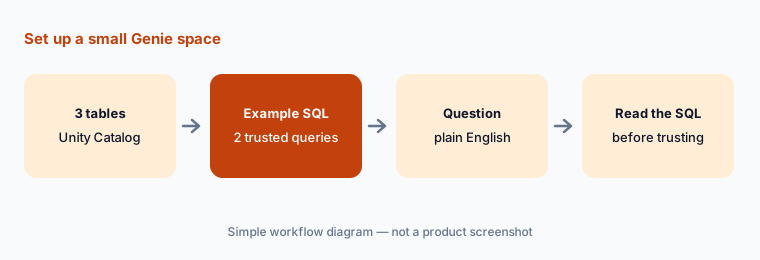
What it is: In the sidebar, click Genie Agents, then New, and choose your tables. Databricks’ requirements: data registered in Unity Catalog (up to 50 tables, views, or metric views per agent), a pro or serverless SQL warehouse, and the Databricks SQL entitlement for authors. Genie Code launches on creation and suggests table descriptions and example queries for you to accept or reject. Databricks’ own advice is to start small — aim for five or fewer tables, hide confusing columns, and add example SQL queries titled with the way users actually phrase the question.
Access works in two layers. The author’s compute credentials are embedded so users don’t need warehouse permissions, but data access is always checked as each end user’s own Unity Catalog identity — row filters and column masks apply, and a question about data a user can’t see returns an empty response. Genie only queries the sources attached to the space, even if instructions mention other tables.
opportunities, accounts, and reps — and adds two example queries: “What is our open pipeline by region?” (excluding closed stages) and “Win rate by segment this quarter.” When a sales manager later asks “open pipe in EMEA,” Genie reuses the example’s pipeline rule instead of summing every opportunity.
Primary workflow:
Create a Genie space with three tables. Add two example SQL queries. Ask one question and read the SQL before trusting the number. If the filter is wrong, fix the SQL and save it with Add as instruction.
2. Ask, then read the Analysis and Show code
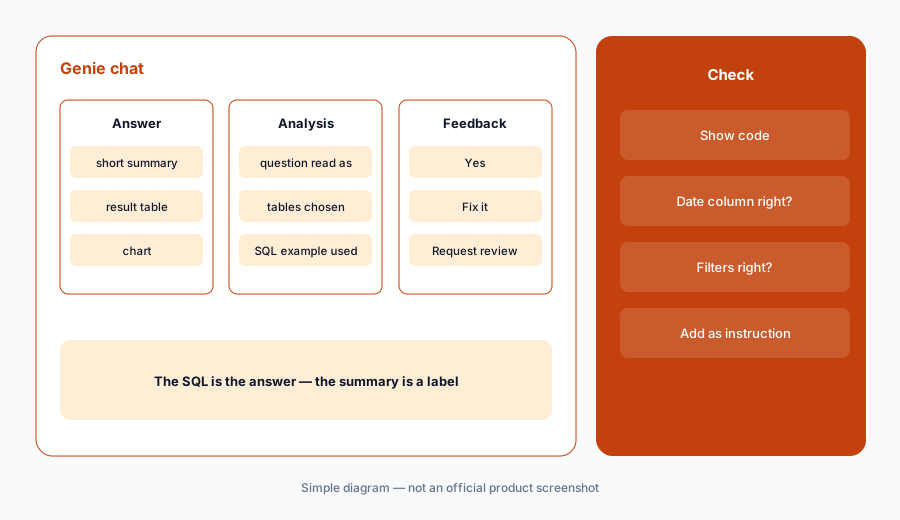
What it is: Business users type a question in chat and usually get a short summary, a result table, and a chart when Genie thinks one helps. Expand Analysis to see how Genie read the question, which tables it chose, any referenced SQL example, and plain-language thinking steps; click Show code for the query. Databricks is explicit about scope: Genie answers data questions such as “What were sales this quarter?” but not “Why were sales low?” — for exploratory questions there is Agent mode, which plans multi-step research and returns a report with findings, charts, and citations you can export as PDF.
Each chat thread keeps its own context, so you can follow up with “only for July.” Query results persist for seven days; after that you rerun the saved SQL. Databricks notes Genie can be non-deterministic — the same prompt can return different outputs — which is exactly why example SQL and trusted assets matter.
order_date filter where finance books refunds on refund_date. She clicks Fix it, notes the right column, and requests a review so the space author adds a filter definition everyone gets.
Read before you forward:
Ask one question whose answer you already know. Expand Analysis and Show code. Check the table, the date column, and every filter. Only forward the number if all three match what you’d have written.
3. Tune with SQL expressions, joins, and trusted assets
What it is: Databricks ranks the tools for teaching Genie: SQL expressions for common business terms (measures like win rate, filters like “large orders,” fields like deal size), example SQL for complex or ambiguous questions, and text instructions only as a last resort. You can define join relationships, add column synonyms, and turn on entity matching so “Florida” maps to 'FL'. Parameterized example queries and Unity Catalog SQL functions are trusted assets: when Genie answers with one, users see it as a verified answer. Each space allows 100 instructions and 200 knowledge-store snippets.
Define one term:
Pick the business term people argue about most. Add it as a SQL expression with two synonyms. Ask the question three different ways and confirm the SQL uses your expression each time.
4. Benchmarks, feedback, and the Monitor tab
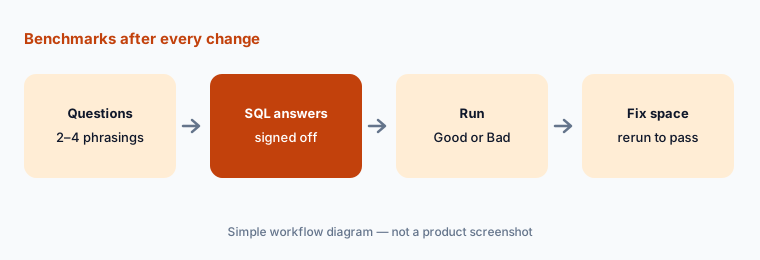
What it is: Benchmarks are a saved test set — up to 500 questions per space — each optionally paired with a SQL answer. In Chat mode, Genie compares its result set with yours and grades each Good or Bad (for example, extra columns count as Bad; rounding to the same four significant digits counts as Good); in Agent mode an LLM judge grades against an evaluation note. Databricks recommends two to four phrasings of each common question. Separately, users answer “Is this correct?” with Yes, Fix it, or Request review, and authors see everything on the Monitor tab — but feedback alone does not change Genie’s behavior; an author has to update the space.
Test before you share:
Add five benchmark questions with SQL answers, using at least two phrasings of one of them. Run benchmarks now and again after your next change to the space. Share the space only when nothing regressed.
5. Genie One, mobile, the API, and Sigma
What it is: Business users who don’t want to pick a space can use Genie One, a single entry point across shared agents, dashboards, and Databricks Apps, including an account-level view across workspaces and iOS and Android apps. Developers can call a space through the Conversation API or embed it in an external app. Outside Databricks, BI tools are starting to call Genie directly — for example, Sigma made Databricks Genie Agents available in Sigma Assistant on 25 Sep 2026, with access governed in Databricks.
Pick one front door:
Decide where your users will ask first — Genie One, a single Genie space, or a BI tool that calls Genie. Point one team there for two weeks and review the Monitor tab before adding a second.
6. Versus Snowflake Cortex, Sigma, and Power BI Copilot
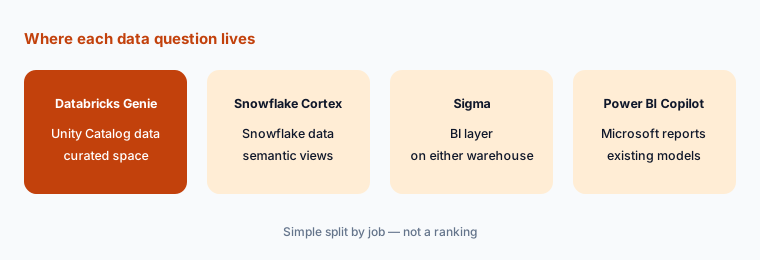
What it is: Genie fits companies whose governed data already lives in Databricks and Unity Catalog. Snowflake Cortex Analyst is the equivalent pattern on Snowflake, built on semantic views. Sigma and ThoughtSpot are BI layers that sit on top of either warehouse. Power BI Copilot fits Microsoft shops whose reports live in Power BI. The deciding question is usually where the trusted tables already are, not which chat box looks nicer.
Follow the data:
List the three tables you’d expose first. Write which platform holds each one. Test the assistant on that platform first, and don’t add a second assistant for the same tables.
Pricing context (October 2026)
Databricks publishes Genie pricing on databricks.com/product/pricing/genie. When we checked on 5 October 2026, it listed Genie One and Genie Agents as a promotion — free for LLM usage until January 31, 2027. From February 1, 2027, every user gets 150 DBUs of free usage per month, then pay-as-you-go. Genie Code already bills that way (150 free DBUs per user per month, billing began July 8, 2026) with a 25%-off promotion until January 31, 2027. Databricks’ footnote says 150 DBUs = $10.50 in US East, and the dollar equivalent varies by region.
Three details matter for budgeting. First, there are no seat or user fees — Genie charges for actual LLM consumption, billed under the Serverless Real-time Inference SKU. Second, the free usage covers LLM usage only: the SQL warehouse that runs Genie’s queries is billed separately at normal Databricks SQL rates (see Databricks SQL pricing; rates vary by cloud, region, and tier, so we don’t quote one). Third, service principals get no free usage, so API-driven use is billed from the first message. Account admins can set Genie budgets with shared and per-user thresholds; Databricks says enforcement is approximate and system.billing.usage is the source of truth.
Uncertainty: Promotional terms, the free DBU allowance, and DBU dollar rates are set by Databricks and differ by region and contract. We can’t estimate SQL warehouse cost for your workload, and the post-promotion price per DBU for Genie depends on your agreement. Check the live Genie and Databricks SQL pricing pages and your account team before you plan beyond January 2027.
When it’s useful (honest take)
Useful when your trusted tables already sit in Unity Catalog, a SQL-literate analyst will own a small, focused space, and you’re willing to write example SQL and benchmarks. Then Genie can take routine “what was X last month?” questions off the data team while every answer keeps a query you can read — and LLM usage is free under the promotion through January 2027.
Less useful when nobody will curate the space: a dozen loosely described tables invite confident wrong answers. Less useful for “why did it move?” questions in standard chat — that needs Agent mode or an analyst. And if your company’s data isn’t on Databricks, adopting Genie means moving data first; use the assistant on the platform you already have.
Paying for Databricks Genie and a few other AI tools? The $9 AI toolkit spreadsheet lists every AI subscription you have, what each one costs, and how fast it pays for itself, so you can see which ones are worth the money.
Want someone to do it for you? AI toolkit audit — $19
Related options (educational)
| Need | Better home | Why |
|---|---|---|
| Governed questions on Databricks / Unity Catalog data | Databricks Genie (this page) | Curated space; per-user Unity Catalog access |
| Governed questions on Snowflake data | Snowflake Cortex | Cortex Analyst on semantic views |
| Spreadsheet-style analysis on either warehouse | Sigma AI | Can call Genie Agents as warehouse agents |
| Notebooks and apps for analysts | Hex AI | SQL and Python behind every answer |
| Reports already in Microsoft Power BI | Power BI Copilot | Summaries and DAX on existing reports |
| A few trusted metrics pushed as digests | Tableau Pulse | Follow metrics; no exploration needed |
FAQ
Is a Genie space the same as a Genie Agent?
Yes. Databricks’ July 2026 release notes say Genie Spaces is now Genie Agents, and its docs note the old name on every Genie Agents page. Setup, example SQL, and benchmarks work the same way.
Can users see data they don’t have access to through Genie?
Databricks says no: compute uses the author’s embedded warehouse credentials, but data access is always checked as each user’s own Unity Catalog identity, including row filters and column masks.
How much does Databricks Genie cost in October 2026?
Databricks’ Genie pricing page listed Genie One and Genie Agents LLM usage free until January 31, 2027, then 150 free DBUs per user per month and pay-as-you-go. SQL warehouse compute is billed separately. Confirm on databricks.com/product/pricing/genie.
How many tables should a Genie space have?
Databricks recommends starting with five or fewer and allows up to 50 tables, views, or metric views. Pre-join related tables into views or metric views rather than attaching everything.
Does Genie learn from thumbs-up and Fix it feedback?
Not on its own. Databricks says feedback doesn’t change Genie’s behavior; authors review it on the Monitor tab and update example SQL, expressions, or instructions. Positive feedback can prompt Genie to suggest new SQL snippets for an author to approve.
Optional next step (if seats overlap)
If you pay for a BI tool’s “ask the data” add-on while Genie on the same tables is free under promotion, that overlap is worth a look before renewal. Map the overlap with the $19 AI toolkit audit or the $9 AI toolkit spreadsheet. Email Audit $19 or Toolkit spreadsheet $9.
Checkout is live via Stripe. After you pay, we email delivery (spreadsheet) or intake next steps (audit).