Tool · Data & BI · Snowflake · Oct 2026
Snowflake Cortex review (Oct 2026): Cortex AI functions and Analyst for ops data
Snowflake Cortex puts large language models next to your tables. Cortex AI functions are SQL functions — summarize, classify, extract, translate — you run on a column the way you’d run UPPER(). Cortex Analyst turns plain-English questions into SQL using a semantic view your team defines. Both run inside Snowflake’s boundary, and both bill in credits rather than seats. This page shows each with an ops job, a Try this, and the checks a person still owns.
What this Snowflake Cortex page covers
This page is for the ops, support, or finance analyst whose company already runs on Snowflake, and for the data engineer who would grant the roles. The question it answers: which Cortex pieces are worth trying on everyday ops data — ticket text, call notes, order tables — what do they cost in credits, and where does a person still have to read the output?
Cortex covers a lot of ground, so we focus on two parts and their neighbors. AI functions such as AI_SUMMARIZE, AI_CLASSIFY, AI_SENTIMENT, and AI_SUMMARIZE_AGG work in plain SQL; Snowflake says the models it offers are deployed inside the Snowflake service perimeter. Cortex Analyst answers business questions from structured data through semantic views. Snowflake now recommends moving Analyst use to Cortex Agents, which can combine Analyst with Cortex Search, code execution, and MCP tools, and which business users reach through Snowflake CoWork — the chat app documented under that name (its iOS listing still says Snowflake Intelligence).
Facts and rates come from Snowflake’s documentation and the Snowflake Service Consumption Table effective October 2, 2026, as we read them on 5 October 2026. Some individual AI functions are Preview features; Snowflake asks you to check each function’s status before production use.

Major features (with how someone uses them)
Examples at a glance: each feature has a concrete example from a real job plus a short Try this you can run this week.
1. AI_SUMMARIZE on a column of tickets (primary)
What it is: AI_SUMMARIZE(text) returns a short summary of a text value (or of a staged file). You call it in a SELECT like any function, so summarizing 20 ticket bodies is one query. To run it, your role needs the USE AI FUNCTIONS account privilege and either the CORTEX_USER or AI_FUNCTIONS_USER database role. Two usage notes from Snowflake are easy to miss: inputs of 110 characters or fewer come back unchanged (and are still billed), and to summarize across many rows you should use AI_AGG or AI_SUMMARIZE_AGG rather than gluing rows together with LISTAGG.
Snowflake recommends a warehouse no larger than MEDIUM for AI functions — a bigger warehouse doesn’t speed them up but does cost more. Batch, set-based queries suit these functions; for interactive, latency-sensitive use Snowflake points to its REST APIs.
SELECT ticket_id, AI_SUMMARIZE(body) FROM tickets_sample LIMIT 20 on a sanitized copy of last week’s tickets. Fifteen summaries are fine. Two drop the customer’s actual ask, and one turns “refund not received” into “billing question.” She adds the raw body beside each summary in the weekly review sheet so team leads can catch the same misses.
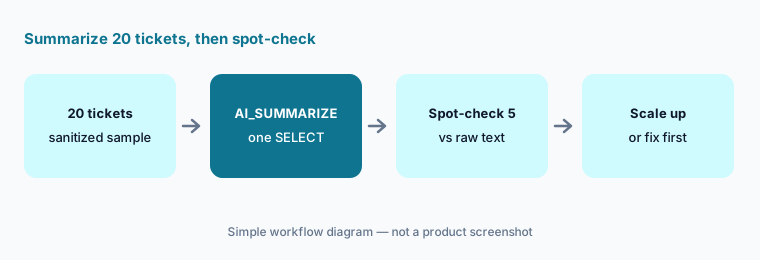
Primary workflow:
Run a summarize function on 20 support-ticket rows. Spot-check five summaries against the raw text. Mark any summary that dropped the customer’s actual request before you run it on a full week.
2. AI_CLASSIFY, AI_SENTIMENT, and across-row summaries
What it is: AI_CLASSIFY sorts text, images, or documents into categories you list; categories can carry short descriptions (25 words or fewer). Snowflake notes that more than about twenty categories may reduce accuracy, and that labels and descriptions count as input tokens for every row. AI_SENTIMENT scores tone. AI_SUMMARIZE_AGG and AI_AGG summarize a whole column — and, unlike single-value functions, Snowflake says they aren’t limited by the model’s context window, so they work on a month of notes grouped by account or product.
AI_SUMMARIZE_AGG(body) grouped by category to get one paragraph per bucket for the monthly review. Before presenting, she pulls 10 random tickets from the “Billing” bucket and checks the labels by hand; two belong in “Account access,” so she sharpens that category’s description and reruns.
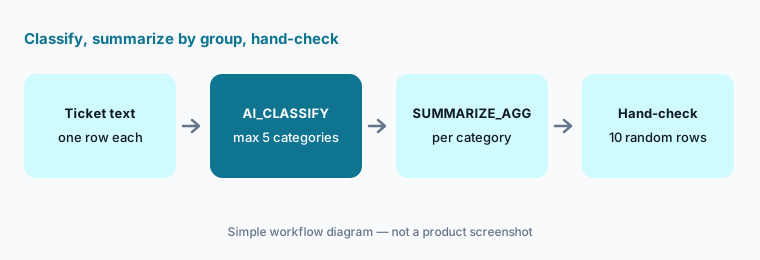
Label, then check:
Classify 200 sanitized tickets into at most five categories with one-line descriptions. Pull ten random rows per category and check them by hand. Fix the worst description and rerun before summarizing any group.
3. Cortex Analyst on a semantic view
What it is: Cortex Analyst is a managed text-to-SQL service: a business user asks a question, Analyst writes SQL against a semantic view, and the SQL runs in your warehouse. A semantic view is a schema-level object that names logical tables, dimensions, facts, metrics (for example net revenue as SUM(gross_revenue * (1 - discount))), and join relationships, plus verified queries — sample questions with trusted SQL. Snowflake says Analyst follows your role-based access controls, doesn’t train on customer data, and answers only questions SQL can resolve — not “what trends do you see?” It’s exposed as a REST API, so teams put it in Streamlit, Slack, Teams, or a BI tool.
Cortex Analyst evaluations run your verified queries as the ground truth, execute Analyst’s SQL, compare results, and track regressions and latency over time. And note the direction of travel: Snowflake’s Analyst pages now open with a recommendation to move to Cortex Agents, which support every Analyst capability.
orders, shipments, and warehouses with an on-time rate metric and five verified queries. When a regional manager asks, “On-time rate for Dallas last month?” Analyst uses the metric instead of inventing one. The analyst runs an evaluation after adding a returns table and finds one verified query now fails because of a new join, which she fixes before telling anyone.
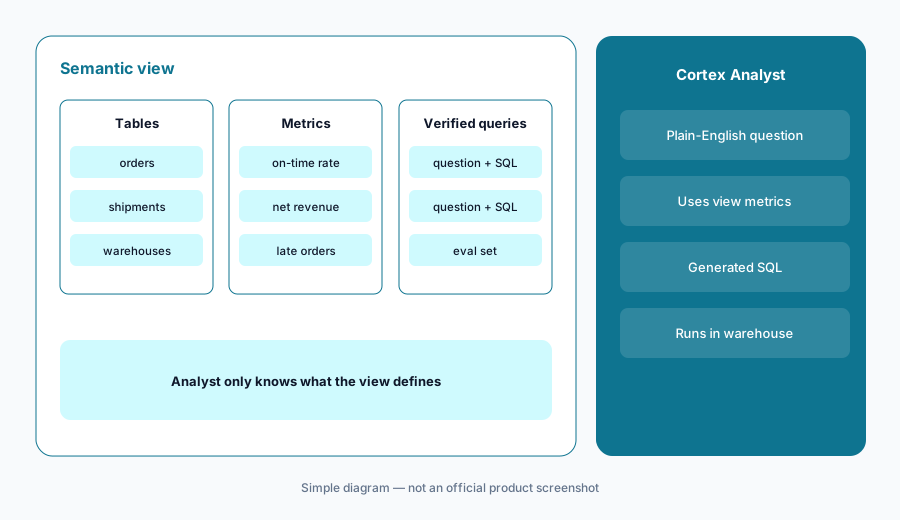
Define, then ask:
Write one metric your team argues about into a semantic view with two verified queries. Ask Analyst the question three ways. Run an evaluation and keep the view only if all verified queries pass.
4. Cortex Agents and Snowflake CoWork
What it is: Cortex Agents are schema-level objects that bundle a model, instructions, and tools — Cortex Analyst over semantic views, Cortex Search over documents, an optional sandboxed Python code-execution tool, custom tools from stored procedures, MCP connectors, and web search. They plan, call tools, and reflect in a loop, and keep conversation threads. Snowflake CoWork is the ready-made chat app business users use to talk to those agents, with charts, saved artifacts, scheduled automations that email fresh results, and document generation. Snowflake’s own docs say the accuracy of agent responses and citations isn’t guaranteed and that you should review answers before serving them to users.
Two tools, one owner:
Build one agent with exactly two tools — Analyst on one semantic view and one Search service. Ask three questions that need both. Open every citation before trusting any answer.
5. Tracking credits and setting per-user quotas
What it is: Because Cortex bills by tokens and messages, cost tracking is part of the job. Snowflake documents account-usage views for this: CORTEX_FUNCTIONS_USAGE_HISTORY and CORTEX_FUNCTIONS_QUERY_USAGE_HISTORY for AI function credits and tokens per call or query, CORTEX_ANALYST_USAGE_HISTORY for Analyst, and METERING_HISTORY with service type AI_SERVICES. For controls, Snowflake describes budgets, resource budgets for tagged agents, shared resource budgets by team, and per-user quotas that can block usage across AI functions, Cortex Agents, Cortex Code, and CoWork. AI_COMPLETE also caches identical calls within a query, and cache hits aren’t billed.
CORTEX_FUNCTIONS_QUERY_USAGE_HISTORY shows a scheduled task running AI_CLASSIFY with 30 long category descriptions over every ticket ever filed, nightly. She changes it to process only new rows, trims the descriptions, and sets a per-user quota for the service user so a repeat can’t run away.
Watch the meter:
Before any scheduled AI function job, run it once on 100 rows and look up that query in CORTEX_FUNCTIONS_QUERY_USAGE_HISTORY. Multiply to full volume and write the monthly estimate next to the job.
6. Versus Databricks Genie, Sigma, and Hex
What it is: Cortex fits companies whose ops data already lives in Snowflake. Databricks Genie is the comparable pattern for Unity Catalog data. Sigma sits on top of Snowflake as a spreadsheet-style BI layer — its AI columns call Snowflake’s AI_COMPLETE, and since September 2026 Sigma Assistant can call Cortex Agents directly. Hex suits analysts who want notebooks and apps over the same tables. For a one-off pasted CSV, a chat assistant such as Claude with artifacts is simpler and needs no warehouse roles.
AI_CLASSIFY + AI_SUMMARIZE_AGG query writes a themes table that the existing Sigma dashboard reads. Nobody exports tickets to a separate AI tool, and access stays under Snowflake roles.
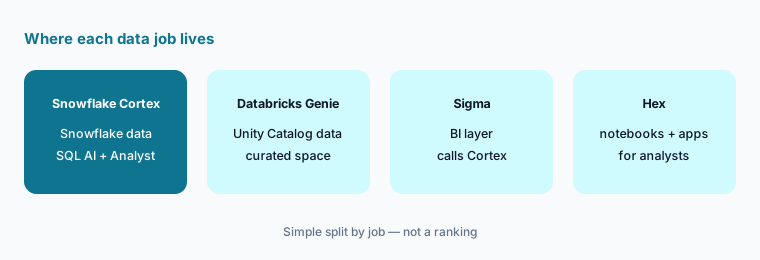
Follow the data:
Write where your ticket or note text lives today. If it’s already in Snowflake, test one AI function there before exporting anything. If it isn’t, don’t move it just to try Cortex.
Pricing context (October 2026)
Snowflake publishes credit rates in the Snowflake Service Consumption Table; the version we read on 5 October 2026 is effective October 2, 2026. Cortex AI functions bill in AI Credits per million tokens processed: AI_SUMMARIZE 1.60 (marked Preview in the table), AI_SENTIMENT 1.60, AI_CLASSIFY 1.62, AI_FILTER 1.62, AI_AGG and AI_SUMMARIZE_AGG 1.85, and AI_TRANSLATE 1.63. AI_COMPLETE varies by model. On-demand AI Credit pricing is listed at $2.00 (Global) and $2.20 (Regional) per AI Credit. For generating functions both input and output tokens bill, and task functions add their own prompt, so billed tokens exceed the text you send.
Cortex Analyst via its REST API is listed at 67 Platform Credits per 1,000 messages (only successful responses count); when Analyst runs through Cortex Agents or CoWork, it bills by tokens at the per-model rates in the same table. Running the generated SQL, and keeping a warehouse running while AI functions execute, also uses normal warehouse credits — on-demand Platform Credits are listed from $2.00 (Standard), $3.00 (Enterprise), and $4.00 (Business Critical) in AWS US East, higher in many other regions. Rough arithmetic for the Try this above: 20 tickets at a few hundred tokens each is on the order of 10,000 tokens, about 0.016 AI Credits for AI_SUMMARIZE — a few cents, plus warehouse time. That is our estimate, not a Snowflake quote.
Uncertainty: Rates depend on edition, cloud region, on-demand versus capacity contracts, and whether a function is Preview; Snowflake updates the consumption table often. Token counts vary by model and language, and warehouse time adds to every AI query. Check the live consumption table and your own usage views on a small sample before you schedule anything at full volume.
When it’s useful (honest take)
Useful when your ops text and tables already live in Snowflake and someone can grant CORTEX_USER or AI_FUNCTIONS_USER to a test role. Then summarizing, classifying, or grouping a few thousand rows is one SQL query that stays inside Snowflake, and a semantic view gives business users governed plain-English questions without a new BI seat.
Less useful when your data isn’t in Snowflake — moving it just to try Cortex rarely pays off. Less useful when nobody will read outputs: a classifier that is right most of the time still mislabels real tickets. And because cost scales with tokens, a careless nightly job over full history can surprise you; set quotas before scheduling.
Paying for Snowflake Cortex and a few other AI tools? The $9 AI toolkit spreadsheet lists every AI subscription you have, what each one costs, and how fast it pays for itself, so you can see which ones are worth the money.
Want someone to do it for you? AI toolkit audit — $19
Related options (educational)
| Need | Better home | Why |
|---|---|---|
| Summarize or classify text already in Snowflake | Snowflake Cortex (this page) | SQL functions; data stays in Snowflake |
| Plain-English questions on Databricks data | Databricks Genie | Curated space on Unity Catalog |
| Spreadsheet-style analysis on Snowflake | Sigma AI | AI columns call Cortex; can use Cortex Agents |
| Notebooks and apps for analysts | Hex AI | SQL and Python behind every answer |
| Search-first BI for business users | ThoughtSpot Spotter | Coached model; no SQL for users |
| Ticket summaries inside the help desk itself | Zendesk AI | Agents see it where they work |
FAQ
What are Cortex AI functions?
SQL functions such as AI_SUMMARIZE, AI_CLASSIFY, AI_SENTIMENT, AI_AGG, and AI_COMPLETE that run language models on your Snowflake data. Your role needs the USE AI FUNCTIONS privilege and the CORTEX_USER or AI_FUNCTIONS_USER database role.
Does my data leave Snowflake?
Snowflake says the LLMs it provides through its AI features are deployed within the Snowflake service perimeter, and that Cortex Analyst does not train on customer data. Model choice and cross-region inference settings affect where processing happens, so check your account’s configuration.
How much does Snowflake Cortex cost in October 2026?
There are no seats; it bills credits. The consumption table effective October 2, 2026 lists AI_SUMMARIZE at 1.60 AI Credits per million tokens, AI Credits at $2.00 (Global) or $2.20 (Regional) on demand, and Cortex Analyst API at 67 Platform Credits per 1,000 messages, plus warehouse time. Confirm in the consumption table.
Should we use Cortex Analyst or Cortex Agents?
Snowflake now recommends Cortex Agents, which support every Analyst capability and add tools like Cortex Search and code execution. Either way, the semantic view and its verified queries do most of the work of getting answers right.
How do we stop a Cortex job from running up credits?
Test on a small sample, look up its cost in CORTEX_FUNCTIONS_QUERY_USAGE_HISTORY, process only new rows, keep the warehouse at MEDIUM or smaller, and set per-user quotas or budgets. Snowflake says quotas can block usage across AI functions, agents, and CoWork.
Optional next step (if seats overlap)
If you pay a help-desk AI add-on, a BI “ask the data” seat, and Cortex credits to summarize the same tickets, that overlap is worth mapping. Map the overlap with the $19 AI toolkit audit or the $9 AI toolkit spreadsheet. Email Audit $19 or Toolkit spreadsheet $9.
Checkout is live via Stripe. After you pay, we email delivery (spreadsheet) or intake next steps (audit).