How-to · Data · Snowflake Cortex · Oct 19, 2026
Classify one table of free text with Cortex AI functions, and track the credits before scaling it
Snowflake Cortex AI functions let you summarize, classify, and aggregate text in SQL inside Snowflake. Classification at full-table scale can burn credits quietly. This page shows how to classify a sample, check labels, and read cost tracking before you scale. Terms: QA means a quality check done by a person.
Who this is for
Ops and data teams whose ticket or notes text already lives in Snowflake. The job here is cost-tracked classification. For a Databricks Genie Agent benchmark before share — a different job — see Databricks Genie Agent benchmark.
How to do it
This is a how-to, not a ranking of warehouse AI. Per the Snowflake Cortex review, Cortex AI functions in SQL include summarize, classify, and aggregate; Cortex Analyst sits on semantic views; cost tracking uses account-usage views and quotas. The ground rule: no full-table classify until a sample passes a human spot-check and someone reads the credit views.
1. Run classify on a 500-row sample
What it is: Create a sanitized 500-row sample, define five or fewer categories with short descriptions, and run AI_CLASSIFY in SQL.
- Keep categories to about twenty or fewer — per Snowflake notes, more can hurt accuracy.
- Grant USE AI FUNCTIONS and a Cortex-related database role to the test role only.
- Store results in a sample table, not over production.
- Keep descriptions short; they count as input tokens every row.
- Do not schedule a full-history job yet.
Ops classifies 500 tickets into Billing, Access, Bug, How-to, and Other with one-line descriptions each.
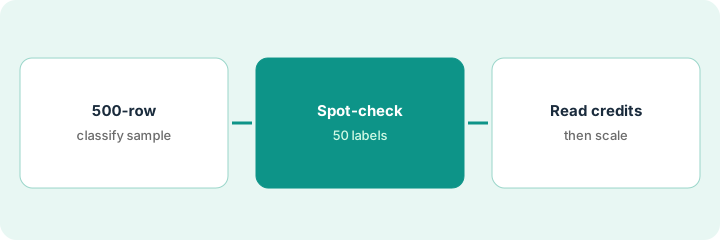
Run AI_CLASSIFY on 500 rows only and write the category list in the worksheet comment.
2. Spot-check fifty labels by hand
What it is: Pull fifty random labeled rows, compare to the raw text, and sharpen category descriptions where labels miss.
- Sample across all categories.
- Mark correct / wrong / unsure.
- Rewrite weak category descriptions and re-run the sample if needed.
- Do not scale while the miss rate is high.
- Keep the spot-check sheet with the project.
Eight of fifty “Billing” rows were actually access problems. Descriptions are sharpened and the sample is re-run.
Check fifty labels before you touch the full table.
3. Read cost tracking; then decide on the full table
What it is: Read CORTEX_FUNCTIONS_USAGE_HISTORY (and related views), set a per-user quota if needed, and only then run incremental full-table classify.
- Open the usage history views Snowflake documents for AI functions.
- Note credits for the sample run.
- Set a quota on the service user if you have one.
- Process new rows incrementally, not the entire history nightly.
- Decide go/no-go in writing.
The sample costs a small credit amount; the owner sets a quota and allows incremental classify on new tickets only.
Read the usage view and write a go/no-go before full-table classify.
Pricing context (October 2026)
This how-to isn’t a price sheet. Per the Snowflake Cortex review, Cortex bills in AI Credits per million tokens with rates published in Snowflake’s Service Consumption Table (our review read the table effective October 2, 2026). We could not re-download that PDF on Oct 19, 2026, so this page quotes no Cortex dollar rates — confirm on Snowflake’s live consumption table and your contract. Dated October 2026.
Checked Oct 19, 2026 on the vendor’s own pricing page: Snowflake publishes Cortex rates in its Service Consumption Table; our Oct 19, 2026 PDF fetch was blocked, so Snowflake’s pricing guide is the starting point and this page quotes no Cortex dollar rates. This page quotes no Snowflake Cortex dollar figure; confirm what your contract includes with Snowflake Cortex or your admin.
Uncertainty: The only prices this site sells here are the optional $9 AI toolkit spreadsheet and $19 AI toolkit audit.
When this helps (honest take)
Useful when ops text already lives in Snowflake and someone can grant AI function roles plus read usage views.
Not useful when you wanted chat without SQL roles, or nobody will spot-check labels.
Related options (educational)
| Need | Where to look | Why |
|---|---|---|
| Snowflake Cortex | Snowflake Cortex | Primary path |
| Genie vs Cortex | Databricks Genie vs Snowflake Cortex | Compare patterns |
| Databricks Genie benchmark | Databricks Genie Agent benchmark | A different job |
FAQ
Which function should we start with?
For labeled buckets, start with AI_CLASSIFY on a sample. Use AI_SUMMARIZE when you need short per-row summaries.
Why no dollar figures here?
Snowflake’s credit rates live in the Service Consumption Table; our Oct 19, 2026 fetch of that PDF was blocked. Confirm rates on Snowflake’s live table.
Optional next step
If you want a one-page toolkit map for the tools you already pay for, use the optional $9 AI toolkit spreadsheet. If you want a short review of seat waste and unused tools, use the optional $19 AI toolkit audit. Neither is required to follow this how-to.