Compare · Data & BI · Oct 2026
Databricks Genie vs Snowflake Cortex Analyst (Oct 2026): ask your warehouse in plain English
Databricks Genie and Snowflake Cortex Analyst both let business users ask data questions in plain English and get answers from SQL that runs in the warehouse. The assistant follows the data: whichever platform already holds your trusted tables is where you test first. This page compares how each is set up, checked, and billed — not as a ranking — with a Try this for each step.
What this comparison covers
This page is for the analytics lead or data engineer asked to give business users “ask the data in English,” and for the ops or finance manager who will use it. If your company runs both platforms, the question is which holds the tables people actually ask about.
Naming has shifted on both sides. Databricks’ July 2026 release notes renamed Genie Spaces to Genie Agents; the family also includes Genie One (for business users) and Genie Code (for developers). Snowflake’s Cortex Analyst docs now recommend moving to Cortex Agents, which include every Analyst capability and reach business users through Snowflake CoWork. We compare the curated “ask your tables” layer on each: a Genie Agent (space) and Cortex Analyst on a semantic view.
Facts come from Databricks’ Genie docs and pricing page, and Snowflake’s Cortex Analyst docs and Service Consumption Table (effective 2 October 2026), read on 5 October 2026. Our standalone Genie and Cortex reviews go deeper.

Major features (with how someone uses them)
Examples at a glance: each feature has a concrete example from a real job plus a short Try this you can run this week.
1. List the three tables you’d expose (primary)
What it is: Both tools work best on a small, curated set. Databricks requires data in Unity Catalog (up to 50 tables, views, or metric views per Genie Agent) and advises starting with five or fewer tables. Cortex Analyst works from a semantic view — logical tables, dimensions, facts, metrics, join relationships, and verified queries. Either way, you choose a few trusted tables and describe them; the assistant follows the data, so test on the platform that already holds them.
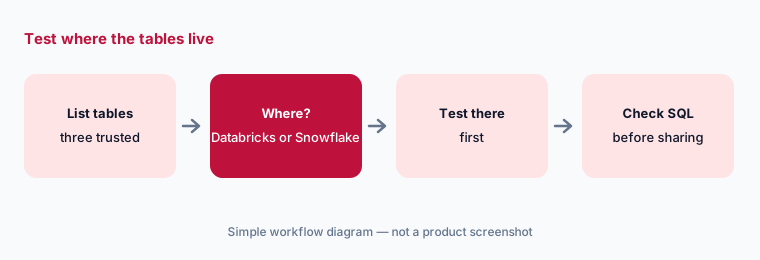
Primary workflow:
List the three tables you’d expose. Whichever platform holds them is where you test first.
2. What you curate: SQL examples vs a semantic view
What it is: Genie is taught with SQL expressions for business terms, example SQL queries titled the way users ask, join relationships, synonyms, and trusted assets; Databricks says text instructions are a last resort. Cortex Analyst is taught through the semantic view’s named metrics and verified queries (sample questions with trusted SQL), and Snowflake offers evaluations that run verified queries as ground truth. Both inherit platform permissions: Genie uses Unity Catalog access, and Analyst follows Snowflake role-based access control.
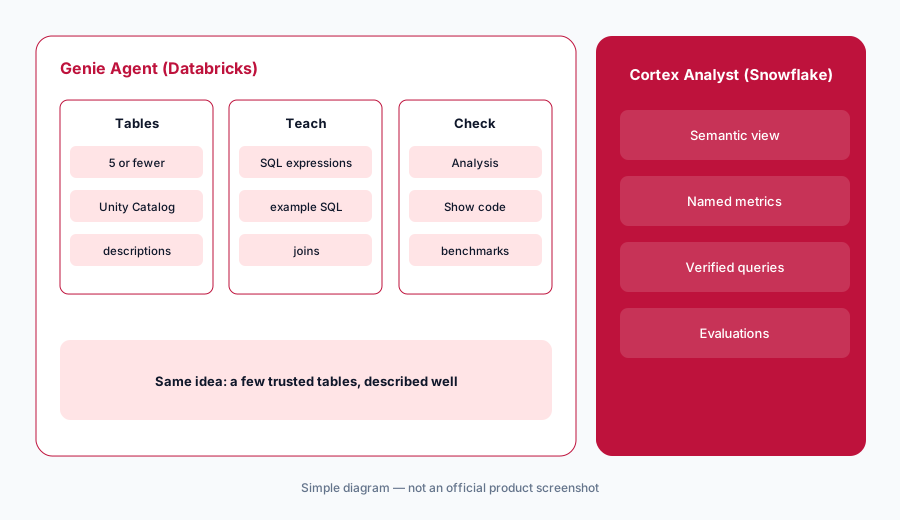
Define one metric:
Write the metric your team argues about most. Define it once in the platform you’re testing (SQL expression or semantic-view metric) and add two example questions with trusted SQL.
3. Checking answers before they’re shared
What it is: Genie shows an Analysis panel (how it read the question, which tables it chose) and Show code for the SQL; Databricks notes the same prompt can return different outputs. Cortex Analyst returns the SQL it generated, and Snowflake says it answers only questions SQL can resolve and doesn’t train on customer data. Both need someone who can read SQL to check answers early on.
Ask what you know:
Ask one question whose answer you already know. Read the generated SQL: table, date column, filters. Share the number only if all three match what you’d have written.
4. How each one bills
What it is: Genie charges for LLM consumption with no seat fee; Cortex Analyst charges per message via its API or by tokens when run through Cortex Agents. In both cases, the warehouse compute that runs the SQL is billed separately at normal rates. The numbers are in the pricing section below.
Watch the meter:
Before widening access, run a two-week pilot with a few users and check usage in the platform’s billing views (Databricks system.billing.usage, or Snowflake’s usage views) alongside warehouse time.
Pricing context (October 2026)
Databricks Genie: Databricks’ Genie pricing page, read on 5 October 2026, listed Genie One and Genie Agents as free for LLM usage until 31 January 2027; from 1 February 2027, each user gets 150 DBUs of free usage per month, then pay-as-you-go. Its footnote says 150 DBUs = $10.50 in US East. Free usage covers LLM use only — the SQL warehouse is billed separately — and service principals get no free usage.
Snowflake Cortex Analyst: Snowflake’s Service Consumption Table, effective 2 October 2026, lists Cortex Analyst via its REST API at 67 Platform Credits per 1,000 messages (successful responses only); through Cortex Agents or CoWork it bills by tokens at per-model rates. AI Credits are listed at $2.00 (Global) and $2.20 (Regional). Running the generated SQL uses normal warehouse credits.
Uncertainty: Promotions end, DBU and credit dollar rates vary by region, edition, and contract, and warehouse cost depends on your queries. We can’t estimate your monthly cost. Check both live pricing pages and your account teams.
When it’s useful (honest take)
Genie is useful when your trusted tables are in Unity Catalog and a SQL-literate analyst will own a small, focused Genie Agent.
Cortex Analyst is useful when your trusted tables are in Snowflake and someone will maintain a semantic view with verified queries — or when you’re ready to move to Cortex Agents. Neither works well on undocumented, sprawling schemas.
Still choosing between Databricks Genie and Snowflake Cortex Analyst? The $19 AI toolkit audit gives you a written plan for which tools to keep using and which to drop across your whole AI stack, including this pair.
Prefer to do it yourself? Spreadsheet — $9
Related options (educational)
| Need | Better home | Why |
|---|---|---|
| Plain-English questions on Databricks tables | Databricks Genie | Genie Agents on Unity Catalog |
| Plain-English questions on Snowflake tables | Snowflake Cortex | Analyst on semantic views, or Cortex Agents |
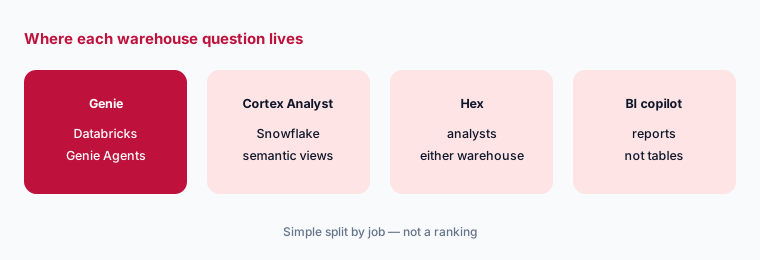
| Analysts who want notebooks and apps | Hex AI | Works on either warehouse |
| Spreadsheet-style BI on the warehouse | Sigma AI | Familiar grid for business users |
| Questions on reports rather than tables | Power BI Copilot | If reports live in Power BI |
FAQ
Is Databricks Genie or Snowflake Cortex Analyst better?
Neither in general. Use the one on the platform that already holds the tables people ask about; the assistant follows the data.
Is a Genie space the same as a Genie Agent?
Yes. Databricks’ July 2026 release notes renamed Genie Spaces to Genie Agents.
Should we use Cortex Analyst or Cortex Agents?
Snowflake’s Cortex Analyst docs recommend moving to Cortex Agents, which support every Analyst capability and add tools such as Cortex Search.
How do Genie and Cortex Analyst bill in October 2026?
Genie One and Genie Agents are free for LLM usage until 31 January 2027, with warehouse compute billed separately. Cortex Analyst via API is 67 Platform Credits per 1,000 messages, or token-based through Cortex Agents, plus warehouse credits.
Do users see data they don’t have access to?
Both respect platform permissions: Genie works with Unity Catalog access controls, and Snowflake says Cortex Analyst follows role-based access control. Configure those first.
Optional next step (if seats overlap)
If your company pays for two warehouses’ AI features, a BI copilot, and notebook seats that all answer the same questions, that overlap is worth mapping. Map the overlap with the $19 AI toolkit audit or the $9 AI toolkit spreadsheet.
Both pages explain what you get and how delivery works before you decide.