Compare · Data & BI · Oct 2026
Hex vs Julius AI (Oct 2026): warehouse notebooks vs chat on a spreadsheet
Hex is a collaborative notebook and app platform on top of your warehouse, with an AI agent and Threads for questions. Julius is a chat workspace where you upload a file and ask for charts. Both can answer “what happened last month?” The deciding question is where your data lives and who needs to trust the answer. This page compares them by that job, with a Try this for each step.
What this comparison covers
This page is for the ops lead, analyst, or founder deciding where data questions should go: a warehouse-connected notebook tool the data team governs, or a chat tool where anyone can drop a CSV. It isn’t a ranking — each tool is the better home for a different situation.
The overlap is growing. Julius now connects to warehouses (Snowflake, BigQuery, Databricks, Postgres, and more), and Hex’s September 2026 changelog added analyzing CSVs in Slack. But their centers of gravity are still different: Hex assumes a warehouse, endorsed tables, and published apps; Julius assumes a person with a file and a question.
Facts come from hex.tech/pricing and Hex’s changelog, and from julius.ai/pricing and the Julius docs, read on 5 October 2026.

Major features (with how someone uses them)
Examples at a glance: each feature has a concrete example from a real job plus a short Try this you can run this week.
1. Name where your data lives (primary)
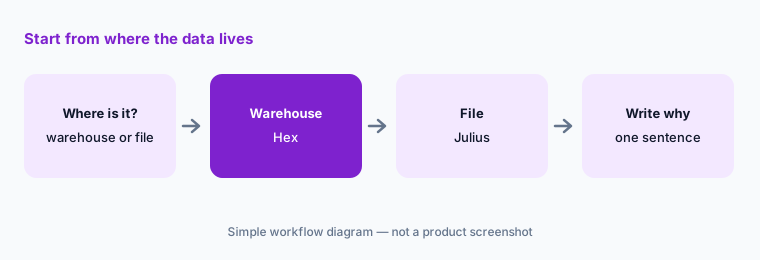
What it is: Hex is built to query your warehouse directly, with SQL and Python cells, an agent that works in notebooks, and Threads for plain-language questions on tables the data team endorses. Julius is built for files — CSV, Excel, Parquet, JSON, and more — analyzed in a cloud container, with optional database connectors. If the data is already in a warehouse, moving it to a CSV to use a chat tool usually loses the definitions and freshness the warehouse gives you.
Primary workflow:
Name where your data lives. Warehouse → Hex; a file on your laptop → Julius. Write one sentence why.
2. Who else needs the answer
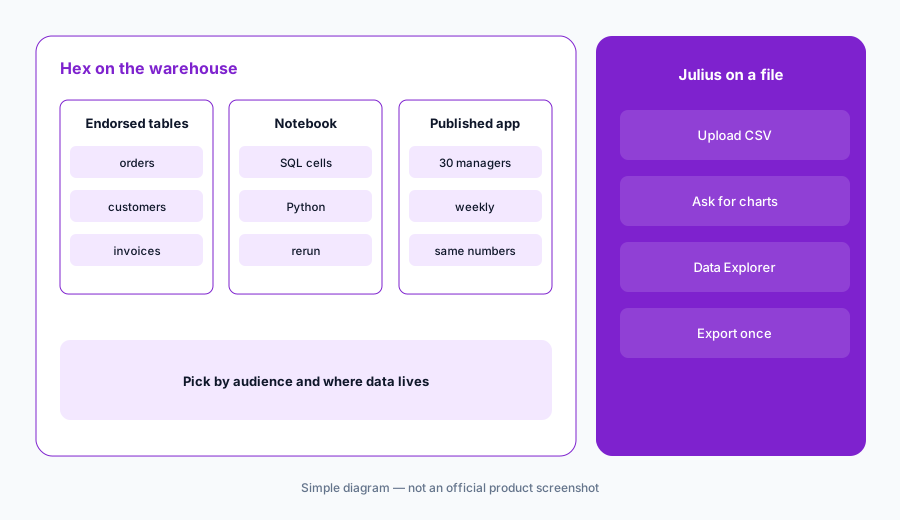
What it is: Hex is designed for sharing: published apps, scheduled runs, and — since 23 September 2026 — Explorers can chat with published Generative Apps. Hex also warns that scheduled CSV exports now use underlying cell outputs, so check recipients should see that data. Julius offers Teams workspaces with shared files and threads, but its answers are tied to a chat and a file, and its docs say paid users’ files stay up to 7 days of inactivity.
Count the audience:
Write how many people need this answer and how often. One person, once: a chat tool is fine. Many people, every week: build it where the data team can govern it.
3. How you check the work
What it is: In Hex, every AI answer can be opened as notebook cells — SQL and Python you can read and rerun. In Julius, the Data Explorer shows the dataframes behind a chart, 49 rows at a time, with CSV export. Both let you inspect; neither replaces recomputing one number yourself.
Recompute once:
Whichever tool you use, recompute one total by hand and compare. Open the SQL (Hex) or the dataframe (Julius) and note the filter that explains any gap.
4. Cost shape: editors and credits
What it is: Hex charges per Editor, with AI credits included per seat; Julius charges per plan, with a monthly credit allowance. A team where a few analysts build and many people consume fits Hex’s model; one person analyzing files fits Julius’s. Model choice drives credit use in both.
Price the real pattern:
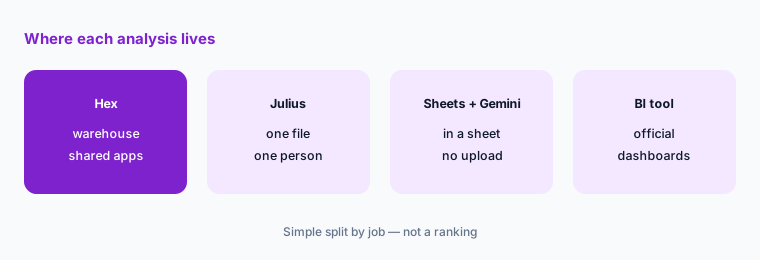
Count who builds analyses and who only reads them. Price Hex for the builders, or one Julius plan for the person with files — not both for everyone.
Pricing context (October 2026)
Hex (hex.tech/pricing, read 5 October 2026): Community free; Professional $36 per Editor per month; Team $75 per Editor per month with a 14-day free trial; Enterprise custom (Explorer seat add-on, BYOK, audit logs). AI features use credits included per seat.
Julius (julius.ai/pricing, read 5 October 2026): Free; Plus $20/month ($16 billed yearly, 2,000 credits); Pro $45/month ($37 yearly, 5,000 credits); Max $200/month ($166 yearly, 25,000 credits); Business $450/month ($375 yearly, 60,000 credits, up to 50 members); Enterprise on request.
Uncertainty: Both vendors meter AI in credits that depend on model and task, so real monthly cost depends on use. Julius’s pages disagree in places (plan list, free credits, file retention). Check both live pricing pages before committing.
When it’s useful (honest take)
Hex is useful when data lives in a warehouse, a data team endorses tables, and answers must be shared and repeated.
Julius is useful when the data is a file, one person needs the answer, and there’s no warehouse or data team to ask. Neither replaces agreeing on metric definitions.
Still choosing between Hex and Julius AI? The $19 AI toolkit audit gives you a written plan for which tools to keep using and which to drop across your whole AI stack, including this pair.
Prefer to do it yourself? Spreadsheet — $9
Related options (educational)
| Need | Better home | Why |
|---|---|---|
| Warehouse data, shared answers | Hex AI | Notebooks, Threads, published apps |
| A one-off CSV or spreadsheet | Julius AI | Chat plus code on a file |
| Data already in a Google Sheet | Sheets + Gemini | No upload needed |
| Self-hosted BI with AI questions | Metabase Metabot | Saved questions first |
| Plain-English questions in Databricks or Snowflake | Genie vs Cortex Analyst | Assistant inside the warehouse |
FAQ
Is Hex or Julius better?
Neither in general. Hex fits data in a warehouse with shared, governed answers; Julius fits a one-off file and one person who needs charts.
Can Julius connect to a warehouse?
Yes. Julius’s docs list connectors for Snowflake, BigQuery, Databricks, PostgreSQL, MySQL, SQL Server, Supabase, and Vertica, among others. It doesn’t carry your certified metric definitions the way a governed BI setup does.
Can Hex analyze a CSV?
Yes. Hex notebooks can work with uploaded files, and its September 2026 changelog added analyzing CSVs in Slack. Its strength is still warehouse data.
How much do Hex and Julius cost in October 2026?
Hex: Community free, Professional $36 and Team $75 per Editor per month, Enterprise custom. Julius: Plus $20, Pro $45, Max $200, and Business $450 per month (lower billed yearly), Enterprise on request.
Should we buy both?
Only if you have both situations: warehouse reporting for many people and one-off files for a few. Price Hex for builders and a single Julius plan for the file person.
Optional next step (if seats overlap)
If a team pays for a notebook platform, a chat-analysis tool, and general chat seats that all chart the same exports, that overlap is worth mapping. Map the overlap with the $19 AI toolkit audit or the $9 AI toolkit spreadsheet.
Both pages explain what you get and how delivery works before you decide.