What’s new · Data & BI · Hex · Sep 2026
What’s new in Hex (Sep 2026): changes data teams should notice
Hex published four changelog entries in September 2026 (10, 15, 22, and 29 September). This page pulls out the changes that affect who can see data, how the agent acts, and what it costs — with the date and link for each. It isn’t a review; for that, see our Hex AI review. Every item below comes from a public Hex changelog page we opened on 5 October 2026.
What this page covers
This page is for the data lead or Hex admin who wants to know what changed in September without reading every changelog post — especially anything that changes who can see data or what the agent can do without asking.
We list only what Hex’s own changelog pages say, with dates. We don’t speculate about roadmap items, and we don’t restate prices beyond the current plan list in the pricing section.
Major features (with how someone uses them)
Examples at a glance: each feature has a concrete example from a real job plus a short Try this you can run this week.
1. Five changes that affect who can see data (primary)
What it is: These five are the ones we’d tell an admin about first, each tied to a Hex changelog page: (1) 22 Sep — Explorers can now chat with published Generative Apps, asking follow-up questions in an agent Thread inside the app. (2) 22 Sep — scheduled CSV exports for Generative Apps use the project’s underlying cell outputs, not transformations made in the app interface; Hex says to confirm cell outputs contain only data appropriate for recipients. (3) 10 Sep — you can upload a CSV in Slack and ask Hex to analyze it in the thread. (4) 15 Sep — MCP clients such as Claude, ChatGPT, or Cursor can create, get, and update Hex projects. (5) 10 Sep — when a publisher’s OAuth credentials expire, viewers see the published app in a read-only state instead of an error.
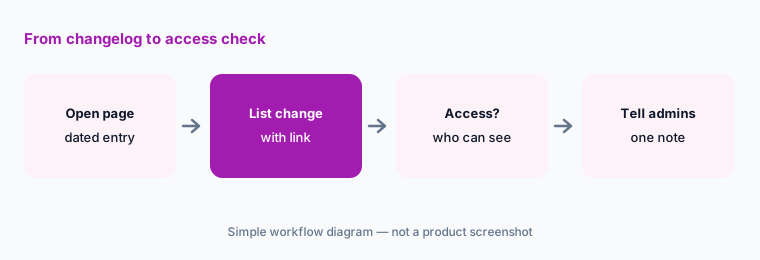
Primary workflow:
From Hex public Sep 2026 notes, list 5 changes that affect who can see data — cite sources (the four changelog links above).
2. 15 Sep: Skip approvals mode and eval suites
What it is: Hex added a Skip approvals mode for the Hex Agent. In the default Ask for approval mode, the agent pauses before destructive actions like deleting a cell or publishing; in Skip approvals mode it works straight through, and you can undo changes from the last agent turn. Hex says anything that expands access — granting OAuth, reconnecting an app, authorizing an MCP server — still waits for approval. The same release lets Managers and Admins publish, version, and schedule eval suites from the CLI and track results in Context Studio.
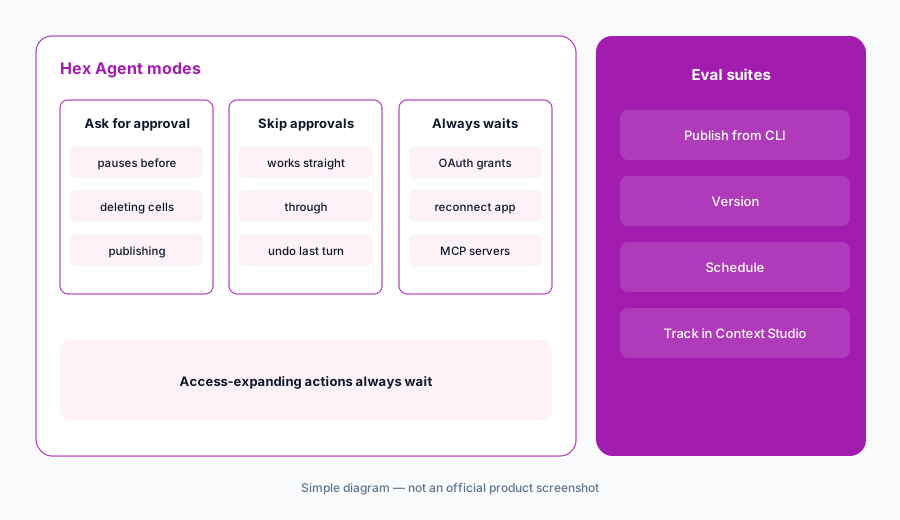
Pick a default:
Decide where Skip approvals is allowed (scratch work only, or everywhere). Write it in your Hex guide, and schedule one eval suite of questions you already know the answers to.
3. 10 and 22 Sep: BYOK providers and new models
What it is: 10 Sep: AWS Bedrock and Google Gemini Enterprise Agent Platform became bring-your-own-key providers; every BYOK request now includes the Hex user’s email so admins can attribute usage; organizations using an OpenAI key can choose Sol, Terra, or Luna. 22 Sep: six new models in the picker — Opus 5.5, Fable 5.1, GPT 6 Sol, GPT 6 Astra, GPT 6 Luna, and Grok 4.6. The GPT 6 models offer an optional Fast mode “at a higher credit cost.” Fable 5.1 requires turning on Allow data retention for specific models and isn’t available on EU or HIPAA single-tenant stacks.
Check the settings:
In Settings → AI & agents, check whether “Allow data retention for specific models” is on and who turned it on. If you use BYOK, confirm your gateway now shows per-user emails.
4. 29 Sep: agent activity classifications
What it is: Context Studio now classifies agent activity by purpose — Analysis, App building, and Modeling — instead of by where it started. Managers and Admins can filter by type, or use hex thread list --classification. Hex also routes small Generative App chart edits to a smaller, faster model to cut wait time and token usage.
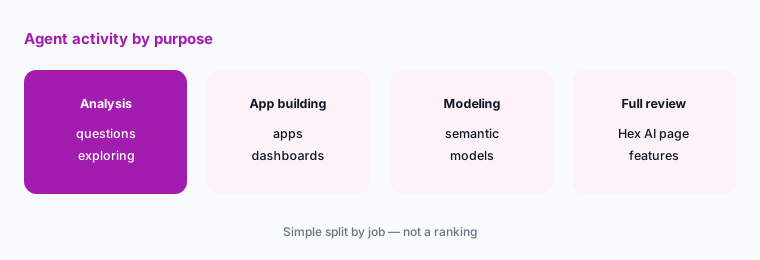
Look at the split:
In Context Studio, filter last month’s agent activity by Analysis, App building, and Modeling. Use the split to decide who needs Editor seats and who only needs to ask.
Pricing context (October 2026)
September’s changelog entries didn’t change plan prices; the only cost note was that GPT 6 Fast mode uses more credits. For reference, hex.tech/pricing on 5 October 2026 listed Community free, Professional $36 per Editor per month, Team $75 per Editor per month (14-day trial), and Enterprise custom.
Uncertainty: We read only the four September changelog pages. Some features may roll out gradually or depend on plan and stack (for example Fable 5.1 availability). Check the live changelog and your workspace settings.
When it’s useful (honest take)
Useful when you administer Hex and need a dated, linked list of September changes — especially exports, agent approvals, and model settings.
Less useful as a buying guide; see Hex AI and Hex vs Julius AI for that.
Paying for Hex and a few other AI tools? The $9 AI toolkit spreadsheet lists every AI subscription you have, what each one costs, and how fast it pays for itself, so you can see which ones are worth the money.
Want someone to do it for you? AI toolkit audit — $19
Related options (educational)
| Need | Better home | Why |
|---|---|---|
| Full review of Hex’s AI features | Hex AI | Agent, Threads, Generative Apps |
| Hex vs a chat tool on files | Hex vs Julius AI | By where data lives |
| September changes in dbt | What’s new in dbt (Sep 2026) | Upstream of Hex for many teams |
| September changes in Power BI | What’s new in Power BI (Sep 2026) | If reports live in Power BI |
| Inventory of data AI seats | Stack map for data ops | Who owns which job |
FAQ
What did Hex change in September 2026?
Hex’s changelog for 10, 15, 22, and 29 September 2026 lists Generative App editing improvements, CSV analysis in Slack, new BYOK providers, eval suites, a Skip approvals mode, MCP project building, chat with Generative Apps for Explorers, scheduled CSV exports, six new models, and agent activity classifications.
Can Explorers chat with Hex apps now?
Yes. Hex’s 22 September 2026 entry says Explorers can chat with published Generative Apps to ask follow-up questions in an agent Thread.
Do scheduled CSV exports respect app filters?
Hex’s 22 September 2026 entry says scheduled exports use the project’s underlying cell outputs, not transformations made in the app interface, and asks you to confirm outputs are appropriate for recipients.
Does Skip approvals let the agent grant access?
No. Hex says actions that expand access, such as granting OAuth, reconnecting an app, or authorizing an MCP server, still wait for approval.
Did Hex change prices in September 2026?
The September changelog entries didn’t change plan prices; they note that GPT 6 Fast mode costs more credits.
Optional next step (if seats overlap)
If a data team pays for Hex, a separate “ask the data” tool, and chat seats that answer the same questions, that overlap is worth mapping. Map the overlap with the $19 AI toolkit audit or the $9 AI toolkit spreadsheet.
Both pages explain what you get and how delivery works before you decide.