What’s new · Data & BI · dbt · Sep 2026
What’s new in dbt (Sep 2026): dbt v2 GA, dbt State, and Wizard changes
September 2026 was a big month for dbt: dbt Summit in Las Vegas (15–18 September) brought product renames and general availability for dbt v2.0 and dbt State, and the platform release notes changed AI defaults and Wizard billing. This page lists the items an analytics lead should act on, each from dbt’s public release notes, read on 5 October 2026. For the Wizard itself, see our dbt Wizard review.
What this page covers
This page is for the analytics lead or dbt platform admin who needs to know which September changes alter defaults, billing, or names — the ones that cause surprises if nobody reads the notes.
Everything here is from the September 2026 section of dbt’s release notes, including its “dbt Summit 2026 announcements” and “Pre-dbt Summit” subsections. We don’t add roadmap speculation.
Major features (with how someone uses them)
Examples at a glance: each feature has a concrete example from a real job plus a short Try this you can run this week.
1. Five changes to act on (primary)
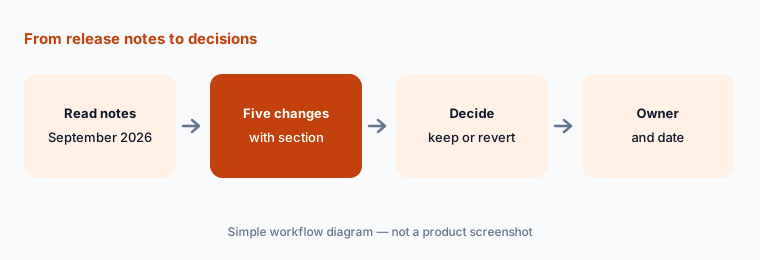
What it is: Our five, each from dbt’s September 2026 release notes: (1) AI features are being enabled by default — already on for new accounts and rolling out to existing ones; organizations that opted out stay off, and admins can toggle them in Account settings. (2) dbt Wizard uses usage-based billing for dbt-managed AI, metered per token against your consumption pool with included usage or a trial and admin-set spend limits; account admins now get email when Wizard credits run out. (3) Behavior-change flags on the Latest release track flipped from false to true (including skip_nodes_if_on_run_start_fails and require_all_warnings_handled_by_warn_error); set them to false in dbt_project.yml to keep old behavior. (4) dbt v2.0 is GA, and pip install dbt now installs v2 (it previously installed the dbt platform CLI). (5) dbt State is GA, with self-serve billing per target table it reuses each day, and the standalone app.state.dbt.com is being retired.
require_all_warnings_handled_by_warn_error now true, two jobs that used to pass with warnings will behave differently. She decides which flags to keep true, sets the rest to false explicitly, and tells the team before the next deploy.
Primary workflow:
From dbt public Sep 2026 release notes, list 5 changes an analytics lead should act on — cite sources (the release notes link above, with the section).
2. dbt Summit: the new names
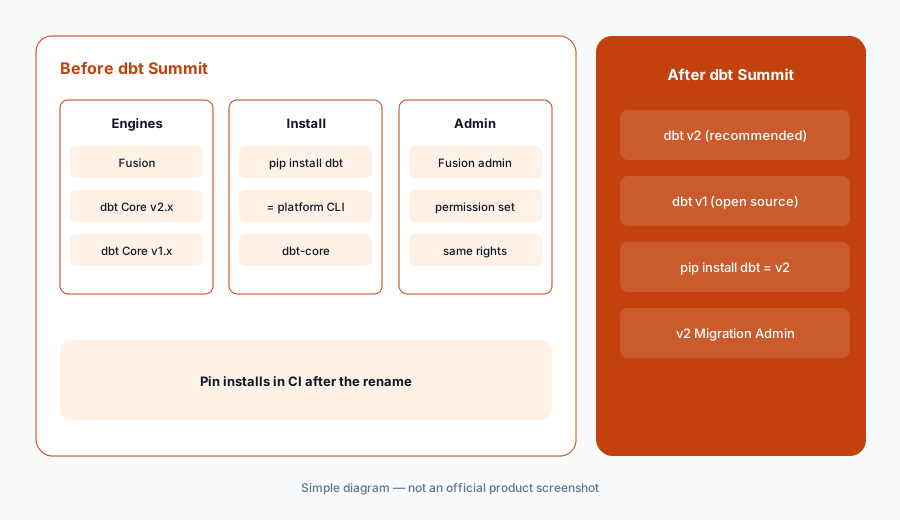
What it is: dbt Labs renamed products at dbt Summit: Fusion and dbt Core v2.x are now dbt v2 (recommended), with dbt OSS as the Apache 2.0 open-source option; dbt Core v1.x is now dbt v1 and remains open source. The GitHub repo for v1 and v2 moved to dbt-labs/dbt. For installs: pip install dbt installs v2; pip install dbt-core remains for v1 for now but will move to pip install dbt-oss over time. dbt also renamed the “Fusion admin” permission set to “v2 Migration Admin” (same permissions).
pip install dbt expecting the platform CLI. After the rename it installs dbt v2 instead. She pins the package explicitly in the image and updates the internal setup docs to the new names.
Check your installs:
Search your CI images and setup docs for pip install dbt and dbt-core. Pin what you mean, and update docs to the new names (dbt v2, dbt v1).
3. GA, preview, and beta from Summit
What it is: Generally available: dbt v2.0 (a single engine written in Rust), dbt State (skips or clones nodes when logic and data haven’t changed), and v2 adapters for Snowflake, BigQuery, Redshift, and Databricks (DuckDB for local use). In beta: Lake Compute (private beta; a DuckDB-based engine for dbt models on Apache Iceberg tables), Wizard Desktop (private beta native app), ClickHouse connections (private beta), an Apache Spark adapter for v2 (beta, local CLI only), and dbt Charts (public beta; YAML-defined dashboards on dbt models, developed with the dct CLI). Before Summit, dbt also added Explore mode (preview) to the Wizard home tab and Studio IDE, and an Explain tab for jobs using dbt State.
Sort by status:
Put each Summit item you care about into GA, preview, or beta. Plan migrations only for GA items; put betas on a watch list with a review date.
4. Smaller September items worth knowing
What it is: Also in September’s notes: the column lineage panel now shows SQL transformation expressions for all users; Cost Insights tracks per-query Snowflake Adaptive warehouse costs automatically when QUERY_METERING_HISTORY is accessible; DuckDB support for Apache Iceberg is GA for local use with dbt v2; job settings now show a dbt State mode dropdown (inherit, on, or off); and Studio IDE detects missing development credentials at startup.
Two lists:
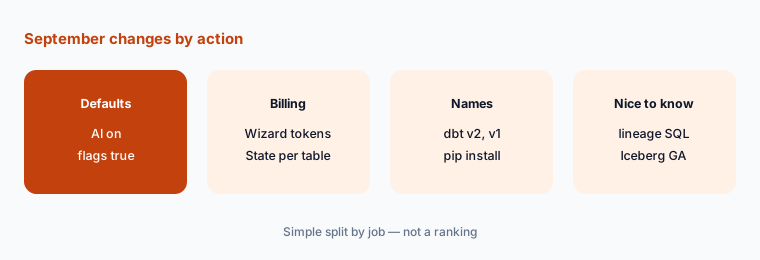
Split your notes into “must act” (defaults, billing, names) and “nice to know.” Send only the first list to whoever owns the dbt account.
Pricing context (October 2026)
dbt platform plan prices didn’t change in September; getdbt.com/pricing on 5 October 2026 listed Developer free, Starter $100 per user per month, and Enterprise and Enterprise+ custom. What changed is how AI and dbt State are billed: Wizard usage with dbt-managed models is metered per token from 1 September 2026 (Developer and Starter get a one-time 30-day trial with $100 in credits per account; Enterprise $100 per month; Enterprise+ $200 per month), and dbt State self-serve billing is per target table reused per day.
Uncertainty: Rollouts of AI-on-by-default happen in phases; your account may not show it yet. Beta items can change or be withdrawn. Check the live release notes and your account settings.
When it’s useful (honest take)
Useful when you own a dbt account and need to know which September changes alter defaults, billing, or names.
Less useful for evaluating Wizard itself; see dbt Wizard.
Paying for dbt and a few other AI tools? The $9 AI toolkit spreadsheet lists every AI subscription you have, what each one costs, and how fast it pays for itself, so you can see which ones are worth the money.
Want someone to do it for you? AI toolkit audit — $19
Related options (educational)
| Need | Better home | Why |
|---|---|---|
| Full review of dbt Wizard | dbt Wizard | Tests, docs, refactors, billing |
| September changes in Hex | What’s new in Hex (Sep 2026) | Downstream analysis |
| September changes in Power BI | What’s new in Power BI (Sep 2026) | If reports live in Power BI |
| Warehouse assistants | Genie vs Cortex Analyst | Questions on dbt-built tables |
| Inventory of data AI seats | Stack map for data ops | Who owns which job |
FAQ
What is dbt v2?
At dbt Summit 2026, dbt Labs renamed Fusion and dbt Core v2.x to dbt v2. dbt v2.0 is generally available and runs on a single engine written in Rust; pip install dbt now installs it.
Are dbt AI features on by default now?
dbt’s September 2026 release notes say AI features are on for new accounts and rolling out to existing accounts; organizations that opted out stay off, and admins can toggle them in Account settings.
How is dbt Wizard billed now?
From 1 September 2026, dbt-managed Wizard usage is metered per token against your consumption pool, with included usage or a trial and admin-set spend limits.
Which behavior-change flags flipped in September 2026?
The release notes list seven flags on the Latest release track now defaulting to true, including skip_nodes_if_on_run_start_fails and require_all_warnings_handled_by_warn_error. Set them to false in dbt_project.yml to keep previous behavior.
Is dbt State generally available?
Yes. dbt announced dbt State GA at dbt Summit 2026; self-serve billing is per target table reused each day, and the standalone app.state.dbt.com is being retired.
Optional next step (if seats overlap)
If a data team pays for dbt AI usage, a general coding agent, and chat seats that all edit the same models, that overlap is worth mapping. Map the overlap with the $19 AI toolkit audit or the $9 AI toolkit spreadsheet.
Both pages explain what you get and how delivery works before you decide.