Tool · Data & BI · dbt · Oct 2026
dbt Wizard review (Oct 2026): AI model edits, docs, and tests for analytics engineering
dbt Wizard is dbt Labs’ AI agent inside the dbt platform. It reads your project’s lineage, tests, docs, and metric definitions, proposes changes as diffs, and can run dbt commands to check its own work. This page walks through the jobs an analytics engineer would actually hand it — tests, docs, refactors, quick data questions — with a Try this for each and a clear line on where a person still reviews the pull request.
What this dbt Wizard page covers
This page is for the analytics engineer or data lead who already runs dbt and wants to know what the Wizard can safely take off the backlog — adding tests nobody wrote, filling in column descriptions, untangling a model — and which steps still need a human reading the diff and the pull request.
A naming note, because the SoT brief and older blog posts blur it: dbt Wizard and dbt Copilot are two different things in October 2026. dbt’s docs describe Wizard as the recommended agent for dbt work (investigate, build, validate, ship), while dbt Copilot remains a separate one-click feature that generates SQL, documentation, tests, and semantic models in Studio IDE, Canvas, and Insights. They are also billed differently, which we cover in the pricing section.
Facts here come from dbt’s Wizard docs, its billing and pricing docs, the dbt platform release notes (including the dbt Summit announcements of 15–18 September 2026), and getdbt.com/pricing, all read on 5 October 2026. Several Wizard surfaces are marked preview or beta in dbt’s own docs; we say so where it matters.
Major features (with how someone uses them)
Examples at a glance: each feature has a concrete example from a real job plus a short Try this you can run this week.
1. Add tests to one model and read the diff (primary)
What it is: Wizard can generate tests, documentation, semantic models, and metrics, and it shows file changes as diffs you review before saving. dbt’s own starter prompt is a good first task: add not_null and unique tests to the primary key of stg_customers. Because Wizard is grounded in your project’s metadata, it knows which column is the key and which tests already exist — but it can still pick the wrong grain or add a test that fails on real data.
Two ways to work: in agent mode you can approve each file change, or let Wizard edit automatically. For a first run, approve each change. A test that passes in the diff but fails on production-sized data is exactly what dbt build on that one model will catch.
stg_orders and asks for primary-key tests plus an accepted_values test on status. The diff adds the YAML block; she notices the accepted values miss a returned status that appears in production. She edits that line, runs dbt build --select stg_orders, and only then opens the pull request.
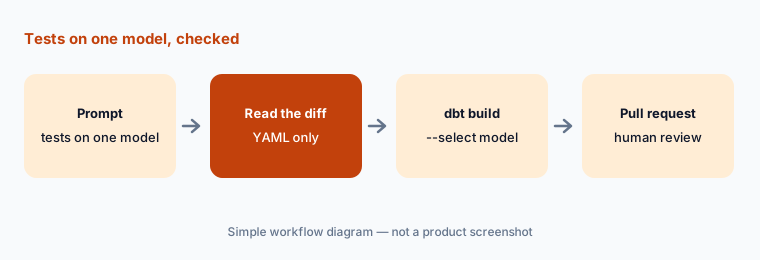
Primary workflow:
Ask the Wizard to add tests to one model. Read the diff. Run dbt build on that model only (for example dbt build --select stg_orders) before merging.
2. Docs and column descriptions without overwriting
What it is: Missing column descriptions are the classic analytics-engineering chore. dbt’s January 2026 release notes say the Wizard detects column names across your schema.yml files, adds only missing descriptions, and preserves existing ones. That is the behaviour to check on your own project: a good docs diff only adds lines.
net_amount “amount after tax” when finance defines it as “after refunds.” She fixes both and adds the finance definition to the model description so the next run has it.
Check the diff:
Ask Wizard for missing descriptions on one model. In the diff, confirm no existing description changed. Correct any description that guesses a business definition, and paste the real definition into the model’s YAML.
3. Model edits and refactors in agent mode
What it is: Wizard can build or refactor models from plain-language prompts and run end-to-end tasks in agent mode. The Wizard home tab (public preview since July 2026) adds inline diffs, DAG previews, and validation; a wayfinder bar shows your project and branch and walks you through Git steps such as committing or creating a branch. dbt also lets teams teach Wizard conventions with skills and hand larger jobs to subagents.
The release notes show the guardrails maturing: tool approval dialogs with number-key shortcuts (May 2026), agent-run commands labelled apart from manual ones in the Studio IDE Commands tab (also May), and automatic retries when an LLM provider blips (July 2026).
fct_revenue model into an intermediate model plus a thinner fact. In approval mode, Wizard proposes three file changes and a DAG preview. He approves the new intermediate model, rejects a change that renamed a column used by a dashboard, and runs the downstream models before committing on a feature branch.
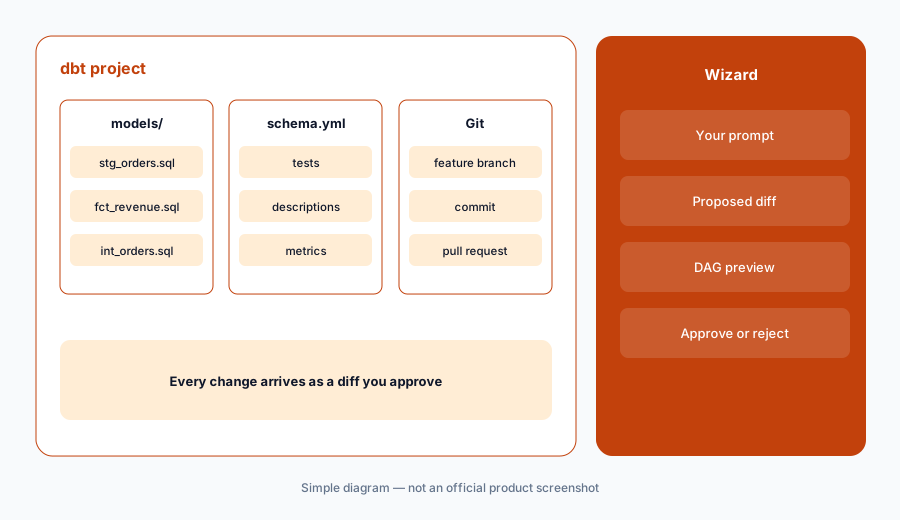
Keep it reviewable:
Run one refactor in approval mode on a feature branch. Reject any change that renames a column used downstream. Build the changed model and its children before you commit.
4. Explore mode for quick data questions (preview)
What it is: dbt added Explore mode (preview) to the Wizard home tab and Studio IDE before dbt Summit. It answers plain-language questions about governed production data with the SQL or metric definition behind every answer, and read-only users can be invited to ask questions without a developer license. That makes Wizard overlap with “ask the data” tools — but its answers lean on whatever metrics your semantic layer already defines.
net_new_arr metric definition and shows it. She compares the total to the board deck, finds a gap from a segment remap, and flags it to the data team instead of re-asking until the numbers match.
Compare once:
Ask Explore mode one question you already report on. Open the SQL or metric definition it used. If the number differs from your report, write down which filter or definition differs before anyone shares either number.
5. Where Wizard runs, and who pays for tokens
What it is: dbt lists four places to use Wizard: the Wizard home tab, the Studio IDE, the terminal (CLI) with or without a dbt platform account, and Wizard Desktop (private beta announced at dbt Summit). Models come either dbt-managed (OpenAI by default, Anthropic, and open-weight models) or bring-your-own-key (Azure AI Foundry/OpenAI on the platform; locally also AWS Bedrock, Google Gemini, Snowflake Cortex, and Databricks Unity AI Gateway). dbt notes that Anthropic enterprise and subscription licenses such as Claude Enterprise aren’t supported.
dbt’s September 2026 notes also say AI features are being enabled by default for existing accounts unless your organization opted out; admins can turn them off in Account settings.
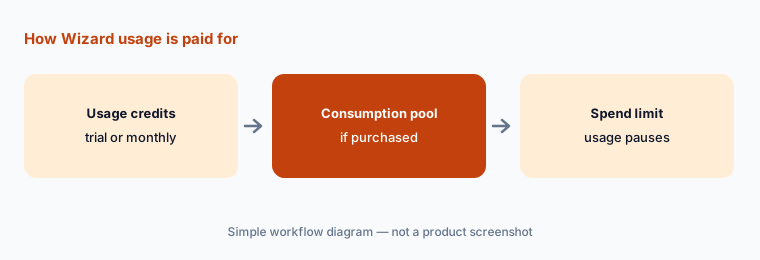
Before rollout:
In Account settings, confirm whether AI features are on, pick dbt-managed or BYOK, and set a monthly Wizard spend limit. Write the limit in your team channel so nobody is surprised when usage pauses.
6. Versus dbt Copilot, a general coding agent, and Hex
What it is: Wizard fits work that lives in a dbt project: tests, docs, refactors, and validation against your own lineage. dbt Copilot is the lighter one-click generator inside dbt. A general coding agent such as Cursor or GitHub Copilot can edit the same files but doesn’t carry dbt’s metadata engine. Hex is where analysts explore and publish on top of the models dbt builds.
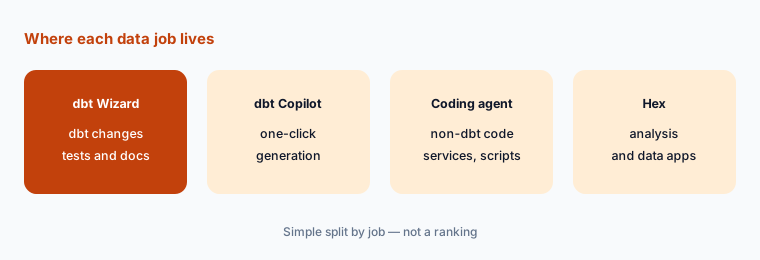
Home for the job:
List last month’s five data tickets. Mark each: dbt change (Wizard), quick generation (Copilot), non-dbt code (coding agent), or a stakeholder question (BI or Hex). Turn on only the tools that won a ticket.
Pricing context (October 2026)
dbt publishes platform prices on getdbt.com/pricing. When we checked on 5 October 2026: Developer is free (one developer seat, 3,000 successful models built per month, one project); Starter is $100 per user per month (five developer seats, 15,000 models built per month, 5,000 queried metrics, one project); Enterprise and Enterprise+ are custom-priced. dbt offers a 14-day trial.
Wizard is billed separately from seats. dbt’s docs say that from 1 September 2026 Wizard usage with dbt-managed models is metered per token, converted to dollars, and drawn from your account’s usage credits and then any purchased consumption pool. Included credits, per account (not per user): Developer and Starter get a one-time 30-day trial with $100 in usage credits; Enterprise gets $100 per month; Enterprise+ gets $200 per month. Credits don’t roll over. Admins can set a monthly spend limit, and usage pauses when it’s reached. Legacy Team plans have no Wizard access. With BYOK, your AI provider bills you directly. dbt Copilot, by contrast, is metered as a monthly allotment of AI actions set by your plan.
Uncertainty: Per-token rates depend on the model and token type (input, cached, output) and are listed in dbt’s Model Provider Rate Table, which we didn’t reproduce here. We can’t estimate what a month of Wizard use costs your team; it depends on prompts, project context, and model. Enterprise seat prices are quote-based. Check dbt’s live pricing page, the Wizard billing FAQs, and Billing & Usage in your account before you plan a rollout.
When it’s useful (honest take)
Useful when you already run dbt on the platform (or the CLI), your backlog is full of missing tests and descriptions, and someone reviews every pull request. Wizard’s metadata grounding makes those diffs faster to write and easier to check than a general chat assistant’s.
Less useful when you don’t use dbt — Wizard is not a general SQL assistant. Less useful on a legacy Team plan (no access) or if nobody will set a spend limit. And it doesn’t remove the need to run dbt build and review the PR: a test that looks right in a diff can still fail on real data.
Paying for dbt Wizard and a few other AI tools? The $9 AI toolkit spreadsheet lists every AI subscription you have, what each one costs, and how fast it pays for itself, so you can see which ones are worth the money.
Want someone to do it for you? AI toolkit audit — $19
Related options (educational)
| Need | Better home | Why |
|---|---|---|
| Tests, docs, and refactors inside a dbt project | dbt Wizard (this page) | Grounded in your lineage and metadata; changes arrive as diffs |
| One-click SQL, docs, or tests in dbt | dbt Copilot | Lighter generator; metered by actions |
| Python services and non-dbt code | Cursor or GitHub Copilot | General coding agents |
| Analysis and data apps on dbt models | Hex AI | Notebooks and apps for analysts |
| Plain-English questions inside the warehouse | Snowflake Cortex or Databricks Genie | Assistant lives where the data lives |
FAQ
Is dbt Wizard the same as dbt Copilot?
No. dbt’s docs describe Wizard as the recommended AI agent for dbt work and dbt Copilot as a separate one-click feature for generating SQL, docs, tests, and semantic models. They are metered differently: Wizard by token-based dollars, Copilot by a monthly action allotment.
Can dbt Wizard add tests and docs?
Yes. dbt says Wizard can generate tests, documentation, semantic models, and metrics and shows changes as diffs before you save. Review the diff and build the model before merging.
How much does dbt Wizard cost in October 2026?
From 1 September 2026, dbt-managed Wizard usage is metered per token in dollars. Developer and Starter accounts get a one-time 30-day trial with $100 in credits; Enterprise gets $100 a month and Enterprise+ $200 a month, per account. Admins can set a spend limit. BYOK usage is billed by your provider.
Can read-only users use Wizard?
dbt says Explore mode (preview) lets read-only users ask questions about governed production data in the Wizard home tab without a developer license. Building and changing models needs development access.
Can we turn Wizard off?
Yes. dbt says AI features are being enabled by default for existing accounts unless the organization opted out, and admins can turn AI features on or off anytime in Account settings.
Optional next step (if seats overlap)
If your data team pays for a dbt AI allowance, a general coding agent, and a separate “ask the data” tool that all touch the same models, that overlap is worth mapping before renewal. Map the overlap with the $19 AI toolkit audit or the $9 AI toolkit spreadsheet.
Both pages explain what you get and how delivery works before you decide.