How-to · Analytics engineering · dbt Wizard · Oct 19, 2026
Let dbt Wizard write tests and docs for a model, and review them as a diff before merging
dbt Wizard can propose tests and documentation as reviewable diffs, and can edit models in agent mode. A wrong uniqueness test still breaks CI if nobody reads the diff. This page shows how to use Wizard for tests and docs with a human diff review before merge.
Who this is for
Analytics engineers who already ship dbt models and want Wizard help without unsupervised merges. The job here is diff review of tests and docs.
How to do it
This is a how-to, not a ranking of transformation tools. Per the dbt Wizard review, Wizard writes tests and docs as reviewable diffs, supports agent-mode model edits and Explore mode, and uses per-token billing from September 2026. The ground rule: no Wizard change merges until a person reviews the diff.
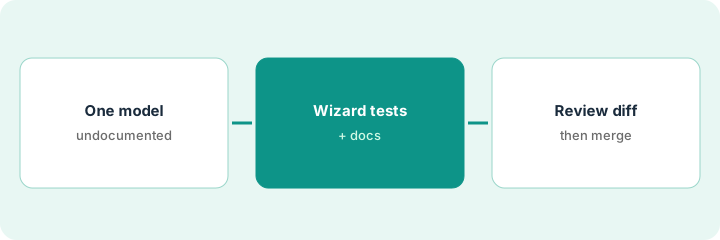
1. Pick one undocumented model
What it is: Choose a model that is used in production dashboards but lacks tests or docs.
- Prefer a staging or mart model with clear grain.
- Note who owns the model.
- Skip agent-mode rewrites of complex macros on the first try.
- Open a branch before inviting Wizard.
- Write what “done” means: tests + docs only.
They pick fct_orders, which powers three dashboards and has no unique test on order_id.
Name one model and open a branch before you ask Wizard.
2. Ask Wizard for tests and docs
What it is: Ask Wizard to propose tests and documentation for that model, and keep the output as a diff — not a force-push to main.
- Request tests that match the grain you believe is true.
- Request doc blocks for columns stakeholders ask about.
- Avoid Explore mode rabbit holes until the diff is clean.
- Note token or credit use for the session.
- Do not accept agent-mode model logic edits in the same change unless you planned them.
Wizard adds a unique test on order_id and documents amount_usd. It also suggests a relationship test the engineer did not ask for.
Ask for tests and docs only; leave unrelated agent edits for a later change.
3. Review the diff; merge and note token use
What it is: Read every added test and doc line, reject bad assumptions, merge when green, and record token use for the team.
- Read the diff like a colleague’s PR.
- Reject tests that assert a grain you have not proven.
- Run CI on the branch.
- Merge only after review.
- Log token or credit spend next to the PR.
The engineer keeps the unique test, rewrites the amount_usd doc, drops the unsolicited relationship test, merges, and notes Wizard credits used.
Review the diff yourself before merge and paste token use in the PR.
Pricing context (October 2026)
This how-to isn’t a price sheet. Per the dbt Wizard review and dbt’s pricing page (checked Oct 19, 2026), Starter lists $100 per user per month; Wizard shows a $100 trial credit then pay-as-you-go, with higher tiers listing about $100 or $200 per month in Wizard credits depending on plan. Confirm on getdbt.com/pricing. Dated October 2026.
Checked Oct 19, 2026 on the vendor’s own pricing page: dbt’s pricing page lists Starter at $100 per user per month; Wizard shows a $100 trial credit then pay-as-you-go, with higher tiers listing about $100 or $200 per month in Wizard credits depending on plan.
Uncertainty: The only prices this site sells here are the optional $9 AI toolkit spreadsheet and $19 AI toolkit audit.
When this helps (honest take)
Useful when you already review dbt PRs and want Wizard to draft tests and docs as diffs.
Not useful when nobody reviews AI diffs, or you wanted unsupervised agent rewrites of core models.
Related options (educational)
| Need | Where to look | Why |
|---|---|---|
| dbt Wizard | dbt Wizard | Primary path |
| Data stack map | Stack map: data ops | Where dbt fits |
FAQ
Does Wizard bill per token?
Per our review, Wizard uses per-token billing from September 2026. Confirm current credit packs on dbt’s pricing page.
Should we start in agent mode?
Start with tests and docs as diffs. Add agent-mode model edits only after that path is trusted.
Optional next step
If you want a one-page toolkit map for the tools you already pay for, use the optional $9 AI toolkit spreadsheet. If you want a short review of seat waste and unused tools, use the optional $19 AI toolkit audit. Neither is required to follow this how-to.