Tool · Data & BI · Metabase · Oct 2026
Metabase Metabot review (Oct 2026): AI questions and SQL help for self-hosted BI
Metabot is the AI assistant built into Metabase. It answers plain-English data questions with the query builder, writes and fixes SQL in the native editor, analyzes charts, and can answer in Slack. For teams already on Metabase — often self-hosted — it adds “ask the data” without a new BI tool. This page shows each job with a real example, a Try this, and where a person still saves the question.
What this Metabase Metabot page covers
This page is for the ops analyst, data generalist, or engineering lead who runs Metabase — frequently the open-source build on their own server — and wants to know whether Metabot can answer the questions colleagues keep asking, and how to keep its answers tied to the saved questions and models the team already trusts.
Metabot shows up in a few places: a chat sidebar (Cmd/Ctrl+E) for questions and chart analysis, AI exploration from + New, SQL generation and fixes in the native editor, inline SQL editing (Cmd/Ctrl+Shift+I), and Metabot in Slack. Admins connect an AI provider and can scope what Metabot searches.
Facts here come from Metabase’s Metabot, AI settings, and AI usage-controls docs, its Metabase AI feature page, and metabase.com/pricing, all read on 5 October 2026.
Major features (with how someone uses them)
Examples at a glance: each feature has a concrete example from a real job plus a short Try this you can run this week.
1. Questions that start from what you already saved (primary)
What it is: When you ask Metabot for a chart, Metabase’s docs say it first looks for existing questions that might answer the request and points you there; otherwise it builds a new chart with the query builder. You can drill into the result or open it in the editor, and save it to a dashboard or collection. Metabase’s docs are blunt: “Like with all generative AI, you’ll always need to double-check results.”
Metabot keeps context within the current conversation only; starting a new chat discards the old one. The docs suggest telling Metabot the table or fields you mean and resetting the chat when you change topics.
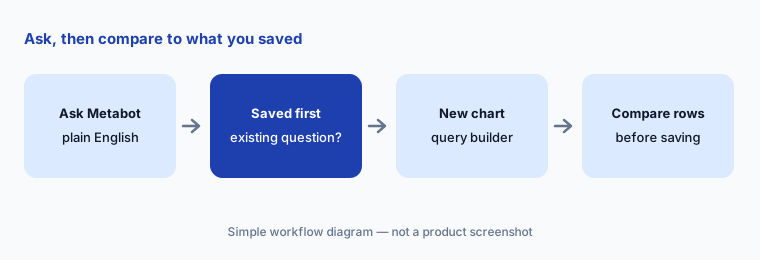
Primary workflow:
Ask Metabot one question you already have a saved question for. Compare the two results row by row. Save Metabot’s version only if every row matches or you can explain the difference.
2. SQL generation, fixes, and inline edits
What it is: In the SQL editor, pick a database, open the sidebar, and ask “Write a SQL query that…”. Metabot generates the SQL but doesn’t run it, so you can inspect it first. When a query errors, Have Metabot fix it proposes a correction. Inline editing (Cmd/Ctrl+Shift+I) lets you name tables, describe a change, and accept or reject the suggested edit.
Limits from Metabase’s docs worth knowing: if you don’t name a table, Metabot only checks the first 100 tables in the selected database and may invent tables beyond that; it can’t generate SQL with variables or field filters; and it can’t change chart formatting or add goal lines.
tickets table. She reads it, sees it uses created_at where her team measures from assigned_at, edits that line, runs it, and saves the question with the definition in its description.
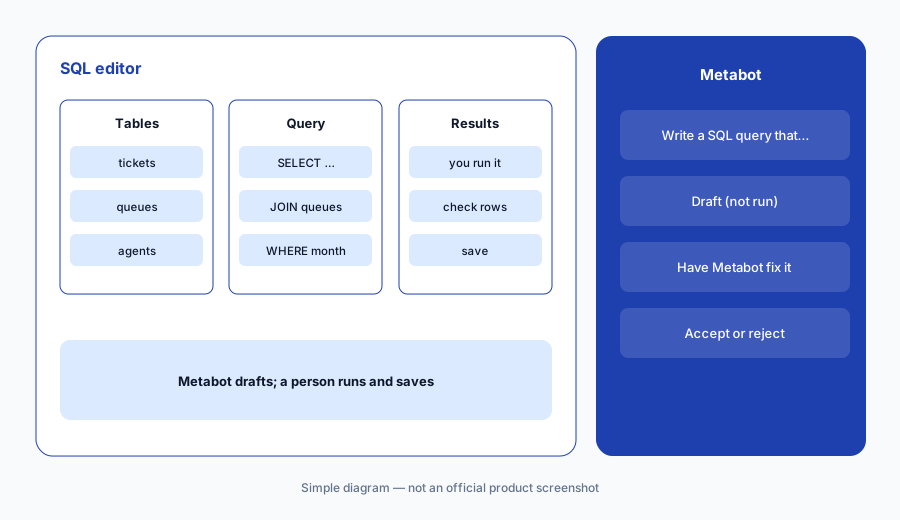
Read before running:
In the SQL editor, name the exact tables and ask Metabot for one query. Read every join and date column before you press run. Fix one thing by hand so you know the query is yours.
3. Verified content, collections, and the glossary
What it is: Admins shape what Metabot uses. On Pro and Enterprise, verified content restricts Metabot to verified models and metrics. A collection for natural language querying limits where AI exploration searches (people can still @-mention items outside it). Metabase’s tips: add descriptions to tables, fields, models, and metrics; set correct semantic types; and define terms like MRR in the glossary.
Metabot inherits the permissions of the person chatting — it can only see what that person can see — so data and collection permissions do the real access control.
Narrow the surface:
Pick the three models people ask about most. Add a one-line description to each key field and two glossary terms. Ask Metabot the same question before and after, and note which source it used each time.
4. Self-hosted vs Cloud: which AI provider
What it is: Metabase’s AI settings docs say self-hosted Metabase needs your own AI API key to use Metabot; Metabase Cloud can use your key or the Metabase AI Service, which picks models for you and bills on token usage. Supported bring-your-own providers include Amazon Bedrock, Anthropic, Microsoft Azure, Mistral, OpenAI, OpenRouter, and Z.AI. A Disable all AI features toggle hides Metabot, inline SQL generation, the MCP server, and the Agent API at once.
Decide the provider:
Write down where your Metabase runs (self-hosted or Cloud) and which AI provider your company already has terms with. Connect only that one, then check usage in the provider’s dashboard after a week.
5. Who can use Metabot, and caps on usage
What it is: AI usage controls are on Pro and Enterprise (self-hosted and Cloud). Admins toggle Metabot per group and per capability — Chat and NLQ, SQL generation, and Other tools such as error-fixing and chart analysis — and can set token or message caps by instance, group, or tenant. If SQL generation is off for a group, Metabot answers SQL-shaped prompts with a query-builder result instead. Pro and Enterprise also get AI usage auditing by user, tool, and feature.
Metabot also works in Slack (DM or @mention). Metabase’s docs note Slack Metabot can create alerts and dashboard subscriptions but can’t modify or delete existing ones.
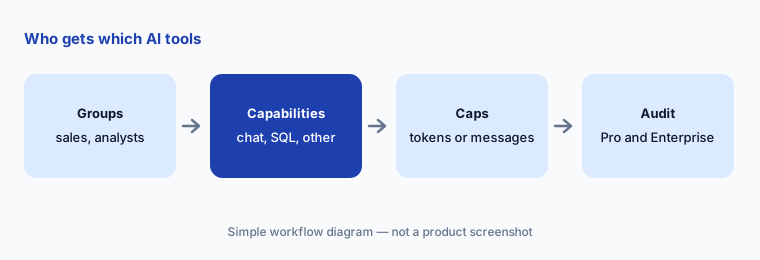
Set the guardrails:
List your Metabase groups. For each, decide yes/no on Chat, SQL generation, and Other tools. If you’re on Pro or Enterprise, set one cap for the group most likely to overuse it.
6. Versus Power BI Copilot, ThoughtSpot, and Hex
What it is: Metabot fits teams already on Metabase who want questions and SQL help without changing BI tools — especially self-hosted shops that want prompts to go to their own provider. Power BI Copilot fits Microsoft shops with Fabric capacity. ThoughtSpot Spotter fits search-first BI on a coached model. Hex fits analysts who live in notebooks and publish apps.
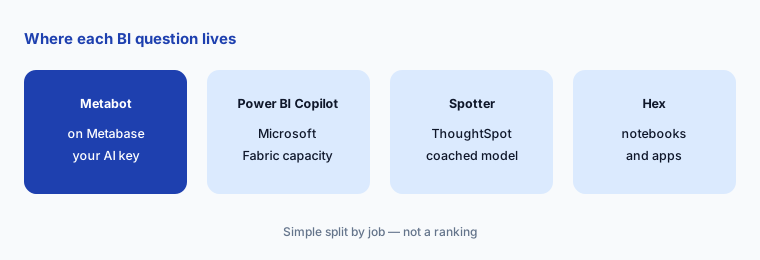
Home for the job:
Count which BI tool people actually open each week. Put AI where they already are. If that’s Metabase, try Metabot for a month before buying another assistant.
Pricing context (October 2026)
Metabase publishes prices on metabase.com/pricing. When we checked on 5 October 2026: Open Source is free (self-hosted, unlimited users) and its feature list includes “Ask questions with AI” and SQL generation. Starter is $100 per month billed monthly (or $1,080 per year) with the first 5 users included and $6 per additional user per month. Pro is $575 per month (or $6,210 per year) with the first 10 users included and $12 per additional user per month. Enterprise is custom, with the page saying prices start at $20,000 per year. Metabase’s pricing page says both your internal team and the people using your embedded analytics count as users.
AI is a usage-based add-on. The pricing page says most customers bring their own AI provider key; if you use Metabase’s AI Service, it’s $3.75 per 1 million tokens, with 1 million tokens included to start. AI usage controls and auditing are listed on Pro and Enterprise.
Uncertainty: With your own key, AI cost shows up on your provider’s bill and depends on model and volume — we can’t estimate it. Hosting costs for self-hosted Metabase are yours too. Annual vs monthly prices differ, and Enterprise is quoted. Check the live pricing page and your provider’s rates before you budget.
When it’s useful (honest take)
Useful when your team already uses Metabase, a few verified models cover most questions, and you want prompts to go to an AI provider you already trust (required on self-hosted). Metabot’s habit of pointing to existing saved questions first keeps answers consistent.
Less useful when your schema is large and undocumented — Metabot only checks the first 100 tables unless you name them, and it can’t write SQL with variables or field filters. Fine-grained AI controls and verified-content limits need Pro or Enterprise.
Paying for Metabase Metabot and a few other AI tools? The $9 AI toolkit spreadsheet lists every AI subscription you have, what each one costs, and how fast it pays for itself, so you can see which ones are worth the money.
Want someone to do it for you? AI toolkit audit — $19
Related options (educational)
| Need | Better home | Why |
|---|---|---|
| Questions and SQL help in an existing Metabase | Metabase Metabot (this page) | No new BI tool; your own AI provider on self-hosted |
| Reports already in Power BI | Power BI Copilot | Summaries and DAX on Fabric capacity |
| Search-first BI on a coached model | ThoughtSpot Spotter | Business users never see SQL |
| Notebooks and data apps | Hex AI | For analysts who write SQL and Python |
| One CSV, no BI tool | Julius AI | Chat-based analysis of a file |
FAQ
What can Metabot do?
Metabase’s docs list answering natural-language questions, building query-builder charts, generating and editing SQL, fixing SQL errors, analyzing charts, generating transforms, generating charts in documents, and answering questions in Slack.
Does Metabot work on self-hosted Metabase?
Yes, but Metabase’s docs say self-hosted instances need your own AI API key. Metabase Cloud can use your key or the Metabase AI Service.
How much does Metabase cost in October 2026?
On 5 October 2026 the pricing page listed Open Source free; Starter $100/month with 5 users included plus $6 per extra user; Pro $575/month with 10 users included plus $12 per extra user; Enterprise from $20,000/year. Metabase’s AI Service is $3.75 per million tokens with 1 million included; most customers bring their own key.
Does Metabot run the SQL it writes?
No. Metabase’s docs say Metabot generates the SQL in the native editor but won’t run it, so you can inspect it first.
Can Metabot see data a user can’t?
No. Metabase says Metabot inherits the permissions of the person chatting, so it only sees what that person can see.
Optional next step (if seats overlap)
If your company pays for Metabase, a separate “ask the data” tool, and chat seats that all answer the same weekly questions, that overlap is worth mapping. Map the overlap with the $19 AI toolkit audit or the $9 AI toolkit spreadsheet.
Both pages explain what you get and how delivery works before you decide.