Tool · Sales & marketing · Support · Sep 2026
Zendesk AI review (Sep 2026): ticket assists for support ops
When Zendesk AI helps macros/triage for teams already on Zendesk. This page maps triage labels, AI-drafted replies with a QA sample before enablement, Copilot honesty, and when Fin or Freddy is the better home.
What Zendesk AI covers here
This page is for support ops already on Zendesk who want AI for triage and drafted replies — with a deliberate QA sample before anything goes wide. We focus on label design, macro-grounded drafts, and enablement discipline. We do not treat Zendesk AI as a reason to leave Freshdesk or Intercom.
Major features (with how someone uses them)
Examples at a glance: each feature has a concrete support-ops example plus a short Try this.
1. Triage labels for inbound tickets
What it is: Design a small, stable label set (topic, intent, risk) that AI classification can apply consistently. Prefer labels your macros and routing already understand — do not invent a taxonomy no one will maintain.
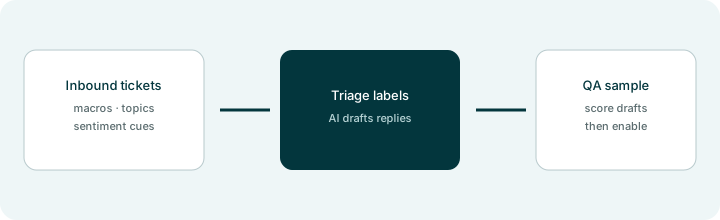
Primary SoT workflow:
Design triage labels and a QA sample set for AI-drafted replies before enablement.
2. AI-drafted replies (macros grounded)
What it is: Suggested first replies and writing assists grounded on macros and help-center articles. Drafts must not invent refunds, SLAs, or product facts the macro never stated. Agent sends — AI does not auto-close risk tickets.
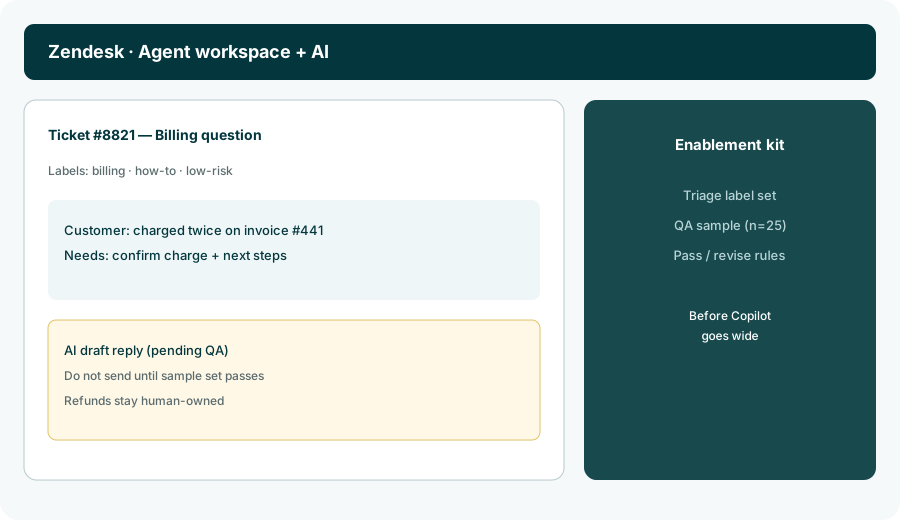
Macro grounding:
Paste one ticket + its matching macro. Draft a reply. Strike any sentence not supported by the macro or ticket. Mark Unknown where the customer’s account detail is missing.
3. QA sample set before enablement
What it is: Before Copilot or AI drafts go team-wide, score a sample (often ~25 tickets across topics) for accuracy, tone, and forbidden claims. Pass/revise rules beat “turn it on Monday.”
Sample design:
Build a 25-ticket QA sample across your top topics. For each: expected label, must-cite macro, and pass/fail rule for AI drafts. Include at least 5 always-human tickets that must never auto-draft.
4. Copilot & included AI surfaces
What it is: Zendesk packages some AI in Suite and deeper assists via Copilot-style add-ons (names and inclusions move). AI agents may meter automated resolutions. Read admin docs for what your plan includes before buying seats you will not use.
Plan inventory:
List AI features your Zendesk plan includes today vs add-on. For each: owner, pilot ticket types, and whether a QA sample is required before enablement.
Pricing context (September 2026)
Public Zendesk pages (as of September 2026) sell Suite (and related Support) tiers with varying included AI features; deeper Copilot-style assists are commonly add-ons on Professional and above, and AI agents are often metered by automated resolutions. Seat list prices and add-on rates move by region and package — confirm on zendesk.com/pricing and Zendesk Help (AI / Copilot docs). This page is dated September 2026 and is not a price sheet.
Uncertainty: Which AI features are “included Suite” vs Copilot add-on, resolution definitions, and seat prices change. Always verify on live vendor pages and your admin console before enablement.
When Zendesk AI is useful (honest take)
Useful when Zendesk is already the helpdesk, macros/help center are current, triage labels are small and maintained, and you will run a QA sample before wide drafts. Less useful when the knowledge base is empty, when most tickets are high-risk edge cases, or when you hoped AI would replace writing macros. If you live in Freshdesk or Intercom, start with those pages instead of migrating for Zendesk AI alone.
Paying for Zendesk AI and a few other AI tools? The $9 AI toolkit spreadsheet lists every AI subscription you have, what each one costs, and how fast it pays for itself, so you can see which ones are worth the money.
Want someone to do it for you? AI toolkit audit — $19
Related options (educational)
| Need | Better home | Why |
|---|---|---|
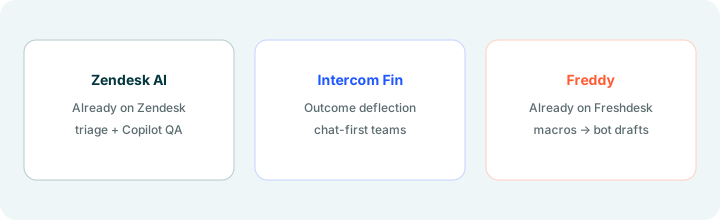
| Already on Zendesk — triage + drafts | Zendesk AI (this page) | Labels + QA sample before enablement |
| Outcome deflection / chat-first | Intercom Fin | Per-outcome packaging; escalate rules |
| Already on Freshdesk | Freshdesk Freddy | Macros → bot drafts + human-only list |
| CRM-native (not helpdesk) | HubSpot AI | Different job — CRM fields, not tickets |
Same job, two products: Freshdesk Freddy vs Zendesk AI.
Inventory seats by job on the stack map for support ops.
FAQ
What is Zendesk AI?
Zendesk’s AI layer — included Suite assists plus optional Copilot/AI-agent packaging. This page is for triage + draft QA on teams already on Zendesk.
Should we enable drafts without a QA sample?
No. Design labels and score a sample set first. Always-human types never get auto-drafts.
Zendesk AI vs Intercom Fin vs Freshdesk Freddy?
Stay in the helpdesk you already pay for. Compare packaging only after that.
What does Zendesk AI cost in September 2026?
Confirm on zendesk.com/pricing and Zendesk Help. Suite seats, Copilot add-ons, and resolution meters change — this review is dated September 2026.
Optional next step (if seats overlap)
If Zendesk AI would sit beside Fin, Freddy, and chat seats, optional help mapping overlap: $19 AI toolkit audit or $9 AI toolkit spreadsheet. Email Audit $19 or Toolkit spreadsheet $9.
Checkout is live via Stripe. After you pay, we email delivery (spreadsheet) or intake next steps (audit).