Ops · Support · AI agent
Intercom Fin review (Sep 2026): support deflection for small support teams
When Fin helps a small support team deflect repetitive tickets — and when human-only still wins. This page maps setup honesty (help content first), outcome pricing, escalate-always ticket types, and a concrete Try this from ten real FAQ answers.
Who this page helps
Founders and ops leads on small support teams (often 1–5 people) drowning in the same password-reset / how-to / “where is my…” tickets. If you already have FAQ answers in docs or a help center and want measured deflection with clear escalate rules, this is your page. If your knowledge base is empty, policies change weekly without docs, or most tickets are refunds and deletions, fix content and escalation rules before buying outcomes.
What Intercom Fin is
Intercom Fin is Intercom’s AI customer agent: it answers and resolves conversations across channels, can take configured actions, and hands off to humans with context. Public packaging (Sep 2026) sells Fin with Intercom seats (Essential / Advanced / Expert) or as Fin on your existing helpdesk — both primarily on per-outcome pricing (~$0.99 per Fin outcome on the public page). This review focuses on small-team deflection honesty — not enterprise transformation marketing.
Major features (with how someone uses them)
Examples at a glance: each feature has a concrete support example plus a Try this mini-workflow.
1. Repetitive-ticket deflection
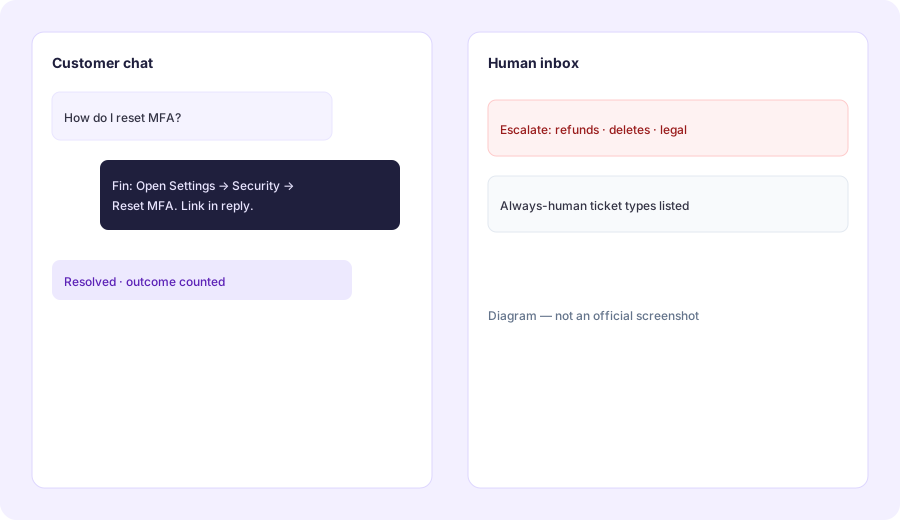
What it is: Fin’s core job for this page: resolve repetitive how-to and status questions from your knowledge/help content so humans see fewer identical tickets. Public Intercom materials cite high resolution rates across large customer bases — treat those as marketing benchmarks, not a promise for your messy FAQ set. Your real rate depends on content quality and escalate rules.
From content you already trust:
From 10 real FAQ answers, draft Fin-ready help content and list 5 ticket types that must always escalate to a human.
2. Help content & setup honesty
What it is: Fin is only as good as the help content, policies, and procedures you give it. Public Intercom copy emphasizes self-serve configuration (tone, knowledge, behavior) and helpdesk integrations, including claims of fast setup. Honest ops take: clean, current FAQs can go live quickly; stale Confluence dumps and conflicting policy docs will produce confident wrong answers and wasted outcomes.
Before connecting Fin to production traffic:
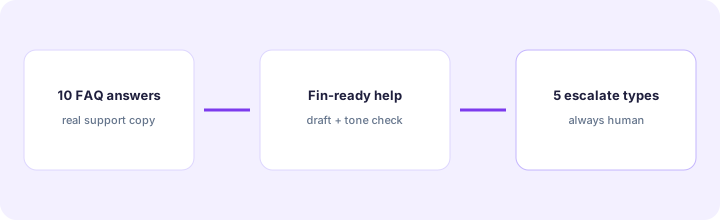
Rewrite these 10 FAQ answers into Fin-ready help articles: one H1 question, 3–6 step answer, last-updated date, and a “when to escalate” line. Flag any answer that conflicts with another.
3. Handoff & always-human types
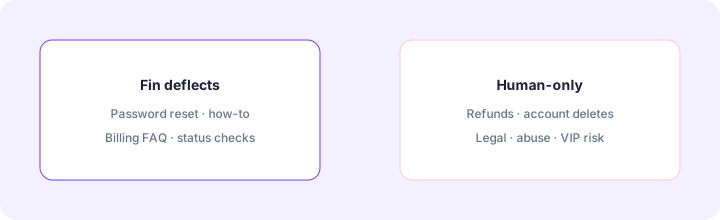
What it is: Fin can hand off to human agents with conversation context. The small-team pattern is to decide before go-live which ticket types must never auto-resolve — refunds, account deletion, legal holds, abuse/safety, VIP commercial exceptions — and encode that as procedures or routing, not hope Fin “knows.”
With your support lead:
List 5 ticket types that must always escalate to a human (one-line reason each). List 5 ticket types Fin may resolve without a human. Do not enable Fin on the first list.
4. Outcome pricing & controls
What it is: Public Intercom pricing frames Fin at about $0.99 per Fin outcome. An outcome is counted when the customer confirms resolution, does not ask for more help after Fin responds, or Fin completes a procedure/handoff workflow — charged once per conversation even if multiple questions are answered (per public FAQ). Intercom seats are separate on Essential/Advanced/Expert. Fin-on-other-helpdesk packaging drops seats but may require a minimum monthly outcome commitment. Set alerts/limits before a busy launch week.
Before enabling Fin on all channels:
Estimate monthly Fin-eligible tickets × $0.99. Add Intercom seat cost if applicable. Name a person who owns the outcome dashboard and a monthly ceiling. If we cannot name both, keep Fin off production for 30 days and only test on a FAQ subset.
Public pricing (September 2026)
Fin is primarily usage-priced per outcome, with optional Intercom seats. From public intercom.com/pricing we cross-checked in September 2026:
- Fin AI Agent: about $0.99 per Fin outcome (definition above — confirm live FAQ).
- Essential: includes Fin; seats from about $29 / seat / month (public “from” framing — confirm annual vs monthly).
- Advanced: includes Fin; seats about $85 / seat / month; more automation/inbox features.
- Expert: includes Fin; seats about $132 / seat / month; SSO/SLA/multibrand-style features.
- Fin on other helpdesks: same ~$0.99/outcome framing; no Intercom seats; minimum monthly commitment may apply (publicly e.g. ~50 outcomes — confirm live).
- Add-ons (optional): Copilot ~$29/agent/mo; Pro / proactive packs separately listed — not required for basic deflection.
Uncertainty flags: Outcome definitions, minimums, seat list prices, and startup discounts change. Channel fees (WhatsApp/SMS/phone) are separate. Never budget from a blog table alone — open Intercom’s live pricing calculator and your outcome dashboard.
When Intercom Fin is useful (honest take)
Fin tends to help when repetitive FAQ volume is real, help content is current, escalate-always types are written down, and someone watches outcome quality weekly. It tends not to help when the knowledge base is empty or contradictory, when most tickets are sensitive (money movement, deletes, legal), or when the team hoped AI would replace writing documentation. Turning Fin on every channel without a ceiling is how outcome bills surprise a small team.
Paying for Intercom Fin and a few other AI tools? The $9 AI toolkit spreadsheet lists every AI subscription you have, what each one costs, and how fast it pays for itself, so you can see which ones are worth the money.
Want someone to do it for you? AI toolkit audit — $19
Alternatives compared: Fin vs parallel options
| Axis | Intercom Fin | Help center + macros only | Other AI support agents | Human-only inbox |
|---|---|---|---|---|
| Best when… | Clear FAQs + measured deflection. | Low volume; macros enough. | Already locked into another desk. | Mostly sensitive / high-touch tickets. |
| Cost shape (Sep 2026) | ~$0.99/outcome + optional seats. | Seat/helpdesk only. | Vendor-specific (often seats + usage). | Human time is the cost. |
| Less useful when… | Empty/conflicted knowledge base. | Same FAQs flood the inbox daily. | You only need Intercom-native Fin. | Repetitive how-tos dominate volume. |
Also see HubSpot AI, Claude for ops, and the ops & automation hub.
Inventory seats by job on the stack map for support ops.
FAQ
What is Intercom Fin?
Intercom’s AI customer agent for resolving repetitive support conversations with handoff to humans — primarily priced per outcome.
How much does Fin cost in September 2026?
Public list: about $0.99 per Fin outcome; Intercom seats extra on Essential/Advanced/Expert. Confirm on intercom.com/pricing.
Should a two-person team buy Fin?
Yes to trial if FAQ volume is real and content is ready. No if tickets are mostly refunds/deletes/legal or docs are empty — fix those first.
Will Fin replace our support hire?
Unlikely for this page’s job. Fin is for deflection of repetitive how-tos; humans still own edge cases, tone on hard moments, and content ownership.
Optional next step (if seats overlap)
If Fin is one of several AI seats and you want a written pass across the whole list, the optional $19 AI toolkit audit produces a short memo. Prefer an editable grid? The $9 AI toolkit spreadsheet is a one-time CSV. Soft offer only — this deep-dive stands alone.
Checkout is live via Stripe. After you pay, we email delivery (spreadsheet) or intake next steps (audit).