Tool · Finance · Datarails · Oct 2026
Datarails review (Oct 2026): AI FP&A on top of Excel for small finance teams
Datarails is an FP&A and reporting platform for finance teams that want to keep their Excel models. Its FinanceOS layer pulls actuals from ERPs, CRMs, HR systems, and spreadsheets into one governed database, and Excel stays the front end. In 2026 its AI moved into a single Datarails AI Assistant (still labeled Beta) with task agents built into individual screens, plus a FinanceOS AI Connector that lets Claude, ChatGPT, and Microsoft Copilot query the same data. This page walks through each with a real job, a Try this, and where finance still checks the number.
What this Datarails page covers
This page is for the controller, FP&A manager, or one-person finance team at a small or mid-size company that runs budgets and board reporting in Excel and spends too much of each month gathering numbers. The question it answers: which parts of Datarails’ AI do real work today, which are switched on per account, and which checks keep an AI answer from reaching leadership untraced.
On naming: Datarails’ older “Genius” page still exists, but as of 7 October 2026 its help center describes one Datarails AI Assistant (Beta) that follows you across the web app. The help center says the earlier Strategy, Planning, and Reporting agents “have merged into a single general assistant.” Task-specific in-flow agents sit on individual screens, and each one is activated separately per account — having the assistant doesn’t mean you have every agent.
Everything below comes from Datarails’ website, AI terms, and help center as we read them on 7 October 2026. Datarails’ own figures (600+ integrations, a 4–6 week average go-live) are vendor claims, not something we measured.
Major features (with how someone uses them)
Examples at a glance: each feature has a concrete example from a real job plus a short Try this you can run this week.
1. AI Assistant and Ask AI: last quarter’s top expense variances (primary)
What it is: The Datarails AI Assistant sits in a bubble on every screen of the web app (not inside the Excel add-in or desktop app). Ask a question and it reads your data under your own permissions, then answers in the panel, draws a chart, or gives you a file to open in Excel. On a dashboard, Ask AI on a widget opens the assistant with that widget’s definition and data already loaded. Datarails’ help center says that for named figures like revenue or margin it tells you whether the number came from a governed business metric or from an aggregation of the underlying table, and that it never estimates a number — if it can’t answer, it says so and asks one clarifying question.
Two details matter for finance. First, the assistant never changes financial data; before it creates anything (a chart, a file, a dashboard widget) it states what will change and waits for your OK. Second, it is powered by Claude models from Anthropic. Datarails’ help center says your questions, the data it retrieves, and attached files are processed on Anthropic’s infrastructure, are not used for training under Anthropic’s commercial terms, are deleted by default within 30 days, and are not covered by Anthropic’s zero-data-retention option. Read that with your security team before rollout.
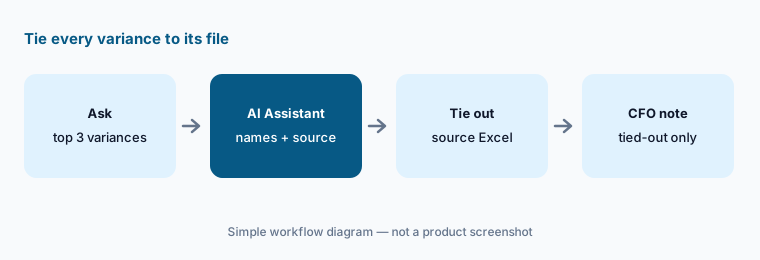
Primary workflow:
Ask Datarails’ AI for last quarter’s top three expense variances. Tie each one back to the source Excel file. Note whether the assistant said each figure came from a governed metric or a table aggregation, and keep only the variances that tie out.
2. In-flow agents: custom reports, Build with AI, and planning files
What it is: Datarails’ in-flow agents are buttons on the screens where the work happens, each opening the same assistant with the request already written. In Report Builder, AI tools > Custom data report returns a file that opens in Excel and Build with AI builds a report with Datarails functions. On the budget and forecast screens, Planning File Creator and Scenario Analysis produce a planning file or a guided scenario. Datarails says AI-built Excel files use Datarails-connected formulas, so they refresh like the rest of your reports.
Datarails also markets Storyboards, which turn dashboards into editable board presentations, and lists “AI Storyboards” on its pricing page. Treat any generated deck as a first draft: the numbers refresh, the narrative still needs a person who knows why they moved.
Refresh before reuse:
Use Report Builder’s Custom data report to pull one department’s monthly opex. Open the Excel file, refresh it, and check two cells against your current P&L before anyone reuses it.
3. Month-End Close agents: flux analysis and draft journal entries
What it is: If you have Datarails Month-End Close (listed under the Expert plan and also sold as an add-on module), its AI tools menu holds Flux analysis (a report of what moved and why, plus an Excel file), Generate journal entry, and specialist assistants for close tasks, cash transaction matching, and intercompany reconciliation. Datarails’ help center is explicit: “Nothing is posted to your books: a journal entry arrives in the conversation as a draft for you to check, and a person posts it, not the agent.”
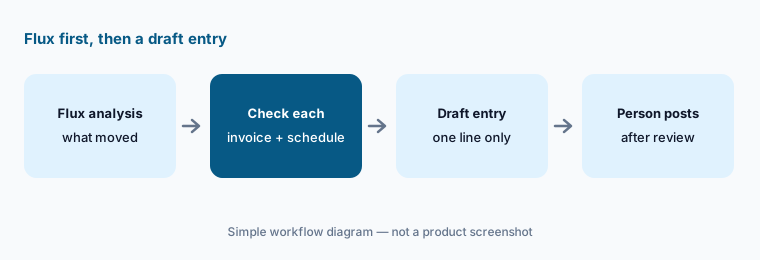
Drafts, not postings:
Run Flux analysis on one month. For each explanation, find the invoice, schedule, or journal behind it. Ask for a draft journal entry for one line only, and have the preparer edit it and a reviewer post it.
4. FinanceOS AI Connector: Claude, ChatGPT, and Copilot on governed data
What it is: The FinanceOS AI Connector is a Datarails-hosted MCP server that lets outside assistants query your Datarails data. Datarails documents setups for Claude Desktop, ChatGPT (Plus, Team, or Enterprise, through custom MCP apps), and Microsoft 365 Copilot (through Copilot Studio, which needs a Microsoft 365 Copilot license). A Super Admin turns it on per organization in AI Center > Manage AI Connectors, and the help center calls it a paid feature.
Datarails’ technical doc (updated 26 August 2026) is unusually candid, and worth reading in full. Every tool it lists today is read-only — but it says read-only “is a property of the tools currently published, not an enforced permission scope,” and write-capable tools are on the roadmap. There is no narrower MCP-only scope: a user sees through the connector whatever they can see in Datarails, including user names and emails and any HR or customer data in your tables. And per-query audit events from the MCP layer “are in development and are not yet complete.” Data that reaches ChatGPT or Claude is also governed by that provider’s terms for your plan.
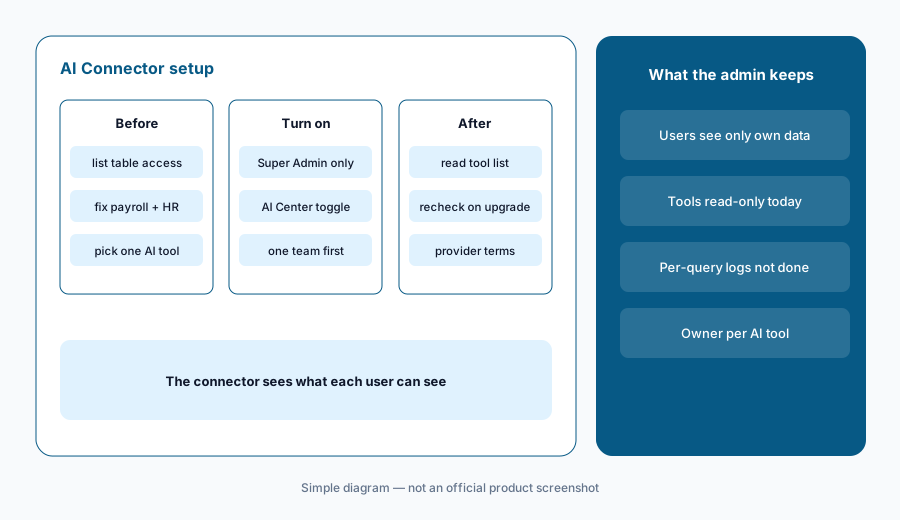
Permissions first:
Before turning on the AI Connector, list who in Datarails can see payroll, HR, or customer tables. Fix those permissions first, because the connector sees what each user sees. Then enable one AI tool for one team and review the tool list it shows.
5. Claude for Excel and the Datarails Add-in Agent
What it is: With a paid Claude plan (Datarails recommends Team or Enterprise for data privacy), the connector also works in Claude for Excel. If the Datarails Excel add-in is open and signed in as the same user, Claude can drive it through the Datarails Add-in Agent: refresh, drill down on a cell, break a cell down by department or account, and build a report of live DR.GET formulas. Datarails says the numbers are the add-in’s, not reconstructed by Claude; Claude always puts a new report on a new sheet and refreshes only what it wrote.
The setup guide mentions an optional tool permission of Always allow so Claude stops asking before each data request. For the first weeks, leave it on asking: the prompts show you exactly which calls Claude makes against your financial data.
New sheet, ask each time:
In Claude for Excel, ask for actuals versus budget by month for one department on a new sheet. Keep tool permissions on ask-each-time for the first week, and compare three cells to a normal Datarails add-in refresh.
6. Where Datarails fits against other options
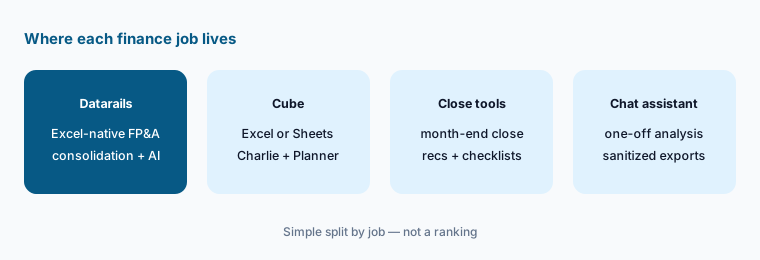
What it is: Datarails suits small and mid-size finance teams that want to keep their Excel models and add consolidation, dashboards, and AI on top. Cube is the closest alternative for teams that live in Excel or Google Sheets. Pigment, Abacum, and Planful move planning into their own model rather than the spreadsheet. Close work at scale — reconciliations and checklists — may sit better in FloQast or Numeric, and one-off analysis of a sanitized export may only need Claude or ChatGPT.
Five reports test:
Write the five reports your team rebuilds every month. In a Datarails demo, ask which ones the AI Assistant or an in-flow agent would draft, which agents your plan includes, and who still reviews each report.
Pricing context (October 2026)
Datarails does not publish prices. On 7 October 2026, its pricing page showed three plans, each with a “Request Quote” button: Professional (FinanceOS, unlimited dashboards, reporting, and planning, 2 users, 1 integration, Datarails AI Agents, the FinanceOS AI Connector, standard support), Premium (adds Spend, 5 users, 2 integrations, premium support), and Expert (adds Cash Management, Month-End Close, Receivables, Desk, 15 users plus 50 viewers, 3 integrations). Cash, Month-End Close, Spend, and Desk are also sold as add-on modules — and the same page’s comparison table says Expert “comes with one of Cash Management, Month-End Close, or Spend Control at no extra cost,” so ask exactly which modules a quote covers.
Two things to confirm on your quote: the help center calls the AI Connector “a paid feature” that needs an active subscription, and it says the assistant and each in-flow agent are switched on per account. Ask in writing which agents and connectors your plan includes.
Uncertainty: Datarails publishes no plan prices, so we quote none; any figure you see elsewhere is someone’s quote, not a list price. The AI Assistant is labeled Beta, agents are enabled per account, and the connector’s tool list may add write-capable tools — all as of 7 October 2026. Customer time-savings quotes on Datarails’ site are vendor claims, not our measurement.
When it’s useful (honest take)
Useful when your models already live in Excel, you consolidate several entities or systems by hand each month, and one or two people own reporting. The assistant and in-flow agents cut first-draft time on variance notes, reports, and flux, and the AI Connector lets the team use Claude or ChatGPT on governed numbers instead of pasted exports.
Less useful when your Datarails permissions are loose — the connector and assistant see whatever each user sees, so fix access first. Less useful if your team has already left Excel for a planning model, or if the main pain is close checklists and reconciliations at volume. And if your source mappings are messy, AI answers will be confidently wrong in the same places your reports are.
Paying for Datarails and a few other AI tools? The $9 AI toolkit spreadsheet lists every AI subscription you have, what each one costs, and how fast it pays for itself, so you can see which ones are worth the money.
Want someone to do it for you? AI toolkit audit — $19
Related options (educational)
| Need | Better home | Why |
|---|---|---|
| Excel-native FP&A with consolidation | Datarails (this page) | FinanceOS, AI Assistant, in-flow agents, AI Connector |
| Stay in Excel or Google Sheets | Cube | Charlie in the Sheets sidebar, Planner Agent, MCP |
| One planning model with AI agents | Pigment AI or Abacum | Planning moves out of the spreadsheet |
| Close checklists and reconciliations | FloQast AI or Numeric | Accounting close, not planning |
| One-off analysis on a sanitized export | Claude for finance | No live data access; you check every number |
| Inventory of finance AI seats | Stack map for finance ops | Overlap check before adding another tool |
FAQ
What is the Datarails AI Assistant?
A single assistant in the Datarails web app (labeled Beta in October 2026) that answers questions on your data under your permissions, draws charts, and produces Excel files. It replaced the earlier Strategy, Planning, and Reporting agents. Task agents on individual screens open the same assistant and are enabled per account.
Can Datarails’ AI change my financial data?
Datarails says the assistant never changes financial data and asks before creating any output. Journal entries arrive as drafts that a person posts. The FinanceOS AI Connector’s published tools are read-only today, though Datarails says write tools are on its roadmap.
Which AI model does Datarails use?
Its help center says the assistant and in-flow agents run on Claude models from Anthropic, via Anthropic’s commercial API. Data is not used for training under those terms, is deleted by default within 30 days, and is not covered by zero-data retention.
Can I use Datarails data in ChatGPT or Claude?
Yes, through the FinanceOS AI Connector (MCP). Datarails documents Claude Desktop, Claude for Excel, ChatGPT Plus, Team, or Enterprise, and Microsoft 365 Copilot via Copilot Studio. A Super Admin enables it, and each user sees only what their Datarails permissions allow.
How much does Datarails cost?
Datarails publishes no prices. As of 7 October 2026 its pricing page lists Professional, Premium, and Expert plans by users, integrations, and modules, each with a Request Quote button. Ask which AI agents and connectors your quote includes.
Optional next step (if seats overlap)
If finance pays for Datarails, a separate BI tool, and several chat assistants that analysts use to write the same variance notes, that overlap is worth mapping. Map the overlap with the $19 AI toolkit audit or the $9 AI toolkit spreadsheet. Email Audit $19 or Toolkit spreadsheet $9.
Checkout is live via Stripe. After you pay, we email delivery (spreadsheet) or intake next steps (audit).