Tool · Finance · Anaplan · Oct 2026
Anaplan AI review (Oct 2026): Anaplan Intelligence for enterprise planning
Anaplan is an enterprise planning platform used for connected finance, sales, supply chain, and workforce plans, usually built by dedicated model builders. Its AI now sits under the name Anaplan Intelligence: Forecaster for machine-learning forecasts, Anaplan Analyst for plain-language questions about your models, CoModeler for building and documenting models, Optimizer, and the AI Gateway for outside assistants over MCP — all managed in Agent Studio. This page walks through each with a real planning job, a Try this, and where the model builder keeps ownership of the logic.
What this Anaplan AI page covers
This page is for the FP&A, supply chain, or sales-planning lead at a large company that already runs on Anaplan — or is evaluating it — and wants to know which AI features are real today, which are add-on subscriptions, and which are announcements. It also covers the naming, which has changed more than once.
On naming: as of 7 October 2026, Anaplan’s documentation groups its AI under Intelligence — Agent Studio, Anaplan Analyst, CoModeler, Forecaster, Optimizer, and Predictive Insights. Anaplan says Anaplan Analyst is “the evolution and unification” of its earlier role-based analysts (Finance, Supply Chain, Sales, and Workforce Analyst), and Analyst on Anaplan’s new Agentic Platform became available on 28 September 2026. The Analyst product page still uses the older CoPlanner name in places, and an Anaplan PlanIQ resource link still appears in the site’s menu; the current forecasting product is called Forecaster.
On 30 June 2026 Anaplan announced the “Agentic Enterprise” and said it would deliver skills-based agents for the office of the CFO by October 2026, with supply chain, HR, and sales suites by year end. Its 10 September 2026 release still described the CFO rollout as “expected later this year.” We cover only what Anaplan documents today and flag the rest as announced. Everything here comes from Anaplan’s website and Anapedia documentation as we read them on 7 October 2026.
Major features (with how someone uses them)
Examples at a glance: each feature has a concrete example from a real job plus a short Try this you can run this week.
1. Forecaster: ML forecasts with backtests (primary)
What it is: Anaplan Forecaster is a machine-learning time-series forecasting tool that runs inside your Anaplan models (Classic and Polaris). You build Forecaster modules, create a data collection from model history, create a forecast model with an algorithm and horizon, then run a forecast action that writes results back. Anaplan’s product page names algorithms such as Prophet, XGBoost, TimesFM, and DeepAR, with automatic model selection and driver explanations. When creating a model you can turn on Write backtest results to Anaplan and compare the forecast with actuals before you run the forward-looking action.
Forecaster comes in Standard and Advanced tiers. Anapedia says Standard suits simpler cases with a clear trend or seasonal pattern, while Advanced includes the full range of algorithms and data insights plus advanced explainability — each driver’s contribution per item and per period. Usage is counted in prediction points: items forecast × successful forecast action runs, against a monthly quota set by your subscription.
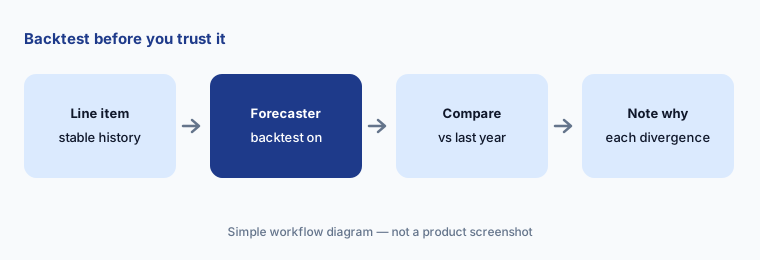
Primary workflow:
Run one AI forecast for a stable line item. Compare it to last year’s actuals by month and note where it diverges. Turn on “Write backtest results to Anaplan” so the comparison sits in the model, and write the business reason for each month that diverges.
2. Anaplan Analyst: plain-language answers with their sources
What it is: Anaplan Analyst lets business users ask natural-language questions about Anaplan models and get answers and charts. Anapedia (updated 29 September 2026) says it follows each model’s access controls, and a Show data sources button shows the workspace, model, module, line item, and dimension behind an answer. Anaplan’s product page adds that Analyst combines generative AI with Anaplan’s calculation engine, can span multiple models in one question, and can write data back to your live model “based on your privileges.”
Write-back is the part to govern. An answer you can check is low risk; a change to a live forecast from a chat panel is not. Decide which roles may write back before turning Analyst on, and treat “Show data sources” as a required step, not an optional one.
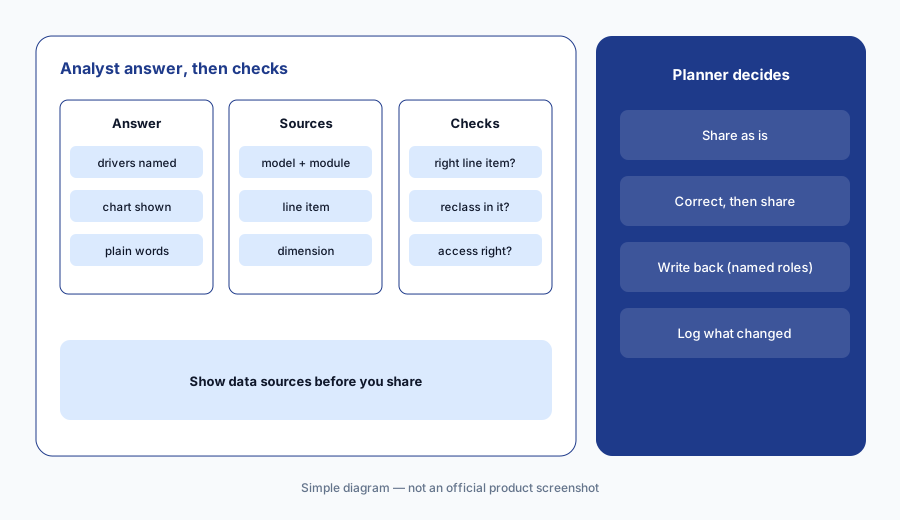
Show the sources:
Ask Anaplan Analyst three questions your leadership asked last month. For each answer, select Show data sources and confirm the module and line item are the ones you would have used. Keep write-back off for everyone except named planners.
3. CoModeler: build plans the model builder approves
What it is: Anaplan CoModeler is an AI agent for model builders, in Polaris and Classic workspaces. Anapedia (updated 2 September 2026) lists what it can do: build models from plain-text CSV specs, create and modify lists, modules, line items, formats, and formulas, manage versions, draft formulas from line-item names, explain formulas in plain language, report model metrics, and produce documentation. Anaplan’s FAQ says CoModeler “presents a step-by-step build plan for user review and approval. It never makes changes automatically.”
Anaplan also says CoModeler should only be used to make changes in development environments, in line with its lifecycle-management practice, and that it can recognize a model in deployed mode. You need to be a workspace administrator to use it.
Explain before build:
In a development model, ask CoModeler to explain your five most complex line items and document one module. Check every explanation against the formula yourself before you let it propose a single build change.
4. Agent Studio and the AI Gateway: who controls the AI
What it is: Agent Studio (Anapedia updated 1 October 2026) is where an AI Admin enables Anaplan Analyst for applications and custom models and switches CoModeler on or off per workspace. Analyst usage is measured in credits, shown on a Usage tab. Analysts set up before 28 September 2026 keep working, and Anaplan asks you to review model roles, selective access, and Dynamic Cell Access before upgrading. The Anaplan AI Gateway connects outside assistants such as Claude, Gemini, and Microsoft Copilot to Anaplan over MCP; Anaplan says it uses existing permissions with read-only controls, records timestamped tool calls, and rate-limits usage.
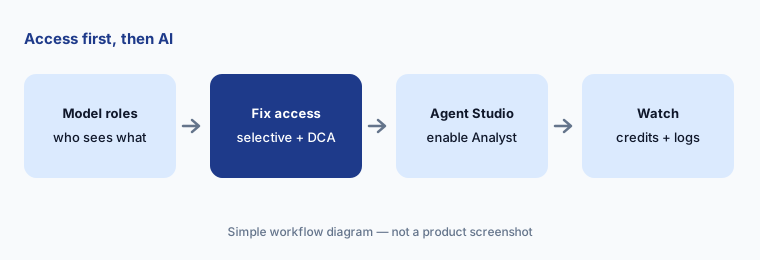
Access before AI:
Before enabling or upgrading Analyst, list every model role that would gain answers through it and check selective access and Dynamic Cell Access for two sensitive line items. Fix gaps first, then switch Analyst on for one application.
5. The Agentic Office of the CFO: announced, check what’s live
What it is: Anaplan’s AI page describes an “Agentic Office of the CFO”: a suite of AI agents across forecasting, variance analysis, tax, treasury, and strategic finance, with similar suites for supply chain, HR, and revenue. The 30 June 2026 announcement said the CFO agents would be delivered “by October this year,” built with select Fortune 1000 CFOs as co-development partners and run on Amazon Bedrock. Anaplan also says customer data, model structures, and metadata are never used to train foundation LLMs, and it achieved ISO/IEC 42001 certification for AI governance (certified 13 August 2026, announced 10 September).
As of 7 October 2026 we found Anapedia documentation for Analyst, CoModeler, Forecaster, Optimizer, Predictive Insights, and Agent Studio, but not for the skills-based CFO agents. Treat them as announced until your account team shows you what is live on your tenant.
Get it in writing:
Ask your Anaplan account team for a written list of the AI agents that are generally available on your contract today, which need a separate subscription, and which are preview — before you put any of them in a project plan.
6. Where Anaplan AI fits against other options
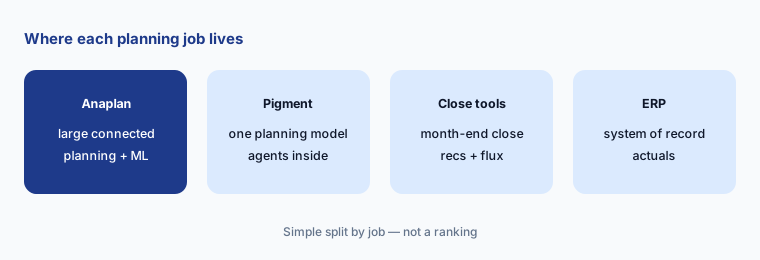
What it is: Anaplan fits large organizations running connected plans across finance, supply chain, sales, and workforce, with dedicated model builders. Pigment often comes up for teams wanting a newer planning model with agents built in. Month-end close stays in accounting tools such as FloQast, and the ERP — for example NetSuite — remains the source of actuals. For one-off questions on a sanitized export, a general assistant such as Claude may be enough.
Separate the decisions:
Write two lists: planning needs (models, users, functions) and AI needs (forecasts, answers, model help). Ask Anaplan to price them separately — platform first, then Analyst, CoModeler, and Forecaster tier — so you can judge each on its own.
Pricing context (October 2026)
Anaplan does not publish prices. On 7 October 2026, anaplan.com/pricing/ redirected to Anaplan’s contact page (“Connect with us”), with demo requests across the site.
Anapedia says Anaplan Analyst and CoModeler are each an “entitled service” requiring a separate subscription, arranged through your Customer Success Business Partner, and that Analyst usage is measured in credits. Forecaster has Standard and Advanced tiers with monthly prediction-point quotas: 240,000 for Standard and for Advanced tier 1, then 1,200,000, 2,400,000, and 4,800,000 for Advanced tiers 2–4. Those are usage allowances, not prices; no price is published for any tier or credit.
Uncertainty: Anaplan publishes no prices, so we quote none. AI naming has shifted (role-based analysts → Anaplan Analyst; CoPlanner and PlanIQ still appear on some pages), the Agentic Platform version of Analyst arrived on 28 September 2026, and the skills-based CFO agents were announced for October 2026 but were not documented when we checked. Customer forecast-accuracy figures on Anaplan’s pages are vendor claims, not our measurement.
When it’s useful (honest take)
Useful when you already run connected plans in Anaplan with dedicated model builders and clean access controls. Forecaster gives planners a backtested ML baseline without a data-science team, Analyst lets business users get answers with visible sources, and CoModeler speeds up documentation and builds in development models.
Less useful when you are choosing a planning platform mainly for its AI — the AI products are separate subscriptions on a platform built for large modeling teams. Less useful when model roles and selective access are loose, because Analyst answers follow those permissions. And for the announced CFO agents, wait for documentation before planning around them.
Paying for Anaplan AI and a few other AI tools? The $9 AI toolkit spreadsheet lists every AI subscription you have, what each one costs, and how fast it pays for itself, so you can see which ones are worth the money.
Want someone to do it for you? AI toolkit audit — $19
Related options (educational)
| Need | Better home | Why |
|---|---|---|
| Large connected planning with ML forecasts | Anaplan AI (this page) | Forecaster, Analyst, CoModeler, AI Gateway |
| One planning model with agents built in | Pigment AI | Analyst and Modeler Agents, Missions, Predictions |
| Month-end close and reconciliations | FloQast AI | Accounting work, not planning |
| Source of actuals | NetSuite AI or Sage Intacct AI | ERP stays the system of record |
| Dashboards on planning outputs | Power BI Copilot | Reporting layer, not modeling |
| Drafting variance commentary from an export | Claude for finance | No model access; you check every number |
FAQ
What is Anaplan Intelligence?
Anaplan’s name for its AI portfolio. As of October 2026 its documentation groups Agent Studio, Anaplan Analyst, CoModeler, Forecaster, Optimizer, and Predictive Insights under Intelligence, and its site adds the AI Gateway for connecting outside assistants over MCP.
Is Anaplan CoPlanner still a product?
Anaplan now leads with Anaplan Analyst, which it calls the evolution and unification of its earlier role-based analysts. The CoPlanner name still appears on the Analyst product page as of October 2026, but the documentation uses Anaplan Analyst.
Can CoModeler change my model without approval?
Anaplan says no: CoModeler presents a step-by-step build plan for review and approval and never makes changes automatically. Anaplan also recommends using it only in development environments.
How is Anaplan Forecaster usage measured?
In prediction points: number of items forecast times successful forecast action runs, against a monthly quota set by your Standard or Advanced tier subscription. Creating a forecast action uses no points; each successful run does.
How much does Anaplan cost?
Anaplan publishes no prices; its pricing URL redirected to a contact page on 7 October 2026. Analyst and CoModeler are separate subscriptions, and Forecaster is sold in tiers. Ask through anaplan.com/contact.
Optional next step (if seats overlap)
If finance pays for a planning platform, AI add-ons on top, a BI copilot, and general chat seats that all answer the same variance questions, that overlap is worth mapping. Map the overlap with the $19 AI toolkit audit or the $9 AI toolkit spreadsheet. Email Audit $19 or Toolkit spreadsheet $9.
Checkout is live via Stripe. After you pay, we email delivery (spreadsheet) or intake next steps (audit).