Tool · IT ops · Zluri · Oct 2026
Zluri review (Oct 2026): SaaS management and access reviews with AI help
Zluri started as a SaaS management platform and now leads with identity governance: its site calls it “Next-Gen Identity Governance and Administration,” built on an identity layer it calls IRIS, with SaaS management still sold alongside. Its AI is woven into reviews and requests rather than packaged as one assistant — Zluri Insights in access reviews, Approver Insights on requests, shadow-AI monitoring, and AI-Powered Integrations for apps with no API. This page walks through each with a real job, a Try this, and the point where a reviewer or app owner signs off.
What this Zluri page covers
This page is for the IT or security person who runs quarterly access reviews, approves app requests, and is asked every audit season to prove that people who left lost their access. The question it answers: where Zluri’s AI and automation shorten that work, which parts are Early Access or limited availability, and where a human still has to confirm before access is removed.
As of 7 October 2026, Zluri’s site groups the product into Identity Visibility & Intelligence (including non-human identities such as service accounts and API tokens), Identity Governance & Administration (access requests, reviews, segregation of duties), Identity Security Posture Management, and a SaaS Management Platform (discovery, shadow IT and shadow AI, license optimization, contracts and renewals). Zluri’s AI Terms say “Zluri AI” is optional, is powered in part by Anthropic’s Claude models through AWS Bedrock, and that customers are responsible for validating AI output with human oversight.
Everything below comes from Zluri’s public website, help center, and dated changelog as we read them on 7 October 2026. Zluri doesn’t sell a single named chat assistant; when we say “AI help” we mean the insights, recommendations, and AI-assisted integrations described in its own docs.
Major features (with how someone uses them)
Examples at a glance: each feature has a concrete example from a real job plus a short Try this you can run this week.
1. Access reviews with Zluri Insights and recommended actions (primary)
What it is: Zluri pulls users and permissions from SaaS, on-prem, and cloud apps (by API, SSO group mapping, SDK, or CSV) and runs recurring certifications with delegated reviewers, reminders, multi-level reviews, and bulk approval for low-risk accounts. Its access-reviews page says AI-powered risk intelligence flags orphaned, over-privileged, and external accounts, and activity data shows who actually uses each app. A Zluri Insights bar in each certification filters records by insight, and Zluri’s 23 September 2026 changelog says recommended actions — Revoke, Modify, or Approve — are “suggestions. The reviewer has the final say.”
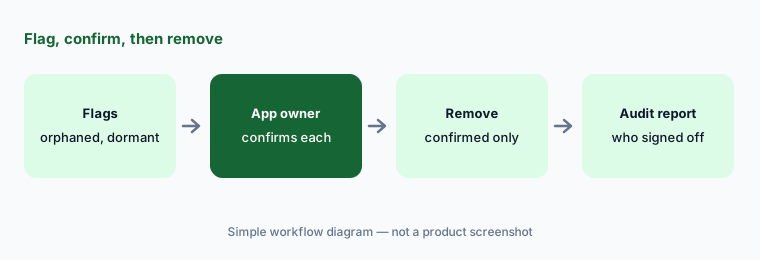
The part to slow down on is closed-loop remediation: after a review, Zluri can deprovision users through API integrations automatically. That is exactly what makes a wrong flag expensive — a contractor marked orphaned because their HR record is stale loses access mid-project. Keep a person between the flag and the removal until you trust your identity data.
Primary workflow:
Run one access review for a single app. Remove nothing until the app owner confirms each flagged user. Keep closed-loop remediation off for that app until the owner’s confirmations match Zluri’s flags for a full cycle.
2. Approver Insights and SoD checks on access requests
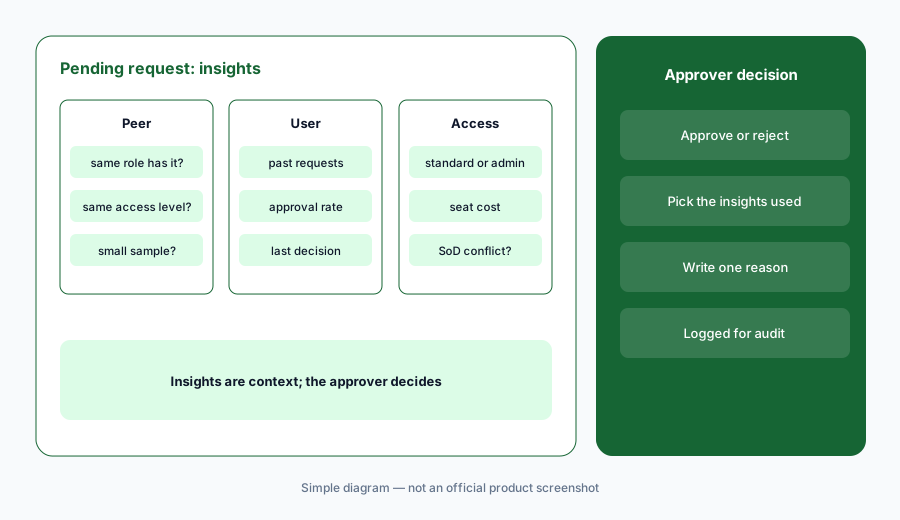
What it is: Approver Insights (help doc updated 23 September 2026) puts a read-only Zluri Insights panel at the top of each pending access request: a summary signal — Approval Recommended, Review Carefully, or Potential Risk Detected — plus Peer Insights (how many people in the same role and department have the app), User Insights (the requester’s 12-month history with it), and Access Insights (standard vs privileged access, estimated seat cost). Approvers record which insights informed the decision and a reason. It is off by default and available to a limited set of organizations.
Zluri’s 10 September 2026 changelog adds SoD violation insights (Early Access): if approving a request would create a segregation-of-duties conflict — say, one person who can both create a vendor and approve payments — the panel names the policy and colliding entitlements. Zluri notes these are shown as context and do not block approval. Two caveats from the docs: insights reflect the moment the request was raised, and peer data needs job title and department synced from your identity provider.
Log the why:
Turn on Approver Insights (if your org has it) for one sensitive app. For two weeks, have approvers write one sentence for every request marked Review Carefully or Potential Risk Detected, then read those reasons together and adjust the policy.
3. Shadow AI: discover, tag, and restrict AI apps
What it is: Zluri’s Monitor AI Apps page says its discovery engine finds AI apps in use — including ones outside SSO — and classifies them into more than 37 app categories. Admins tag each AI app Managed, Unmanaged, Restricted, or Needs Review; employees are alerted when they request an unmanaged or restricted AI app, and admins get notified when a restricted one is accessed. Custom policies can auto-reject requests for restricted AI apps, and deprovisioning tasks can go out through Slack, email, or Jira, prompting users to self-offboard or managers to remove access.
Owner per AI app:
Export Zluri’s AI app list. Tag each one Managed, Unmanaged, Restricted, or Needs Review, write an owner for every Needs Review app, and send self-offboarding prompts only for Restricted apps — never a silent removal.
4. License reclaim: App Insights and Request to Forego
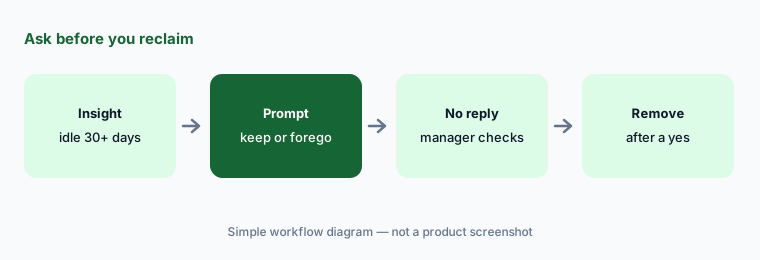
What it is: Each app’s Insights tab (help doc updated 28 September 2026) shows cards such as Unused Licenses (licensed users inactive 30 days or more), Undeprovisioned Licenses (people who left but still hold a license), Suspended Users with License, and Licenses Nearing Threshold, each with a Review button that opens the filtered user list. Request to Forego sends employees a Slack or email prompt to keep or give up a license, with reminders, and can run a pre-configured playbook — such as removing the license — for people who never respond.
Manager before removal:
Run Request to Forego for one app with two reminders. Set the no-response step to notify the manager, not remove the license, for the first cycle, and count how many non-responders turned out to be on leave or seasonal users.
5. AI-Powered Integrations: apps without an API
What it is: Many apps don’t offer an admin API, or keep it on an expensive tier. Zluri’s AI-Powered Integrations (help doc updated 20 May 2026) connect to those apps through their web interface: predefined, deterministic browser automation does the steps, and AI interprets the interface when layouts change. Setup needs administrator credentials, stored in Zluri’s credential vault, for the capabilities you choose — user discovery, provisioning, deprovisioning, and role changes. Zluri lists validation checks and guardrails against unintended operations; Adobe and Figma are among the documented examples.
Treat this like giving a contractor an admin login: scope the credentials to the smallest role that does the job, start with discovery only, and add deprovisioning after you’ve compared a few runs against the app’s own user list.
Discovery first:
Connect one no-API app with an AI-Powered Integration using a least-privilege admin account and discovery only. Compare two syncs with the app’s own user list before you enable any provisioning or deprovisioning.
6. Where Zluri fits against other options
What it is: Zluri is strongest when access reviews, access requests, and audit evidence are the main job, with SaaS discovery and license cleanup alongside. Torii leans harder into renewals, contracts, and AI spend tracking. JumpCloud is the directory and device manager itself, with SaaS and AI discovery added. Front doors such as Atomicwork and Moveworks take the employee’s request in chat; Zluri can be where that request’s approval and provisioning rules live.
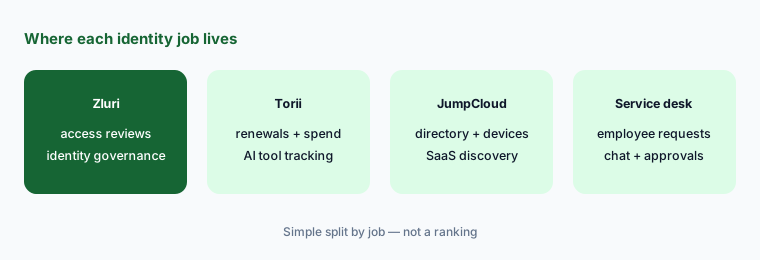
Name the main job:
Write the one job you most need solved — audits and access reviews, renewals and spend, or employee requests. Ask Zluri for a quote and a list of which modules (IGA, SMP, ISPM) and which insight features are in that quote.
Pricing context (October 2026)
Zluri’s pricing page was a “See Zluri in action” demo request form when we checked on 7 October 2026. It showed no prices for any module — identity visibility, identity governance, posture management, or SaaS management.
Several features in this review are not generally available: Approver Insights is for “a limited set of organizations,” SoD violation insights and the Segregation of Duties module are Early Access, and the canvas-based Workflows v2 builder is in beta. Ask your rep which of these your contract includes and whether any cost extra.
Uncertainty: Zluri’s pricing page showed no prices on 7 October 2026, so we quote none. Zluri doesn’t name a single AI assistant; its AI help is spread across insights, recommendations, and AI-Powered Integrations, and some of it is Early Access or limited availability. Zluri’s own outcome figures, such as faster reviews, are vendor claims, not our measurement.
When it’s useful (honest take)
Useful when you run recurring access reviews for audits (SOC 2, ISO 27001, SOX), approve a steady stream of app requests, and want evidence of who signed off on what. Insights in reviews, approver context on requests, and license reclaim prompts all shorten real work — as long as an app owner confirms before removal.
Less useful when your identity data is messy — stale HR titles and missing departments make peer insights and orphan flags wrong. Less useful when you want a conversational AI assistant; Zluri’s AI shows up as signals and suggestions inside workflows. And if renewals and AI spend are the main pain, compare Torii first.
Paying for Zluri and a few other AI tools? The $9 AI toolkit spreadsheet lists every AI subscription you have, what each one costs, and how fast it pays for itself, so you can see which ones are worth the money.
Want someone to do it for you? AI toolkit audit — $19
Related options (educational)
| Need | Better home | Why |
|---|---|---|
| Access reviews, requests, and audit evidence | Zluri (this page) | Insights in reviews, approver context, SoD checks |
| Renewals, contracts, and AI tool spend | Torii | Contract extraction, reclaim workflows, AI Module |
| Directory and device management | JumpCloud AI | Identity and devices first; SaaS discovery added |
| Employee requests in chat | Atomicwork or Moveworks | Front door; approvals can route elsewhere |
| Security compliance evidence beyond access | Vanta AI | Controls and audits across the whole program |
| Drafting an access-review policy | Claude for security ops | Writing help only; no access to your apps |
FAQ
Does Zluri have an AI assistant?
Not a single named one, as of October 2026. Zluri’s AI help appears as risk insights and recommended actions in access reviews, Approver Insights on access requests, shadow-AI discovery, and AI-Powered Integrations that drive apps without APIs. Zluri’s AI Terms say Zluri AI is optional and powered in part by Anthropic’s Claude models via AWS Bedrock.
Can Zluri remove access automatically after a review?
Yes. Zluri offers closed-loop remediation that deprovisions users through API integrations after a review. Zluri’s changelog also says its recommended actions are suggestions and the reviewer has the final say; we suggest an app owner confirms each flagged user before removal.
Is Zluri still a SaaS management tool?
Yes, but it now leads with identity governance. As of October 2026 its site describes Next-Gen Identity Governance and Administration, built on an identity layer called IRIS, with a SaaS Management Platform still offered for discovery, shadow IT and AI, license optimization, and renewals.
What are Approver Insights?
A read-only panel on each pending access request showing a summary signal plus peer, user, and access insights, with a decision log for the approver’s reason. Zluri says it is off by default and available to a limited set of organizations; SoD violation insights on requests are Early Access.
How much does Zluri cost?
Zluri’s pricing page was a demo request form with no prices on 7 October 2026. Ask for a quote by module. Confirm on zluri.com/pricing.
Optional next step (if seats overlap)
If you pay for an identity governance tool, a SaaS management tool, and a separate compliance platform that all pull the same user lists, that overlap is worth mapping. Map the overlap with the $19 AI toolkit audit or the $9 AI toolkit spreadsheet. Email Audit $19 or Toolkit spreadsheet $9.
Checkout is live via Stripe. After you pay, we email delivery (spreadsheet) or intake next steps (audit).