How-to · SaaS management · Zluri · Oct 19, 2026
Run one Zluri access review with Zluri Insights, and have the app owner sign off on every recommended action
Zluri’s access reviews surface Insights and recommended actions so you can reclaim or tighten access without guessing. That only helps if the person who owns the app agrees before anything is removed. This page shows how to run one review and keep every change behind an owner sign-off.
Who this is for
IT and security teams that already use Zluri for SaaS and shadow-AI discovery and want access reviews with a named app-owner gate. The job here is owner sign-off on recommended actions. For letting Torii’s Contract Magic Auto-Fill read a renewal and having finance check every field — a different job — see Torii Contract Magic renewal finance check.
How to do it
This is a how-to, not a ranking of SaaS management tools. Per the Zluri review, Zluri covers SaaS and shadow-AI discovery, access reviews with Zluri Insights and recommended actions, Approver Insights on access requests, and SoD conflict checks labeled Early Access. The ground rule: no recommended removal runs until the app owner signs off in writing.

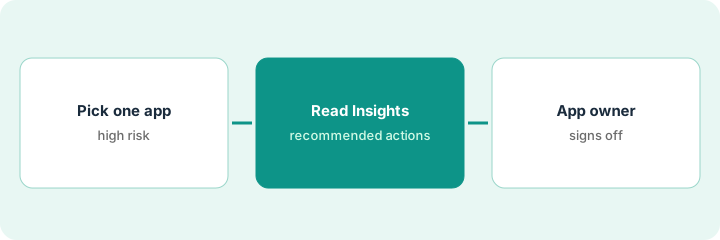
1. Pick one high-risk app for the first review
What it is: Choose a single application with clear owners and real risk if the wrong people keep access — then run the access review only for that app.
- Name the app and the business owner in one line.
- Confirm who can approve removals before you start.
- Prefer an app with recent joiner/mover/leaver churn over a quiet catalog entry.
- Note whether SoD conflict checks are available in your instance (Early Access per our review).
- Write the success rule: every recommended action is accepted, rejected, or deferred with a reason.
Security picks the expense tool after three contractors still had admin roles a month after their end dates. The finance systems owner is named as the only person who can approve removals.
Write the app name, owner email, and “no removal without owner sign-off” at the top of the review notes.
2. Read Insights and every recommended action
What it is: Open Zluri Insights for that app, list each recommended action, and treat SoD flags as Early Access signals you log — not automatic removals.
- Export or copy the recommended actions into a sheet with user, entitlement, and reason.
- Mark anything you cannot explain from the Insight text as “needs owner.”
- If SoD conflict checks appear, log them as Early Access only and do not treat them as finished policy.
- Separate license reclaim ideas from hard access removals.
- Do not bulk-accept the list.
Insights recommends removing admin from two contractors and downgrading three finance contractors to read-only. One SoD flag appears for a user who also owns the vendor portal; that row is logged as Early Access, not auto-fixed.
Paste every recommended action into a three-column sheet: user, action, owner decision (blank).
3. App owner signs off before any access is removed
What it is: Send the sheet to the app owner. Only actions they accept are executed, and you record who signed and when.
- Owner marks accept, reject, or defer with a one-line reason.
- You execute only accepted rows in Zluri.
- Store the signed sheet next to the review record.
- Schedule a follow-up for deferred rows.
- Tell requesters that Approver Insights may still apply on new access requests — that is a separate path.
The owner accepts both contractor admin removals, rejects one downgrade because that person closes month-end, and defers two others until after close. IT removes only the two accepted admins and files the signed sheet.
Get a written accept/reject/defer on every row before you click remove.
Pricing context (October 2026)
This how-to isn’t a price sheet. Per the Zluri review and Zluri’s pricing page (checked Oct 19, 2026), Zluri shows a demo request with no public list prices. Ask for a quote by module. Dated October 2026.
Checked Oct 19, 2026 on the vendor’s own pricing page: Zluri shows no public list price. Zluri’s pricing page is a demo request form with no module prices. This page quotes no Zluri dollar figure; confirm what your contract includes with Zluri or your admin.
Uncertainty: The only prices this site sells here are the optional $9 AI toolkit spreadsheet and $19 AI toolkit audit.
When this helps (honest take)
Useful when you already discover SaaS and shadow AI in Zluri and need one review where an app owner gates every removal.
Not useful when nobody owns the app, you want automatic SoD remediation, or you expected published seat prices on Zluri’s site.
Related options (educational)
| Need | Where to look | Why |
|---|---|---|
| Zluri access reviews | Zluri | Primary path |
| Torii renewal auto-fill check | Torii Contract Magic renewal finance check | A different job |
| IT stack map | Stack map: IT ops | Where SaaS management fits |
FAQ
Are SoD conflict checks generally available?
Per our review they are labeled Early Access. Log flags; do not treat them as finished policy until your instance says otherwise.
How much does Zluri cost?
Zluri’s pricing page showed no list prices when we checked Oct 19, 2026. Ask for a quote by module.
Optional next step
If you want a one-page toolkit map for the tools you already pay for, use the optional $9 AI toolkit spreadsheet. If you want a short review of seat waste and unused tools, use the optional $19 AI toolkit audit. Neither is required to follow this how-to.