How-to · SaaS management · Torii · Oct 19, 2026
Let Torii’s Contract Magic Auto-Fill read a renewal, and have finance check every field before the renewal date is trusted
Torii’s Contract Magic Auto-Fill can pull renewal terms from a contract so IT stops retyping dates. Finance still has to trust the date that goes on the calendar. This page shows how to auto-fill one renewal and keep finance’s check in front of the trusted renewal date.
Who this is for
IT and finance teams that already run Torii for app and shadow-AI discovery and renewals. The job here is finance checking every auto-filled field before the renewal date is trusted. For running a Zluri access review with owner sign-off on recommended actions — a different job — see Zluri access review Insights owner sign-off.
How to do it
This is a how-to, not a ranking of SaaS management tools. Per the Torii AI review, Torii covers app and shadow-AI discovery, Contract Magic Auto-Fill for renewals, usage-based license reclaim, the Eko governance copilot, and an AI Module for AI spend. The ground rule: no renewal date is trusted until finance matches each auto-filled field to the signed contract.

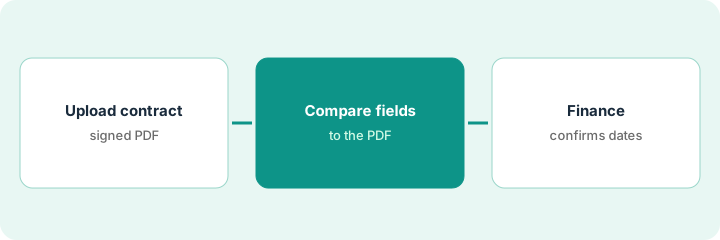
1. Upload one renewal contract
What it is: Pick a contract renewing in the next two quarters, upload the signed PDF into Torii, and run Contract Magic Auto-Fill once.
- Choose a renewal with a clear notice window and a known owner.
- Upload the signed PDF, not a draft or a redline.
- Run Auto-Fill and leave the raw PDF linked to the record.
- Do not edit the calendar yet.
- Note whether the AI Module will later track spend for this vendor — that is a separate check.
IT uploads the signed CRM renewal PDF. Auto-Fill returns a renewal date, notice days, and seat count. The PDF stays attached.
Upload only the signed PDF and write “finance check still open” on the Torii record.
2. Compare each auto-filled field to the PDF
What it is: Open the PDF beside Torii and tick every field that matches; rewrite or blank any field that does not.
- Check renewal date, notice window, seat or license count, and auto-renew language.
- If Auto-Fill invents a field the PDF never states, clear it.
- Mark mismatches in a short list for finance.
- Do not trust AI Module dollar figures as your invoice — per our review most AI spend figures are estimated token value.
- Keep the comparison notes with the record.
Auto-Fill shows 90-day notice; the PDF says 60. Seat count matches. IT blanks the notice field and flags it for finance.
Make a two-column list: field vs PDF line, and blank any field you cannot point to in the PDF.
3. Finance confirms renewal date and notice window
What it is: Finance signs off on the corrected fields before IT puts the date on the shared renewal calendar.
- Finance confirms renewal date and notice window in writing.
- IT updates Torii only after that confirmation.
- Add the date to the shared calendar with the finance contact named.
- Optionally open the AI Module later to track this vendor’s AI spend as estimated vs billed.
- Never let Auto-Fill alone move money or cancel a product.
Finance confirms the 60-day notice and the renewal date, rejects the 90-day Auto-Fill value, and IT updates Torii and the calendar the same day.
Get finance’s written OK on renewal date and notice window before the date is trusted.
Pricing context (October 2026)
This how-to isn’t a price sheet. Per the Torii AI review and Torii’s pricing page (checked Oct 19, 2026), Torii lists IGA, SaaS Management, and AI Management with no public list prices. Dated October 2026.
Checked Oct 19, 2026 on the vendor’s own pricing page: Torii shows no public list price. Torii’s pricing page lists IGA, SaaS Management, and AI Management with Get started buttons and no dollars. This page quotes no Torii dollar figure; confirm what your contract includes with Torii or your admin.
Uncertainty: The only prices this site sells here are the optional $9 AI toolkit spreadsheet and $19 AI toolkit audit.
When this helps (honest take)
Useful when you already manage renewals in Torii and need finance to gate the date before anyone trusts Auto-Fill.
Not useful when nobody in finance will open the PDF, or you expected published Torii seat prices.
Related options (educational)
| Need | Where to look | Why |
|---|---|---|
| Torii AI features | Torii AI | Primary path |
| Zluri access-review sign-off | Zluri access review Insights owner sign-off | A different job |
| IT stack map | Stack map: IT ops | Where renewals fit |
FAQ
Are AI Module dollar figures my invoice?
Mostly not. Per our review, Torii says most figures are estimated token value; a few vendors sync billed amounts. Confirm in Torii’s own definitions before budgeting.
How much does Torii cost?
Torii’s pricing page showed no list prices when we checked Oct 19, 2026. Ask for a quote.
Optional next step
If you want a one-page toolkit map for the tools you already pay for, use the optional $9 AI toolkit spreadsheet. If you want a short review of seat waste and unused tools, use the optional $19 AI toolkit audit. Neither is required to follow this how-to.