Tool · Finance · Abacum · Oct 2026
Abacum review (Oct 2026): AI planning for mid-market finance teams
Abacum is an FP&A platform for mid-market and fast-growing companies: budgets, forecasts, headcount, and reporting in one model fed by the ERP, CRM, and HR systems, with budget owners entering their own numbers. Its AI is branded Abacum Intelligence, launched in April 2026 as five layers across the platform. The newest piece, AI Data Entry (5 October 2026), lets a department head describe a budget change in a sentence and review the proposed numbers before anything moves. This page walks through each with a real job, a Try this, and who approves.
What this Abacum page covers
This page is for the head of FP&A or finance lead at a scale-up or mid-market company who runs budget season with a dozen department heads, chases their inputs in Slack, and then explains why numbers moved. The question it answers: what Abacum’s AI actually does in October 2026, what it is allowed to change, and where the budget owner and finance still sign off.
On 9 April 2026 Abacum launched Abacum Intelligence as “a unified AI layer across the entire platform” with five parts: Context, Modelling, Narrative, Scenario, and Workflow Intelligence. Abacum says 60% of its customers use it daily and that it logged 10,000+ agent interactions in Q1 2026 — vendor figures, not our measurement.
Everything below comes from Abacum’s product pages, newsroom, and product blog as we read them on 7 October 2026. We found no public help center or changelog for Abacum (its docs sit inside the app), so feature limits below are as Abacum describes them publicly; ask for the in-app documentation during a demo.
Major features (with how someone uses them)
Examples at a glance: each feature has a concrete example from a real job plus a short Try this you can run this week.
1. AI Data Entry: one department budget request (primary)
What it is: AI Data Entry is the Abacum Intelligence agent for budget input. A budget owner opens an Input Table, invokes Abacum Intelligence, and describes the change — Abacum’s own example is “Same team as last year, but the Atlassian contract goes up 15%. We’re dropping ChatGPT. Adding Claude at €50k starting Q2.” It reads that alongside prior inputs, actuals, and history, and proposes which values change and where. Abacum says nothing changes until the owner approves; one click applies it, and the original request is saved in the change history next to the number.
Abacum’s 5 October 2026 post says AI Data Entry is enabled in every Abacum org (hover over an Input Table to find it). The same post says the proposal can include new rows, but also lists “creating new lines” and data entry for Versioned Dimensions as coming next — so test a request that needs a brand-new line before you rely on it.
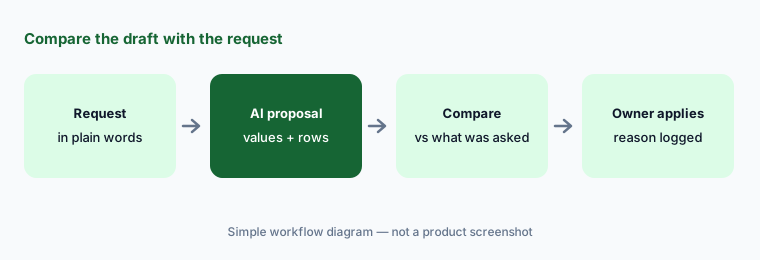
Primary workflow:
Send one department budget request through Abacum. Compare the AI draft to what the department head actually asked for. Mark each proposed value “matches,” “differs,” or “missing” before anyone clicks apply, and check that the request text shows up in the change history.
2. AI Spaces: a report from a prompt or a template
What it is: AI Spaces (launched 15 July 2026) builds a Space — Abacum’s dashboard and report page — from a plain-language request or a template: Financial Reporting, Headcount Planning, OPEX Reporting, or Revenue Operations. Abacum says it assembles KPI cards, tables, charts, input tables, and commentary from your real variables, versions, and dimensions, in your company colors, as a first draft you edit block by block. You review and publish; stakeholders then self-serve within the permissions you set. A “Plan mode” that proposes the Space before building it is listed as coming soon.
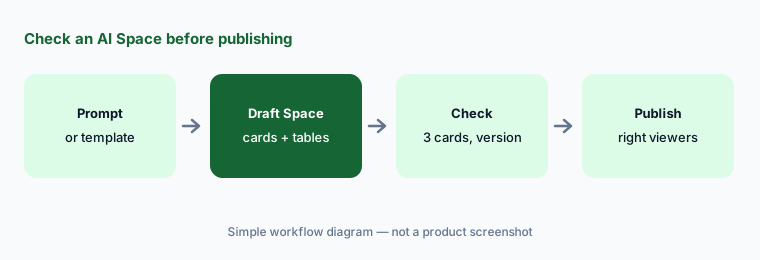
Check before publishing:
Build one AI Space from the OPEX Reporting template for one department. Before publishing, check three KPI cards against the model, confirm which version each card uses, and set who can see it.
3. Narrative Intelligence: variance summaries you can trace
What it is: Narrative Intelligence covers AI summaries, variance analysis, and AI charts: plans and performance turned into plain-language explanations that adapt to the viewer, so a sales leader can ask about pipeline conversion and get an answer grounded in the governed model. Abacum’s pitch is “a glass box, not a black box” — it says you can right-click any cell to see which data sources, formulas, and assumptions drove an AI-generated result, and that the AI works inside the same role-based permissions as your team.
Right-click the big three:
Take one AI variance summary. Right-click the three biggest figures it cites and confirm the source, formula, and assumption behind each before the summary goes into the monthly pack.
4. Scenario Studio, AI Forecasting, and goal seek
What it is: Scenario Intelligence pairs Scenario Studio and AI Forecasting to model “what if” questions, with backsolving, sensitivity analysis, and goal seek — Abacum’s example is “How do we reach $125M without adding headcount?” Abacum says scenarios run off the base version so the baseline stays visible, and that it gives “full transparency into certain assumptions.” That wording matters: check which assumptions it shows and which it doesn’t.
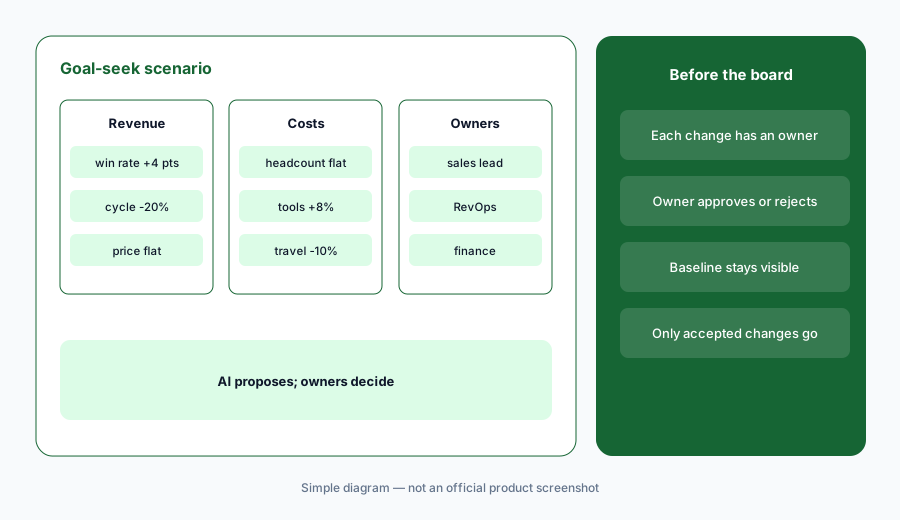
An owner per assumption:
Ask Scenario Studio one goal-seek question leadership actually asked. Write down every assumption it changed and have the owner of each line approve or reject it before the scenario is shared.
5. Context Intelligence, the Excel connector, and MCP
What it is: Context Intelligence is the data layer: Abacum says AI classifies and maps incoming accounts (Smart Mapping), cleans data, and flags anomalies in real time. The Excel connector pushes and pulls data both ways between Excel and Abacum. And Abacum says it connects via MCP to Claude, Gemini, and ChatGPT (its launch release also names Slack) so people can ask questions of financial data in those tools “with full governance guardrails.” Abacum keeps an edit history across models, Spaces, and dimension mappings, and holds SOC 2 Type II and ISO 27001.
Auto-mapping is useful and also where quiet errors start: a new GL account mapped to the wrong line flows into every report. And any outside assistant connected by MCP reads under someone’s permissions — Abacum’s public pages don’t say whether MCP access is read-only or can write, so ask.
Spot-check the mappings:
Review last month’s AI-mapped accounts and flagged anomalies. Spot-check ten mappings against the GL, and list every outside assistant connected through MCP with an owner and whether it can write.
6. Where Abacum fits against other options
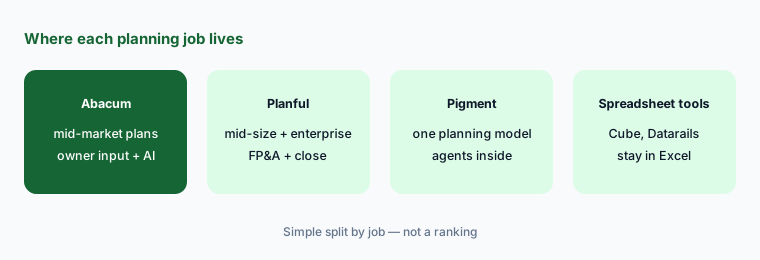
What it is: Abacum suits mid-market and scale-up finance teams that want one planning model with budget owners contributing directly. Planful serves mid-size and enterprise FP&A with consolidation and its own AI assistants. Pigment is a close peer for teams moving off linked spreadsheets. Teams that want to stay in spreadsheets may prefer Cube or Datarails, and the largest connected-planning programs often run on Anaplan.
Three workflows on a sample model:
Write the three planning workflows your budget owners complain about most. In an Abacum demo, ask to see each one on a sample model, including where the owner approves and where finance signs off.
Pricing context (October 2026)
Abacum does not publish prices. On 7 October 2026, abacum.ai/pricing redirected to the home page, and the site offers “Book a demo” and an interactive demo instead. We found no plan names, seat counts, or AI add-on prices on Abacum’s public pages.
Abacum describes AI Data Entry as enabled in every Abacum org and presents Abacum Intelligence as part of the platform rather than a separate product, but its public pages don’t say whether any AI features carry usage limits or extra fees. Ask for that in writing with the quote.
Uncertainty: Abacum publishes no prices, so we quote none; any figure you see elsewhere is someone’s quote, not a list price. With no public help center, feature limits come from Abacum’s marketing and blog posts as of 7 October 2026 — “Plan mode” for AI Spaces and new-line support in AI Data Entry are listed as coming. Abacum’s customer percentages and time savings are vendor claims, not our measurement.
When it’s useful (honest take)
Useful when budget season means a dozen department heads, version chasing, and finance re-keying numbers from Slack. AI Data Entry puts the owner’s reason next to the number, AI Spaces speeds up first-draft reports, and traceable summaries help finance check the “why” before it spreads.
Less useful when the team is two people who own every number — the owner-input workflow is the point. Less useful if your planning needs heavy multi-entity consolidation at enterprise scale, or if you want to stay in spreadsheets. And because Abacum’s detailed docs aren’t public, plan time in the demo to see the exact limits.
Paying for Abacum and a few other AI tools? The $9 AI toolkit spreadsheet lists every AI subscription you have, what each one costs, and how fast it pays for itself, so you can see which ones are worth the money.
Want someone to do it for you? AI toolkit audit — $19
Related options (educational)
| Need | Better home | Why |
|---|---|---|
| Mid-market planning with owner input | Abacum (this page) | AI Data Entry, AI Spaces, Scenario Studio |
| Mid-size and enterprise FP&A | Planful AI | Analyst, Planner, Signals, Projections |
| One planning model with AI agents | Pigment AI | Analyst and Modeler Agents |
| Stay in Excel or Google Sheets | Cube or Datarails | Spreadsheets stay the front end |
| Large connected planning | Anaplan AI | Dedicated model builders |
| Inventory of finance AI seats | Stack map for finance ops | Overlap check before adding another tool |
FAQ
What is Abacum Intelligence?
Abacum’s AI layer, launched 9 April 2026, with five parts: Context (mapping, cleansing, anomalies), Modelling (AI formula builder), Narrative (summaries and variance), Scenario (Scenario Studio, AI Forecasting, goal seek), and Workflow (routing and approvals, plus MCP).
Can Abacum’s AI change a budget without approval?
Abacum says no for AI Data Entry: it proposes values in the Input Table, nothing changes until the budget owner approves, and the original request is saved in the change history.
What is AI Data Entry in Abacum?
An Abacum Intelligence agent, announced 5 October 2026, that turns a plain-language budget change into proposed values for an Input Table. Abacum says it is enabled in every org; creating new lines and Versioned Dimensions support are listed as coming next.
Does Abacum work with ChatGPT or Claude?
Abacum says it connects via MCP to Claude, Gemini, and ChatGPT so people can query financial data in those tools under Abacum’s governance. Its public pages don’t say whether MCP access can write, so confirm that before connecting.
How much does Abacum cost?
Abacum publishes no prices. As of 7 October 2026 its pricing URL redirects to the home page and the site offers a demo instead. Ask whether any AI features have usage limits or extra fees.
Optional next step (if seats overlap)
If finance pays for a planning platform, a BI tool, and chat assistants that budget owners use to draft the same requests, that overlap is worth mapping. Map the overlap with the $19 AI toolkit audit or the $9 AI toolkit spreadsheet. Email Audit $19 or Toolkit spreadsheet $9.
Checkout is live via Stripe. After you pay, we email delivery (spreadsheet) or intake next steps (audit).